
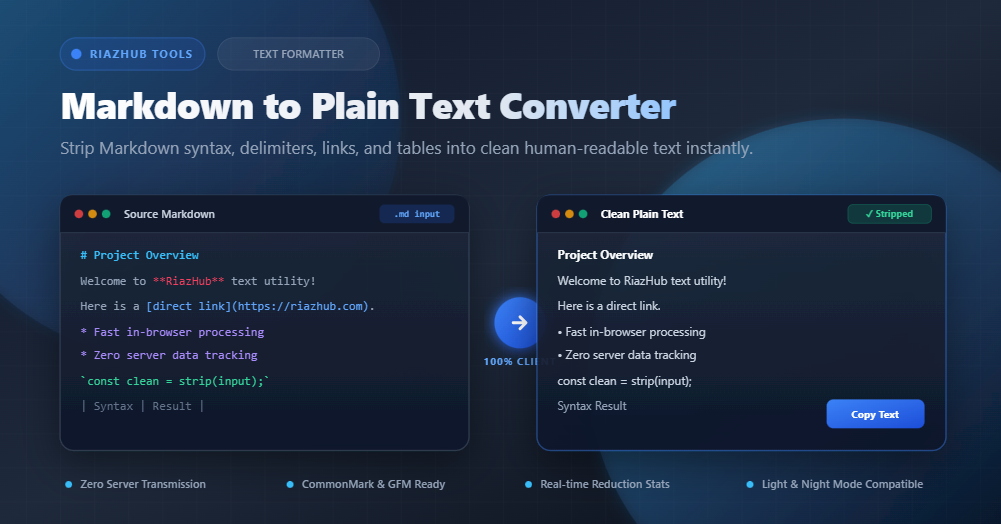
Markdown has become the undisputed lingua franca for technical documentation, developer notes, GitHub README files, and content management systems. Its lightweight formatting syntax makes writing structured documents effortless with simple keyboard symbols like hashes (#), asterisks (**), brackets ([]()), and fences (```).
However, when you need to repurpose that content for plain text email newsletters, SMS broadcasts, text-to-speech (TTS) voice engines, AI/LLM data preprocessing, or traditional word processors, raw Markdown syntax becomes visual noise. Having a voice engine read out “asterisk asterisk important note asterisk asterisk” or pasting broken link syntax into an email damages readability and professionalism.
In this comprehensive guide, we will explore why syntax stripping is essential and how you can use the free, browser-based Markdown to Plain Text Converter on RiazHub to clean your text in real time with 100% data privacy.
Need to Clean Markdown Right Now?
Transform raw Markdown files or snippets into distraction-free plain text with instant character and reduction stats.
Why Convert Markdown to Plain Text? Key Use Cases
While Markdown is great for writing and rendering HTML, many modern workflows demand pure, delimiter-free prose. Here are the most frequent scenarios where stripping Markdown is necessary:
1. Text-to-Speech (TTS) Voice Synthesis & Screen Readers
Audio readers and assistive screen technology often read punctuation literally. Converting Markdown to natural prose ensures audio summaries, audiobooks, and accessibility tools sound natural without awkward pronunciation of brackets, backticks, and octothorpes.
2. Plain Text Email Fallbacks & SMS Delivery
When sending transactional emails, automated alerts, or SMS marketing messages, rich formatting is either unsupported or consumes precious character limits. Stripping markdown delimiters ensures maximum message clarity.
3. Large Language Model (LLM) & NLP Training Pipelines
Feeding raw GitHub repositories and Markdown documentation into AI embedding pipelines can waste token limits on syntax tokens (###, ```, |---|). Cleaning your corpus with a dedicated utility reduces token bloat and improves semantic similarity scores.
4. Effortless Pasting into Word Processors & CMS Editors
Copying raw Markdown into Google Docs, Microsoft Word, Slack, or Apple Notes often results in awkward leftover symbols. Converting to clean text first lets you paste pure prose without formatting glitches.
How Markdown Stripping Works: Syntax Transformation Matrix
A high-performance syntax stripper evaluates CommonMark and GitHub Flavored Markdown (GFM) token trees to extract human-readable text while discarding or transforming markup delimiters. The table below illustrates how different Markdown elements are cleaned:
| Markdown Element | Raw Markdown Syntax | Stripped Plain Text Output |
|---|---|---|
| Headings (H1 – H6) | # Main Title |
Main Title (or uppercase) |
| Bold & Italic | **Important** *Note* |
Important Note |
| Hyperlinks | [RiazHub](https://riazhub.com) |
RiazHub (or RiazHub (https://riazhub.com)) |
| Images & Alt Text |  |
Company Logo (or removed) |
| Fenced Code Blocks | ```js\nconsole.log(1);\n``` |
console.log(1); |
| Blockquotes | > "Simplicity is key." |
"Simplicity is key." |
| Tables | | Col 1 | Col 2 |\n|---|---|\n| A | B | |
Col 1 Col 2\nA B |
| Task Lists | - [x] Completed task |
Completed task |
| Strikethrough | ~~Outdated info~~ |
Outdated info |
Using the Markdown to Plain Text Converter tool on RiazHub, you can customize each of these transformation rules with simple toggle switches.
Step-by-Step: How to Use the RiazHub Markdown Converter
Converting your documents is fast and straightforward. Follow these four simple steps:
- Input Your Markdown: Paste your Markdown string directly into the left editor or drag-and-drop any
.md,.markdown, or.txtfile from your computer. - Select a 1-Click Formatting Profile: Choose from four convenient presets:
- Pure Natural Prose: Strips all formatting, numbers, and symbols for effortless reading.
- Clean Documentation: Preserves standard bullet markers (•) and keeps URL references next to link text.
- Single-Line Compact: Strips linebreaks and excess spaces into a single continuous string.
- Terminal Ready: Retains monospaced structure and underline dividers.
- Fine-Tune Custom Settings (Optional): Customize how heading uppercase styles, table column alignment, inline code, and HTML tags are handled.
- Copy or Download: Click the one-click Copy Text button to copy the cleaned output to your clipboard, or click Download .txt to save your text file locally.
Try the Live Tool with Zero Setup
No registration, no software downloads, and no server tracking. Experience instant Markdown stripping directly in your browser.
100% Client-Side Privacy Guarantee
Many online text utilities send your content to remote web servers for backend processing. This poses serious confidentiality risks if you are handling proprietary software documentation, internal company wikis, API keys, or private meeting notes.
The RiazHub Markdown to Plain Text utility operates entirely within your browser’s JavaScript engine. Zero bytes of text are ever transmitted to an external server or stored in a database. Your data remains strictly on your local machine.
Frequently Asked Questions (FAQ)
Does this tool support GitHub Flavored Markdown (GFM)?
Yes. The parser supports standard CommonMark as well as GFM additions including task lists (- [x]), strikethrough (~~del~~), tables (| col |), and fenced code blocks with language identifiers.
Can I extract code from inside code fences without the triple backticks?
Yes. By default, the tool extracts the inner raw code snippet while removing the enclosing ``` delimiters, or you can choose to strip code blocks completely.
How are Markdown tables formatted in plain text?
The stripper removes column pipes (|) and header separator dividers (|---|---|), organizing the table rows into neat, space-aligned columns for clean plain text display.
Is there a file size limit?
Because all processing is executed locally in your browser’s memory, you can strip large README files and multi-megabyte documentation files with virtually zero latency.
Ready to simplify your content workflows? Visit the Markdown to Plain Text Converter on RiazHub today.
Markdown to Plain Text Converter
Strip Markdown syntax, formatting symbols, links, tables, and tags into clean, human-readable plain text instantly in your browser with zero server transmission.
Markdown relies on delimiter symbols to designate formatting. This tool employs high-speed client-side regex tokenizers to eliminate markup noise while preserving readable paragraph flow.
| Markdown Syntax | Stripping Pattern | Plain Text Output |
|---|---|---|
# Heading 1 |
Leading hash markers stripped | Heading 1 |
**Bold text** |
Asterisks and underscores removed | Bold text |
[RiazHub](https://riazhub.com) |
Bracket extraction (anchor preserved) | RiazHub |
| Col 1 | Col 2 | |
Pipes stripped into spaced columns | Col 1 Col 2 |
- Text-to-Speech (TTS) Engines: Eliminates awkward reading of asterisks, hashes, brackets, and quotes for silky smooth audio playback.
- Email & SMS Newsletters: Prepares human-readable plain text fallbacks for email clients and SMS gateways.
- AI / LLM & NLP Data Pipelines: Strips Markdown syntax from documentation and README datasets for maximum token efficiency and clean semantic training.
- Word Processors & Notes: Paste notes cleanly into Apple Notes, Google Docs, or Word without syntax clutter.
All parsing, stripping, regular expression transformations, and exports execute locally inside your web browser. No text, confidential documents, or files are ever sent to RiazHub.com servers or third-party APIs.