
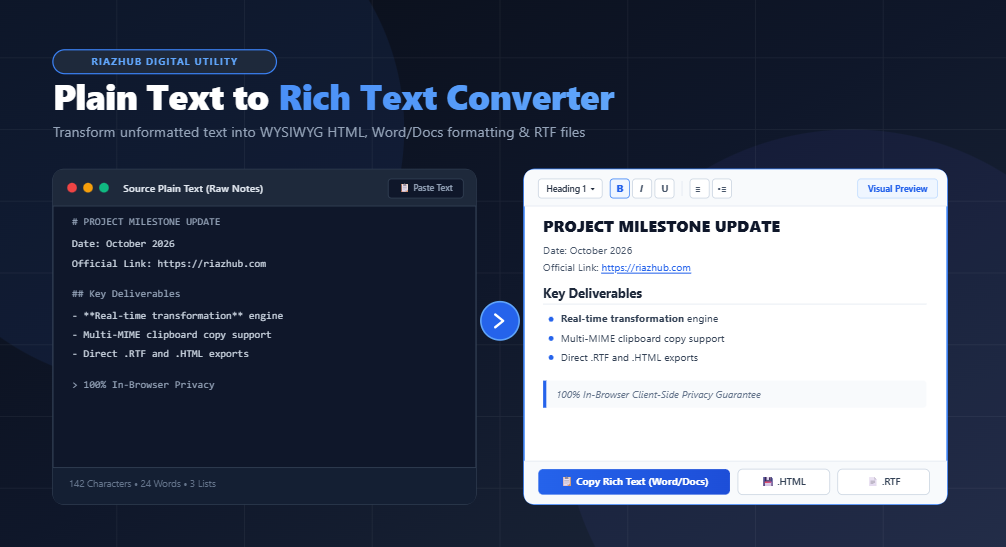
In an era of fast-paced digital communication, raw text is everywhere. Whether drafting quick bullet points in Notepad, copying logs from a remote terminal, taking scratchpad notes during a conference call, or compiling bulleted lists in a messaging app, plain text remains the universal lingua franca of raw data. However, when it comes time to publish those notes into Microsoft Word, Google Docs, an executive email newsletter, or an HTML CMS, raw text falls flat.
Manually re-highlighting lines, creating hyperlinks, bolding headers, and rebuilding lists in standard word processors wastes valuable time. That is why we built the Plain Text to Rich Text Converter on RiazHub. This modern, browser-based utility instantly bridges the gap between raw unformatted characters and beautifully styled, multi-format rich text.
Why Plain Text Conversion Is Essential for Modern Workflows
Plain text files (.txt, .log, raw markdown) contain pure character sequences with no inline font weights, link structures, or color styles. When you paste raw text directly into Word or Gmail, you lose visual hierarchy. Headings look identical to regular body sentences, web links remain unclickable strings, and numbered sequences do not indent properly.
Using the plain text to rich text formatter eliminates this friction through real-time heuristic parsing. The converter inspects line breaks, leading hyphens, numbering patterns, and URLs, automatically synthesizing an interactive WYSIWYG document on the fly.
⚡ Real-Time Auto Detection
Converts dashes into bulleted lists, numbers into ordered lists, and markdown tokens into bold, italic, and inline code as you type.
📋 Multi-MIME Clipboard
Copies simultaneous text/html and text/plain payloads, allowing seamless paste into Gmail, Notion, Apple Mail, and Docs.
📄 RTF & HTML File Export
Generates native Rich Text Format (.rtf) files for desktop desktop suites alongside clean, production-ready HTML code.
🔒 100% In-Browser Privacy
Zero server uploads. All parsing and conversions execute strictly on your device using client-side JavaScript.
How the Auto-Formatting Engine Works
The browser-based rich text tool uses intelligent, rule-based transformation passes. Rather than requiring strict markdown syntax or complex code tags, it recognizes common human typing habits:
- Automatic Hyperlinks & Email Anchors: Raw links like
https://riazhub.comand email addresses likesupport@riazhub.comare immediately wrapped in secure<a href="..." target="_blank" rel="noopener">anchor tags. - Smart Bullet Lists: Lines beginning with hyphens (
-), asterisks (*), or unicode bullets (•) are consolidated into structured<ul><li>containers with proper nesting. - Ordered Lists: Sequences starting with
1.,2., or3.automatically convert to semantic<ol><li>blocks. - Automatic Heading Hierarchy: Hash prefixes (
#,##,###) or standalone ALL-CAPS lines are parsed into distinct<h1>,<h2>, and<h3>elements. - Markdown Shorthands: Supports inline bold (
**bold**), italic (*italic*), strikethrough (~~del~~), and inline monospace (`code`). - Quotes & Dividers: Lines starting with
>convert to styled blockquotes, and triple dashes (---) turn into clean horizontal dividing rules.
“Formatting should never get in the way of ideas. With instant plain text conversion, you can write with raw typing speed and let the engine produce presentation-grade documents.”
The Power of Multi-MIME Clipboard Copying
A frequent frustration with traditional online formatters is clipboard degradation. If an online tool copies only raw HTML tags as plain text, pasting into Microsoft Word outputs literal brackets like <strong>Hello</strong> instead of bold text.
The Plain Text to Rich Text Converter solves this by leveraging modern browser ClipboardItem APIs. When you click Copy Rich Text, the tool generates a dual-payload bundle containing:
- A
text/htmlBlob containing semantic, styled HTML elements. - A
text/plainBlob containing cleaned fallback text.
When you paste into rich text editors like Microsoft Word, Google Docs, Notion, or Apple Mail, the target software inspects the clipboard, detects the rich HTML payload, and renders all formatting, links, tables, and colors seamlessly.
1-Click Styling Presets for Every Channel
Different publishing targets require different typographic aesthetics. The online WYSIWYG HTML & RTF converter includes 4 one-click typography themes tailored for specific destinations:
| Preset Theme | Typographic Style | Best For |
|---|---|---|
| Modern Clean | Clean sans-serif typography, generous line-height, modern accent colors. | Google Docs, Notion, team wikis, and general publishing. |
| Formal Document | Classic Georgia / Times serif font, justified alignment, elegant header rules. | Microsoft Word proposals, legal drafts, academic outlines, and formal memos. |
| Email Newsletter | High-contrast, cross-client email typography with bulleted links. | Gmail, Outlook, Mailchimp, Substack, and client correspondence. |
| Developer Notes | Crisp monospace font, framed code spans, structured debug tables. | API changelogs, terminal logs, GitHub README drafts, and technical wikis. |
Interactive WYSIWYG Ribbon Customization
In addition to automatic conversion rules, the right-hand canvas provides a complete interactive WYSIWYG formatting ribbon. You can highlight any sentence in the live preview and:
- Change block levels between Paragraph, H1, H2, H3, and H4.
- Apply custom text foreground and background highlight colors.
- Adjust text alignment (Left, Center, Right, Justified).
- Insert custom hyperlinks with prompt dialogues.
- Indent or outdent bullet and numbered list items.
- Toggle between the Visual Preview and Clean HTML Code View to fine-tune source code before copying.
Exporting to Native RTF (Rich Text Format) & HTML
Need to share formatted documents with desktop users without opening word processors? With our text to RTF online tool, you can click 💾 .HTML to download a standalone, responsive HTML file or click 📄 .RTF to download a cross-platform Rich Text Format file compatible with Microsoft Word, LibreOffice, TextEdit, and WordPad.
Privacy & Security: 100% Client-Side Processing
When working with proprietary company memos, customer communications, or personal notes, confidentiality is paramount. Most web converters transmit pasted text to remote cloud servers for processing, introducing potential security risks.
The RiazHub Plain Text to Rich Text Converter operates entirely inside your client browser. Zero text bytes, email addresses, or document drafts are ever uploaded, logged, or stored on external servers. You can even run the tool offline once the web page is loaded.
Conclusion
Whether you are a developer compiling release notes, a marketer organizing newsletter drafts, a student preparing study summaries, or a business professional formatting executive emails, eliminating manual formatting speeds up your daily workflow.
Bookmark the Plain Text to Rich Text Converter on RiazHub today and turn unformatted plain text into polished, professional rich documents with a single click.
Plain Text to Rich Text Converter
Transform unformatted plain text into formatted rich text, WYSIWYG documents, HTML emails, and copyable RTF documents instantly in your browser.
Plain Text to Rich Text & RTF Guide
ClipboardItem containing both a text/html blob and a fallback text/plain blob. When you paste into Microsoft Word, Google Docs, Notion, or Gmail, the target app automatically chooses the rich HTML layer—preserving bold headings, clickable hyperlinks, lists, and colors seamlessly without breaking layout.
- Headings:
# Heading 1,## Heading 2, or ALL-CAPS single lines - Bold & Italic:
**bold**,*italic*,__bold__,_italic_ - Lists: Lines starting with
-,*,•or numbers like1.,2. - Links & Emails: Automatically converted into safe hyperlinks (e.g.
https://riazhub.comorname@example.com) - Quotes & Code:
> Blockquotesand`inline code`