
Add Line Breaks & Delimiter to Newline Converter: The Ultimate Guide to Text Segmentation, Word Boundary Wrapping, and Data Stream Formatting
1. Introduction: The Universal Problem of Unstructured Text Streams
In modern digital workflows, text data is frequently generated, exported, or transmitted as continuous, unformatted single-line streams. Whether copying comma-separated IDs from a database console, extracting unformatted speech-to-text transcripts, inspecting minified API JSON dumps, or handling long single-paragraph essays, unstructured text creates severe operational friction.
Reading, editing, and debugging horizontal walls of text without structural vertical breaks causes cognitive fatigue, leads to costly data entry errors, and makes spreadsheet importing unnecessarily tedious. Manually placing cursors and hitting the Enter key across hundreds of items is slow, error-prone, and inefficient.
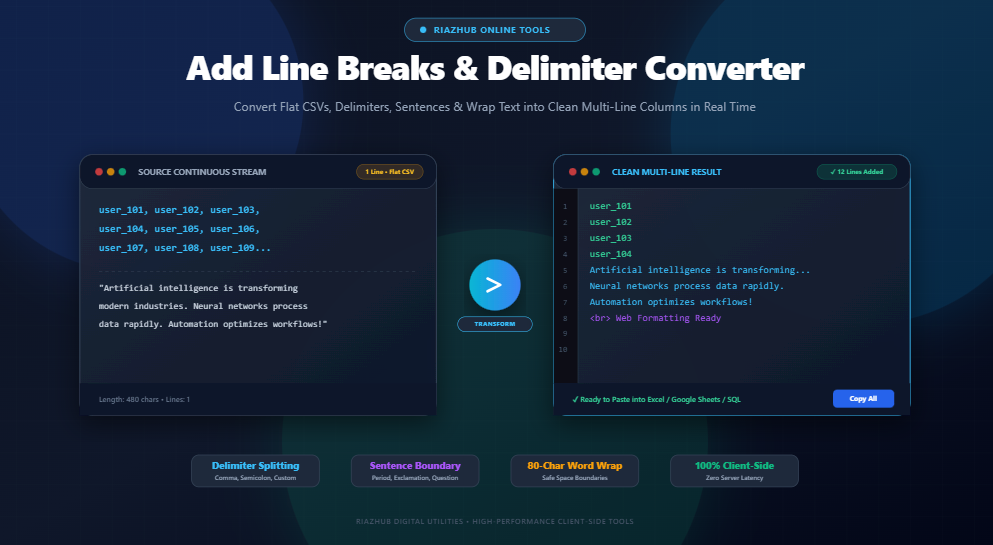
This is where an automated, instantaneous, browser-based Add Line Breaks & Delimiter Converter becomes indispensable. By converting specific characters, punctuation marks, word thresholds, or column limits into crisp newlines, you can format, inspect, and export clean vertical lists and readable paragraphs in milliseconds.
2. The Anatomy of Line Breaks: LF (\n), CRLF (\r\n), and HTML <br> Tags
Before configuring line break rules, it is essential to understand how different operating systems and web browsers interpret line terminations under the hood.
| Line Break Type | Escape Sequence / Tag | Byte Representation | Primary Platform / Application |
|---|---|---|---|
| Unix / Linux / macOS (LF) | \n |
0x0A (Line Feed) |
Modern Linux, macOS, Android, iOS, Git repositories, JSON/API payloads |
| Windows (CRLF) | \r\n |
0x0D 0x0A (Carriage Return + Line Feed) |
Windows Notepad, legacy DOS tools, standard HTTP protocol headers, RFC 5322 emails |
| Classic Mac (CR) | \r |
0x0D (Carriage Return) |
Legacy Mac OS 9 (pre-OS X systems) |
| HTML Line Break | <br> or <br /> |
HTML DOM Element | Webpages, WordPress blog posts, rich text email templates, CMS editors |
| HTML Paragraph | <p>...</p> |
HTML Block Element | Semantic web content, long-form editorial copy, academic articles |
When you transform text on the RiazHub Add Line Breaks Tool, you have full control over whether to output single line breaks (\n), double paragraph gaps (\n\n), or web-ready <br> tags.
3. Core Text Transformation Modes Explained
Text segmentation requirements differ widely based on your source data. The Delimiter to Newline Converter on RiazHub offers four specialized algorithmic modes designed for specific data structures:
3.1 Delimiter & Character Splitting (CSV, Semicolon, Pipe, Custom Words)
This mode searches for a specific character, sequence, or custom delimiter string (such as commas ,, semicolons ;, pipes |, tabs \t, or hyphens -) and inserts a line break either immediately after or before the match.
- Keep Delimiter: Retains the punctuation mark at the end of each resulting line (e.g.,
apple,\nbanana,\norange,). - Remove Delimiter: Strips the character completely, leaving pure values on each line (e.g.,
apple\nbanana\norange). - Custom Word Delimiters: Allows splitting on phrases like
AND,OR,[ITEM], or---for advanced text parsing.
3.2 Word-Frequency Segmentation (Every N Words)
When working with continuous transcription logs, lyric sheets, or raw speech recordings that lack punctuation, word-frequency segmentation breaks continuous text into uniform groups of N words per line (e.g., 5, 10, 15, or 20 words per line). This creates visually balanced, scannable blocks suitable for teleprompters, subtitles, and social media captions.
3.3 Column Limit & Word-Boundary Safe Wrapping (Every N Characters)
In programming, plain text email authoring (RFC 5322), and terminal display management, text must adhere to a strict column width—traditionally 72 or 80 characters. The character wrap mode offers two formatting paths:
- Word-Boundary Safe Wrap (Recommended): Scans backwards from the column limit to the nearest whitespace, wrapping the line cleanly without severing words in half.
- Hard Character Wrap: Slices text strictly at the exact N-th character index, which is useful for fixed-width mainframe records, cryptographic keys, and Base64 strings.
3.4 Sentence Boundary Detection (. ? ! and Multilingual Punctuation)
For linguistic analysis, proofreading, language translation (CAT tools), and editorial review, reading one sentence per line drastically accelerates error detection. The sentence boundary mode identifies grammatical terminators—including English periods (.), exclamation marks (!), question marks (?), Arabic question marks (؟), and Urdu full stops (۔)—and places each complete thought onto its own line while intelligently ignoring common abbreviations (like e.g., i.e., Dr., Mr., etc.).
Experience these four distinct modes with live real-time feedback using the Add Line Breaks utility.
4. 6 High-Impact Real-World Use Cases for Automated Line Break Insertion
Automated newline injection solves high-friction bottlenecks across diverse technical and business disciplines:
4.1 Converting Flat CSV & Delimited Strings into Vertical Spreadsheet Columns
Database queries, analytics exports, and CRM lookups often return continuous comma-separated strings (e.g., user_102, user_103, user_104, user_105). If you paste this continuous string into Microsoft Excel or Google Sheets, it dumps all values horizontally across hundreds of columns in a single row.
By using the CSV to Multi-Line preset on RiazHub with “Remove Delimiter” and “Trim Whitespace” enabled, the string is instantly converted into a vertical column list ready for direct pasting into spreadsheet column A.
4.2 SQL Queries, Database IN (…) Clauses, and Array Initializations
When debugging SQL queries involving hundreds of foreign keys or email records, formatting an IN ('id1', 'id2', 'id3') clause requires clean vertical formatting. Inserting line breaks after each comma makes complex SQL statements legible, Git-diffable, and easily reviewed in team pull requests.
4.3 72/80-Column Safe Wrapping for Plain Text Emails & Terminal Consoles
Command-line interface (CLI) tools, server SSH sessions, and traditional Unix mail user agents (like Mutt) display best when lines do not exceed 80 characters. Unwrapped long lines cause horizontal scrolling or jarring character splits. The 80-character safe wrap ensures cross-terminal compatibility across all operating systems.
4.4 Video Subtitle Generation, Transcription Timing & Lyric Syncing
Automated speech recognition (ASR) tools frequently output endless run-on sentences. Splitting raw speech transcripts every 10 to 12 words creates natural timing chunks that can be converted into SRT or VTT subtitle cues for YouTube, TikTok, and video editing suites.
4.5 Web CMS Content Formatting & HTML <br> Tag Injection
When publishing plain text articles, poetry, recipes, or contact addresses into WordPress or custom web applications, line breaks can collapse into a single line if rendered inside raw HTML containers. Using the HTML <br> Injection mode appends <br> tags to every line, ensuring exact typographic fidelity on all web browsers.
4.6 Server Log Parsing, Forensic Tracing & Debugging Continuous Payloads
Minified JSON logs, Apache access dumps, and API response webhooks often arrive as dense single-line strings. Breaking on delimiters like }{, ;, or custom timestamp patterns isolates individual log entries for rapid forensic auditing.
You can execute all of these operations instantly using the free Add Line Breaks & Delimiter Converter on RiazHub.
5. Under the Hood: High-Performance Client-Side Regex & Segmentation Algorithms
The RiazHub text segmentation engine executes pure client-side JavaScript regular expressions engineered for high throughput and zero UI freezing:
A. Safe Delimiter Escaping & Dynamic Regular Expressions
Because user-entered delimiters may contain special regex characters (such as . * + ? ^ $ { } ( ) | [ ] \), the engine first sanitizes the string before constructing a dynamic global regular expression:
// Escapes special regex characters for safe literal matching
const escapedDelim = delimiter.replace(/[.*+?^${}()|[\]\\]/g, '\\$&');
const regex = new RegExp(escapedDelim, 'g');

// Formats with chosen break position
const formatted = removeDelimiter
    ? text.replace(regex, breakString)
    : (position === 'after'
        ? text.replace(regex, delimiter + breakString)
        : text.replace(regex, breakString + delimiter));
B. Word-Boundary Safe Line Wrapping Algorithm
Rather than blindly slicing text at fixed character indices, the algorithm evaluates whitespace boundaries to prevent word clipping:
function wrapTextWordSafe(text, limit, breakStr = '\n') {
    const lines = text.split(/\r?\n/);
    const wrapped = [];

    lines.forEach(line => {
        if (line.length <= limit) {
            wrapped.push(line);
        } else {
            let remaining = line;
            while (remaining.length > limit) {
                let spaceIdx = remaining.lastIndexOf(' ', limit);
                if (spaceIdx === -1) {
                    spaceIdx = remaining.indexOf(' ', limit);
                }
                if (spaceIdx === -1) {
                    wrapped.push(remaining);
                    remaining = '';
                    break;
                }
                wrapped.push(remaining.substring(0, spaceIdx));
                remaining = remaining.substring(spaceIdx + 1);
            }
            if (remaining.length > 0) wrapped.push(remaining);
        }
    });

    return wrapped.join(breakStr);
}
6. Step-by-Step Guide: How to Use the RiazHub Add Line Breaks Utility
Formatting unstructured text takes only four intuitive steps:
- Step 1: Input Your Text: Paste your continuous text, CSV string, or article into the left input box, or drag and drop a
.txt,.csv,.md, or.logfile directly onto the editor. - Step 2: Choose a Quick Preset or Formatting Mode: Select one of the 1-click presets (such as CSV to Multi-Line or One Sentence Per Line), or customize rules using the Delimiter, Every N Words, Character Wrap, or Sentence Boundary tabs.
- Step 3: Fine-Tune Spacing & Break Types: Select your preferred line break format (
\n,\n\n, or<br>) and toggle options like “Trim Whitespace” or “Remove Existing Blank Lines”. - Step 4: Copy or Download: Inspect the real-time preview with synchronized line numbers on the right, and click Copy to Clipboard or Download as .txt.
Ready to try it? Launch the Add Line Breaks & Delimiter Converter right now in your browser.
7. Client-Side Security & Zero-Server Privacy Guarantee
Data security and user privacy are fundamental principles of RiazHub digital utilities:
- Zero Server Transmission: 100% of text segmentation, character replacement, regex matching, and file importing occurs locally within your web browser using vanilla JavaScript.
- Proprietary & Sensitive Data Safe: You can safely paste confidential financial reports, customer CSV databases, private API keys, medical transcripts, and proprietary code without risk of network interception or server caching.
- Instantaneous Sub-Millisecond Speed: Without network round-trips or server latency, even multi-megabyte text payloads are processed in real time.
8. Frequently Asked Questions (FAQ)
Can I break text after commas and remove the commas at the same time?
Yes. Simply select the Delimiter Mode, enter a comma (,) as your target delimiter, choose “Add Break AFTER delimiter”, and check the “Remove Delimiter” checkbox. Your comma-separated values will be transformed into a clean vertical list with no trailing commas.
What is the difference between Single Line Break (\n) and Double Line Break (\n\n)?
A single line break moves the cursor directly to the next line without empty spacing (ideal for items in a list or addresses). A double line break creates an empty line between blocks, resulting in standard editorial paragraphs.
Does the 80-character wrap cut long words in half?
No. When the “Word-Boundary Safe Wrap” option is enabled (default), the tool looks backwards from the 80th character to find the closest space, preserving whole words on their respective lines.
Can I format right-to-left (RTL) languages like Arabic, Urdu, or Persian?
Yes. The tool features dynamic text direction detection (dir="auto") and fully supports multilingual sentence terminators such as the Arabic question mark (؟) and Urdu Khatma (۔).
Is there a file size limit for text transformation?
Because all processing is executed locally by your device’s browser engine, the tool can easily handle large text files containing tens of thousands of lines without lag or timeouts.
9. Conclusion & Reformat Your Text Online
Transforming chaotic, continuous text streams into structured, scannable, and clean multi-line documents is an essential daily task for developers, copywriters, data analysts, and digital creators. Having an ultra-fast, zero-server privacy utility removes repetitive manual labor and ensures pristine typographic consistency.
Visit the free Add Line Breaks & Delimiter to Newline Converter on RiazHub to format continuous lists, wrap terminal scripts, split sentences, and inject HTML line breaks in real time.
Add Line Breaks & Delimiter Converter
Insert line breaks after specific characters, delimiters, words, sentences, or every N characters/words to format unstructured text, CSV lists, and long paragraphs instantly.
Line Break Insertion Rules & Formatting Mode
Line Break & Text Boundary Formatting Guide
When to Use Line Breaks vs. Paragraph Breaks
Single Line Breaks (\n): Ideal for separating items in lists, postal addresses, lines of poetry, tabular data entries, code strings, and SQL queries where items belong to the same logical group without excessive vertical whitespace.
Double Line Breaks / Paragraphs (\n\n): Essential for readable editorial content, blog posts, essays, and reports. Empty lines provide vital cognitive breathing room between distinct thoughts and topic shifts.
Word-Boundary Safe Wrapping vs. Hard Wrapping
When sending plain text emails, formatting terminal output, or creating 80-column legacy mainframe files, Word-Boundary Safe Wrapping finds the last whitespace before the column limit to break cleanly without splitting words in half (preventing errors like turning international into interna- and tional).
Delimiter Splitting for Data Pipelines & Spreadsheets
Many databases, APIs, and exported logs output long continuous comma-separated (CSV), pipe-separated (PSV), or semicolon-delimited text. Using the Delimiter Mode with the "Remove Delimiter" option instantly converts flat rows into clean vertical column lists ready to paste directly into Microsoft Excel, Google Sheets, or SQL IN (...) clauses.
Zero-Server Privacy & Data Security Guarantee
All line transformations, character wrapping, regular expression segmentations, and file parsing occur 100% locally inside your web browser via client-side JavaScript. No text, confidential customer records, proprietary source code, or uploaded documents are ever transmitted over the network or saved on any server.