
The Comprehensive Guide to Kebab-Case, URL Slugs, and Web Identifier Casing
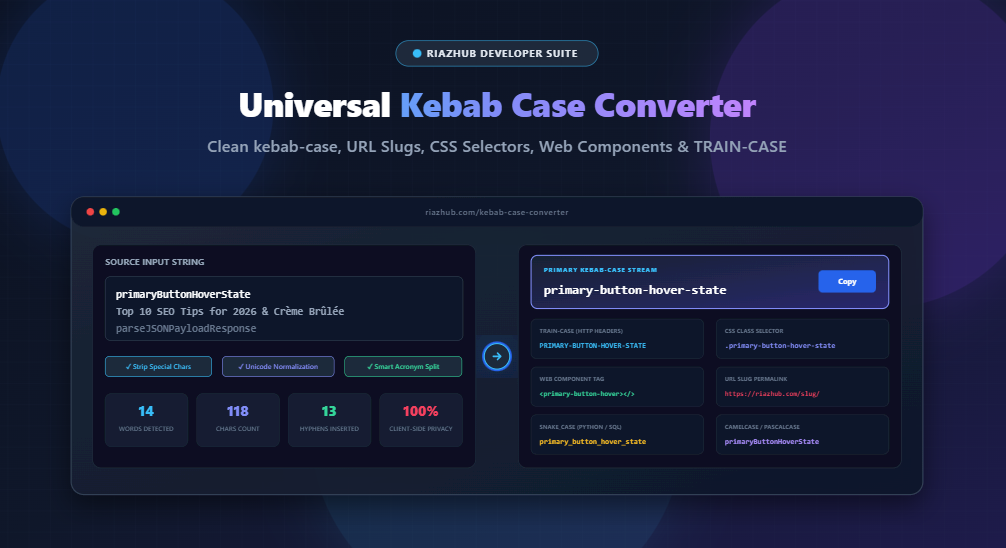
In modern full-stack web development, clean identifier casing is not just an aesthetic preference it is a fundamental requirement for search engine optimization (SEO), CSS stylesheets, HTML5 custom elements, and RESTful API route architecture. When converting human-readable titles or camelCase code variables into web-ready strings, developers require a reliable, instant tool. You can immediately access the live Universal Kebab Case Converter & Web Slug Naming Suite on RiazHub to transform any text or code snippet with zero latency.
⚡ Try the Universal Kebab Case Converter
Convert code variables, headlines, and multi-line datasets into standard kebab-case, TRAIN-CASE, CSS class selectors, and W3C Web Component tags directly in your browser with 100% privacy.
1. What is Kebab-Case and Why is it the Web Standard?
kebab-case (alternatively known as dash-case, hyphen-case, or lisp-case) is a naming convention where all letters are converted to lowercase and individual words are joined by hyphens (-).
Unlike programming languages that rely on camelCase or snake_case, the web platform natively favors hyphens across core specifications:
- Search Engine Permalinks: Major search engines (Google, Bing) treat hyphens as explicit word delimiters in URLs. Using underscores (
user_profile_settings) often binds tokens together in indexers, whereas kebab-case (user-profile-settings) ensures optimal keyword segmentation. - CSS Selectors and BEM Methodology: CSS identifiers are case-insensitive by default in standard HTML5 documents. Hyphens allow hierarchical naming without casing ambiguity (e.g.,
.card__button--primary-active). - HTML5 Attributes & Data Attributes: Custom attributes and data attributes strictly use hyphenated lowercase naming (e.g.,
data-user-auth-token). - npm Package Naming: The official npm registry enforces lowercase kebab-case package names (e.g.,
lodash-es,react-router-dom).
2. Comparison of Modern Programming Casing Conventions
Software engineers constantly translate identifiers between different layers of the technology stack. The table below illustrates how different casing patterns represent the same semantic entity:
| Convention Name | Formatted Example | Primary Ecosystems & Use Cases |
|---|---|---|
| kebab-case | riaz-hub-online-tools |
CSS classes, HTML data attributes, URL permalinks, npm packages |
| TRAIN-CASE | RIAZ-HUB-ONLINE-TOOLS |
HTTP header specifications (e.g., CONTENT-TYPE), COBOL, Fortran |
| Title-Kebab-Case | Riaz-Hub-Online-Tools |
Markdown chapter slugs, capitalized URL document anchors |
| CSS Class (.selector) | .riaz-hub-online-tools |
Tailwind classes, BEM modifiers, Web stylesheets |
| Web Component Tag | <riaz-hub-online-tools> |
W3C Custom Elements, Vue, Angular, Lit components |
| snake_case | riaz_hub_online_tools |
Python variables, SQL column names, PostgreSQL tables, Rust |
| camelCase | riazHubOnlineTools |
JavaScript & TypeScript variables, JSON object keys |
| PascalCase | RiazHubOnlineTools |
React component names, C# / Java class definitions |
Instead of manually rewriting variables between Python, TypeScript, and CSS, the RiazHub Kebab Case Converter instantly outputs all eight formats simultaneously on live multi-format developer cards.
3. The W3C Web Component Custom Element Hyphen Rule
One of the most critical web standards governed by the W3C and WHATWG specifications is the Custom Element Name requirement. According to the HTML Living Standard:
“All custom element tag names must contain at least one hyphen (
-) and start with an ASCII lowercase letter.”
For instance, <app-user-card> and <kebab-case-converter> are valid custom tags, while <usercard> is invalid. This rule protects forward compatibility, guaranteeing that browser vendors can introduce new native HTML elements (such as future <dialog> or <model> tags) without colliding with user-defined web components.
✅ Valid Custom Element
<riaz-hub-nav-menu>
Contains hyphens, non-conflicting with native HTML specification.
❌ Invalid Custom Element
<riazhubnavmenu>
Lacks required hyphen; rejected by browser custom element registry.
4. Technical Challenges in Automated Kebab-Case Tokenization
Converting arbitrary strings into clean kebab-case sounds deceptively simple, but robust engines must resolve complex boundary ambiguities:
A. Compound Acronym Disambiguation
Consider a variable name like parseJSONPayload. A naive tokenizer that only looks at single capital letters might split this as parse-j-s-o-n-payload. An intelligent boundary engine uses lookahead regular expressions to preserve consecutive uppercase acronyms while separating following title-case words:
// Advanced JavaScript Acronym Boundary Splitting
function extractWords(str) {
    return str
        .replace(/([a-z\d])([A-Z])/g, '$1 $2')             // camelCase split
        .replace(/([A-Z]+)([A-Z][a-z\d]+)/g, '$1 $2')      // Acronym sequence split
        .replace(/[-_.\/\\]+/g, ' ')                       // Delimiter normalization
        .normalize('NFD').replace(/[\u0300-\u036f]/g, '')   // Strip accents
        .trim().split(/\s+/);
}
Using this algorithm, parseJSONPayload correctly outputs parse-json-payload, and getHTTPResponseCode becomes get-http-response-code.
B. Unicode Diacritics and Accented Latin Characters
International headlines often contain accented vowels and non-ASCII glyphs (e.g., Crème Brûlée or München Straßenbahn). In web permalinks, accented characters can cause URL-encoding issues (such as %C3%A8). Normalizing strings via normalize('NFD') strips combining diacritical marks to generate clean ASCII slugs like creme-brulee and munchen-strassenbahn.
5. Quick Workflow: How to Convert Strings with RiazHub
Converting your variables and datasets takes only seconds using the RiazHub Kebab Case Tool:
- Input Text or Upload File: Type or paste your raw strings into the input textarea, or drag and drop a plain text (
.txt,.csv,.json) file. - Select Quick Preset Profile: Choose from Standard kebab-case, CSS / BEM Class, Web Component Tag, URL Slug, or TRAIN-CASE.
- Fine-Tune Engine Rules: Toggle options to strip non-alphanumerics, collapse duplicate hyphens, remove accents, or deduplicate multi-line lists.
- Copy or Export: Click the 1-click Copy kebab-case button or download the converted list as a clean
.txtfile.
6. Client-Side Processing and Zero-Data Transmission
Privacy is paramount when dealing with codebases, internal database schemas, or proprietary headlines. The Universal Kebab Case Converter on RiazHub executes 100% of string processing inside your client browser. No inputs, uploaded files, or converted values are ever stored or sent over a network connection.
Ready to Optimize Your Web Identifiers?
Save development time and eliminate manual formatting errors across your projects.
Universal Kebab Case Converter & Web Slug Suite
Convert text, variable names, and multi-line strings into clean kebab-case, CSS class names, URL slugs, and TRAIN-CASE in real time.
Source Input Text
Kebab-Case Engine Rules
Developer Guide & Web Naming Standards
kebab-case (also known as dash-case or lisp-case) separates words with hyphens (-). Because CSS class selectors and HTML attributes are case-insensitive in HTML5 standards, using hyphens eliminates ambiguity and prevents unexpected casing bugs across different browsers and web parsers.
Search engines (such as Google and Bing) treat hyphens as natural word separators in URLs, whereas underscores (_) are often treated as joined characters. Therefore, kebab-case is the gold standard for SEO-optimized permalinks.
kebab-case: All lowercase words separated by hyphens (e.g., user-profile-settings). Used in CSS, HTML attributes, CLI flags, and REST APIs.
TRAIN-CASE (or SCREAMING-KEBAB-CASE): All uppercase words joined with hyphens (e.g., CONTENT-TYPE, X-REQUEST-ID). Commonly found in HTTP headers, COBOL, Fortran, and strict protocol specifications.
Lisp-case: Functionally identical to kebab-case, historically rooted in the Lisp programming language family (Scheme, Clojure, Common Lisp) where hyphens are valid identifier characters.
Under the W3C Web Components standard, any custom element tag name must contain at least one hyphen (-) (e.g., <app-modal>, <user-avatar-card>). This rule ensures that user-defined components never clash with future native HTML tags added by the WHATWG/W3C specifications.
All tokenization, regex splitting, Unicode accent removal, and casing conversions happen 100% locally inside your web browser using modern ES6+ JavaScript. No text, variable names, secret keys, or uploaded files are ever sent to our servers or third parties.