
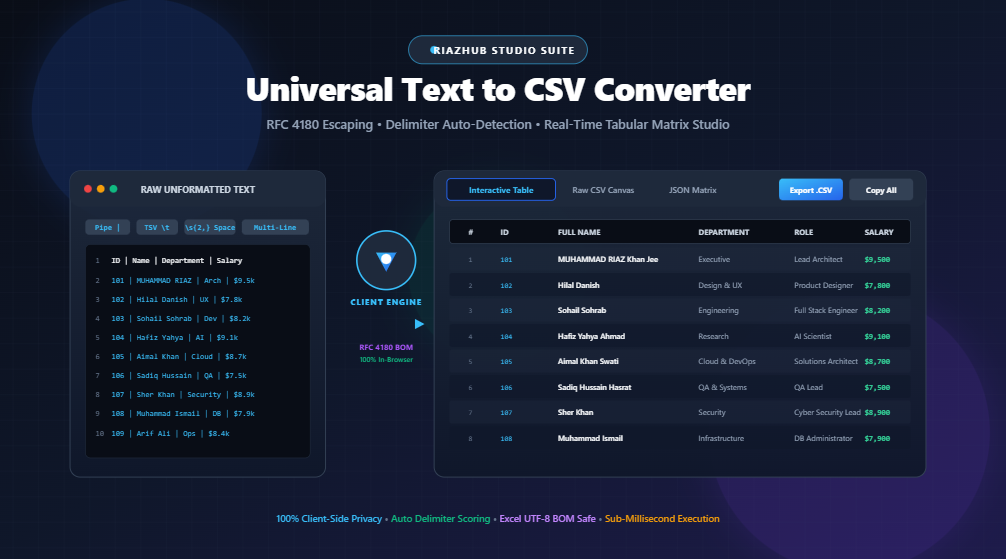
Universal Text to CSV Converter: Master Tabular Data Parsing & RFC 4180 Escaping
In modern data engineering, system administration, and business intelligence workflows, raw data rarely arrives formatted cleanly in a ready-to-use spreadsheet. Developers, database administrators, and financial analysts frequently deal with unformatted plain text dumps, pipe-delimited log files (|), tab-separated values (TSV), space-aligned command line outputs, or block-formatted key-value lists.
Converting this raw text into a standard Comma-Separated Values (CSV) file should be seamless. However, unescaped commas, embedded double quotes, multiline breaks, and character encoding issues often result in broken rows, split columns, and corrupted characters in applications like Microsoft Excel, Google Sheets, or PostgreSQL.
To solve this, you can use the free RiazHub Universal Text to CSV Converter & Tabular Data Transpiler to instantly parse, escape, preview, and transpile messy datasets into clean, RFC 4180-compliant spreadsheets entirely in your browser.
🚀 Convert Unformatted Text to CSV Instantly
Paste raw text, logs, or TSV data and transform it into RFC 4180-compliant CSV and Excel spreadsheets in real time.
1. Understanding the RFC 4180 Standard: Why Raw Splitting Fails
A common mistake when writing custom parsing scripts is using simple string splitting (such as text.split(',')). This naive approach fails the moment a field contains:
- A literal comma: A field like
"New York, US"gets erroneously split into two columns. - Double quotation marks: A value like
14" Monitorbreaks standard column readers. - Embedded line breaks: Multiline addresses or comments produce incomplete, disjointed spreadsheet records.
The Internet Engineering Task Force (IETF) standardized CSV behavior under RFC 4180. The three primary compliance rules are:
- Field Encapsulation: Any field containing the active delimiter (comma, semicolon, or tab), double quotes, or newline characters must be enclosed in double quotes (e.g.,
"London, UK"). - Quote Escaping: If a double quote appears inside a field, it must be escaped by prefixing it with an additional double quote (e.g.,
"14"" Monitor"). - Line Terminators: Records should terminate with standard CRLF (
\r\n) or LF (\n) sequences.
The Universal Text to CSV Converter automatically enforces these RFC 4180 escaping rules on every parsed field.
2. The UTF-8 Byte Order Mark (BOM): Eliminating Excel Character Corruption
Have you ever opened a CSV file containing Arabic, Urdu, Persian, Chinese, Japanese, or accented European letters in Microsoft Excel, only to see strange symbols like السلام or é instead of readable text?
Why this happens: Unlike modern text editors that default to UTF-8, Microsoft Excel for Windows defaults to the operating system’s legacy ANSI/OEM code page unless explicitly instructed otherwise.
The solution is prefixing the file with the UTF-8 Byte Order Mark (BOM: \uFEFF). This 3-byte signature signals to Microsoft Excel that the incoming stream is encoded in UTF-8, forcing Excel to render international characters and non-Latin typography accurately without requiring manual import wizards.
3. Supported Delimiter Strategies & Data Structures
Different systems output data in distinct formats. With the RiazHub Tabular Data Transpiler, you have access to multiple parsing strategies:
- Auto-Detect Delimiter: Leverages heuristic frequency scoring across commas, tabs, pipes, and semicolons to determine your structure automatically.
- Pipe-Separated Logs (
|): Cleans up database dumps, Unix command outputs, and server logs. - Tab-Separated Values (TSV /
\t): Transpiles raw clipboard copies from Excel or Google Sheets into standard CSV. - Multi-Space Aligned Columns: Converts fixed-width shell outputs (such as
ps aux,top, or system monitors) using intelligent regex splitting (\s{2,}). - Custom String / Regex: Allows arbitrary delimiters such as
::, slashes, hyphens, or custom regex expressions. - Multi-Line Record Blocks: Automatically groups consecutive N lines into a single structured row, ideal for transpiling key-value formatted blocks.
4. Comma (,) vs. Semicolon (;) Delimiters: European Regional Standards
In countries such as Germany, France, Italy, Spain, and throughout Latin America, the comma serves as the decimal separator (e.g., 148.500,00 €).
Because commas represent decimals, regional installations of Microsoft Excel expect the semicolon (;) as the column delimiter. The Text to CSV Tool provides a 1-click “European Excel” preset that configures semicolon output separation combined with UTF-8 BOM encoding for complete regional compatibility.
5. Feature Comparison: Command Line vs. Basic Converters vs. RiazHub Studio
| Feature / Capability | CLI / Python Scripts | Generic Online Converters | RiazHub Matrix Studio |
|---|---|---|---|
| Client-Side Privacy | Local Only | Often Uploads to Server | 100% In-Browser (Zero Server Upload) |
| Delimiter Auto-Detection | Manual Setup Required | Limited | Real-Time Heuristic Engine |
| RFC 4180 Escaping | Requires Custom Code | Inconsistent | Strict Standard Compliance |
| UTF-8 BOM for Excel | Manual Hex Prep | Rarely Supported | 1-Click Toggle (Default ON) |
| Interactive Table Preview | None | Static Text Only | Live Sortable Table + JSON Studio |
| Export Formats | File Output | CSV Only | CSV, TSV, JSON, & Clipboard Copy |
6. How to Convert Text to CSV in 3 Simple Steps
- Input Your Data: Paste unformatted text, logs, or lists directly into the input editor, or drag and drop a
.txt,.log, or.tsvfile on the Text to CSV Converter Page. - Select Delimiter & Sanitization Options: Choose “Auto-Detect” or pick a specific delimiter (Pipe, Tab, Multi-Space, Regex). Toggle header row recognition, whitespace trimming, or European semicolon output.
- Preview & Export: Switch between the Interactive Data Table, Raw CSV Code Canvas, or JSON Array Matrix. Click Copy CSV or Download .csv to save your file immediately.
Ready to Clean & Transpile Your Datasets?
No software installation, no command line scripts, and zero data leakage. Free, secure, and instant.
7. Frequently Asked Questions (FAQs)
") inside a field value is doubled ("") and the entire field is enclosed in quotes, ensuring that spreadsheet software reads the quote as literal text rather than a column boundary.\s{2,}|\t) to separate tabular terminal dumps into individual clean CSV columns.[{ "header": "value" }] array ready for download or API consumption.Universal Text to CSV Converter
Transform unstructured text, log files, fixed-width columns, or delimited lists into clean, RFC 4180-compliant CSV and Excel spreadsheets in real time.
Source Input Text
RFC 4180 Standards, Excel Encoding & Privacy Reference
RFC 4180 is the official IETF standard specification for Comma-Separated Values (CSV) MIME types. According to the specification:
- Delimiters within values: Any field containing the active delimiter (such as a comma
,) must be enclosed in double quotes (e.g."London, UK"). - Quotes within values: Any double quote character inside a field must be escaped by preceding it with another double quote (e.g.
"He said ""Hello"""). - Line breaks: Fields containing embedded line breaks (
\nor\r\n) must also be fully enclosed in double quotes.
Microsoft Excel on Windows often defaults to the system ANSI code page when double-clicking to open .csv files. If your data contains non-Latin scripts (Arabic, Urdu, Persian, Chinese, Japanese) or accented characters (é, ü, ñ), Excel may display them as garbled text ("mojibake").
Adding the 3-byte UTF-8 Byte Order Mark (BOM: \uFEFF) at the very beginning of the CSV stream explicitly forces Excel to recognize and render full Unicode characters flawlessly.
In many European countries (e.g., Germany, France, Italy, Spain) and Latin America, the standard decimal separator is the comma (e.g. 12,50 € instead of 12.50).
Because the comma is reserved for decimals, regional Microsoft Excel installations default to using the semicolon (;) as the CSV list separator. When exporting files for European users, select "Semicolon (;)" as the output delimiter.
All parsing, sanitization, table matrix generation, and file exporting run locally inside your web browser's JavaScript V8 engine. No confidential corporate spreadsheets, server logs, personal contacts, or financial datasets are ever sent across the network or stored on any server.