
How to Convert Plain Text, Delimited Lines, and Key-Value Configs into Clean JSON
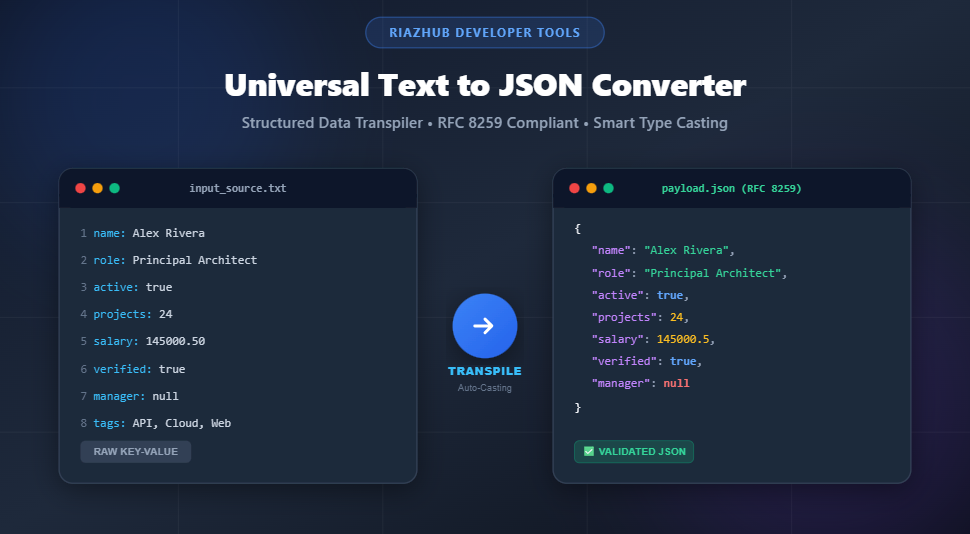
In modern software engineering, web development, and cloud data pipelines, JSON (JavaScript Object Notation) reigns as the universal lingua franca for data interchange. Whether you are seeding a NoSQL database, hydrating Kubernetes ConfigMaps, generating mock REST API payloads, or parsing server audit logs, unformatted text frequently stands between you and production-ready data. In this comprehensive guide, we explore the mechanics of data transpilation, smart primitive type casting, and how to utilize the Universal Text to JSON Converter on RiazHub to automate these tasks with sub-millisecond precision.
Convert plain text lists, .env files, CSV tables, and regex-matched log lines into formatted or minified JSON directly in your browser with zero server latency.
1. The Challenge of Unstructured Data in Modern Architecture
Every software developer, system administrator, and data analyst routinely encounters plain text that holds critical structural value:
- Environment Variables & Configs:
.env,.ini, and.conffiles storing database connection strings, feature flags, and API endpoints. - Spreadsheet Exports & CSV Dumps: Comma-separated or tab-separated tables requiring transformation into collections of objects for MongoDB, Firebase Firestore, or PostgreSQL JSONB columns.
- Raw Server Logs: Nginx, Apache, or Kubernetes stdout logs containing IP addresses, status codes, and response times in tabular or pattern-based text lines.
- Flat Keyword Lists: Simple line-by-line inventories of slugs, SKU identifiers, user IDs, or dictionary keys that need to be packaged into JSON array literals.
Manually rewriting quotes, braces, colons, and commas is not only tedious and error-prone it almost inevitably introduces syntax anomalies like missing closing brackets or unescaped characters. Utilizing an automated utility like the Text to JSON Converter & Structured Data Transpiler completely eliminates manual overhead by enforcing RFC 8259 syntax validation.
2. Core Conversion Topologies: Matching Input to Structure
Plain text comes in various formats. Choosing the correct structural model ensures that the resulting JSON hierarchy accurately represents the data domain.
Mode A: Line-by-Line String Array
When each line represents an individual standalone value (such as a list of tags, categories, or country names), the transpiler converts every line into a JSON array element:
// Input:
// Apple
// Banana
// Cherry

[
  "Apple",
  "Banana",
  "Cherry"
]
Mode B: Key-Value Object Mapping
For configuration files and environment definitions, lines typically follow a KEY=VALUE or key: value pattern. The converter isolates the delimiter, trims surrounding whitespace, and casts the value into a key-value object:
// Input:
// APP_ENV=production
// PORT=8080
// DEBUG_MODE=false
// TIMEOUT_MS=null

{
  "APP_ENV": "production",
  "PORT": 8080,
  "DEBUG_MODE": false,
  "TIMEOUT_MS": null
}
Mode C: Delimited Tabular Data to Array of Objects
When processing CSV or TSV data where the first row specifies column headers, each subsequent row is mapped to an object where headers serve as object keys:
// Input:
// id,username,tier,active
// 101,jdoe,enterprise,true
// 102,asmith,pro,false

[
  {
    "id": 101,
    "username": "jdoe",
    "tier": "enterprise",
    "active": true
  },
  {
    "id": 102,
    "username": "asmith",
    "tier": "pro",
    "active": false
  }
]
Mode D: 2D Matrix Array (Array of Arrays)
For numerical matrices, geometric coordinates, or tabular data where key overhead must be minimized, lines are tokenized into sub-arrays without repeating column headers:
// Input:
// 12.5, 45.0, 98.2
// 14.1, 48.3, 91.0

[
  [12.5, 45, 98.2],
  [14.1, 48.3, 91]
]
Mode E: Regex Named Group Extraction
For semi-structured text like server access logs, Regular Expression capture groups (e.g., (?<ip>\S+) (?<status>\d+)) extract matching segments directly into structured JSON keys per line.
You can test all 5 structural modes simultaneously inside the RiazHub Structured Data Transpiler Studio.
3. Understanding Smart Primitive Type Casting
A common limitation of rudimentary string splitting scripts is that they treat all tokenized values as raw strings (e.g., "8080", "true", "null"). While syntactically valid JSON, this requires downstream applications to perform secondary parsing.
The Text to JSON Converter integrates an intelligent type evaluation engine:
| Raw Plaintext Token | Standard String Split | Smart Type Cast (RFC 8259) | JavaScript Type |
|---|---|---|---|
42 or 129.95 |
"42", "129.95" |
42, 129.95 |
Number |
true / false |
"true", "false" |
true, false |
Boolean Literal |
null, nil, undefined |
"null" |
null |
Null Literal |
01234 (Leading Zero) |
"01234" |
"01234" (Preserved) |
String (Protects Zip codes & IDs) |
4. Performance Comparison: Formatted vs. Minified JSON
During development and schema design, indentation (2 spaces, 4 spaces, or tabs) improves human readability. However, in production microservices and high-throughput REST APIs, whitespace constitutes unnecessary payload overhead.
Consider a table of 10,000 records:
- 2-Space Formatted Payload: ~1.85 MB transfer size with extensive newline (
\n) and indentation characters. - Minified Single-Line JSON: ~1.15 MB transfer size (a 37% reduction in network payload).
The RiazHub Text to JSON utility includes instant 1-click view switching between Formatted Code, an Interactive Collapsible Object Tree, and production-ready Minified Single-Line JSON.
Transform Complex Datasets into Clean JSON in Seconds
Take advantage of drag-and-drop file imports, auto-detected delimiters, key sorting, and schema linting.
5. Step-by-Step Tutorial: Converting Text to JSON on RiazHub
- Input Your Data: Paste plain text directly into the source textarea or drag and drop a
.txt,.csv,.tsv,.log, or.envfile. - Select Your Mode: Choose from String Array, Key-Value Object, Array of Objects, 2D Matrix, or Regex Extractor.
- Configure Delimiters & Options: Enable or disable Smart Type Casting, Whitespace Trimming, Skip Blank Lines, or wrap your result in a parent key (e.g.,
{"data": [...]}). - Inspect & Validate: Use the interactive tree inspector to expand and collapse nested structures, or click Validate for real-time RFC 8259 syntax confirmation.
- Export: Click Copy JSON for your clipboard or Download .json to save the output file locally.
6. Privacy & In-Browser Execution Guarantee
When handling proprietary databases, environment secrets, or customer records, uploading data to remote servers introduces security compliance risks. The Universal Text to JSON Converter at RiazHub operates entirely client-side within your browser’s JavaScript engine. No plain text, credentials, or converted JSON payloads are ever transmitted, logged, or stored on external servers.
Frequently Asked Questions (FAQ)
How does the converter handle commas inside quoted CSV strings?
When using the Array of Objects mode, the tokenizer properly respects quotes and standard delimiter boundaries, preserving commas within quoted text fields.
Will phone numbers or postal codes starting with ‘0’ be converted to numbers?
No. The smart type casting engine detects leading zeros (e.g., "00123" or "08450") and preserves them as quoted strings to prevent accidental data corruption.
Can I convert JSON back to plain text?
Yes. Use the Swap button inside the Text to JSON Converter to load formatted JSON back into the input console for rapid editing and re-formatting.