
How to Batch Convert & Transcode Images to WebP, PNG, JPG, BMP & ICO Directly in Your Browser
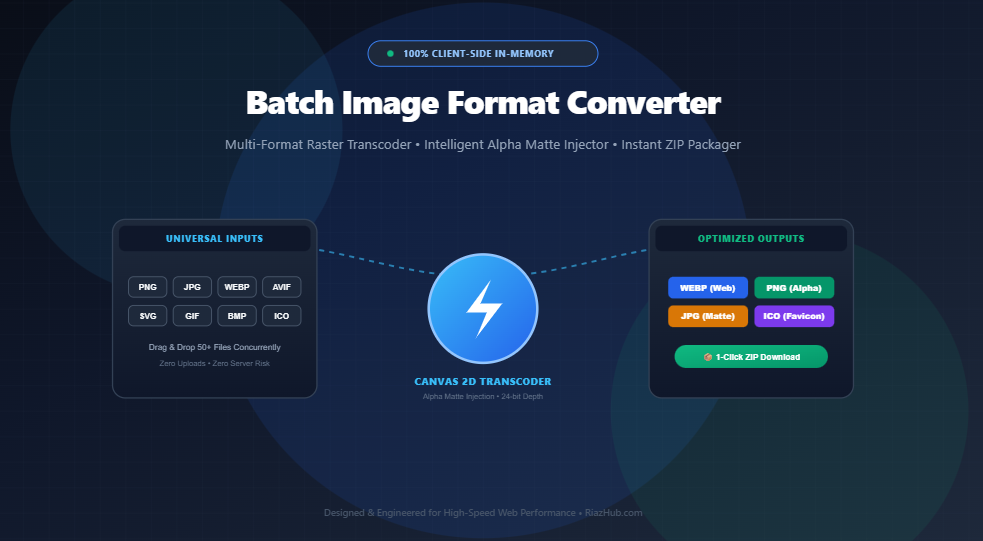
Whether compressing heavy e-commerce product catalogs for Google PageSpeed, converting transparent vector logos to web-ready JPEG banners, or generating multi-size Windows favicons, image transcoding is a daily necessity. Discover how the browser-based Universal Batch Image Format Converter on RiazHub allows instant, zero-upload raster transcoding directly within your device’s memory.
Jump directly to the Universal Batch Image Format Converter Studio to drag, drop, and convert unlimited PNG, JPG, WEBP, AVIF, GIF, BMP, ICO, and SVG files with 1-click ZIP archiving.
The Modern Image Format Landscape: Why Web Performance Demands Format Flexibility
In modern web design and digital publishing, images represent over 60% of total web page payload. When websites serve unoptimized legacy graphics, mobile visitors abandon slow pages, bounce rates climb, and search engines penalize rankings under Google’s Core Web Vitals (specifically Largest Contentful Paint – LCP).
However, digital creators and development teams face a fragmented matrix of competing image formats:
- Marketing & Social Teams: Frequently export massive 10MB uncompressed JPEG photos straight from cameras or Canva that choke mobile browser bandwidth.
- UI/UX Designers: Export crystal-clear 24-bit transparent PNG graphics that preserve alpha transparency but consume 5× to 10× more file weight than necessary.
- Web Performance Engineers: Need to convert every asset into ultra-lightweight WebP files to pass PageSpeed audits and achieve sub-second load times.
- Software & App Developers: Require valid multi-resolution
.icopackages containing 16px, 32px, 48px, and 64px bitmaps for cross-browser favicon support and Windows desktop shortcuts. - Legacy & Embedded Systems: Demand raw 24-bit uncompressed BMP bitmaps with standardized DIB headers for legacy hardware and internal software pipelines.
Solving this format fragmentation traditionally meant installing expensive desktop software or uploading sensitive photos to obscure third-party conversion websites. With the RiazHub Batch Image Format Converter, your entire batch is transcoded locally inside browser memory using native HTML5 Canvas hardware acceleration.
Deep Dive: WebP vs. PNG vs. JPG vs. BMP vs. ICO
Selecting the ideal output format determines whether your graphics load instantly with razor-sharp fidelity or bog down your website. Here is an architectural breakdown of each target format supported by the online image transcoding studio:
| Target Format | Compression Algorithm | Alpha (Transparency) | Typical Size Savings | Optimal Use Case |
|---|---|---|---|---|
| WEBP | VP8 Predictive / VP8L Lossless | Yes (Full 8-bit Alpha) | 25% – 35% smaller than JPG; 50%–70% smaller than PNG | Modern websites, blogs, e-commerce stores, and high-speed web apps. |
| PNG | DEFLATE (Zip-based Lossless) | Yes (Full 8-bit Alpha) | Lossless (Pixel-perfect fidelity) | Logos, UI badges, vector icons, technical diagrams, and transparent overlays. |
| JPG / JPEG | Discrete Cosine Transform (DCT Lossy) | No (Flattened on Matte) | Significant reduction (Adjustable 10%–100%) | High-resolution photography, print media, social banners, and legacy devices. |
| BMP | Uncompressed RGB Bitmap (DIB) | No (Flattened on Matte) | Raw Byte Array (Uncompressed) | Embedded hardware, Windows desktop utilities, machine vision, and raw archiving. |
| ICO | Multi-Resource Icon Directory (PNG Streams) | Yes (Per Icon Slice) | Bundles 16px, 32px, 48px, 64px into one file | Browser tab favicons, bookmark drawers, desktop app icons, and PWA manifests. |
The Alpha Transparency Problem: Why Converting Transparent PNGs to JPEG Creates Ugly Black Borders
One of the most frustrating hurdles when converting transparent PNG or SVG images into non-transparent formats like JPEG or BMP is the dreaded “Black Box Artifact.”
Because the JPEG and BMP specifications do not have an alpha transparency channel, any pixel with an alpha value of 0 has undefined color values. Standard conversion scripts simply set the background to RGB (0, 0, 0), resulting in a stark, unsightly black rectangular background behind transparent logos, badges, and icons.
How RiazHub’s Intelligent Alpha Matte Blending Works
The Batch Image Format Converter automatically detects when you are converting transparent graphics into JPEG or BMP. Before rasterizing the pixel array, the canvas engine injects a solid background matte layer allowing you to choose between:
- Clean Studio White (
#FFFFFF): Perfect for product listings, blogs, and crisp presentation against white web backgrounds. - Deep Contrast Black (
#000000): Ideal for night mode mockups, dark theme branding, and automotive imagery. - Custom Hex Palette: Pick any exact branding hex color to seamlessly blend transparent logos onto your company’s signature brand color.
Multi-Resolution ICO Favicon Architecture: Why Single-Size Favicons Fail
Many creators assume that saving a single 32×32 pixel graphic as favicon.ico is sufficient. In reality, modern operating systems and web browsers query different icon resolutions depending on the user’s display context:
- 16 × 16 px: Displayed in dense browser tabs and address bar dropdowns.
- 32 × 32 px: Rendered in standard desktop bookmarks, browser toolbars, and New Tab pages.
- 48 × 48 px: Utilized by Windows desktop shortcuts, taskbars, and file explorer thumbnails.
- 64 × 64 px: Displayed on high-DPI Retina displays and mobile application home screen drawers.
When you choose ICO in the Universal Batch Image Converter, the studio executes multi-pass canvas downsampling with high-fidelity bicubic smoothing. It then compiles the slices into a valid binary ICONDIR header structure containing all chosen resolutions packaged into a single, universal .ico file ready for your website root.
Step-by-Step: How to Batch Convert Images in 4 Easy Steps
Converting large image collections with the RiazHub Batch Transcoder takes just seconds:
Drag and drop up to 50+ files into the upload zone, or click “Select Files.” You can mix and match formats simultaneously—including PNG, JPG, WEBP, AVIF, GIF, BMP, and SVG. Alternatively, click “Load Sample Batch” to test the studio with demo graphics immediately.
Choose your master target format using the one-click pill selectors:
- WEBP: Tune the compression slider (default 90%) for the ideal balance between visual sharpness and lightweight file size.
- PNG: Preserve 24-bit pixel-perfect alpha transparency.
- JPG / JPEG: Select your alpha matte background color (White, Black, or Custom Hex).
- ICO: Check off your preferred embedded resolutions (16px, 32px, 48px, 64px).
- BMP: Export uncompressed raw bitmap files.
Want to add a custom suffix like -optimized or -web to all converted filenames? Simply enter it into the suffix input field. If you need different formats for specific files in the same batch, toggle on “Enable Per-File Format Override” to set targets individually in the queue.
Click “⚡ Convert All Queued Images.” The non-blocking asynchronous pipeline processes each item in milliseconds without freezing your browser. Once finished, click “📦 Download All as ZIP Archive” to package every converted asset into a single, organized archive.
The Architecture Behind 100% Client-Side Privacy: Zero Server Uploads
Most online image conversion utilities act as black boxes. When you upload photos to typical free web tools, your images are transmitted across the public internet to remote cloud servers, where they may be stored, analyzed, or cached indefinitely.
The Universal Batch Image Format Converter is built on a fundamentally different, privacy-first architectural paradigm:
- Local Memory Execution: All files are read into local browser RAM via the HTML5
FileReaderAPI. - Hardware-Accelerated Canvas Rendering: Pixel decompression, scaling, color matting, and re-encoding occur entirely inside your browser’s native Canvas 2D engine.
- Embedded Pure JavaScript ZIP Packager: Converted binary blobs are assembled into a valid PKZIP binary stream using native typed arrays (
Uint8Array) and hardware-fast CRC-32 checksum hashing without relying on bloated third-party CDNs. - Zero Server Transmission: Not a single pixel, thumbnail, or byte of image data ever leaves your computer or phone. Your company branding, client mockups, and confidential photos remain 100% private.
Best Practices for Image SEO & Google Core Web Vitals Optimization
Converting formats is only the first step. To achieve maximum SEO impact and top PageSpeed scores, follow these proven best practices:
- Default to WebP for Web Graphics: Serving WebP files instead of standard PNGs or JPEGs typically slashes payload size by 30%–70%, directly accelerating your Largest Contentful Paint (LCP) benchmark.
- Maintain Dimension Attributes: Always include
widthandheightattributes on your<img>HTML tags to prevent Cumulative Layout Shift (CLS). - Use Descriptive Filenames: Take advantage of the custom suffix feature in the Batch Image Transcoder to create search-friendly names (e.g.,
wireless-mechanical-keyboard-product-view.webp). - Deploy Multi-Size Favicons: Always provide a multi-resolution
.icofile in your website root to ensure crystal-clear bookmark rendering across Android, iOS, Windows, and macOS devices.
Frequently Asked Questions (FAQ)
Is this batch image converter completely free to use?
Yes! The Universal Batch Image Format Converter on RiazHub is 100% free with no account registration, no watermarks, and no artificial daily conversion limits.
Are my uploaded photos stored on your servers?
No. Because all decoding, transcoding, and ZIP bundling happen locally inside your browser’s private memory, zero image bytes are ever transmitted to or stored on RiazHub servers.
Can I convert SVG vector files to PNG or WebP?
Yes! The studio accepts scalable vector graphics (SVG) alongside standard raster formats (PNG, JPG, WEBP, AVIF, GIF, BMP, and ICO) and accurately rasterizes them at full resolution into your chosen output format.
How does the ZIP download work without server software?
The tool includes an embedded, native zero-dependency PKZIP builder written in pure modern JavaScript. It compiles your converted files directly into a standard .zip archive in browser memory and triggers an instant download via native object URLs.
Universal Batch Image Format Converter
Convert dozens of images across WEBP, PNG, JPG, BMP, and ICO formats simultaneously with transparent background control and 1-click ZIP export.
Queue is Currently Empty
Drag and drop images into the dropzone or click "Load Sample Batch" to begin converting.
| File Name | Source | Target | Resolution | Original Size | Output Size | Savings Delta | Action |
|---|---|---|---|---|---|---|---|
| No images queued. Add images to view the metadata matrix. | |||||||
Overall Storage Delta & Efficiency Breakdown
Image Format Standards, Compression Algorithms & Transparency Guide
Developed by Google, WebP delivers 25%–35% smaller file sizes compared to standard JPEG at equivalent visual quality. It achieves this through VP8 intra-frame predictive encoding, which models pixel gradients and spatial redundancies across blocks. Furthermore, WebP natively supports 8-bit alpha channel transparency (VP8L) with lossless compression, effectively replacing both PNG and JPG for web publishing.
The JPEG and BMP specifications lack support for alpha transparency channels. When a transparent PNG or SVG is rasterized to JPEG without pre-compositing, the transparent background pixels default to arbitrary black pixels (`#000000`), creating ugly jagged black edges around logos, icons, and transparent borders. Our studio eliminates this defect by automatically rendering an intelligent alpha matte layer (defaulting to clean White `#FFFFFF` or your custom hex choice) directly behind the image before pixel export.
An ICO file is a specialized binary container designed by Microsoft containing an ICONDIR header and multiple ICONDIRENTRY blocks.
Rather than saving a single pixel scale, our client-side generator rasterizes your graphic simultaneously to 16×16, 32×32, 48×48, and 64×64 pixel dimensions and packages them with embedded lossless PNG data streams.
This guarantees sharp presentation across legacy Windows taskbars, high-DPI Retina screens, and modern mobile browser bookmark drawers.
Every single image byte, proprietary photo, medical scan, signature, or commercial asset uploaded to this studio stays completely localized inside your device's browser memory.
All rendering, pixel matrix conversions, color matting, and ZIP compression are performed via native HTML5 Canvas 2D contexts, typed arrays (Uint8Array), and binary data blobs.
Zero image data is ever transmitted to RiazHub or third-party servers.