
Mastering High-Resolution Web Graphics: How to Resize and Scale Entire Image Batches in Your Browser
In today’s visually-driven digital ecosystem, visual content rules the web. High-resolution product photography, crisp mobile wallpapers, 4K digital illustrations, and social media carousels command attention. However, when unoptimized, camera-raw, or oversized images make their way into production websites and ecommerce storefronts, they trigger devastating consequences: bloated page weights, slow render times, elevated server hosting fees, and severe penalties across Google’s Core Web Vitals metrics, especially Largest Contentful Paint (LCP).
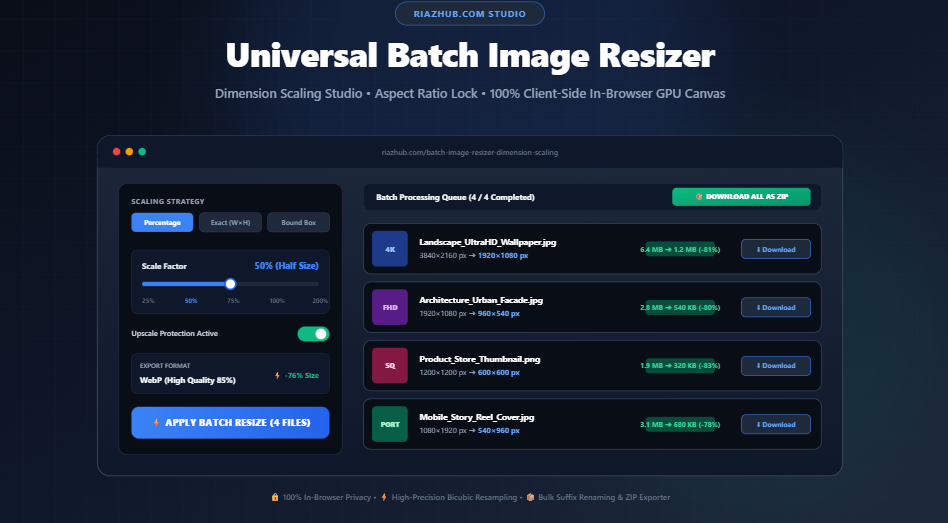
Until recently, scaling dozens or hundreds of graphics required heavy desktop software subscriptions or uploading confidential graphics to untrusted third-party cloud servers. To eliminate these compromises, RiazHub developed the Universal Batch Image Resizer & Dimension Scaling Studio a browser-native, GPU-accelerated utility engineered to resize, re-sample, and transcode batches of images with zero server uploads.
The Hidden Cost of Oversized Images on Modern Websites
Modern mirrorless cameras and smartphones routinely capture images exceeding 48 megapixels (e.g., 8000 × 6000 pixels at 15MB to 35MB each). Serving these colossal files directly to website visitors causes three distinct architectural problems:
- Catastrophic Largest Contentful Paint (LCP): Google measures how quickly the largest visible element above the fold finishes loading. A 10MB hero banner can take 4 to 8 seconds to parse on mobile 4G connections, immediately degrading search rankings.
- Client-Side Memory & Decimation Choke: When mobile browsers decode enormous 4K or 8K files inside CSS containers styled to
max-width: 400px, the device’s CPU and GPU must continuously downscale millions of redundant pixels in volatile RAM, leading to sluggish scrolling and battery drain. - Bandwidth & CDN Overcharges: Serving thousands of monthly shoppers unscaled product catalogs can quickly trigger massive bandwidth bills from cloud hosts and content delivery networks.
Using the RiazHub Batch Image Resizer, you can immediately constrain batches of images to exact device-friendly breakpoints—reducing file sizes by 70% to 90% without sacrificing visual fidelity.
Understanding the 5 Core Dimension Scaling Strategies
Different workflows demand distinct mathematical scaling approaches. The Batch Image Resizer studio provides 5 distinct scaling modes tailored to various media pipelines:
📐 1. By Percentage (%)
Applies a universal proportional decimation factor (from 10% to 300%). Ideal for reducing a uniform photoshoot batch by exactly 50% or 75% while keeping all original aspect ratios completely intact.
🎯 2. Exact Pixels (W × H)
Enforces specific pixel coordinates with an optional Aspect Ratio Lock 🔒. If locked, changing the width automatically updates the height based on the original geometry to prevent unnatural distortion.
↔️ 3. Max Width Constraint
Caps the maximum horizontal boundary (e.g., 1920px for Full HD web banners) while dynamically calculating the appropriate proportional height for every queued image.
↕️ 4. Max Height Constraint
Constrains vertical boundaries (e.g., 1080px for social video posters or mobile stories) while computing proportional horizontal dimensions.
📦 5. Fit Bounding Box
The gold standard for e-commerce galleries. Scales photos down so they fit completely inside a predetermined boundary (e.g., 800 × 800 px) without cropping, stretching, or adding letterbox borders.
🛡️ Upscale Protection
A built-in safety guard that prevents smaller thumbnails or icons in your queue from being enlarged past their native resolution, avoiding blurry pixelation.
High-Precision Bicubic Decimation vs. Standard Decimation
When downscaling an image from 3840 × 2160 down to 1920 × 1080, an algorithm must decide which pixels to discard and how to blend remaining color values. Primitive online tools use nearest-neighbor decimation, creating harsh pixelated edges and shimmering moiré artifacts across textiles, architecture, and typography.
The Universal Batch Image Resizer at RiazHub.com executes multi-tap bicubic resampling directly within HTML5 Canvas with imageSmoothingQuality = 'high'. This technique applies weighted mathematical interpolation to 16 surrounding pixels for every target pixel, yielding smooth gradients, crisp diagonal lines, and natural edge anti-aliasing.
Traditional Cloud Resizers vs. RiazHub In-Browser Studio
Why choose client-side processing over legacy online image conversion sites? Here is a breakdown of key operational differences:
| Capability | Standard Online Resizers | RiazHub Batch Image Resizer |
|---|---|---|
| Data Privacy & Security | Uploads files to third-party cloud servers | 100% In-Browser (Zero files leave your device) |
| Processing Speed | Limited by upload/download internet bandwidth | Instant Local GPU Acceleration |
| Batch Archiving | Individual downloads or paid premium ZIP | Free Native In-Memory PKZIP Exporter |
| Format Transcoding | Rarely includes modern formats like WebP | Lossless PNG, High-Efficiency WebP & JPEG |
| File Size Limits | Restricted to 5MB–10MB without a subscription | Handles High-Res 4K & RAW-Derived Photos |
Step-by-Step: How to Resize Dozens of Images in Under 30 Seconds
Follow these four simple steps using the RiazHub Batch Image Resizer:
- Queue Your Graphics: Drag and drop any assortment of PNG, JPG, WebP, AVIF, BMP, or GIF files into the studio dropzone. You can also click “Load Demo Batch” to immediately preview how the engine operates.
- Select Your Scaling Strategy: Choose between Percentage, Exact Pixels, Max Width, Max Height, or Bounding Box. Adjust the sliders or numeric input fields to match your target specifications.
- Tune Output Quality & Filename Suffixes: Select your desired output format (such as Convert to WebP for maximum web efficiency) and dial in your quality slider (85% recommended). Use custom tokens like
_{w}x{h}to automatically append final resolutions to every exported filename. - Process & Export: Click “⚡ Apply Batch Resize to All”. Once completed, download individual photos or click “📦 Download All as ZIP Archive” to receive your entire processed catalog in a single, organized archive.
Real-World Workflows: Who Benefits Most?
The RiazHub Image Resizer solves daily bottlenecks across multiple creative and technical disciplines:
- Shopify & WooCommerce Merchants: Uniform product photography is essential for high conversion rates. Use the Bounding Box Mode (e.g., 800 × 800 px) to standardize varied vendor photos into uniform, fast-loading store thumbnails.
- Content Creators & Bloggers: Reduce 5000px stock photography down to 1440px width before inserting images into WordPress posts, dramatically improving mobile PageSpeed scores.
- Frontend Engineers & Designers: Rapidly prepare responsive
srcsetimage sets by generating@1xand@2xresolution batches using custom percentage presets. - Photographers & Agency Teams: Package client proofing batches by downscaling raw exports into lightweight, watermarked WebP archives for rapid client email distribution.
Frequently Asked Questions (FAQ)
Will resizing reduce my image quality?
Downscaling reduces pixel dimensions, which naturally removes superfluous image data. However, because RiazHub applies high-grade bicubic resampling, your images remain visually sharp and crisp, while dropping in file size by 60% to 85%.
Are my personal or business images uploaded to your servers?
No. The RiazHub Batch Image Resizer operates 100% inside your browser’s local memory using HTML5 Canvas and native JavaScript. Not a single byte is ever transmitted across the internet.
What does “Upscale Protection” do?
When Upscale Protection is active, any queued image that is already smaller than your target max-width or max-height will remain at its original resolution rather than being artificially stretched, preventing blurry pixelation.
Can I convert images to WebP while resizing?
Yes! In the format selection menu, choose “Convert to WebP”. The tool will automatically resize your dimensions and transcode the output into Google’s modern WebP format simultaneously.
Conclusion: Speed Up Your Workflow with Modern Browser Utilities
High performance on the modern web does not require sacrificing visual impact. By adopting systematic dimension scaling, you can deliver breathtaking visual experiences while maintaining sub-second load times and flawless Core Web Vitals.
Bookmark and explore the Universal Batch Image Resizer & Dimension Scaling Studio on RiazHub.com today and experience the speed of private, client-side batch media optimization.
Universal Batch Image Resizer
Resize dozens of images simultaneously by percentage, custom pixels, or max boundaries with aspect ratio locking and 1-click in-browser ZIP export.
Image Resampling Standards, Pixel Interpolation & DPI Guide
When downscaling high-resolution camera photos or wallpapers to web dimensions, proper pixel decimation is crucial. This studio leverages HTML5 Canvas with imageSmoothingQuality = 'high', applying a high-precision multi-tap bicubic filter. This eliminates moiré patterns, staircase aliasing on diagonal lines, and preserves fine textures while discarding unnecessary pixel mass.
Standard aspect ratios (16:9 for landscape monitors, 4:3 for tablets, 1:1 for square catalog listings, and 9:16 for vertical smartphone stories) must be preserved. Enabling the Aspect Ratio Lock 🔒 or using Max Width, Max Height, or Bounding Box ensures images dynamically calculate proportional coordinates, safeguarding your graphics against geometric distortion.
Serving full 4K (3840×2160) images on mobile screens wastes bandwidth, triggers browser decimation overhead, and harms Google's Largest Contentful Paint (LCP). Resizing images to exact responsive container widths (such as 1920px for hero banners or 400px for thumbnails) combined with modern WebP transcoding typically yields 60% to 85% bandwidth reduction without perceptible quality loss.
All pixel manipulation, canvas rendering, compression, and ZIP archiving occurs strictly within your local browser runtime. Zero photos, confidential graphics, ecommerce mockups, or personal identity files are ever uploaded or transmitted across the network, guaranteeing total privacy and immediate speed.