
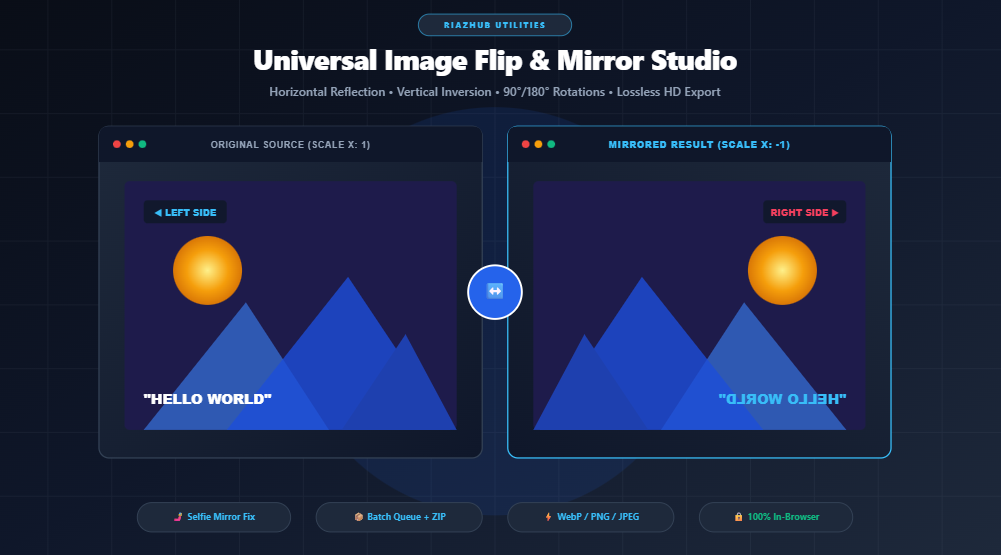
Need to quickly mirror, flip, or rotate photos with zero quality loss?
Use RiazHub’s Free Universal Image Flip & Mirror Studio →
Few things are as frustrating as snapping a great front-camera selfie only to discover that the text on your shirt is printed completely backwards. Or finding the perfect stock photo or icon for your website layout, only to realize the subject is looking in the wrong direction.
Whether you are fixing mirrored selfie reflections, producing symmetric e-commerce product graphics, creating water reflection effects, or leveling crooked camera horizons, image orientation errors happen constantly. While desktop photo editors like Photoshop or GIMP can flip images, launching heavy software for a 5-second task is unnecessarily tedious.
With the Universal Image Flip & Mirror Studio on RiazHub, you can flip, mirror, rotate, and batch-export your pictures right in your browser with complete privacy and zero quality degradation.
Why Front-Facing Cameras Mirror Your Photos
To understand why horizontal flipping is so important, it helps to understand how smartphone cameras operate. When you glance into a real mirror, your reflection is horizontally reversed. Because humans are accustomed to this mirror view, smartphone camera apps mirror the live preview screen so you can frame your shot naturally.
However, once you tap the shutter button, different camera apps process the saved file differently:
- Optical Reality (Unflipped): The camera saves the photo as someone standing in front of you would see it. Any text or logos read correctly from left to right, but your face may feel slightly unfamiliar because you are used to your mirror reflection.
- Mirrored Capture: The camera saves the exact reflection you saw on your screen. Your facial composition feels familiar, but background signs, shirt logos, and book titles are flipped backwards.
By opening the Image Flip & Mirror Transformation Tool, you can restore reversed photos with a single click using the built-in Selfie Mirror Fix preset.
CSS Mirroring vs. True Canvas Pixel Restructuring
A common misconception is that flipping an image with a CSS rule such as transform: scaleX(-1); actually changes the image.
CSS only alters the visual appearance on your current screen. The underlying image file remains identical. If a visitor downloads the image, saves it to their phone, or shares it on social media, the photo reverts back to its unflipped state.
In contrast, RiazHub’s Image Flip Studio uses HTML5 Canvas 2D matrix transformation algorithms (ctx.scale(-1, 1) and ctx.rotate). It permanently restructures the raw pixel data into a new binary file. When you download the result as a WebP, PNG, or JPEG, the flip is baked directly into the image file permanently.
Try the Live Split-Screen Before & After Viewer
Test horizontal mirroring, vertical inversion, and fine angle adjustments in real time.
Core Features of the Flip & Mirror Studio
1. Horizontal Flip (Mirror Left-to-Right)
Inverts coordinates along the vertical Y-axis. This is the classic mirror reflection ideal for correcting front-camera selfies, adjusting directional gaze in portraits, and harmonizing web page layouts.
2. Vertical Flip (Upside-Down Inversion)
Inverts pixel coordinates across the horizontal X-axis. This technique is frequently used by digital artists and web designers to craft realistic water reflections and mirror surface graphics.
3. Dual-Axis Flip (180° Inversion)
Flips both horizontal and vertical axes simultaneously. It is the fastest way to normalize inverted document scans, upside-down overhead camera shots, or misoriented receipts.
4. 90° Rotations & Fine-Tune Angle Leveling
In addition to rapid 90° clockwise, 90° counter-clockwise, and 180° rotations with automatic dimension swapping, the tool includes a fine-tune leveling slider ranging from -45° to +45° to straighten crooked horizon lines.
5. Multi-File Batch Queue & 1-Click ZIP Download
Instead of modifying one image at a time, you can drag and drop dozens of photos at once. Click Apply Transform to Entire Batch to mirror all items concurrently, then download them packaged in a single .zip archive created directly in your browser memory.
How to Flip Your Images Step-by-Step
- Select or Drag Photos: Open the Image Flip & Mirror Tool and upload your files (JPG, PNG, WEBP, AVIF, BMP, or GIF).
- Choose Your Transform: Click Flip Horizontally, Flip Vertically, or one of the 1-click presets (like Selfie Mirror Fix or Water Reflection).
- Compare Results: Switch between the Interactive Stage, the Split-Screen Before/After Slider, or the Side-by-Side View to verify your changes.
- Select Output Format: Choose to preserve the original format or export as high-compression WebP, lossless PNG (retaining alpha transparency), or high-compatibility JPEG.
- Save or Copy: Click Download Transformed Image, Copy to Clipboard, or Download All as ZIP Archive for batch exports.
Popular Creative & Professional Use Cases
- E-Commerce Product Symmetry: Mirror lifestyle product photography so hero items look consistently toward buttons and pricing tables.
- Water & Landscape Reflections: Duplicate a scenic photo, vertically flip the bottom half, and export in lossless PNG to create artistic reflections.
- Social Media Selfie Correction: Ensure logos, background signs, and clothing text appear in their proper readable orientation before publishing.
- Document Scanning Clean-up: Correct upside-down receipt, invoice, or legal document scans instantly without third-party desktop tools.
Complete Privacy: 100% In-Browser Execution
Privacy is a top priority. When using the Universal Image Flip & Mirror Studio on RiazHub, all image decoding, coordinate affine transformations, compression, and ZIP packaging occur strictly inside your device’s browser memory.
Zero photos, selfie reflections, artwork, or personal documents are ever uploaded to an external server. Your files never leave your computer or phone, providing total security and instantaneous processing speeds.
Ready to Fix or Mirror Your Images?
Fast, free, private, and works on all devices without installing any software.
Universal Image Flip & Mirror Studio
Flip photos horizontally or vertically, correct selfie front-camera reflections, rotate orientations, and mirror entire image batches with instant lossless HD export.
Drag & drop images here
Supports JPG, PNG, WEBP, AVIF, BMP, GIF
No multiple files loaded yet.
Drag and drop multiple images or click "Select Images".
📐 How do 2D Canvas Matrix Affine Transforms Work?
When an image is mirrored, HTML5 Canvas inverts coordinate vectors using matrix scale multiplication: ctx.scale(-1, 1) flips the X-axis across the center origin, while ctx.scale(1, -1) inverts the Y-axis. The tool translates the canvas origin to the midpoint, applies rotations and axis inversions, and rasterizes high-definition pixel buffers.
🤳 Why do Smartphone Selfie Cameras Capture Mirrored Photos?
To mimic a physical mirror during composition, front-facing phone cameras reflect the live viewfinder. However, some camera apps save the inverted mirror view rather than true optical reality. Horizontal flipping corrects this inversion, ensuring that text, logos, and facial features appear exactly as seen by others.
🖥️ CSS Display Mirroring vs. Canvas Pixel Restructuring
CSS transforms (transform: scaleX(-1)) only alter visual rendering on your screen; they do not alter the underlying image file. This studio uses GPU-accelerated HTML5 Canvas to permanently restructure the binary pixel matrix, allowing you to export genuine flipped WEBP, PNG, or JPEG files.
🔒 100% In-Browser Privacy Guarantee
All image decoding, coordinate transformations, file compression, and ZIP packaging occur strictly inside your web browser. Zero photos, selfie reflections, artwork, or transformed files are ever transmitted to any remote server or cloud service.