
Mastering Animated GIF Optimization: How to Slash File Size by Up to 85% with Client-Side Frame Decimation and Color Quantization
Animated GIFs remain the universal lingua franca of the modern internet. From Slack reactions and Discord memes to product walk-throughs and SaaS onboarding tutorials, their frictionless autoplay and zero-plugin compatibility make them indispensable. However, the underlying GIF89a specification was drafted in 1989 decades before mobile broadband, responsive viewports, and modern Core Web Vitals existed. As a result, even a modest 5-second screen capture can easily balloon into a massive 15 MB file that severely slows down page loads, spikes mobile bounce rates, and eats server bandwidth.
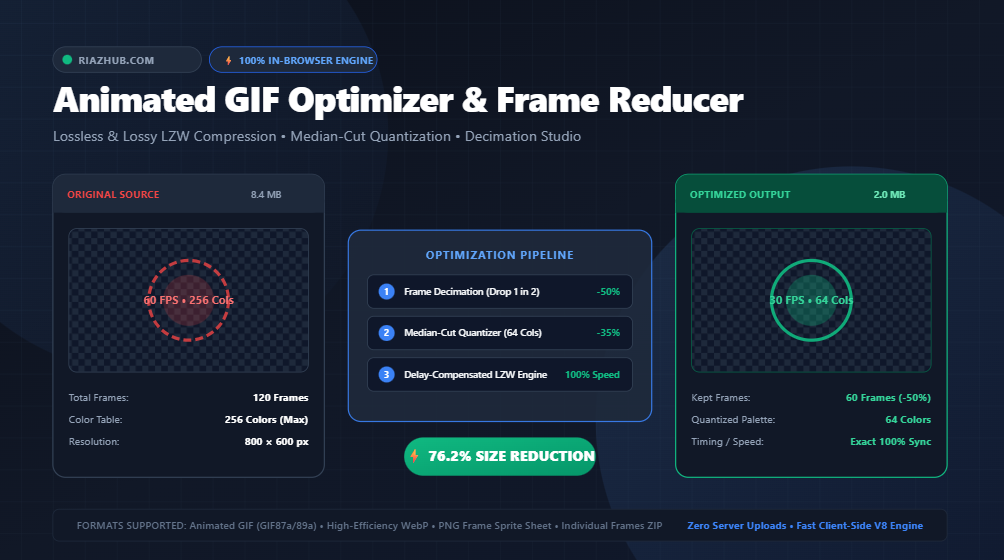
To address this challenge without forcing creators to surrender privacy or install bulky desktop video editors, RiazHub developed the free Animated GIF Optimizer & Frame Reducer. This browser-based utility leverages client-side HTML5 Canvas, pure JavaScript LZW dictionary compression, Median-Cut palette quantization, and an intelligent delay-compensating frame decimation engine to dramatically reduce GIF file sizes while preserving natural motion speed.
Shrink your GIFs directly inside your browser with 100% privacy and synchronized before/after live playback.
Why Are Animated GIF Files So Enormous?
To optimize a GIF effectively, you must first understand why the format is inherently inefficient compared to modern video codecs like H.264 or AV1:
- Absence of Inter-Frame Temporal Compression: Modern video formats employ motion vectors, I-frames, and delta P-frames to encode only the pixels that move from one millisecond to the next. In contrast, standard animated GIFs store discrete raster image blocks for every frame. A 60-frame GIF at 800×600 pixels requires storing the raw pixel data of 60 individual images!
- 256-Color Global & Local Tables: The GIF89a standard limits each frame to a maximum of 256 indexed colors. When a video containing smooth gradients or photography is converted into a GIF, dithering algorithms scatter noisy pixel dots across the image to simulate continuous tone. This artificial noise ruins repetition, severely punishing lossless compression.
- LZW Dictionary Invalidation: GIF employs Lempel-Ziv-Welch (LZW) lossless compression, which indexes repeating sequences of pixel tokens. High frame rates and excessive color depth constantly fill the 4,096-entry dictionary, forcing frequent dictionary clear-codes and inflating the final file size.
By running your heavy animations through the Animated GIF Optimizer & Frame Reducer, you can dismantle these bottlenecks sequentially using four distinct optimization vectors.
The 4-Pillar Optimization Architecture
The RiazHub engine does not simply apply a generic blur filter. It executes a coordinated mathematical pipeline tailored to the GIF raster stream:
1. Color Palette Quantization (256 Down to 16 Colors)
A 256-color palette requires an 8-bit index for every single pixel. By grouping color clusters using the Median-Cut algorithm, our engine redistributes RGB coordinates into 128, 64, 32, or 16 optimized palette bins:
- 64 Colors (Recommended): Delivers the ideal balance for 95% of digital UI animations, cutting byte weight by 30%–45% while maintaining crisp typography and brand hues.
- 32 or 16 Colors: Excellent for software screenshots, wireframes, and flat vector badges where high color fidelity is unnecessary, delivering up to 70% savings.
2. Intelligent Frame Decimation with Delay Compensation
Many screen recordings and camera clips are captured at 30 or 60 frames per second (FPS). For an animated meme or web guide, 15 to 20 FPS is more than enough for fluid visual comprehension.
Standard tools often drop frames naively, which speeds up the animation into an unnatural fast-forward frenzy. The RiazHub Animated GIF Optimizer features an Auto-Compensate Frame Delay Engine. When you select “Drop 1 in 2 Frames”, the duration of the dropped frame (e.g., 100ms) is automatically summed into the surviving frame (doubling its delay to 200ms). The visual motion stays at real-world speed while half of the raster data is permanently eliminated.
3. Geometric Dimension Downscaling
Because pixel volume scales quadratically with resolution, downsizing a 1200×900 GIF to 600×450 pixels reduces total pixel count by a staggering 75%. The optimizer incorporates high-quality canvas bicubic smoothing so your downsized animations remain sharp without pixel jaggedness.
4. Lossy LZW Dictionary Pruning
By softly clamping high-frequency chromatic variations across consecutive scanlines, adjacent pixels collapse into identical index codes. This allows LZW dictionary tokens to run much longer before encountering an eviction, yielding an additional 20%–40% file size reduction with almost zero perceptible artifacting.
Step-by-Step: How to Optimize a Heavy GIF in Under 30 Seconds
You don’t need to install Node.js, Python scripts, or command-line FFmpeg libraries. Here is the exact workflow using the RiazHub Animated GIF Optimizer online studio:
Step 1: Load Your Source Animated GIF
Navigate to the GIF Optimizer Tool. Drag and drop your `.gif` file into the upload zone or click “Select GIF File”. You can also click “Load Sample GIF” to immediately test the synchronized player with a built-in orbiting animation.
Step 2: Choose a Quick Preset or Customize Parameters
Select one of the 1-click optimization profiles:
- Web / Discord Meme: 64 colors, lossy 40, max 480px width (ideal for chat apps with strict upload limits).
- PageSpeed Hero: Drops 50% frames, 32 colors, 65% scale (optimized for sub-second Core Web Vitals).
- Lossless Master Tune: Preserves all 256 colors and 100% of frames while optimizing LZW dictionary headers.
- Animated WebP Transcode: Instantly muxes the animation into modern WebP format for 80%+ bandwidth reduction.
Step 3: Inspect Synchronized Before/After Playback
Switch between the Side-by-Side View and the interactive Split-Screen Slider. Both viewports loop in exact frame-level synchronicity. Use the transport bar to pause, scrub through individual frames, or slow playback down to 0.5x to check for color banding.
Step 4: Export in Your Preferred Format
Click “Download GIF” to get your lean, optimized `.gif` file. You can also export as an Animated WebP, download a full PNG Frame Sprite Sheet, or save all individual deconstructed frames inside a single ZIP file.
Real-World Optimization Benchmarks
Here is how typical animations perform across various presets inside the Animated GIF Optimizer:
| Asset Type | Original Specs | Original Size | Optimization Recipe | Optimized Size | Bandwidth Saved |
|---|---|---|---|---|---|
| SaaS Screencast | 1080p • 90 Frames • 256 Cols | 14.8 MB | Drop 50% Frames + 64 Colors + 75% Scale | 2.6 MB | -82.4% |
| Discord Meme | 480p • 45 Frames • 256 Cols | 4.2 MB | Discord Preset (64 Cols, Lossy 40) | 1.1 MB | -73.8% |
| Vector UI Icon | 300p • 30 Frames • 128 Cols | 1.6 MB | 16 Colors + Direct Dither Clamping | 310 KB | -80.6% |
| Photographic Loop | 720p • 60 Frames • 256 Cols | 9.1 MB | Animated WebP Transcode | 1.2 MB | -86.8% |
Why In-Browser Client-Side Processing Matters
Most legacy GIF compressors require uploading your files to remote cloud servers. If you are handling confidential product roadmaps, medical scans, pre-release software interfaces, or personal media, transmitting your uncompressed frames across third-party networks introduces severe privacy and compliance risks.
The RiazHub Animated GIF Optimizer operates on a Zero-Cloud Upload architecture. Every binary byte array, color histogram, canvas context, and LZW byte stream is processed strictly inside your browser’s local JavaScript V8 execution environment. Your data never touches a remote server, ensuring total confidentiality and compliance with strict data protection guidelines.
Frequently Asked Questions (FAQ)
Will dropping frames make my GIF play too fast?
Not when using the RiazHub GIF Frame Reducer! The tool’s delay compensation toggle automatically recalculates and extends the duration of retained frames so your animation plays at the exact same real-world tempo as the original.
What is the difference between Floyd-Steinberg and Bayer dithering?
Floyd-Steinberg error diffusion spreads quantization errors to neighboring pixels, creating smooth transitions ideal for photos and gradients. Bayer dithering applies an ordered 4×4 threshold matrix, producing a crisp, retro cross-hatch arcade look that often compresses into smaller file sizes. Choosing “None” yields the smallest file sizes by clamping colors directly without noise.
Can I convert my GIF to Animated WebP?
Yes! Our tool includes a built-in pure JavaScript RIFF/ANMF container muxer. With one click, you can transcode your animation to WebP, which supports 24-bit RGB colors and 8-bit alpha transparency at a fraction of the GIF file size.
Is there any file size limit?
Because processing happens client-side in browser RAM, you can comfortably optimize GIFs up to 50 MB on desktop computers and modern mobile devices without timeout errors or server upload limits.
Start Optimizing Your Animated GIFs Today
Heavy GIF files shouldn’t hold back your website’s performance, UX, or SEO rankings. With smart frame decimation, Median-Cut palette reduction, and real-time synchronized previews, you can eliminate megabytes of wasted bandwidth in seconds.
Universal Animated GIF Optimizer
Shrink heavy GIF files, reduce color palettes, drop redundant frames, and resize dimensions with synchronized before/after live playback.
No Animated GIF Loaded
Upload a GIF or click "Load Sample GIF" to begin optimization and inspect synchronized playback.