
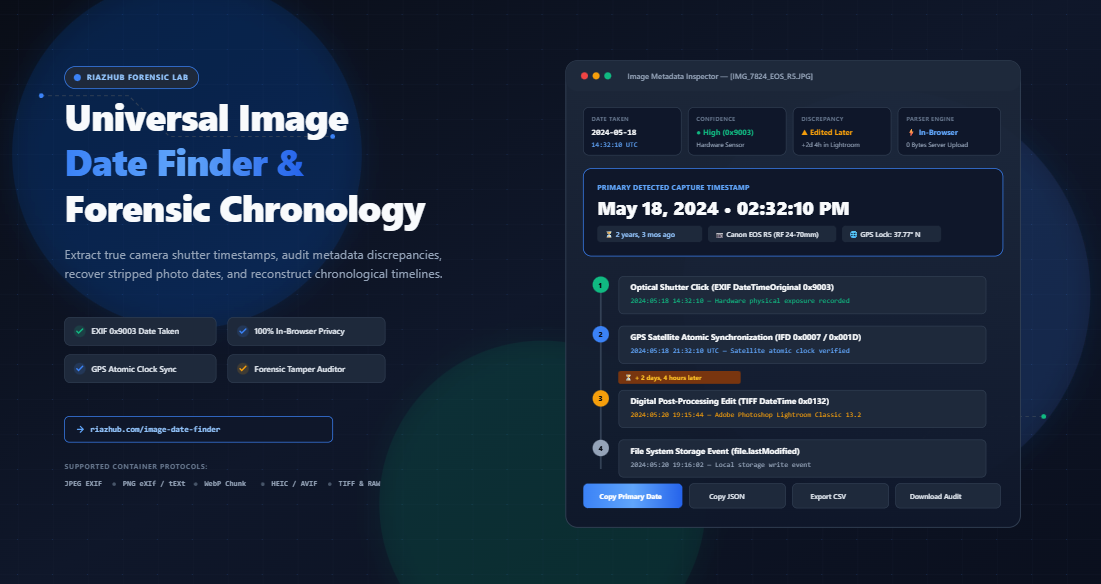
In modern computing, file system dates are notorious liars. Whenever you copy an image from a smartphone to a computer, download an attachment from an email, save a cloud backup, or transfer files across flash drives, your operating system generates brand-new “Date Created” and “Date Modified” timestamps reflecting the moment the file was written to that specific drive completely overwriting the original chronological record.
To uncover the real moment an image came into existence, you must bypass surface-level operating system attributes and inspect the binary architecture inside the file itself. By using the free, client-side Image Date Finder & Forensic Chronology Studio on RiazHub, you can instantly parse deep binary EXIF markers, satellite GPS timestamps, and filename tokens right inside your browser without uploading your sensitive personal photos to any third-party server.
In this comprehensive forensic guide, we will unpack how camera sensors write timestamps, why social media networks erase them, how to audit editing discrepancies, and how to verify chronological integrity with forensic precision.
1. The Anatomy of Photo Dates: EXIF vs. File System vs. Digitized
When an image file is saved by a digital camera or smartphone, it doesn’t just store pixel color values. It embeds an intricate binary data block structured according to the Exchangeable Image File Format (EXIF) standard. Within this block, multiple distinct date markers are recorded at different stages of the capture and editing pipeline:
| Metadata Tag | Hex Identifier | What It Actually Represents | Reliability Grade |
|---|---|---|---|
| DateTimeOriginal | 0x9003 |
The exact millisecond the optical camera shutter clicked and photons hit the physical sensor. | 🟢 Highest (True Moment of Capture) |
| DateTimeDigitized | 0x9004 |
When the analog electrical signal was processed into a digital matrix (nearly identical to 0x9003 for digital cameras; differs for analog document scanners). | 🟢 High (Digital Conversion Event) |
| DateTime (Base TIFF) | 0x0132 |
The timestamp recorded by editing software (e.g., Adobe Photoshop, Lightroom, Canva) when the photo was edited and re-encoded. | 🟡 Moderate (Reflects Software Save) |
| GPS Date & Time Stamp | 0x001D / 0x0007 |
Atomic clock satellite timestamps broadcast from orbital GPS constellations during coordinate acquisition. | 🟢 Exceptional (Atomic Accuracy) |
| File System Modified | file.lastModified |
Operating system attribute showing when the file was last copied, downloaded, or saved to local storage. | 🔴 Low (Easily Corrupted by Transfers) |
When you drop a file into the RiazHub Universal Image Date Finder, the binary parser executes a tiered heuristic lookup. It prioritizes the uncorrupted 0x9003 DateTimeOriginal hardware sensor record above all else, ensuring that surface-level file transfer dates never mislead you.
2. Why Operating System Dates Lie (The File Transfer Fallacy)
Understanding why Windows Explorer, macOS Finder, and Android file managers show conflicting dates requires understanding how operating systems treat files as digital containers.
Imagine purchasing a vintage photograph printed in 1994. If you place that photograph into a fresh cardboard shipping box today, the box is brand new (created today), but the physical image inside is three decades old. Operating systems track the box, not the contents. When you download a photo from Google Photos, iCloud, or a flash drive, the operating system creates a fresh container on your drive and stamps it with the current time.
This is why legal investigators, digital forensics experts, and insurance claim auditors never cite file system attributes as evidence. Instead, they utilize specialized parsers like the Forensic Chronology Studio to delve into the TIFF IFD (Image File Directory) header chunks, extracting the hardware sensor timestamp that remains frozen in time regardless of how many times the container file is duplicated.
Never rely on “Date Created” in Windows Explorer or macOS Finder when assessing photo authenticity. Always verify the binary
DateTimeOriginal tag embedded inside the JPEG App1 or PNG chunk data.3. What Happens When EXIF is Stripped? (Social Media & Messaging Apps)
If you have ever attempted to inspect a photo received through WhatsApp, Facebook Messenger, Instagram, or X (formerly Twitter), you likely discovered that all EXIF metadata tags including the camera make, lens model, GPS coordinates, and capture dates—were completely absent.
This occurs because major social media networks operate automated privacy scrubbing and recompression pipelines:
- User Privacy Protection: Stripping metadata prevents malicious actors from downloading user photos and reading home GPS coordinates or serial numbers.
- Bandwidth Optimization: Heavy EXIF and color profile chunks add unnecessary kilobytes to millions of photos served every second across CDNs.
How Filename Date Heuristics Recover the Truth
When EXIF tags are stripped, how can you determine when a photo was taken? Fortunately, smartphone cameras and messaging apps automatically encode capture timestamps into the filename string at the instant of creation:
WhatsApp Image 2026-05-12 at 14.30.22.jpeg→ Captured May 12, 2026 at 2:30:22 PM.IMG_20251104_084512.jpg→ Captured November 4, 2025 at 8:45:12 AM.PXL_20240831_152304123.jpg→ Google Pixel camera capture on August 31, 2024.Screenshot_20250115-182045.png→ Screen grab on January 15, 2025.
RiazHub’s Image Date Finder & Metadata Parser features an intelligent regex heuristic engine. If a photo’s binary EXIF headers were stripped during messaging transmission, the engine seamlessly falls back to filename token extraction, ensuring you still obtain an accurate, actionable capture timestamp.
4. GPS Satellite Timestamps: The Unfakeable Atomic Clock
While standard camera clocks can be manually set to the wrong date by a user or drift over time due to battery depletion, GPS satellite metadata cannot be easily spoofed.
When a smartphone or GPS-enabled DSLR captures an image outdoors with location services active, the onboard receiver locks onto microwave signals broadcast by satellite constellations orbiting 20,000 kilometers above Earth. These satellites carry onboard atomic clocks accurate to within nanoseconds. The image records this atomic time inside GPS IFD Tags 0x001D (GPSDateStamp) and 0x0007 (GPSTimeStamp).
By auditing the GPS atomic clock against the camera’s internal DateTimeOriginal clock using the RiazHub Chronology Studio, forensic analysts can immediately spot internal clock drifts, incorrect timezone settings, or deliberate timestamp tampering.
5. Forensic Tamper Auditing: Detecting Edits & Re-Saves
One of the most powerful features of modern chronological analysis is discrepancy auditing. In an untampered camera output, the shutter timestamp, digital conversion timestamp, and file modification timestamp are either identical or separated by a fraction of a second.
However, when a photo has been manipulated, edited, or re-exported, noticeable chronological fractures appear across the metadata timeline:
- Temporal Time Drift: If
DateTimeOriginalreads May 18, 2024, but TIFFDateTime (0x0132)reads August 25, 2026, the image was reopened and re-saved over two years after capture. - Software Fingerprints: Image editing applications like Adobe Photoshop, Lightroom, Canva, GIMP, and Snapseed automatically stamp their software name and version number into Tag
0x0131 (Software). - Filename vs. EXIF Contradictions: Renaming a file to simulate an older or newer date while leaving the underlying binary EXIF tags untouched immediately triggers a red discrepancy flag in our audit engine.
You can test any suspect image right now by visiting the Forensic Chronology Studio on RiazHub. Switch to the “Forensic Discrepancy Report” tab to receive an instant verdict on whether the file is an untampered camera original or a post-processed edit.
6. Universal Multi-Container Format Support
Modern photography is no longer limited to basic JPEG files. Different operating systems and device manufacturers utilize various container formats with distinct metadata packaging schemes:
- JPEG / JPG: Embeds TIFF structures inside APP1 (
0xFFE1) markers. - PNG: Encapsulates raw uncompressed TIFF payloads inside dedicated
eXIfchunks or textual metadata insidetEXtchunks. - WebP: Google’s modern web format utilizes a RIFF chunk container with an
EXIFFourCC chunk. - HEIC / AVIF: High-efficiency formats utilized by modern iPhones and Android devices containing ISO base media file structures.
- TIFF & Camera RAW: Uncompressed professional photography files starting with Intel (
0x4949) or Motorola (0x4D4D) byte orders.
The Universal Image Date Finder dynamically reads and interprets all of these binary structures in real time, giving you a unified chronological timeline regardless of what format your camera shot in.
7. Why Client-Side Browser Privacy Matters
When working with sensitive family photos, proprietary business graphics, or confidential legal evidence, uploading images to an external server poses severe privacy and security risks. Many free online “EXIF viewer” tools transmit your files to cloud servers where images may be cached, logged, analyzed, or indexed.
RiazHub’s tool operates on a strict 100% Privacy-First Architecture. By leveraging native JavaScript ArrayBuffer, DataView, and binary slicing APIs, all metadata parsing occurs inside your computer’s local memory. Zero bytes of image data, GPS coordinates, or camera serial numbers are ever transmitted across the internet.
Inspect Your Image Dates in Real Time
Drag and drop your photos into our free, browser-based utility to extract hidden EXIF timestamps, audit editing history, and download comprehensive forensic reports.
8. Step-by-Step Guide: How to Find Photo Dates on RiazHub
Extracting the full chronological timeline of any photo takes less than two seconds:
- Access the Utility: Navigate to the Universal Image Date Finder & Forensic Chronology Studio.
- Select or Drop Images: Drag one or more photos into the ingestion dropzone, click “Select Image(s)”, or press
Ctrl+Vto paste an image directly from your clipboard. - Inspect the Primary Date: The top KPI bar and Master Date Card will instantly display the primary capture timestamp along with a confidence rating and calculated relative age (e.g., “Captured 2 years, 3 months ago”).
- Examine the Sequential Timeline: Switch to the “Timeline Stream” tab to see a chronological roadmap plotting the optical shutter click, sensor digitization, satellite time lock, editing modifications, and OS file save events.
- Review Raw Tags: Open the “All Raw EXIF Date Tags” tab to inspect exact hexadecimal tag IDs (
0x9003,0x9004,0x0132,0x001D) and their raw string values. - Export Your Audit: Use the 1-click action toolbar to copy the formatted date, export full JSON metadata, or download a structured CSV or TXT audit report for your records.
9. Frequently Asked Questions (FAQ)
Can someone fake or alter an EXIF capture date?
Yes. Specialized EXIF editing software can modify or inject fake timestamps into standard JPEG headers. However, experienced forensic examiners can detect tampering by checking for internal metadata inconsistencies—such as mismatched thumbnail headers, conflicting GPS satellite atomic timestamps, or software recompression markers. You can audit these markers using the RiazHub Forensic Discrepancy Auditor.
Why does my photo show a different time than what I remember?
Digital cameras do not automatically adjust for timezones unless connected to a GPS receiver or smartphone. If you traveled to another timezone and forgot to update your camera’s internal clock, your photos will reflect your home timezone. Our tool includes a Timezone Selector allowing you to toggle between Local Browser Time, Universal Coordinated Time (UTC / GMT), and Native Camera Recorded Time.
Can I batch inspect multiple photos at once?
Absolutely. You can drop dozens of photos simultaneously into the Image Date Finder Batch Queue. The tool will parse each image in parallel, allowing you to sort photos chronologically from oldest to newest and export a consolidated CSV chronology report with one click.
Does taking a screenshot preserve the original photo date?
No. When you take a screenshot of a photo displayed on your screen, your device creates a brand-new image file containing only the current screen pixels. The screenshot will reflect the date and time the screen grab was performed, not when the original photo was captured.
Conclusion
Whether you are solving a personal photo mystery, verifying the history of a real estate picture, compiling evidence for an insurance investigation, or organizing digital archives, relying on operating system file dates will inevitably lead to mistakes. By inspecting true binary EXIF headers, satellite GPS markers, and filename tokens, you can uncover the authentic history of any digital picture.
Ready to discover when your images were truly captured? Head over to the Universal Image Date Finder & Forensic Chronology Studio on RiazHub.com and inspect your files in real time with 100% privacy guaranteed.
Universal Image Date Finder & Forensic Chronology Studio
Discover exact photo capture dates, extract embedded EXIF/GPS timestamps, audit editing discrepancies, and batch inspect image history in real time.
Chronological stream plotting each milestone from optical shutter exposure through digital processing to the current file system save event.
Comprehensive table of all date-relevant tags extracted from JPEG App1 TIFF markers, PNG chunks, WebP EXIF payloads, and file headers.
| Tag Name | Hex ID | Raw Value in File | Interpreted Meaning | Verification |
|---|---|---|---|---|
| No file active. Upload or select an image to inspect raw metadata tags. | ||||
| Preview | Filename | Date Taken | Source Confidence | Camera / Device | Forensic Status | Action |
|---|---|---|---|---|---|---|
| Batch queue empty. Drag multiple photos into the dropzone to audit them simultaneously. | ||||||
Forensic Image Date Verification Guide & Standards
DateTimeOriginal (Tag 0x9003) is permanently embedded into the image binary structure by the camera hardware the exact millisecond the optical shutter clicks. It captures the true moment of creation. In contrast, File System Modified Date is an operating system attribute that updates whenever a file is copied, downloaded, moved to a flash drive, or saved by an image viewer. Relying on OS file dates frequently leads to chronological inaccuracies of years.
Major social media networks and messaging apps automatically strip all EXIF metadata (including GPS coordinates, camera serial numbers, and capture timestamps) during image compression. This protects user privacy by preventing strangers from deducing when and where photos were taken. When EXIF is absent, our tool uses Filename Regex Heuristics to extract embedded timestamps from tokens like WhatsApp Image 2026-05-12 at 14.30.22.jpeg.
Inside JPEG APP1 markers, the TIFF structure starts with an endianness indicator: 0x4949 ("II" for Intel, Little-Endian) or 0x4D4D ("MM" for Motorola, Big-Endian). Little-endian devices (most modern smartphones and computers) store the least significant byte first, whereas big-endian stores the most significant byte first. Our in-browser binary reader dynamically detects the byte order so every EXIF tag offset is resolved with 100% precision.
Your photos never leave your computer or phone. All binary slicing, ArrayBuffer parsing, DataView reads, and forensic discrepancy comparisons are executed directly inside your local web browser using JavaScript. No files, private camera captures, GPS coordinates, or legal evidence graphics are ever transmitted over the network or saved to any server.