
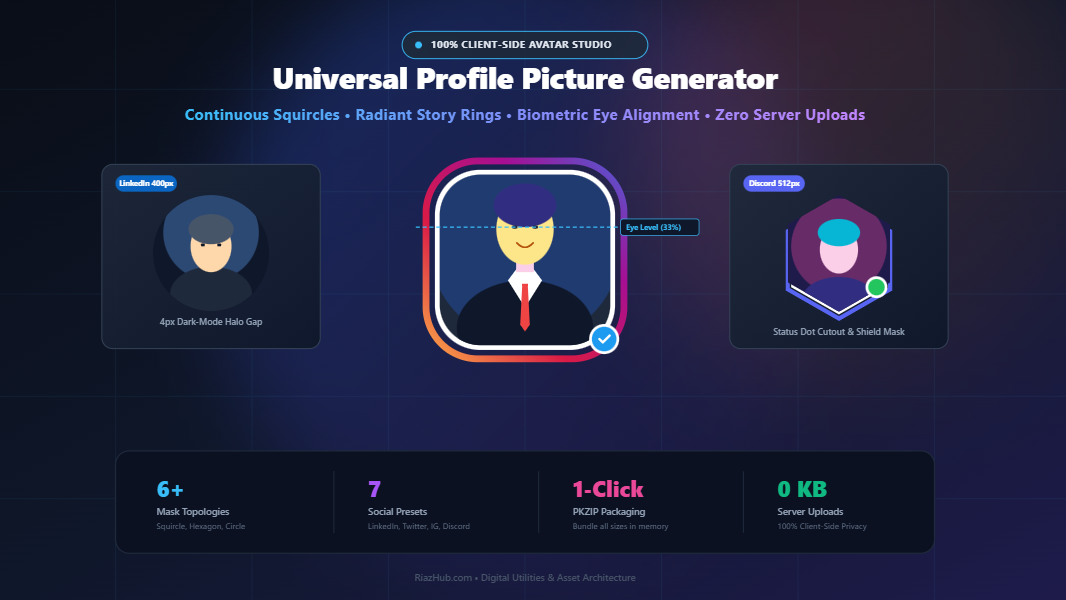
The Complete Science of Social Media Profile Pictures: How to Frame, Crop, and Style Avatars for Maximum Engagement
In modern feeds saturated with thousands of posts every second, your profile picture is your 40-pixel visual handshake. Learn the biometric framing rules, ring gap psychology, and continuous squircle mathematics that make elite creators and executives stand out across LinkedIn, Twitter/X, Instagram, and Discord.
When a prospective client, recruiter, or follower scrolls through a busy timeline, cognitive neuroscience reveals that human brains process your profile avatar in less than 13 milliseconds. Long before they read your headline, evaluate your bio, or scan your post copy, your avatar establishes whether you appear authoritative, approachable, or amateurish.
Yet, the vast majority of professionals make critical framing mistakes: eyes positioned too low in the circular crop, dark clothing bleeding seamlessly into dark mode interfaces, pixelated crops, or mismatched aspect ratios across social networks.
To eliminate these issues without requiring bulky desktop photo editors or expensive subscription services, we built the Profile Picture Generator & Avatar Studio at RiazHub.com. In this deep dive, we will unpack the exact visual science of modern avatars and demonstrate how to craft pixel-perfect assets for every major social media channel in seconds.
⚡ Quick Access to the Free Avatar Studio:
Ready to transform your headshot right now? Launch the RiazHub Profile Picture Generator & Avatar Studio in your browser. It features 100% private client-side processing, mathematical continuous squircle masks, Instagram story rings, and 1-click multi-platform ZIP packaging.
1. The Biometric “Rule of Thirds” in Professional Headshots
Traditional photography relies heavily on the rule of thirds to establish visual interest. However, when a photo is compressed down into a microscopic 32px or 48px circle on mobile feeds, classical horizontal composition fails.
Instead, digital avatar composition demands Biometric Eye-Level Alignment:
- The 33% Eye Horizon: Your pupil horizon should sit precisely one-third of the way down from the top boundary of the circular frame. This positioning ensures that your head fills the upper dome of the circle, creating a psychological impression of upright posture, confidence, and alertness.
- The 75% Chin Baseline: The bottom of your chin should ideally touch the 75% horizontal baseline, allowing your neck and suit shoulders to anchor the lower half without crowding the circular tangent.
- Central Symmetry: The bridge of the nose must align with the exact vertical center axis to prevent the avatar from appearing off-balance or lopsided when rotated inside native circular app wrappers.
Inside the Profile Picture Generator on RiazHub, you can toggle the built-in Biometric Eye-Level Alignment Horizon overlay to visually calibrate your pupils and chin in real-time as you pan and zoom your portrait.
2. Dark Mode Psychology: Why the 4px Ring Gap is Essential
Over 72% of modern social media sessions occur in Dark Mode or Night Theme settings on platforms like Twitter/X, Discord, Slack, and LinkedIn.
This creates a widespread aesthetic failure known as silhouette bleeding: if you wear a black blazer, navy suit, or dark turtleneck, the edges of your body dissolve directly into the pitch-black feed background. Your profile picture appears as an awkward, floating disembodied head.
The secret weapon employed by top tech founders and executive creators is the Dynamic Avatar Ring with an Offset Breathing Gap:
- The Outer Accent Ring (6px to 10px): A vibrant solid tone (such as LinkedIn Blue or Electric Emerald) or an eye-catching gradient that instantly draws the peripheral vision of scrolling users.
- The Ring Gap / Inset Buffer (3px to 5px): A pure white or high-contrast offset halo that sits between your photo and the outer colored ring. This clean breathing space creates an unbreachable barrier, ensuring your clothes never bleed into dark theme feeds.
Using the in-browser avatar studio, you can dial in your exact ring width, gap buffer, and choose from solid hues, custom dual gradients, or the viral Instagram Story multi-stop ring in a single click.
3. Beyond Circles: The Rise of Continuous Curvature Squircles
While legacy platforms like LinkedIn and Twitter enforce a 1:1 circular crop, modern operating systems and design-forward communities (such as Figma, Slack workspaces, Discord bots, and modern portfolio sites) have shifted heavily toward squircles and polygon shields.
However, there is a fundamental difference between a standard CSS border-radius rounded box and an authentic super-ellipse squircle:
- Traditional Rounded Rectangles: Consist of straight line segments joined by circular quarter-arcs. At the juncture where the straight edge meets the curve, the mathematical derivative of curvature experiences an abrupt step function, creating a harsh “corner tangent break.”
- Apple-Style Continuous Squircles: Governed by the Lamé super-ellipse equation $|x/a|^r + |y/b|^r = 1$ with exponent $r \approx 4.5$. The curvature changes smoothly and continuously without a single sharp juncture, producing optical harmony that feels organic and state-of-the-art.
The Universal Profile Picture Generator tool calculates genuine super-ellipse polynomials in HTML5 Canvas, giving you access to authentic continuous squircles, hexagonal shields, diamonds, and octagons with full sub-pixel anti-aliasing.
4. Platform-by-Platform Avatar Specifications & Requirements
Each social network employs different rendering engines, compression algorithms, and display dimensions. Exporting a single low-resolution image and uploading it across all services leads to fuzzy artifacts and awkward automatic cropping.
Below is the comprehensive specification guide maintained inside our tool:
| Social Platform | Recommended Export | Native Aspect | Default Silhouette | Optimal Ring Style |
|---|---|---|---|---|
| LinkedIn Profile | 400 × 400 px | 1:1 Square | Circle | Corporate Navy / Blue Ring with 4px White Gap |
| Twitter / X Avatar | 400 × 400 px | 1:1 Square | Circle (Accounts) / Squircle (Orgs) | Electric Blue with Verified Checkmark Badge |
| Instagram PFP | 320 × 320 px | 1:1 Square | Circle | Instagram Story Multi-Stop Radiant Gradient |
| Discord & Slack | 512 × 512 px | 1:1 Square | Circle / Squircle | Hexagonal Shield with Online Green Dot |
| YouTube Channel | 800 × 800 px | 1:1 Square | Circle | Bold 10px High-Contrast Vibrant Border |
| Master HD Preset | 1024 × 1024 px | 1:1 Square | Multi-Topology | Lossless 32-bit PNG with Transparent Alpha |
Rather than manually resizing and exporting six individual files in Photoshop, the RiazHub Profile Picture Generator includes an in-browser ZIP packager that renders all resolution variations and bundles them into a clean .zip file with one click.
5. Intelligent Subject Backdrop Synthesizer & Chroma Keying
One of the greatest hurdles to achieving a professional headshot is a distracting or cluttered domestic background. A messy bookshelf, kitchen counter, or uneven bedroom lighting can instantly undercut your credibility.
Our generator integrates an intelligent Backdrop Synthesizer with Euclidean Chroma Keying:
- Solid Studio Tones: Replace household backgrounds with curated corporate tones like Corporate Navy, Studio Light, or Executive Blue.
- Vibrant Mesh & Radiant Gradients: Blend dynamic two-tone angles that add depth and dimension behind your portrait.
- Chroma Difference Isolation: Isolate subject boundaries from solid walls using mathematical Euclidean RGB color space analysis:
Distance = √((R₁ - R₂)² + (G₁ - G₂)² + (B₁ - B₂)² )Combined with soft edge feathering, this allows you to cleanly isolate your headshot and project studio-grade lighting behind yourself without green screens.
- Transparent Alpha Mode: Export 32-bit PNG files with transparent backgrounds so you can drop your silhouette directly onto slides, podcasts, or custom website headers.
6. Step-by-Step Guide: How to Generate Your New Avatar in 60 Seconds
Follow this quick tutorial to build your new personal brand asset using the RiazHub Avatar Studio:
- Step 1 — Upload or Paste Photo: Drag and drop your selfie or headshot into the dropzone, press
Ctrl+Vto paste from your clipboard, or click Load Sample Portrait to experiment with pre-loaded assets. - Step 2 — Pick Silhouette Topology: Select between Circle, Continuous Squircle, Hexagon, Rounded Rectangle, Diamond, or Octagon.
- Step 3 — Align Biometrics: Use the Zoom and Tilt straightener sliders, or click and drag directly inside the stage viewport to position your eyes along the top third horizon line.
- Step 4 — Customize Ring & Backdrop: Turn on the radiant border ring, adjust thickness to 8px and gap to 4px, and pick your primary and secondary brand colors.
- Step 5 — Preview in Live Social Mockups: Switch to the Social Mockups tab to see exactly how your avatar renders inside realistic LinkedIn profile cards, Twitter tweets, and Instagram headers.
- Step 6 — 1-Click Export: Hit Generate & Download Avatar for your primary size, copy directly to your clipboard, or click Download All Sizes (ZIP) to save the complete multi-platform asset bundle.
7. Privacy First: 100% In-Browser Client-Side Processing
In an era where online privacy is paramount, uploading your personal selfies, biometric face data, or corporate headshots to cloud servers poses substantial security risks. Many online photo converters upload your images to remote servers where they may be stored, analyzed, or retained.
The Profile Picture Generator & Avatar Studio at RiazHub.com was architected with a strict Zero-Data-Transmission Privacy Guarantee:
- All image decoding occurs inside your browser via the HTML5
FileReaderAPI. - All clipping masks, continuous squircle calculus, gradients, and status badge overlays are calculated locally on your graphics hardware via
OffscreenCanvasand 2D Canvas contexts. - The multi-platform ZIP archive is assembled in your device’s memory using a native JavaScript PKZIP binary stream generator.
- Zero bytes of image data ever touch an external server or database. You can even disconnect your internet connection once the page is loaded and generate all your avatars completely offline.
Frequently Asked Questions (FAQ)
What is the best resolution for a LinkedIn profile picture?
LinkedIn officially recommends 400 × 400 pixels at a 1:1 square aspect ratio. Our studio automatically exports at this exact specification, ensuring razor-sharp clarity without blurry compression artifacts.
Why should I use a squircle instead of a standard circle?
Squircles offer up to 21% more visible canvas area compared to circles of the same width, giving your face more breathing room while maintaining organic, rounded contours. They are ideal for Discord, Slack, portfolio sites, and modern tech brands.
Can I copy the generated avatar directly to my clipboard?
Yes. The studio integrates the modern W3C Clipboard API (navigator.clipboard.write). Clicking “Copy to Clipboard” writes a lossless 32-bit PNG directly to your system clipboard, ready to be pasted into Figma, Slack, or any document with Ctrl+V.
Is this tool completely free to use?
Yes, 100% free with no account creation, no watermarks, and no usage limits. You can generate as many avatar variations and download as many ZIP bundles as you need.
Universal Profile Picture Generator & Avatar Studio
Craft professional, pixel-perfect avatars for LinkedIn, Twitter/X, Instagram, and Discord with continuous super-ellipse squircles, radiant border rings, dynamic backdrops, and live social feed mockups.
Upload Source Headshot
Silhouette Mask Topology
Platform Target Preset
Framing & Biometric Horizon
Export Settings & Format
Sarah Jenkins 1st
Chief Product Architect & Engineering Director • Ex-Stripe, Angel Investor
San Francisco Bay Area • 500+ connections
Just updated my avatar with the RiazHub Profile Picture Generator studio! The continuous squircle curvature and story ring gradient look razor sharp across dark mode feeds. 🚀✨
Tech Explorer & Designer 🎨
Building scalable digital experiences.
📍 SF / NYC
| Platform Target | Resolution | Aspect | Live Preview | Download |
|---|
Social Media Avatar Framing & Resolution Science Guide
Industry-standard guidelines to achieve maximum executive presence and contrast across modern feed algorithms.
The Biometric "Rule of Thirds"
Eye contact drives trust. Align your eyes along the upper 33% horizontal horizon line. When eyes rest on the top third, the headshot exudes confidence, alertness, and authentic executive presence rather than feeling sunken into the frame.
The 4px Ring Gap Psychology
Dark mode accounts for over 72% of modern feed views. Adding a 3px to 5px clean white or transparent gap between your photo and the outer colored ring prevents dark clothes from visually bleeding into dark backgrounds, making your profile pop instantly.
Continuous Curvature Squircles
Unlike traditional CSS rounded rectangles that suffer from sharp tangent breaks at corner transitions, our super-ellipse squircle algorithms use continuous Lamé calculus curves ($r \approx 4.5$) identical to iOS app icons for flawless optical harmony.
Zero-Data Client-Side Privacy
Your personal selfies and corporate headshots never leave your machine. All transformations, clipping matrices, and ZIP generation run 100% inside your browser's native JavaScript canvas sandbox without storing or transmitting a single byte.