
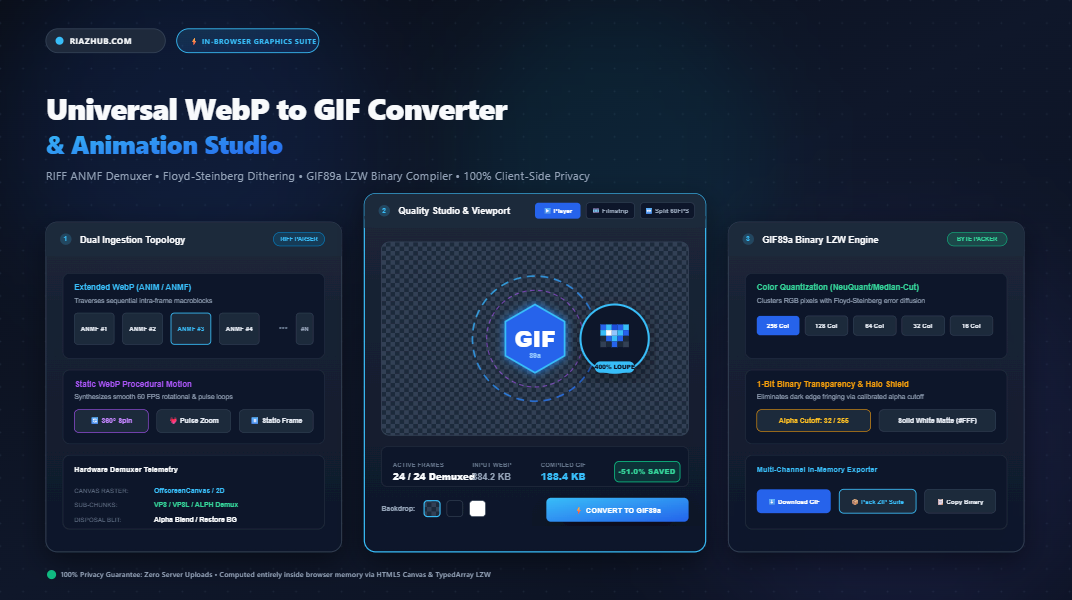
How to Convert WebP to Animated GIF: The Ultimate Guide to In-Browser Demuxing, Floyd-Steinberg Dithering, and GIF89a LZW Compilation
Discover why WebP remains the web’s premier delivery format yet falters in legacy software, Discord emojis, and marketing newsletters and learn how the zero-latency, privacy-first Universal WebP to GIF Converter & Animation Studio on RiazHub demuxes RIFF ANMF chunks, balances 1-bit transparency, and builds compliant GIF89a bitstreams directly inside your browser.
1. The WebP vs. GIF Paradox: Modern Compression vs. Universal Compatibility
Introduced by Google, WebP revolutionized web asset delivery. By combining predictive intra-frame coding from the VP8 video codec with arithmetic entropy encoding and dedicated alpha transparency channels, animated WebP images frequently achieve file size reductions of 60% to 80% compared to traditional Graphics Interchange Format (GIF) files.
Yet despite its undeniable mathematical superiority, WebP faces significant friction in real-world creative and communication workflows:
- Email Marketing Clients: Microsoft Outlook, Apple Mail legacy configurations, and corporate email clients consistently fail to animate WebP files, displaying only the first static intra-frame.
- Chat & Social Platforms: Discord custom animated emoji slots, Slack reactions, Telegram stickers, and legacy forums frequently mandate true
image/gifbinary streams adhering to the 1989 GIF89a standard. - Documentation & Markdown Repositories: GitHub README banners, GitLab wikis, and markdown renderers exhibit inconsistent thumbnail generation when embedding animated WebP files.
- Presentation Suites: Keynote, PowerPoint, and legacy video editing timelines often reject extended WebP files containing multi-frame chunks.
When you need universal playback across every operating system, mobile app, and browser manufactured in the last 35 years, GIF89a remains the indisputable global lingua franca. With the RiazHub WebP to GIF Converter, you can bridge this gap in seconds without relinquishing data privacy.
2. Inside the Pipeline: How Extended WebP Demuxing Operates
Unlike a standard raster container that encapsulates a single pixel grid, an Extended Animated WebP file relies on the Resource Interchange File Format (RIFF) specification. It represents a temporal stream subdivided into distinct binary chunks:
RIFF [Size] WEBP → VP8X (Feature flags & canvas dimensions) → ANIM (Global background & loop counts) → ANMF chunks (Frame sub-rectangles, millisecond durations, disposal, and alpha blending flags).
Each ANMF (Animation Frame) chunk does not necessarily cover the full canvas. To minimize payload weight, WebP encoders only store the bounding rectangle of pixels that change between consecutive frames:
- Intra-Frame Offsets: Reading $X_{\text{offset}} \times 2$ and $Y_{\text{offset}} \times 2$ to place the sub-region accurately on the parent canvas.
- Frame Dimensions: Deriving explicit width ($1 + \text{widthMinusOne}$) and height ($1 + \text{heightMinusOne}$).
- Temporal Frame Duration: Parsing the 24-bit unsigned millisecond delay ($T_{\text{ms}}$) to maintain precise playback speed.
- Alpha Blending & Disposal Flags: Executing disposal method 0 (retain frame) vs. 1 (dispose to background) and alpha blending (blend over previous content) vs. overwrite.
Traditional server-side converters upload your entire file to cloud queues, subjecting your images to processing queues and privacy risks. In contrast, the RiazHub Universal WebP to GIF Tool performs complete RIFF chunk traversal, sub-chunk extraction, and hardware-accelerated rasterization directly inside your browser via OffscreenCanvas and JavaScript typed arrays.
3. The Color Quantization Challenge: Compressing 16.7 Million Colors into 256
WebP images operate in 24-bit truecolor space (supporting up to 16,777,216 distinct hues) alongside an 8-bit alpha channel. GIF89a, however, enforces an indexed color model capped at $2^8 = 256$ total colors per frame.
Without intelligent quantization, converting a smooth photographic WebP into GIF results in harsh color banding, contour artifacts, and ruined gradients.
Median-Cut & Popularity Color Clustering
The conversion engine analyzes the spatial distribution of RGB vectors across the image data. By subdividing color bounding boxes along the color axis of greatest variance (Median-Cut algorithm), it clusters millions of pixel values into an optimized local color palette of 16, 32, 64, 128, or 256 entries.
Floyd-Steinberg Error Diffusion Dithering
To prevent harsh banding transitions in skies, shadows, and skin tones, the WebP to GIF Animation Studio integrates an adjustable Floyd-Steinberg Error Diffusion Dithering Engine. For every pixel $(x, y)$, the quantization error—the residual difference between the original color and the nearest palette color:
Error = Original_RGB - Nearest_Palette_RGB;
Pixel(x + 1, y)     += Error * (7 / 16) * DitherFactor;
Pixel(x - 1, y + 1) += Error * (3 / 16) * DitherFactor;
Pixel(x,     y + 1) += Error * (5 / 16) * DitherFactor;
Pixel(x + 1, y + 1) += Error * (1 / 16) * DitherFactor;
By dialing the dithering slider from 0% (solid flat clustering) to 100% (maximum gradient dispersal), you can balance visual sharpness against compressed file weight.
4. Mastering 1-Bit Transparency: Banishing the Ugly “Dark Halo” Effect
One of the most persistent hurdles designers encounter when converting transparent WebP logos or stickers to GIF is the dreaded dark outline or white fringing around anti-aliased borders.
Why does this occur?
- WebP’s Alpha Channel: WebP supports 256 levels of smooth semi-transparency (alpha 0 to 255), allowing subtle dropshadows and soft antialiased edges.
- GIF89a’s Binary Transparency: GIF only understands 1-bit transparency. A pixel is either 100% opaque or 100% transparent. There is no middle ground.
If an encoder naively marks pixels with alpha < 255 as transparent, semi-transparent border pixels that were pre-multiplied against a dark background become jagged. If it marks them opaque, you get an unsightly dark halo.
The RiazHub WebP to GIF Converter solves this with dual mitigation topologies:
- Calibrated Alpha Cutoff Slider (1–128): Calibrate the exact boundary threshold where semi-transparent pixels transition to pure transparency, isolating the primary artwork cleanly.
- Fallback Solid Matte Compositing: When transparency is unneeded, composite the alpha channel against pure studio white (
#FFFFFF), dark slate (#0F172A), or custom hex colors to create perfectly smooth anti-aliased edges without jagged stair-stepping.
5. Architecture Comparison: In-Browser vs. Cloud Converters vs. Desktop Suites
How does the browser-based RiazHub Converter compare against conventional cloud converters and heavyweight desktop applications?
| Feature Capability | RiazHub Browser Studio | Cloud Online Converters | Desktop Suites (PS / FFmpeg) |
|---|---|---|---|
| Privacy & Security | 100% Client-Side (0 Uploads) | Transferred to External Cloud | Local Disk Processing |
| Upload Queue Latency | Instantaneous (0s Network Lag) | High (Upload & Download Delays) | Instantaneous |
| Installation Required | Zero (Any Modern Web Browser) | Zero | Gigabytes of Binaries & Dependencies |
| Procedural Motion (Static WebP) | 360° Spin, Pulse Zoom, Wiggle | Static 1-Frame Only | Requires Manual Keyframing |
| Frame Sequence Exclusion | 1-Click Filmstrip Toggle | Not Supported | Supported (Complex Timeline) |
| Real-Time 60 FPS Split Slider | Built-In CSS Clip-Path Slider | None | None |
| 200% / 400% Inspection Loupe | Real-Time Pixel Dither Lens | None | Manual Canvas Zoom |
| Batch Processing Limit | 50+ Files (Zero Queue Paywalls) | Capped at 2–5 Files per Hour | Batch Scripting Capable |
| In-Memory PKZIP Packaging | Bundles GIF, PNGs & Manifest | Raw Single Download Only | Requires Shell Scripts |
6. Step-by-Step Tutorial: How to Convert and Optimize WebP to GIF
Follow this quick visual workflow using the RiazHub WebP to GIF Studio:
- Step 1: Ingest Your WebP Assets
Navigate to the converter workspace. Drag and drop single or batch WebP images into the ingestion dropzone, click Select WebP File(s), or pressCtrl+Vto paste directly from your operating system clipboard. You can also click Load Sample Animated WebP to experiment instantly. - Step 2: Calibrate Frame Rate & Skipping
Adjust the Frame Rate slider (from 5 to 30 FPS). If payload weight is critical (e.g., sticking under Discord’s 256 KB or 512 KB upload limits), choose Skip Every 2nd Frame (2x) to instantly slash file weight by 50% while preserving optical motion continuity. - Step 3: Fine-Tune Color Palette & Dithering
Pick an indexed color depth (256, 128, 64, 32, or 16 colors). Adjust the Floyd-Steinberg dithering percentage to remove banding from smooth gradients. Toggle transparent background retention and dial the Alpha Cutoff threshold slider to eliminate dark fringes. - Step 4: Inspect via Split-Screen & Loupe Viewports
Switch between viewport studio tabs:- Live GIF Player: Test looping playback over Checkerboard, Slate, or White backdrops.
- Filmstrip Frame Sequence: Click Exclude on individual blur or transition frames to trim the animation.
- Split Before/After: Drag the vertical comparison divider to verify color fidelity against the original WebP.
- Zoom Loupe: Hover with the 200% or 400% magnifying lens to inspect dithering dots and anti-aliasing edges.
- Step 5: Export GIF, Copy to Clipboard, or Package ZIP
Click Download Animated GIF for instant file saving, Copy GIF to Clipboard to paste into messaging apps, or Download Sequence (.zip) to receive the compiled GIF, individual frame-by-frame PNG sequence, and a JSON metadata manifest.
7. Procedural Motion Synthesis: Transforming Static Logos into Eye-Catching Loops
What happens if you upload a static WebP image without animation chunks? While basic converters simply output an uninspired 1-frame GIF, the RiazHub Animation Studio features built-in Procedural Motion Engines:
- 360° Continuous Spin: Generates a smooth, 24-frame antialiased rotational loop around the image’s mathematical center of mass. Perfect for badges, loading spinners, and circular product logos.
- Pulsing Scale & Zoom: Employs sinusoidal elastic easing ($S = 1.0 + 0.22 \times \sin^2(\pi \cdot t)$) over 20 frames to simulate a heartbeat or attention-grabbing notification pulse.
- Static Single Frame: Compiles an optimized, quantized single-frame GIF with crisp 1-bit transparency for legacy systems.
8. Frequently Asked Questions (FAQ)
navigator.clipboard.write([new ClipboardItem({'image/gif': blob})]) API. When clicked, the compiled binary GIF is written directly into your operating system clipboard, allowing you to paste it straight into Discord, Slack, Photoshop, or messaging apps with Ctrl+V..zip archive containing: (1) the compiled .gif animation, (2) full-resolution individual .png frames named sequentially (frame_001.png, frame_002.png), and (3) a manifest.json metadata summary documenting frame rates, color depth, and dimensions.Universal WebP to GIF Converter & Animation Studio
High-performance in-browser WebP demuxing, Floyd-Steinberg color quantization, and native GIF89a compilation. Convert animated or static WebP images into universally compatible GIF animations with zero server uploads.
No WebP Loaded Yet
Drag and drop an animated or static WebP file, or load a sample to start.