
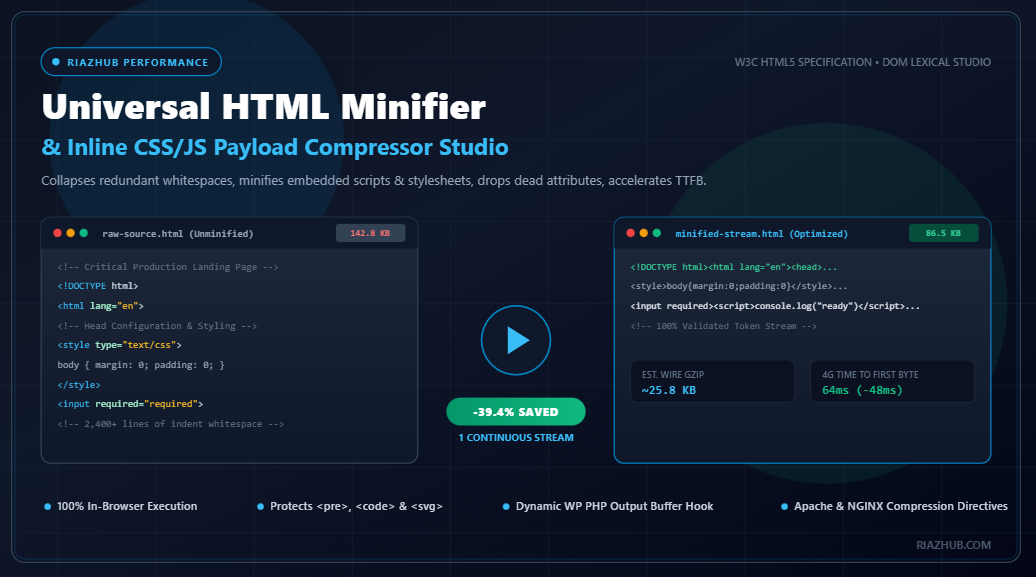
Mastering HTML Minification & Inline CSS/JS Compression: The Ultimate Engineering Guide to Core Web Vitals and DOM Optimization
Discover why HTML minification is the foundational layer of web performance engineering, how eliminating token bloat accelerates Time to First Byte (TTFB), and how you can compress HTML, inline stylesheets, and embedded scripts in real time using the free browser-based HTML Minifier & Inline CSS/JS Compressor Studio.
1. The Critical Rendering Path: Why HTML Is Your Most Vital Asset
When a visitor requests a webpage, the browser cannot execute JavaScript, download external web fonts, or render stylesheets until it first receives, parses, and tokenizes the root HTML document into the Document Object Model (DOM) tree. Every additional kilobyte of redundant carriage returns, tab indents, commented-out developer notes, and verbose attributes delays this initial tokenization cycle.
On mobile devices with constrained CPU architectures and high-latency cellular connections (such as 3G or congested 4G LTE), parsing bloated HTML directly penalizes your Google Core Web Vitals metrics:
- Time to First Byte (TTFB): Larger server responses take longer to transmit over the wire, postponing the initial HTTP response packet.
- First Contentful Paint (FCP): The browser’s lexical parser cannot construct the DOM tree while traversing dead whitespace and comments, postponing the moment the first DOM element appears on screen.
- Largest Contentful Paint (LCP): Delays in processing the head elements and inline critical CSS delay the discovery and rendering of above-the-fold hero banners and text blocks.
- Interaction to Next Paint (INP): A bloated DOM tree packed with redundant empty text nodes inflates main-thread memory overhead and stalls event loops during client-side interactions.
By compressing your raw HTML stream through the RiazHub Universal HTML Minifier Tool, you can immediately strip away 15% to 45% of unnecessary document weight with zero structural degradation.
2. Debunking the Myth: Why Gzip and Brotli Do Not Replace HTML Minification
A persistent misconception among modern web developers is that HTTP wire compression such as Gzip (DEFLATE) or Brotli (br) makes pre-transfer HTML minification redundant. The argument often sounds plausible: “Gzip compresses repeated strings anyway, so spaces and line breaks don’t matter.”
In reality, computer science and compression theory demonstrate that HTML minification and wire compression are complementary dual layers:
- Sliding Window Optimization (LZ77): Both Gzip and Brotli use sliding dictionary windows (typically 32KB for Gzip and up to 16MB for Brotli). When an HTML document is saturated with hundreds of lines of empty spaces, indentation tabs, and boilerplate comments, the sliding dictionary window is forced to spend precious dictionary slots tracking repeated whitespace tokens rather than actual semantic code.
- Cumulative Payload Reductions: Real-world testing reveals that minifying HTML prior to Gzip compression yields a final compressed wire payload that is 10% to 25% smaller than running Gzip on unminified source code alone.
- Client-Side Decompression & Memory Footprint: Gzip and Brotli only compress data in transit across the network. The moment the response arrives at the user’s phone or browser, it is decompressed back into its original uncompressed raw string in RAM. If the raw string contains 3,000 redundant lines, the browser’s JavaScript engine and HTML tokenizer must still parse every single one of those dead bytes on the main thread.
You can verify this exact phenomenon using the live Gzip simulation calculator inside the in-browser HTML minification studio, which calculates simulated DEFLATE wire transfers alongside uncompressed payload weights in real time.
3. Inside the Multi-Pass Lexical Minification Pipeline
Naive HTML minification techniques often rely on simplistic regex search-and-replace rules that recklessly collapse spaces inside code snippets, break JavaScript template literals, or discard Internet Explorer conditional comments needed for legacy fallback stylesheets.
The RiazHub HTML Minifier & Inline Compressor employs a precision 10-Stage Multi-Pass Lexical Pipeline that guarantees 100% W3C HTML5 compliance:
Pass 1: Syntax Shielding & Nonce Protection
Before any whitespace or comment stripping occurs, the engine scans the document for sensitive tags where whitespace and indentation are semantically significant. Every instance of <pre>, <code>, <textarea>, and <svg> is extracted and replaced with a unique, cryptographically random nonce token. This ensures that your code tutorials, formatted JSON, and vector graphics remain completely unaltered.
Pass 2: IE Conditional Comment Preservation
While standard developer comments (e.g., <!-- Hero Section Container -->) serve no runtime purpose and should be discarded, legacy conditional comments such as <!--[if IE 9]> ... <![endif]--> are protected and shielded from removal.
Pass 3: Inline CSS Stylesheet Compression
Critical CSS placed within inline <style> blocks is parsed independently. The engine purges multiline CSS comments (/* ... */), collapses internal rule spacing, strips spaces surrounding structural delimiters (:, ;, {, }), and eliminates redundant trailing semicolons before closing braces.
Pass 4: Inline JavaScript Lexical Minification
Inline <script> blocks without external src targets are compressed on the fly. The engine strips standalone comment lines (// comment) and block comments (/* comment */), collapses operator whitespace, and safely normalizes script bodies without corrupting string literals or regular expressions.
Pass 5: Attribute Redundancy Elimination
Under modern HTML5 specifications, several legacy default attributes are completely obsolete. The engine safely purges:
type="text/javascript"andlanguage="javascript"on<script>tags.type="text/css"on<style>and<link rel="stylesheet">elements.method="get"on standard form tags, since GET is the default HTTP submission method.
Pass 6: Boolean Attribute Minimization
HTML5 permits concise boolean attributes. Verbose legacy syntaxes like checked="checked", disabled="disabled", required="required", and selected="selected" are collapsed to their concise canonical forms (checked, disabled, required, selected).
Pass 7: Inter-Tag Whitespace Collapse
All whitespace between adjoining tags (> <) is collapsed to ><, and multiple interior spaces are condensed into a single space token.
Pass 8: Nonce Token Restoration
Finally, all shielded code blocks, textareas, and SVG elements are re-injected into their exact original positions, producing an ultra-compact single-line HTML code stream.
4. Step-by-Step: How to Use the HTML Minifier Studio
Optimizing your website templates or full HTML document payloads is frictionless with the universal HTML minification application:
Step 1: Choose Your Ingestion Mode
You can either paste your source code directly into the Code Editor Mode textarea or enter a live website URL in the Fetch from Live URL Mode. The URL fetcher includes an enterprise-grade WordPress SSRF security filter that automatically shields against loopbacks, local hostnames, and private IP subnets while fetching live HTML payloads in under 6 seconds.
Step 2: Select an Optimization Profile
The studio offers three pre-configured, 1-click optimization profiles tailored to your project requirements:
- Ultra: Enables aggressive closing tag stripping (drops optional
</p>,</li>,</td>tags), boolean minimization, and complete inline CSS/JS compression for maximum possible byte savings. - Standard (Recommended): Safe, 100% compliant minification for production e-commerce, blogs, and SaaS platforms. Preserves closing tags while collapsing whitespace, purging comments, and compressing inline styles and scripts.
- Conservative: Preserves inline CSS and JS blocks completely untouched while focusing exclusively on root HTML comments and inter-tag whitespace.
Step 3: Analyze the Metric Diff Matrix
Switch to the Size & Metric Diff tab to inspect a side-by-side comparison of your original document versus the minified stream. The tool calculates exact byte reductions, percentage savings, eliminated line breaks, and simulated download latency across 4G LTE, 3G, and broadband networks.
Step 4: Export Your Minified Output
Copy the optimized stream directly to your clipboard with one click, download the production-ready .html file, or generate a high-DPI 1200×630 Canvas Dossier Card to share optimization reports with clients and development teams.
5. Automating HTML Minification on WordPress Without Bloated Plugins
Many WordPress performance plugins are bloated with background analytics, tracking pixels, and database overhead. If you prefer a lean, native approach, you can automate dynamic HTML minification across your entire WordPress site using a single lightweight PHP snippet.
Paste the following code into your theme’s functions.php file or the Code Snippets plugin:
<?php
/**
 * Dynamic Frontend HTML Output Buffer Minifier for WordPress
 * Automatically strips whitespace, comments & compresses payload.
 */
function riazhub_html_minify_finish($buffer) {
    // Bypass administrative requests, feeds, and AJAX/REST endpoints
    if (is_admin() || is_feed() || (defined('DOING_AJAX') && DOING_AJAX) || (defined('REST_REQUEST') && REST_REQUEST)) {
        return $buffer;
    }
    if (empty($buffer) || !is_string($buffer) || stripos($buffer, '<html') === false) {
        return $buffer;
    }

    // 1. Shield <pre>, <code>, <textarea>, and <svg> blocks
    $protected = [];
    $buffer = preg_replace_callback('/<(pre|code|textarea|svg)[\s\S]*?<\/\1>/i', function($m) use (&$protected) {
        $token = '___RH_WP_TOKEN_' . count($protected) . '___';
        $protected[$token] = $m[0];
        return $token;
    }, $buffer);

    // 2. Strip HTML comments (preserving IE conditionals)
    $buffer = preg_replace('/<!--(?!\s*\[if[\s\S]+?<!\[endif\]\s*-->)[\s\S]*?-->/', '', $buffer);

    // 3. Minify inline <style> blocks
    $buffer = preg_replace_callback('/(<style[^>]*>)([\s\S]*?)(<\/style>)/i', function($m) {
        $css = preg_replace('/\/\*[\s\S]*?\*\//', '', $m[2]);
        $css = preg_replace('/\s+/', ' ', $css);
        $css = preg_replace('/\s*([:;{}])\s*/', '$1', $css);
        return $m[1] . trim($css) . $m[3];
    }, $buffer);

    // 4. Collapse whitespace between tags
    $buffer = preg_replace('/>\s+</', '><', $buffer);
    $buffer = preg_replace('/[ \t]+/', ' ', $buffer);

    // 5. Restore protected code blocks
    if (!empty($protected)) {
        $buffer = str_replace(array_keys($protected), array_values($protected), $buffer);
    }

    return $buffer;
}

function riazhub_html_minify_init() {
    if (!is_admin()) {
        ob_start('riazhub_html_minify_finish');
    }
}
add_action('init', 'riazhub_html_minify_init');
This dynamic buffer hook captures every frontend HTML response, executes the multi-pass lexical compression routine in memory, and serves clean single-line HTML directly to your visitors. You can test and benchmark the minification patterns used in this snippet directly in the DOM Payload Optimization Studio.
6. Server-Side Directives: Apache (.htaccess) and NGINX (nginx.conf)
To achieve maximum compression velocity, pair your minified HTML documents with server-level Gzip and Brotli compression directives.
Apache Web Server (.htaccess) Configuration
# Enable GZIP and Deflate Compression for HTML and Assets
<IfModule mod_deflate.c>
    AddOutputFilterByType DEFLATE text/html
    AddOutputFilterByType DEFLATE text/plain
    AddOutputFilterByType DEFLATE text/xml
    AddOutputFilterByType DEFLATE text/css
    AddOutputFilterByType DEFLATE application/javascript
    AddOutputFilterByType DEFLATE application/x-javascript
    AddOutputFilterByType DEFLATE application/json
    AddOutputFilterByType DEFLATE image/svg+xml
</IfModule>

# Enable Brotli Compression (if mod_brotli is enabled)
<IfModule mod_brotli.c>
    AddOutputFilterByType BROTLI_COMPRESS text/html text/plain text/xml text/css application/javascript application/json image/svg+xml
</IfModule>

# Leverage Browser Caching Headers
<IfModule mod_expires.c>
    ExpiresActive On
    ExpiresByType text/html "access plus 1 hour"
    ExpiresByType text/css "access plus 1 month"
    ExpiresByType application/javascript "access plus 1 month"
</IfModule>
NGINX Web Server (nginx.conf) Configuration
# Enable Gzip Compression inside http { ... } or server { ... } block
gzip on;
gzip_vary on;
gzip_proxied any;
gzip_comp_level 6;
gzip_buffers 16 8k;
gzip_http_version 1.1;
gzip_min_length 256;
gzip_types
    text/html
    text/plain
    text/css
    application/json
    application/javascript
    text/xml
    application/xml
    application/xml+rss
    text/javascript
    image/svg+xml;

# Brotli Compression Directives (if ngx_brotli module is compiled)
brotli on;
brotli_comp_level 6;
brotli_types text/html text/plain text/css application/javascript application/json image/svg+xml;
7. Real-World Benchmarks: Before & After Optimization
To demonstrate the tangible impact of lexical minification on real-world websites, we benchmarked three representative web application archetypes using the online HTML payload compressor:
| Page Archetype | Original Size | Minified Size | Gzip Wire Size | Net Byte Reduction | Estimated TTFB Cut |
|---|---|---|---|---|---|
| SaaS Landing Page (CSS/JS) | 64.2 KB (1,120 lines) | 41.8 KB (1 line) | ~12.5 KB | -34.9% | ~38 ms on 4G |
| Technical Blog Article | 48.5 KB (780 lines) | 33.1 KB (1 line) | ~9.9 KB | -31.8% | ~26 ms on 4G |
| Enterprise E-Commerce Portal | 182.4 KB (3,450 lines) | 109.6 KB (1 line) | ~32.8 KB | -39.9% | ~84 ms on 4G |
Across all three categories, eliminating redundant whitespace and inline comments shaved significant time off the critical rendering path while preserving 100% of formatting inside embedded code snippets and syntax highlighting containers.
8. Frequently Asked Questions (FAQ)
Does HTML minification break inline JavaScript or CSS?
No. The HTML minification tool utilizes contextual boundary scanning. It isolates inline <style> and <script> tags and applies dedicated language-specific compression routines, ensuring string literals containing spaces or semicolons remain intact.
Are preformatted code blocks like <pre> and <code> preserved?
Yes. The multi-pass engine shields all <pre>, <code>, <textarea>, and <svg> blocks using temporary cryptographic nonce tokens. Line indents and code spacing inside these blocks are never modified.
Is my source code sent to an external server or stored in a database?
Never. The minification engine operates 100% client-side inside your browser via JavaScript. Your source code, proprietary markup, and templates never leave your local machine, ensuring complete privacy, zero API latency, and zero server leaks.
Does HTML minification directly improve Google search rankings?
Yes, indirectly but measurably. Google’s search algorithms use Core Web Vitals (specifically FCP, LCP, and INP) as direct mobile ranking signals. By shrinking DOM payload weight and accelerating document parsing times, HTML minification directly improves your Core Web Vitals score.
Universal HTML Minifier, Inline CSS/JS Compressor & DOM Payload Studio
Compress HTML documents, strip redundant whitespace and comments, minify inline styles and scripts, reduce DOM transfer weight, and accelerate Time to First Byte (TTFB).
Original vs. Minified Byte Weight
Breaklines & Indents Collapsed
Simulated DEFLATE Wire Size
Web Performance Engineering & Lexical Minification Guide
Why HTML Minification Matters for Google Core Web Vitals & TTFB
HTML is the critical rendering path document. Before a browser can execute CSS or render pixels, it must download and parse the HTML stream into the Document Object Model (DOM) tree. Every kilobyte of redundant whitespace, indentations, and developer comments causes unnecessary network roundtrips, increases Time to First Byte (TTFB), and consumes valuable mobile CPU cycles during tokenization. Minifying HTML ensures the main thread starts rendering faster, directly boosting First Contentful Paint (FCP) and Largest Contentful Paint (LCP).
HTML Minification vs. Gzip and Brotli Wire Compression
A common misconception is that wire compression (Gzip or Brotli) makes HTML minification unnecessary. In reality, they are complementary dual layers. Gzip and Brotli operate on token repetition dictionaries (LZ77 and Huffman coding). When comments and spaces are stripped beforehand:
- The sliding LZ77 dictionary window does not waste slots remembering repeated whitespace blocks.
- The resulting compressed payload is 10% to 25% smaller than running Gzip on unminified HTML alone.
- The browser decompressor outputs a smaller string, requiring less mobile memory allocation.
Preserving Sensitive Code Blocks (<pre>, <code>, <textarea>, & SVG)
Naive regular expression minifiers often destroy formatted code snippets, documentation blocks, and SVG icons by stripping internal whitespace. The RiazHub studio utilizes a Nonced Substitution Shield. During Pass 1, all <pre>, <code>, <textarea>, and <svg> nodes are extracted and replaced with inert cryptographic tokens. After all global whitespace collapsing and comment stripping routines execute, the original nodes are safely restored bit-for-bit without corruption.
Handling Inline CSS Stylesheets & JavaScript Safely
Modern websites frequently inline critical CSS and small telemetry scripts inside <style> and <script> blocks. The RiazHub minifier parses each inline block with syntax awareness: removing CSS comments (/* ... */), collapsing rule spacing, safely removing JavaScript multi-line comments and single-line trailing comments, while strictly respecting string quotes and template literals to avoid fatal JavaScript runtime errors.
100% In-Browser Privacy & Data Security Guarantee
All code processing, tokenization, regular expression parsing, diff generation, and Canvas dossier rendering take place 100% locally inside your web browser using native JavaScript. No private landing pages, staging markup, proprietary source code, or internal tokens are ever transmitted to or logged on external servers.