
Mastering HEX to RGB & RGBA Conversion: The Comprehensive Colorimetry, CSS Level 4 & WCAG Contrast Architecture Guide
Explore the mathematical mechanics behind digital color models. From bit-depth allocation in 24-bit sRGB and 32-bit alpha-channel hexadecimal strings to modern space-separated CSS Color Module Level 4 syntax, gamma-corrected relative luminance, and WCAG 2.1 accessibility thresholds—here is everything software engineers, UI/UX designers, and front-end architects need to know.
⚡ Convert Colors Instantly in Your Browser
Need to convert 3, 4, 6, or 8-digit HEX codes to CSS Level 4 rgb(), inspect HSL / CMYK / CIE LAB spaces, synthesize harmonic palettes, and audit real-time WCAG 2.1 contrast ratios? Launch the free, client-side utility:
1. The Foundations of Digital Color: 24-Bit vs. 32-Bit Encodings
Every visual display terminal, from ultra-high-density mobile OLED screens to professional desktop color grading monitors, creates the illusion of a full-color spectrum by exciting three primary sub-pixel emitters: Red, Green, and Blue (the additive sRGB color model, standardized by IEC 61966-2-1).
In standard 24-bit digital color representation, each of the three channels is allocated an 8-bit byte ($2^8 = 256$ discrete levels, ranging from 0 through 255). When combined, this provides:
Hexadecimal notation is simply a base-16 positional numeral representation of these binary bytes. Because one hexadecimal character represents exactly 4 bits (a nibble), two characters correspond to one complete 8-bit byte:
00in base-16 corresponds to0in decimal (0% emission).7Fin base-16 corresponds to127in decimal (~50% emission).FFin base-16 corresponds to255in decimal (100% full saturation).
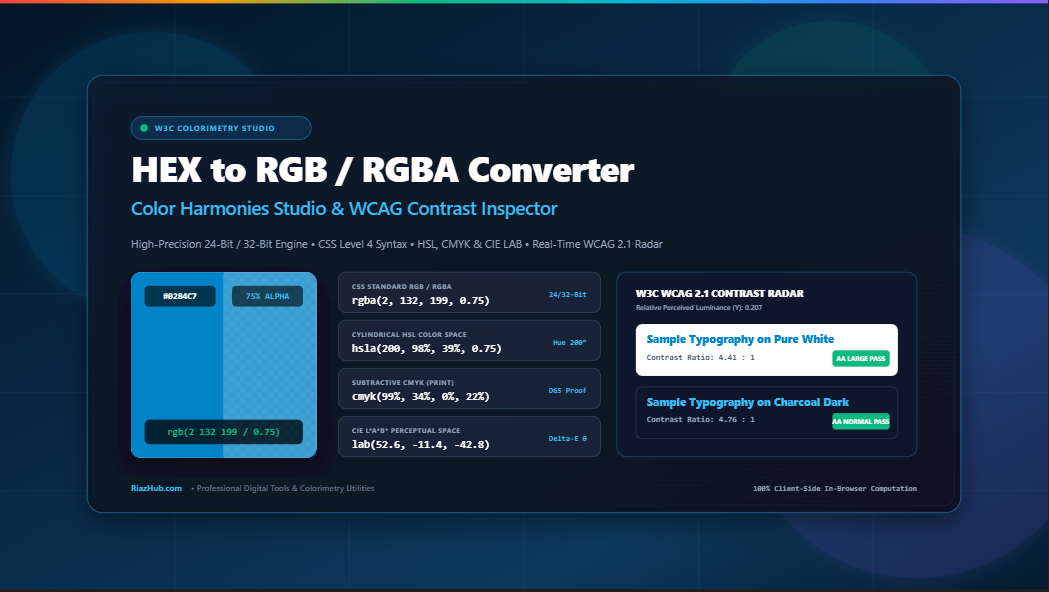
When you input a standard 6-digit hex code like #0284C7 into the Universal HEX to RGB Converter, the engine segments the string into three independent byte pairs:
G = parseInt(“84”, 16) = 132
B = parseInt(“C7”, 16) = 199
⇒ Output: rgb(2, 132, 199)
2. The 8-Digit Revolution: Alpha Transparency in CSS Color Level 4
Historically, web developers were forced to juggle two separate notations: hexadecimal strings for opaque colors (#RRGGBB) and functional notation for translucent colors (rgba(r, g, b, a)).
With the ratification of the W3C CSS Color Module Level 4 specification, hexadecimal syntax expanded from 24 bits to 32 bits through the formal introduction of 4-digit (#RGBA) and 8-digit (#RRGGBBAA) notations.
| Syntax Notation | Character Structure | Bit Depth | Expansion / Mapping Rule | Example |
|---|---|---|---|---|
| 3-Digit Shorthand | #RGB |
12-Bit | Each nibble duplicated: #F09 → #FF0099 |
#08C → rgb(0, 136, 204) |
| 4-Digit Alpha | #RGBA |
16-Bit | Each nibble duplicated: #08CF → #0088CCFF |
#08C8 → rgba(0, 136, 204, 0.53) |
| 6-Digit Standard | #RRGGBB |
24-Bit | Three 8-bit bytes (Alpha implicitly 1.0) | #0284C7 → rgb(2, 132, 199) |
| 8-Digit Alpha | #RRGGBBAA |
32-Bit | Fourth byte represents opacity ($00 = 0.0, FF = 1.0$) | #0284C780 → rgba(2, 132, 199, 0.50) |
To verify whether your translucent UI assets render as expected across all viewing devices, you can test 8-digit strings in real-time inside the RiazHub Color Harmonies & Contrast Studio, which provides a dedicated checkerboard split-screen preview for instant opacity verification.
3. Modern CSS Syntax: Why Commas Are Becoming Obsolete
For decades, CSS developers wrote functional color notation using comma separation:
/* Legacy CSS Syntax (CSS Level 1 & 2) */
color: rgb(2, 132, 199);
background-color: rgba(2, 132, 199, 0.75);
However, modern CSS specifications have unified functional notations across all color spaces (including hsl(), lab(), lch(), and oklch()). In modern CSS:
- Channels are separated by whitespace instead of commas.
- The alpha channel is separated by an explicit forward slash (
/). - The function name
rgb()now handles both opaque and translucent values interchangeably, rendering the legacyrgba()function redundant.
/* Modern CSS Color Module Level 4 Syntax */
color: rgb(2 132 199);
background-color: rgb(2 132 199 / 0.75);
border-color: rgb(2 132 199 / 75%);
The Universal HEX to RGB Studio generates both legacy comma-delimited strings and clean CSS Level 4 space-delimited declarations with 1-click clipboard actions, ensuring backward compatibility with older stylesheets while preparing your design tokens for modern CSS architectures.
4. Multi-Space Colorimetry: Bridging sRGB, HSL, CMYK, and CIE L*a*b*
While RGB mirrors the physics of monitor hardware and HEX provides a compact string notation, digital designers frequently need to translate colors into other mathematical spaces to execute specific tasks:
A. Cylindrical Coordinates: HSL (Hue, Saturation, Lightness)
RGB is non-intuitive for human color selection: increasing the red channel changes both hue and brightness simultaneously. The HSL color space reorganizes sRGB into a cylindrical coordinate system:
- Hue ($H \in [0^\circ, 360^\circ]$): The angular position on the chromatic color circle ($0^\circ = \text{Red}, 120^\circ = \text{Green}, 240^\circ = \text{Blue}$).
- Saturation ($S \in [0\%, 100\%]$): The vividness or purity of the shade relative to gray.
- Lightness ($L \in [0\%, 100\%]$): The illumination level ($0\% = \text{Black}, 50\% = \text{Pure Tone}, 100\% = \text{White}$).
C_max = max(r, g, b), C_min = min(r, g, b), Δ = C_max – C_min
Lightness: L = (C_max + C_min) / 2
Saturation: S = Δ === 0 ? 0 : Δ / (1 – |2L – 1|)
Hue: H = 60° × ((g – b)/Δ mod 6) [if C_max === r]
B. Subtractive Printing Gamut: CMYK
Unlike screens which emit light additively, physical printing inks subtract reflected light from white paper. CMYK models this via Cyan, Magenta, Yellow, and Key (Black):
C = (1 – r – K) / (1 – K)
M = (1 – g – K) / (1 – K)
Y = (1 – b – K) / (1 – K)
C. Perceptually Uniform Space: CIE L*a*b* (D65)
Neither RGB nor HSL are perceptually uniform: a 10% change in green lightness looks far more extreme to human eyes than a 10% change in blue lightness. Standardized by the International Commission on Illumination (CIE), $L^*a^*b^*$ models human vision directly:
- $L^*$: Perceptual lightness ($0 = \text{Black}, 100 = \text{Diffuse White}$).
- $a^*$: Green (−) to Red (+) chromatic axis.
- $b^*$: Blue (−) to Yellow (+) chromatic axis.
You can inspect exact, synchronized conversions across all these color spaces simultaneously on the RiazHub Colorimetry Deck.
5. Photopic Vision & W3C Relative Luminance: Why Humans See Green 10× Brighter Than Blue
A critical colorimetry mistake is assuming that perceived brightness is equal to the arithmetic average of RGB channels: $(R + G + B) / 3$. In reality, human retinas are packed with three classes of cone cells (L, M, and S) whose spectral absorption curves peak heavily in the green-yellow band:
To establish an accurate, objective standard for digital contrast, the W3C Web Content Accessibility Guidelines (WCAG 2.1) mandate the calculation of Relative Luminance ($Y$).
The W3C Relative Luminance Formula
First, standard gamma-compressed 8-bit sRGB channels are linearized back to physical light energy:
(where C ∈ { R/255, G/255, B/255 })
Then, the linearized channels are weighted by the CIE photopic luminosity function:
Notice the dramatic disparity in coefficients: Green light accounts for 71.52% of human perceived luminance, Red accounts for 21.26%, and Blue contributes a mere 7.22%. Consequently, pure primary green (#00FF00, $Y = 0.715$) appears almost ten times brighter to human perception than pure primary blue (#0000FF, $Y = 0.072$), despite both possessing identical peak channel values of 255!
6. W3C WCAG 2.1 Contrast Ratios & Legal Compliance Standards
Visual readability on digital displays depends upon sufficient luminance contrast between foreground typography and background surfaces. The W3C defines contrast ratio ($CR$) between two colors with luminances $L_1$ (lighter) and $L_2$ (darker) as:
The $+0.05$ constant accounts for ambient surface flare reflecting off glass computer screens. This produces a scale from $1:1$ (identical colors, zero contrast) to $21:1$ (purest black against purest white).
| WCAG 2.1 Level | Typography Classification | Minimum Contrast Threshold | Primary Use Cases |
|---|---|---|---|
| Level AA | Normal Body Text (<18pt / 24px) | 4.50 : 1 | Blog articles, paragraph text, form inputs, metadata |
| Level AA | Large Text (≥18pt / 24px or ≥14pt bold) | 3.00 : 1 | Headings, hero banners, button labels, UI icons |
| Level AAA | Enhanced Normal Text | 7.00 : 1 | Government portals, medical records, high-legibility UIs |
| Level AAA | Enhanced Large Text | 4.50 : 1 | Accessible enterprise headers, dashboard KPIs |
The WCAG Contrast Inspector automatically evaluates your active color against both Pure White (#FFFFFF) and Deep Charcoal (#0F172A), providing instant pass/fail badges across all four compliance benchmarks.
7. Algorithmic Color Harmony Synthesis
Building cohesive design systems requires mathematically balanced palettes. By projecting a color into HSL cylindrical space and rotating its hue angle ($\theta$), algorithms can generate reliable harmonic combinations:
- Complementary ($\theta + 180^\circ$): Opposite ends of the color wheel. Delivers maximum chromatic contrast and visual excitement.
- Split-Complementary ($\theta + 150^\circ, \theta + 210^\circ$): Pairs the base color with the two colors adjacent to its direct complement, offering high contrast with reduced visual tension.
- Analogous ($\theta \pm 30^\circ$): Chromatically adjacent colors that evoke natural serenity and visual harmony.
- Triadic ($\theta + 120^\circ, \theta + 240^\circ$): Three equidistant hues forming an equilateral triangle across the color wheel, creating balanced, vibrant themes.
- Monochromatic: Preserves the exact hue and saturation while systematically stepping lightness ($L \pm 16\%, L \pm 32\%$) to construct depth, hover states, and card surfaces.
Inside the Universal Color Harmonies Studio, clicking on any generated harmonic swatch immediately promotes that shade to the active workspace, allowing you to cycle through palettes effortlessly.
8. Implementing Design Tokens: Developer Integration Guide
Translating raw color coordinates into maintainable code requires structuring them into design tokens. Here is how to implement your converted values across contemporary frameworks:
A. CSS Custom Properties (:root)
:root {
  --color-primary-hex: #0284C7;
  --color-primary-rgb: 2, 132, 199;

  /* Legacy & modern syntax bridges */
  --color-primary: rgb(var(--color-primary-rgb));
  --color-primary-alpha: rgba(var(--color-primary-rgb), 0.85);
  --color-primary-css4: rgb(2 132 199 / 0.85);
}
B. Tailwind CSS Configuration
// tailwind.config.js
module.exports = {
  theme: {
    extend: {
      colors: {
        brand: {
          DEFAULT: '#0284C7',
          rgb: 'rgb(2, 132, 199)',
          translucent: 'rgb(2 132 199 / 0.85)',
        }
      }
    }
  }
};
C. Mobile Native Integration (Swift iOS & Android XML)
// Swift (iOS UIColor)
let brandColor = UIColor(red: 2/255.0, green: 132/255.0, blue: 199/255.0, alpha: 1.0)

<!-- Android XML res/values/colors.xml -->
<resources>
    <color name="brand_primary">#FF0284C7</color>
    <color name="brand_primary_translucent">#D90284C7</color>
</resources>
Conclusion: Precision Colorimetry at Your Fingertips
Digital color is not merely aesthetic—it is a rigorous discipline governed by photopic physics, international standards, and legal accessibility mandates. Whether you are standardizing your web app’s design tokens, creating accessible contrast combinations, or generating high-DPI specification cards for client handoff, accurate color conversion is essential.
Ready to Analyze Your Brand Palettes?
Test 24-bit and 32-bit HEX strings, audit WCAG 2.1 compliance ratios, and export 1200×630 specification dossiers with 100% client-side privacy.
Universal HEX to RGB / RGBA Studio
High-precision 24-bit / 32-bit in-browser colorimetry engine. Convert 3, 4, 6, and 8-digit HEX codes to CSS Level 4 rgb(), HSL, CMYK, and CIE LAB spaces, evaluate real-time W3C WCAG 2.1 contrast ratios, synthesize harmonic design palettes, and export 1200x630 specification dossier cards.
This live sample renders body copy using your active color over a white surface.
This live sample renders body copy using your active color over a dark UI surface.
| Standard Criteria | Threshold | Against White (#FFF) | Against Black (#000) |
|---|---|---|---|
| WCAG AA Normal Text (<18pt / 24px) | 4.50 : 1 | Pass (4.41) | Pass (4.76) |
| WCAG AA Large Text (≥18pt or 14pt bold) | 3.00 : 1 | Pass (4.41) | Pass (4.76) |
| WCAG AAA Normal Text (Enhanced) | 7.00 : 1 | Fail (4.41) | Fail (4.76) |
| WCAG AAA Large Text (Enhanced) | 4.50 : 1 | Fail (4.41) | Pass (4.76) |
:root {
  --color-primary-hex: #0284C7;
  --color-primary-rgb: 2, 132, 199;
  --color-primary: rgb(var(--color-primary-rgb));
  --color-primary-alpha: rgba(2, 132, 199, 1);
}
module.exports = {
  theme: {
    extend: {
      colors: {
        'brand': {
          DEFAULT: '#0284C7',
          rgb: 'rgb(2, 132, 199)',
        }
      }
    }
  }
};
$color-brand-hex: #0284C7;
$color-brand-rgb: (2, 132, 199);
$color-brand: rgb(2, 132, 199);
// Swift (iOS UIColor)
let brandColor = UIColor(red: 2/255.0, green: 132/255.0, blue: 199/255.0, alpha: 1.0)

<!-- Android XML colors.xml -->
<color name="brand_primary">#FF0284C7</color>
⚡ Real-World Preset Color Scenarios
📚 Color Science, W3C Specifications & Accessibility Guide
#0284C7), the characters are grouped into three 8-bit pairs representing Red, Green, and Blue. Each channel ranges from 00 (decimal 0) to FF (decimal 255), allowing $256 \times 256 \times 256 = 16,777,216$ distinct possible colors. In shorthand 3-digit notation (e.g. #F09), each digit is doubled to yield #FF0099.
#RRGGBBAA). For instance, #00000080 represents pure black with 50% opacity ($128/255 \approx 0.50$). Shorthand 4-digit notation (#RGBA) expands each digit symmetrically (e.g., #1238 becomes #11223388). Modern browser rendering engines parse 8-digit codes natively in CSS properties.
#0000FF) looks substantially darker to the human eye than pure green (#00FF00), despite both sharing a channel maximum of 255.
- Level AA Normal Text: Contrast ratio of at least 4.5:1 for body typography under 18pt (24px) or 14pt (18.66px) bold.
- Level AA Large Text: Minimum ratio of 3.0:1 for headlines and large text elements.
- Level AAA Enhanced: Minimum ratio of 7.0:1 for normal text and 4.5:1 for large text to assist users with low visual acuity.