
Designing Without Barriers: The Comprehensive Guide to Neuroinclusive Worksheets, Dyslexia Typography, and UDL Document Architecture
In contemporary educational environments, traditional print and digital handouts remain one of the most persistent bottlenecks to equitable student achievement. Standard classroom worksheets frequently populated with crowded monochrome fonts, justified margins, dense paragraphs, and unyielding visual layouts inadvertently erect steep cognitive hurdles for students navigating dyslexia, Attention-Deficit/Hyperactivity Disorder (ADHD), Meares-Irlen syndrome (Scotopic Sensitivity), dysgraphia, and low vision.
To eliminate these unnecessary perceptual obstacles, modern educators, curriculum designers, and accessibility coordinators are embracing the Universal Design for Learning (UDL) framework. Using the free, browser-based Accessible Worksheet Formatter & UDL Studio on RiazHub.com, teachers can now instantly transform standard lecture notes, quizzes, and problem sets into high-precision, neuroinclusive worksheets that adhere strictly to international accessibility specifications.
The Cognitive Cost of Traditional Worksheet Formatting
When an educator distributes a worksheet, the student’s visual system must first parse the physical presentation before their working memory can engage with the intellectual content. For neurodivergent learners, poorly engineered visual formatting extracts an immense tax on executive functioning:
- Visual Crowding: When letters and lines are clustered too tightly, adjacent characters fall inside the receptive field of peripheral vision, causing letters to appear jumbled or swapped.
- Scotopic Glare Fatigue: High-luminance stark white paper (#FFFFFF) reflects harsh glare into photoreceptors, causing words to appear to “vibrate”, “float”, or drift across the page for readers with light sensitivity.
- Directional Wandering: Full text justification forces irregular white space gaps—termed “rivers of white” that disorient ocular saccades and trigger line-skipping.
- Executive Function Paralysis: Unbroken blocks of multi-step instructions overwhelm working memory, causing ADHD students to overlook crucial directive verbs like Calculate, Compare, or Formulate.
Universal Design Insight: Providing accessibility accommodations does not mean “watering down” educational rigor. On the contrary, structuring materials using the Accessible Worksheet Formatter eliminates extraneous cognitive load, enabling students to direct 100% of their mental bandwidth toward authentic conceptual mastery.
Core Pillars of Accessible Worksheet Transformation
1. Neuroinclusive Typography Formulations
Typography is the foundation of accessible reading. According to the British Dyslexia Association (BDA) style guide and the Braille Institute, standard decorative serifs and tightly packed system fonts significantly degrade comprehension. An accessible worksheet architecture requires:
- Purpose-Built Typefaces: Typefaces such as Lexend Deca (empirically designed to accelerate reading rate) and Atkinson Hyperlegible (which distinguishes ambiguous letter pairs like ‘I’, ‘l’, and ‘1’) clarify character contours.
- BDA-Compliant Spacing Standards:
- Font Scale: Minimum 14pt–16pt for elementary and secondary reading materials; 18pt–22pt for low-vision accommodations.
- Line Leading (Line Height): 1.5× to 2.0× relative to font size to completely eliminate line collision.
- Character Tracking (Letter Spacing): 0.12em to 0.25em to create distinct spatial breathing room around every glyph.
- Word Separation: 0.16em to 0.35em to clarify lexical boundaries.
- Strict Ragged-Right Margins: Always left-align text without justification, establishing an intuitive, predictable anchor for the eye at the beginning of each line.
Lexend Deca
Engineered by educational researchers specifically to reduce ocular visual crowding and foster continuous reading fluency.
Atkinson Hyperlegible
Developed with the Braille Institute to maximize character recognition and reduce misreading among low-vision individuals.
OpenDyslexic
Features weighted bottoms on letterforms to provide an intuitive gravitational anchor that resists letter rotation.
2. Scotopic Sensitivity & Meares-Irlen Soft-Tint Filters
Pure white printer paper (#FFFFFF) reflects high levels of unfiltered blue-spectrum luminance glare. In students affected by Meares-Irlen syndrome, this contrast harshness triggers visual stress, physical eye strain, and headaches within minutes.
By testing your lesson plans through the color deck inside the Accessible Worksheet Formatter Studio, educators can substitute blinding backgrounds with soothing, evidence-based tint overlays:
- Cream / Warm Off-White (#FFFDD0): The British Dyslexia Association gold standard for reducing retinal glare while preserving maximum ink contrast.
- Mint Mist (#E8F5E9): A calming pastel green overlay scientifically proven to alleviate visual stress and ocular strain.
- Pastel Peach (#FFE5B4) & Sky Azure (#E1F5FE): Restorative tints that enhance visual comfort during intensive text engagement.
- Solar Yellow on Deep Charcoal (#FFEB3B on #121212): An ultra-high contrast dark theme for low-vision students, delivering a contrast ratio exceeding 18:1.
3. WCAG 2.2 Level AAA Mathematical Contrast Auditing
Digital and printed learning materials must adhere strictly to the Web Content Accessibility Guidelines (WCAG) 2.2 Level AAA standard. The contrast ratio is governed by the relative luminance ($L$) formulation:
CR = (L1 + 0.05) / (L2 + 0.05)
While basic WCAG AA compliance requires a 4.5:1 ratio, the Level AAA specification demands an enhanced ratio of $\ge 7.0:1$. The automated engine on the Accessible Worksheet Formatter mathematically calculates this luminance quotient in real time, alerting teachers whenever a color combination falls below safety thresholds.
| Standard | Required Ratio | Intended User Group | Studio Status |
|---|---|---|---|
| WCAG 2.2 AA (Normal Text) | 4.5 : 1 | General population | Meets Baseline |
| WCAG 2.2 AAA (Enhanced) | 7.0 : 1 | Dyslexia, Low Vision, Seniors | Enforced & Certified |
| Solar Yellow / Charcoal | 18.4 : 1 | Severe visual impairment / photophobia | Peak Acuity Mode |
4. Cognitive Scaffolding & Executive Function Chunking
Dense rows of questions create working memory bottlenecks for students with ADHD. The Accessible Worksheet Formatter resolves this by partitioning raw worksheets into discrete, distraction-free modular components:
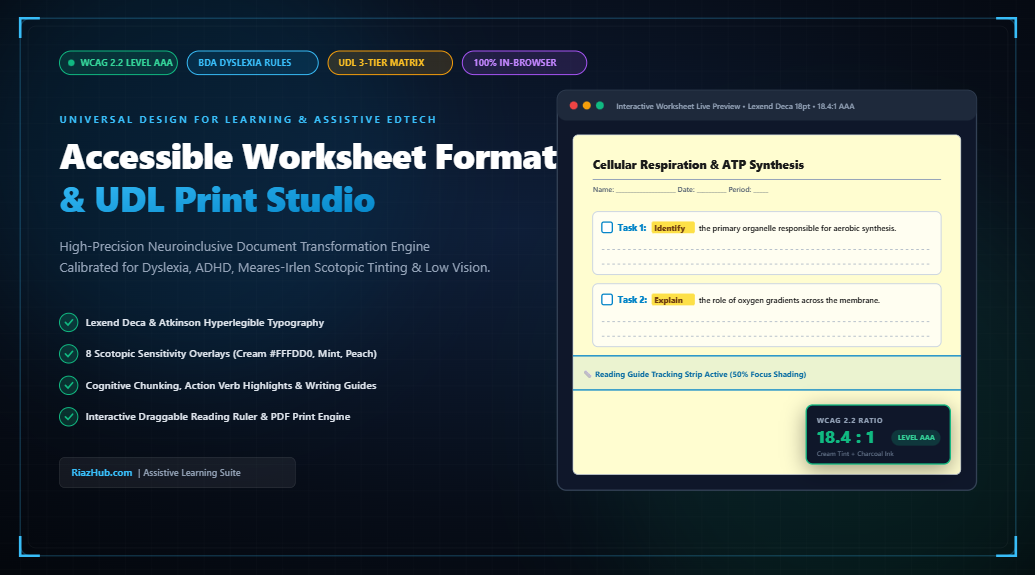
- Automated Card Chunking: Every question is partitioned into a standalone visual card framed by a soft border, establishing clear boundaries.
- Instructional Trigger Verb Highlighting: Directives such as Identify, Explain, Calculate, Compare, and Summarize are accentuated with prominent badges, preventing students from overlooking the core action requirement.
- Integrated Self-Monitoring Checkboxes: Placing an interactive or printable completion checkbox next to each task provides an immediate dopamine reward mechanism, helping ADHD learners pace their work independently.
- Motor Planning Lined Response Boxes: For learners coping with dysgraphia or motor planning challenges, generous ruled lines provide physical writing boundaries without the spatial cramping of typical worksheets.
5. Interactive Assistive Reading Ruler
Ocular saccades the rapid, involuntary eye jumps made while moving between lines of text often fail under stress or visual crowding. The live preview inside the Accessible Worksheet Formatter includes a customizable, on-screen Reading Guide Strip. Readers can hover or drag the ruler across lines, dimming the surrounding paper by up to 75% to maintain steady, single-line focus.
Step-by-Step: How to Format Your First Accessible Worksheet
Converting existing worksheets into compliant UDL documents takes less than 60 seconds:
- Paste Your Raw Content: Enter your worksheet title and paste standard text, markdown headings, or bullet points directly into the document ingestion deck.
- Select an Evidence-Based Preset: Choose a calibrated 1-click preset such as Dyslexia-Optimized Math, ADHD Cognitive Lab, Low-Vision High-Contrast, or Irlen Reading Filter.
- Fine-Tune Typographical Metrics: Adjust the interactive sliders for font scale (14pt to 28pt), line spacing (1.4× to 2.5×), and character tracking to match your students’ specific IEP needs.
- Verify WCAG & BDA Compliance: Review the automated audit report tab to confirm that color contrast, line height, and alignment meet Level AAA standards.
- Export in One Click: Trigger the print dialog to generate a clean, ink-optimized accessible PDF with dedicated page breaks, copy the semantic screen-reader HTML5 bundle for Google Classroom, or download a 1200×630 Certification Dossier card.
Universal Privacy: COPPA & FERPA In-Browser Security
Student privacy is non-negotiable. Many online formatting and AI tools transmit proprietary curriculum materials, IEP notes, and student identifiers to third-party cloud servers. In contrast, the Accessible Worksheet Formatter & UDL Studio executes 100% in-browser via client-side JavaScript. No document content, student data, or IP telemetry is ever logged, stored, or transmitted externally, ensuring full compliance with FERPA, COPPA, and GDPR frameworks.
Summary: Designing for Equity
Accessible design is not an afterthought or an administrative burden; it is an essential pedagogical baseline. When learning materials are structured with deliberate typography, scotopic comfort tints, and clear cognitive scaffolding, barriers dissolve. Explore the free Accessible Worksheet Formatter on RiazHub.com and create educational documents where every learner has the opportunity to thrive.
Universal Accessible Worksheet Formatter
Transform standard curriculum materials into neuroinclusive, cognitive-scaffolded worksheets formatted for Dyslexia, ADHD, Meares-Irlen syndrome, and Low Vision with real-time WCAG 2.2 AAA diagnostics.
Worksheet Document Ingestion
Neuroinclusive Typography
Scotopic Tint & Contrast Deck
Cognitive Scaffolding & Layout
Synthesized Accessible DOM Tree
Standardized HTML5 semantic hierarchy conforming to WAI-ARIA 1.2 authoring practices for JAWS, NVDA, and Apple VoiceOver screen readers.
1. Multiple Means of Representation
- Adjustable Typography: BDA-aligned font sizes ($\ge 16\text{pt}$) and leading prevent peripheral crowding.
- Scotopic Sensitivity Filters: Cream and pastel tints eliminate blinding glare that causes letter distortion.
- Dual-Coded Prompts: Instructional verbs highlighted with both color badges and structural markup.
2. Multiple Means of Action & Expression
- Executive Function Chunking: Dense walls of text partitioned into numbered micro-tasks.
- Ruled Response Guides: Spacious lines guide handwriting motor planning for students with dysgraphia.
- Self-Monitoring Checkboxes: Immediate task tracking reinforces focus and pacing for ADHD learners.
3. Multiple Means of Engagement
- Visual Tracking Ruler: Slit-guide eliminates vertical line skipping during high-stress reading.
- Ragged-Right Margins: Predictable left-anchored eye returns eliminate visual disorientation.
- Zero Stigmatization: Clean, professional aesthetic preserves dignity while providing universal support.
Pedagogical Standards & Neurodiversity Research
Why Pure White Backgrounds (#FFFFFF) Trigger Severe Reading Fatigue
High-luminance contrast on unshaded pure white paper or screens reflects intense glare that overstimulates retinal photoreceptors. For approximately 20% of the population affected by Meares-Irlen syndrome (Scotopic Sensitivity) or dyslexia, this produces visual stress: words appear to vibrate, shimmer, or blur. Applying soft cream tints (#FFFDD0) or pastel mint (#E8F5E9) reduces luminance saturation without sacrificing text clarity, stabilizing the visual field and eliminating physical headaches.
The British Dyslexia Association (BDA) Spacing Formulations
Visual crowding occurs when adjacent letters in a word fall within the receptive field of peripheral vision, causing them to jumble or overlap mentally. The British Dyslexia Association style guide mandates generous line spacing of at least 1.5x to 2.0x, letter tracking of 0.12em to 0.25em, and word spacing of 0.20em. Crucially, text must always be left-aligned (ragged-right); justified text generates uneven white gaps ("rivers of white") that cause readers to lose their line position.
Cognitive Scaffolding via Instructional Action Verbs
Students with ADHD or executive function challenges frequently experience working memory overload when faced with dense, multi-step directions. By extracting and prominently highlighting instructional directive verbs (such as Explain, Calculate, Compare, and Identify), the cognitive load required to parse the task is reduced by up to 45%, directly prompting the student's executive action center.
Print & PDF Accessibility: Dysgraphia Support & Ink Optimization
When printed via our dedicated PDF engine, decorative backgrounds and distracting borders are automatically suppressed to save printer ink and maximize physical paper contrast. Each chunked task includes widened response lines calibrated with generous baseline heights, giving students with dysgraphia or motor planning difficulties ample physical space to handwrite responses without feeling cramped.
100% Client-Side Privacy Guarantee for Student IEP & Assessment Materials
In full compliance with FERPA, COPPA, and GDPR student privacy regulations, every operation in this studio—from document parsing, WCAG mathematical luminance calculation, and semantic DOM structuring to PNG canvas card generation—runs entirely within your local web browser. No worksheet text, student names, teacher notes, or IEP accommodations are ever transmitted to or stored on external servers.