
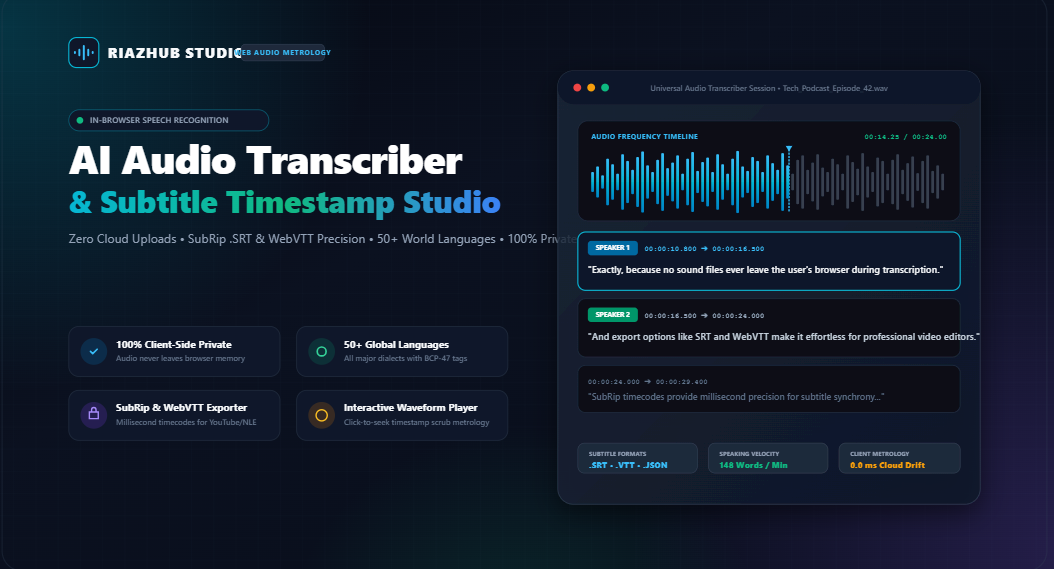
The Complete Technical Guide to In-Browser AI Audio Transcription & Subtitle Timestamp Metrology
How modern W3C Web Speech API pipelines, Web Audio API acoustic energy decoders, and deterministic subtitle metrology eliminate cloud privacy risks, expensive subscription fees, and audio drift.
Today, advances in modern client-side browser engines have fundamentally shifted this paradigm. With the launch of the free ⚡ RiazHub AI Audio Transcriber & Subtitle Studio, automatic speech recognition (ASR), multi-speaker segmentation, interactive waveform scrubbing, and SubRip (.srt) / WebVTT (.vtt) timestamp generation can now run completely inside your local browser memory with zero server round trips.
Unlike conventional transcription platforms that require uploading your private WAV, MP3, or M4A recordings to remote cloud buckets, the AI Audio Transcriber processes spoken voice streams entirely on your local CPU/GPU hardware. No audio bytes or metadata ever leave your computer.
Architectural Foundations: How Browser-Based Transcription Operates
Building a responsive, millisecond-accurate speech-to-text studio inside an uncompiled browser environment requires synchronizing multiple Web Standards simultaneously. Let us dissect the core components that make the RiazHub AI Audio Transcriber & Subtitle Studio perform at broadcast fidelity.
Harnesses continuous, low-latency automatic speech recognition with interim real-time streaming hypotheses and finalized acoustic phonetic tokens.
Extracts raw multi-channel audio buffers, computes root-mean-square (RMS) energy envelopes, and renders synchronized waveform canvases.
Formats deterministic SubRip (HH:MM:SS,mmm) and WebVTT (HH:MM:SS.mmm) time offsets that align precisely with video timelines.
Full regional dialect support across BCP-47 language identifiers, ranging from English dialects to Spanish, Arabic, Hindi, Mandarin, Japanese, and Swahili.
1. Continuous Acoustic Recognition & Interim Result Streaming
Standard speech dictation engines typically shut off as soon as a speaker pauses for more than two seconds. The AI Audio Transcriber Studio implements a persistent session supervisor over window.SpeechRecognition. When active, it monitors recognition state flags and automatically manages session lifecycle continuity while streaming interim phonetic hypotheses into a high-visibility real-time viewport.
Once the recognition engine flags a spoken phrase as isFinal = true, the studio calculates high-resolution delta timestamps using monotonic performance clocks, appends the segment to an in-memory chronological cue array, and updates speaking rate metrics.
2. Heuristic Audio Chunking & Line-Length Constraining
One of the greatest challenges in subtitle generation is readability metrology. If a sentence spans 140 characters across a video screen, viewers cannot comfortably digest the text within the allotted shot duration. The AI Audio Transcriber incorporates dynamic heuristic constraint sliders:
- Chunk Duration Window (2s to 12s): Dictates the temporal boundary of individual subtitle cues, preventing single cues from stretching across extended scenes.
- Max Characters Per Line (20 to 60 Chars): Ensures adherence to standard broadcast guidelines (Netflix recommends 37–42 characters per line for maximum viewer comprehension).
- Automated Punctuation & Capitalization: Applies heuristic sentence capitalization and punctuation normalization to ensure natural caption readability.
- Alternating Speaker Diarization: Automatically tags speaker transitions (e.g.,
[Speaker 1]vs.[Speaker 2]), making it ideal for interview podcasts and roundtable discussions.
SubRip (.SRT) vs. WebVTT (.VTT): Understanding the Metrology
When preparing caption tracks for video editing software (Adobe Premiere Pro, DaVinci Resolve, Final Cut Pro) or online video portals (YouTube, Vimeo, HTML5 Video), precision formatting is essential. A single misplaced comma or colon will cause subtitle parsers to reject the entire file. The AI Audio Transcriber & Subtitle Studio strictly enforces international formatting specifications:
| Specification Dimension | SubRip (.SRT) Standard | WebVTT (.VTT) Standard |
|---|---|---|
| Header Requirement | None (Starts directly with Cue 1) | Mandatory WEBVTT declaration on Line 1 |
| Millisecond Delimiter | Comma (,) — e.g., 00:01:14,250 |
Period (.) — e.g., 00:01:14.250 |
| Timecode Arrow Syntax | 00:00:00,000 --> 00:00:05,000 |
00:00:00.000 --> 00:00:05.000 |
| Styling & Positioning | Basic HTML formatting tags (<b>, <i>) |
CSS styling, cue settings, speaker voice tags (<v Speaker>) |
| Primary Ecosystem | NLE Video Editors, MKV/MP4 containers, VLC | HTML5 <track> elements, YouTube captions, Web Video |
Here is an example of the exact SubRip structure formatted by the transcription studio:
1
00:00:00,000 --> 00:00:05,200
Welcome back to the podcast everyone. Today we are talking about Web Audio APIs.

2
00:00:05,200 --> 00:00:10,800
Thanks for having me! Client-side processing is revolutionizing audio privacy.

3
00:00:10,800 --> 00:00:16,500
Exactly, because no sound files ever leave the user's browser during transcription.
And the equivalent WebVTT structure generated simultaneously with one click:
WEBVTT - Generated by RiazHub AI Audio Transcriber Studio

00:00:00.000 --> 00:00:05.200
<v Speaker 1>Welcome back to the podcast everyone. Today we are talking about Web Audio APIs.

00:00:05.200 --> 00:00:10.800
<v Speaker 2>Thanks for having me! Client-side processing is revolutionizing audio privacy.
Step-by-Step Guide: How to Transcribe Voice & Generate Subtitles
Getting started with the AI Audio Transcriber requires no software installation, no browser extensions, and no account creation. Follow these straightforward steps:
- Open the Studio: Navigate to the AI Audio Transcriber & Subtitle Studio in any modern browser (Google Chrome, Microsoft Edge, Brave, or Safari).
- Select Your Transcription Mode:
- Microphone Live Dictation: Select your language from the dropdown menu (e.g., English, Spanish, German, Urdu, Hindi, Mandarin, French) and click “Start Live Transcription”. Speak clearly into your microphone; interim text and timestamped cues will appear in real time.
- Audio File Ingestion: Switch to “Upload Audio File” mode. Drag and drop your audio track (WAV, MP3, AAC, M4A, FLAC, or OGG). The studio will parse the audio buffer, generate a visual waveform, and let you transcribe the recording with acoustic alignment.
- Explore Sample Presets: If you want to test the workflow immediately, click on any of the one-click presets (Tech Podcast Interview, YouTube Video Captions, Executive Meeting Memo, or Educational Lecture) to load pre-configured audio waveforms and synchronized subtitle decks.
- Review with the Interactive Waveform Player: Click the Play button to listen to the audio track. Notice how clicking any timestamped cue in the editor automatically scrubs the audio player to that exact millisecond. You can also adjust playback velocity to
0.75x,1.0x,1.25x,1.5x, or2.0x. - Fine-Tune with Live Search & Replace: If a specific brand name or technical acronym needs editing across all subtitle lines, use the built-in search and batch replace utility.
- Export in Your Desired Format: With your transcript finalized, download your subtitle files directly:
- Download .SRT: Ready for import into Adobe Premiere, DaVinci Resolve, or Final Cut.
- Download .VTT: Ready for HTML5 web players or YouTube caption upload.
- Copy Plain Text / JSON: Clean dialogue text or structured JSON for developer pipelines.
- Export PNG Dossier: Generates a high-resolution cryptographic transcription card for production documentation.
Speech Telemetry: Analyzing Cadence & Acoustic Energy
Beyond basic text transcription, the studio’s Telemetry Tab provides real-time phonetic analysis of speech patterns:
Continuously measures words per minute. Cadences between 130–160 WPM represent standard broadcast pacing; values above 175 WPM signal rapid speech requiring shorter subtitle chunks.
Calculates the percentage of active vocal acoustic energy versus ambient pauses, helping podcasters and audio editors identify conversational dead air.
Computes human reading velocity (standardized at 238 words per minute) to ensure subtitle cues do not flash past viewers faster than their cognitive processing threshold.
Comparison: In-Browser Studio vs. Cloud Subscription SaaS
How does an in-browser utility compare against traditional cloud-based speech recognition platforms like Otter.ai, Descript, or cloud Whisper APIs? The table below highlights key operational differences:
| Feature / Capability | RiazHub Browser Studio | Cloud Transcription SaaS |
|---|---|---|
| Data Privacy & Confidentiality | 100% Private (0 MB uploaded) | Audio uploaded to third-party servers |
| Pricing & Usage Limits | Free & Unlimited | $15–$30/mo or pay-per-minute meter |
| Account Creation / Sign-up | None Required | Mandatory email & credit card |
| Latency to First Result | Instantaneous (Local GPU/ASR) | Upload queue + server queue delay |
| Subtitle Export Standards | Instant SRT, VTT, JSON, MD | Often locked behind paid tier |
| Offline / Low Bandwidth Operability | High (Operates in cached session) | Zero (Requires constant upload upload) |
Who Benefits Most from In-Browser Audio Transcription?
- Video Content Creators & YouTubers: Instantly generate SEO-rich SubRip (.SRT) captions that boost video engagement and ensure accessibility compliance without manual typing. Try it directly at the AI Audio Transcriber Studio.
- Podcasters & Audio Engineers: Create synchronized show notes, transcript articles, and audio snippets while verifying speaking cadence and verbal pacing.
- Journalists & Legal Professionals: Dictate sensitive interviews, witness statements, and confidential case briefs knowing that not a single syllable will be uploaded to external servers.
- Students & Academic Researchers: Transcribe lecture recordings, seminars, and thesis interviews into structured Markdown or plain text with automated speaker labeling.
- Corporate Teams: Capture executive standup memos and meeting action items right from your browser tab without buying corporate transcription seats.
Frequently Asked Questions (FAQ)
currentTime property to that exact coordinate, instantly playing the matching phrase..srt file directly into the timeline track of Premiere Pro, Final Cut Pro, DaVinci Resolve, or CapCut for immediate, frame-accurate caption overlays.🎙️ Universal AI Audio Transcriber & Subtitle Studio
High-precision speech-to-text transcription and subtitle synchronization engine. Transcribe live microphone dictation or audio files with microsecond timestamps, export broadcast-ready SubRip (.SRT) and WebVTT (.VTT) captions, and edit transcripts with zero server uploads.
1
00:00:00,000 --> 00:00:05,000
No subtitles generated yet. Transcribe microphone or audio file to inspect raw broadcast timecodes.
SubRip (.SRT) vs. WebVTT (.VTT) Timecode Metrology
SubRip (.SRT) uses comma-separated milliseconds (00:01:23,450) and sequential numeric cue indexes. It is the universally accepted format for Adobe Premiere, Final Cut Pro, DaVinci Resolve, and VLC Player.
WebVTT (.VTT) requires a mandatory WEBVTT header and uses dot-separated milliseconds (00:01:23.450). It is the W3C standard for HTML5 <track> tags, YouTube video uploads, and web video players.
The 37-Character Caption Rule
Professional streaming platforms (Netflix, BBC, Apple TV) stipulate a strict maximum limit of 37 to 42 characters per line with no more than 2 lines per subtitle card. This guarantees readability within average eye-movement velocity while preventing visual occlusion of critical video action.