
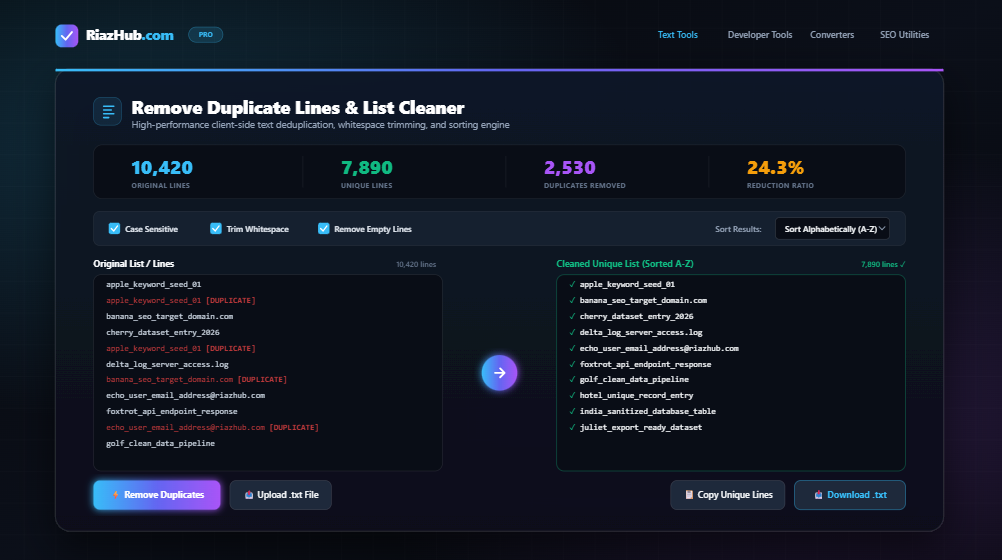
Managing large text datasets, email lists, URL databases, code logs, or keyword lists can quickly become overwhelming when cluttered with duplicate entries, uneven spacing, or blank lines. Manual deduplication is not only tedious and time-consuming, but it is also highly prone to human error.
That is why we built the RiazHub Remove Duplicate Lines & List Cleaner—a free, high-performance, browser-based utility designed to clean, deduplicate, format, and sort your text lists instantly.
In this guide, we will explore how duplicate lines impact data quality, how our deduplication engine works, and how you can use the Remove Duplicate Lines Tool on RiazHub to streamline your workflow in just a few clicks.
Why Is List Cleaning and Deduplication Important?
Duplicate data creates unnecessary bloat and inefficiency across almost every digital workflow:
- SEO & Keyword Research: When analyzing thousands of search queries or backlink targets, duplicate keywords skew search volume metrics and lead to wasted marketing budgets.
- Email Marketing & Outreach: Sending duplicate marketing emails to the same recipient damages sender reputation, increases spam complaints, and inflates email service provider costs.
- Software Development & Database Management: Duplicate database entries, duplicate CSS/JS classes, or repeated environment variables cause execution bugs, memory overhead, and bloated configuration files.
- Data Science & Analytics: Clean input data is fundamental to accurate reporting. Duplicate records corrupt statistical models, machine learning datasets, and analytical visualizations.
Introducing RiazHub’s Online Remove Duplicate Lines Tool
The RiazHub Remove Duplicate Lines Tool is a powerful online utility crafted for speed, privacy, and ease of use. Unlike server-side converters that upload your confidential files to external servers, RiazHub processes your text entirely inside your web browser using modern JavaScript engines.
Key Features
- ⚡ Real-Time Client-Side Processing: Zero server lag. Your text is processed instantly in your browser without uploading data to any external server.
- 🔒 100% Secure & Private: Confidential list data, email addresses, and API keys remain completely safe on your device.
- 🎛️ Customizable Deduplication Controls:
- Case Sensitivity Toggle: Choose whether
Appleandappleare treated as duplicate entries or unique items. - Trim Whitespace: Automatically strips leading, trailing, and redundant spaces before comparing lines.
- Remove Empty Lines: Eliminates blank rows to give you a clean, compact output list.
- Case Sensitivity Toggle: Choose whether
- 🔀 Advanced Sorting Options: Sort your deduplicated results Alphabetically (A-Z), Reverse Alphabetically (Z-A), or keep the original appearance order.
- 📁 Local .txt File Upload & Download: Import
.txt,.csv, or.logfiles directly from your computer, and export cleaned lists with auto-generated filenames containing site branding, exact date, and timestamp (e.g.,RiazHub_Cleaned_List_2026-07-31_15-24-00.txt). - 📊 Live Statistical Dashboard: Track original line count, unique lines remaining, duplicates removed, and percentage reduction in real time.
- 🌓 Adaptive Dark / Light Mode: Seamlessly integrates with your browser and system theme preferences for maximum reading comfort.
Step-by-Step Guide: How to Clean Your Text Lists
Deduplicating your data using the Remove Duplicate Lines Utility on RiazHub takes only a few simple steps:
Step 1: Open the Tool
Navigate to the official RiazHub Remove Duplicate Lines Page.
Step 2: Input Your Raw Text or File
You can provide your uncleaned text in two ways:
- Copy & Paste: Paste your raw list directly into the left Original List / Lines text area.
- Upload File: Click Upload .txt File or drag and drop your text file directly onto the input box.
Step 3: Select Your Options
Customize your cleaning settings using the control toolbar:
- Check Case Sensitive if letter capitalization matters.
- Keep Trim Whitespace enabled to clean extra spaces around items.
- Keep Remove Empty Lines checked to strip out blank spaces.
- Select your desired Sort Results preference (e.g., Sort Alphabetically A-Z).
Step 4: Process and Export
Click Remove Duplicates (or let real-time processing handle it automatically). Your deduplicated, formatted list will instantly appear in the Cleaned Unique List text area.
To save your output:
- Click Copy Unique Lines to copy the cleaned list to your clipboard with one click.
- Click Download .txt to download a time-stamped text file directly to your device.
Common Use Cases
1. SEO & Content Strategists
Clean keyword seeds, remove duplicate URLs from sitemaps, sanitize backlink prospect lists, and deduplicate search queries before importing them into SEO suites like Ahrefs, SEMrush, or Google Search Console. You can quickly deduplicate large keyword sets on RiazHub Remove Duplicate Lines.
2. Email Marketers & Sales Teams
Ensure your lead lists contain unique email addresses before initiating outreach campaigns. Deduplicating subscriber lists prevents duplicate sends, reduces bounce rates, and lowers campaign expenses.
3. Programmers & System Administrators
Clean server logs, extract unique IP addresses, sanitize environment variable lists, remove duplicate CSS selectors, or deduplicate SQL query lists. Try processing your developer logs on RiazHub List Cleaner.
4. Students, Researchers & Editors
Format reference lists, extract unique items from survey responses, organize bibliography citations, or clean up large bulleted lists efficiently.
Why Choose RiazHub’s Free Online List Cleaner?
While there are basic text tools available on the web, many are loaded with intrusive popups, slow server turnarounds, or strict file size limitations.
The RiazHub Remove Duplicate Lines Tool stands out because:
- It requires no registration, no signup, and no subscription fee.
- It features unlimited list capacity powered by modern client-side JavaScript.
- It prioritizes data privacy, keeping your text strictly on your machine.
- It provides timestamped file downloads for clear version tracking.
Frequently Asked Questions (FAQ)
Is my data uploaded to any server?
No. All deduplication, trimming, and sorting logic runs 100% locally inside your web browser. Your text never leaves your computer.
How does the timestamped file download work?
When you click Download .txt, the tool dynamically generates a file named RiazHub_Cleaned_List_YYYY-MM-DD_HH-MM-SS.txt matching your local date and time, ensuring your saved files remain organized.
What file formats are supported for upload?
You can upload any plain text format including .txt, .csv, .log, .text, or .json files.
Clean Your Text Lists Today
Stop wasting valuable hours removing duplicate lines by hand. Streamline your data workflows, clean your lists in seconds, and boost your productivity today.
👉 Access the free tool now at RiazHub Remove Duplicate Lines & List Cleaner.