
Whether you are a developer formatting raw code, a data analyst cleaning exported spreadsheets, a student polishing a research paper, or a content writer copy-pasting text from PDFs and web pages, dealing with unwanted blank lines and erratic spacing can quickly become a frustrating headache.
Unnecessary blank lines disrupt readability, waste file storage, mess up code logic, and clutter lists. Manually deleting empty lines row by row in a large document takes valuable time and leads to human error. Fortunately, you can instantly clean up any text document using the free online Remove Empty Lines & Blank Space Cleaner hosted on RiazHub.com.
Need to Clean Your Text Instantly?
Purge blank lines, collapse extra line breaks, and trim whitespace in seconds with zero file uploads or server transfers.
Why Do Extra Empty Lines and Blank Spaces Appear?
Unexpected empty lines often appear due to conflicting system line break standards and formatting conversions:
- Copy-Pasting from PDFs & Web Pages: When copying content from PDF documents or websites, hidden HTML tags, paragraph breaks, and table boundaries are converted into multiple consecutive blank lines.
- Cross-Platform Text Transfers (Windows vs. Unix vs. Mac): Windows systems use
\r\n(Carriage Return + Line Feed) while Unix/Linux systems use\n. Moving text files across different operating systems frequently generates invisible whitespace lines. - Database & CSV Exports: Database queries, CSV file dumps, and JSON logs often export empty records as blank line padding.
- Code Formatting & Indentation: Programmers frequently encounter accidental tab spaces and trailing whitespace inside nested blocks of code.
Key Features of RiazHub’s Blank Space Cleaner
The Remove Empty Lines Tool on RiazHub offers a comprehensive set of powerful filtering options designed to give you total control over how your text is cleaned:
How to Use the Free Tool on RiazHub.com
Cleaning your document with the RiazHub Remove Empty Lines Tool requires just three simple steps:
- Paste or Drag Your File: Copy your raw text into the input field or drag and drop a
.txtfile directly into the editor using the Upload .txt File button. - Select Your Cleaning Options: Choose whether to purge all empty lines, consolidate multiple line breaks, or trim line padding.
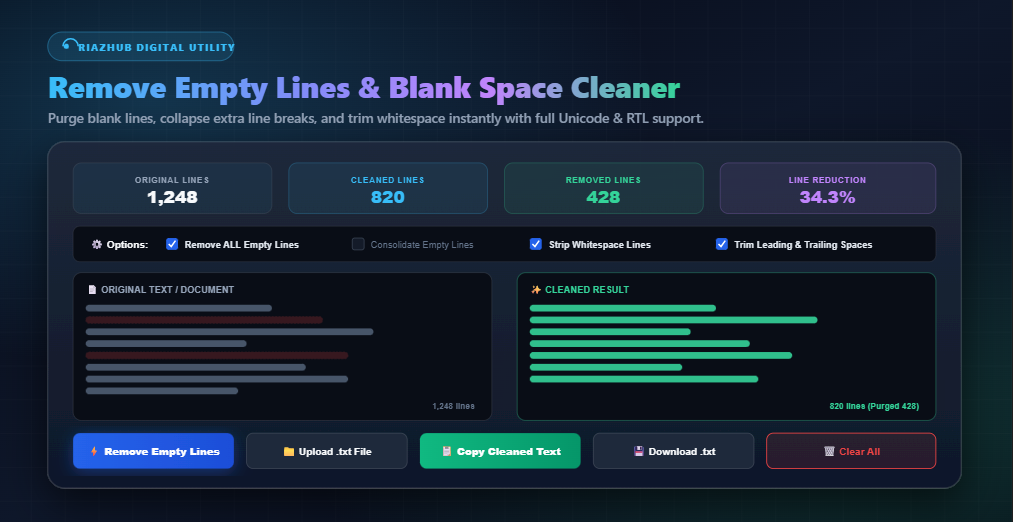
- Copy or Download Cleaned Text: Click Remove Empty Lines to see real-time line count statistics. Click Copy Cleaned Text to copy the output to your clipboard or Download .txt to save it directly to your device.
Why Choose RiazHub’s Remove Empty Lines Tool?
Unlike generic online text tools, the Remove Empty Lines Utility on RiazHub provides key security and usability advantages:
- 100% Private Client-Side Processing: Your text is processed entirely in your web browser using high-speed JavaScript. No text, data, or files are ever sent to external servers or logged in any database.
- Universal Unicode & Bi-directional (RTL/LTR) Support: Accurately formats text in English, Arabic, Urdu, Russian, Chinese, Japanese, and any global character set. Right-to-Left (RTL) scripts align right automatically as you type.
- Real-Time Line Count Analytics: Displays immediate statistics including Original Lines, Cleaned Lines, Lines Removed, and exact Percentage Line Reduction.
- Mobile-Friendly & Lightning Fast: Optimized for smartphones, tablets, and desktop computers with light and night mode support.
Ready to Clean Up Your Documents?
Try the RiazHub Remove Empty Lines & Blank Space Cleaner today. It is completely free, instant, and requires no registration or software installation.