
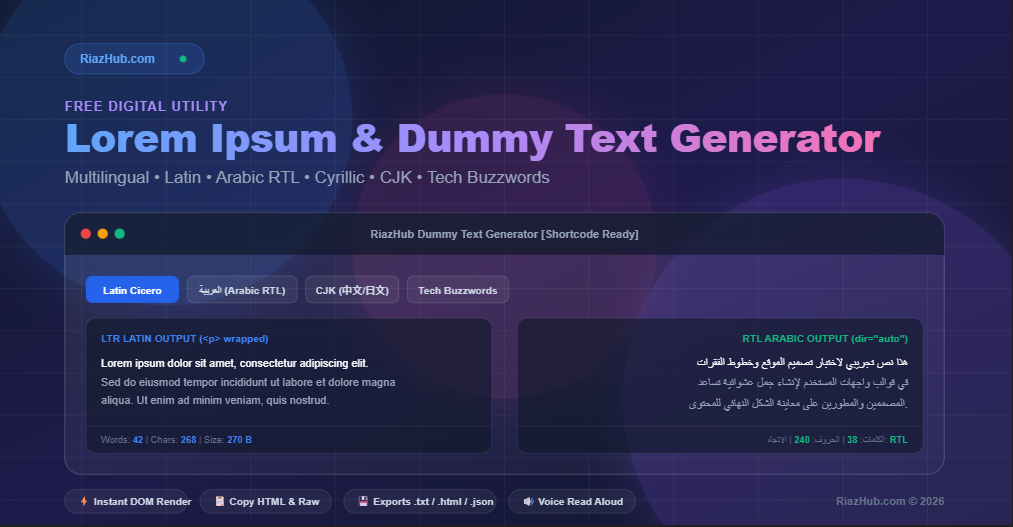
That is why we built the free RiazHub Dummy Text Generator—a feature-packed utility designed specifically to streamline typography testing for developers and designers worldwide.
🌟 Why Standard Lorem Ipsum Isn’t Enough Anymore
Standard “Lorem Ipsum” works well for English and Western European language layouts. However, modern global applications demand multi-script layout validation:
- Right-to-Left (RTL) Layout Shifts: Arabic and Urdu flow from right to left, altering navigation alignment, padding, and text wrapping. Using the RiazHub Multilingual Dummy Text Generator, you can instantly produce pseudo-Arabic placeholder text with automatic
dir="auto"bi-directional alignment. - CJK Typography Density: Chinese, Japanese, and Korean scripts do not use traditional space-separated word boundaries in the same way European languages do. Testing with CJK dummy text ensures line breaks and character spacing render cleanly.
- Slavic & Eastern European Script Testing: Cyrillic text uses unique ascender and descender heights that impact vertical rhythm in grid systems.
- Niche Industry Wireframing: Standard Latin can feel detached when pitching tech startups or culinary websites. Specialized presets like Tech Buzzwords or Foodie & Gourmet Ipsum add authentic context to design prototypes.
🛠️ Key Features of the RiazHub Dummy Text Generator
The RiazHub Dummy Text Generator provides an array of developer-focused controls to save you time during wireframing and prototyping:
1. Multi-Script Language Presets
Switch seamlessly between multiple script dictionaries:
- Latin (Classic Cicero): Authentic Latin Cicero text starting with classic “Lorem ipsum dolor sit amet…”.
- Arabic / Urdu Script: Middle Eastern placeholder text with dynamic RTL directionality.
- Cyrillic Script: Eastern European placeholder text for Slavic typography.
- CJK Script: Chinese, Japanese, and Korean character patterns.
- Tech & Developer Buzzwords: Modern tech jargon (“cloud-native”, “full-stack”, “kubernetes”, “microservices”).
- Foodie & Gourmet Ipsum: Culinary placeholder text (“artisanal”, “sourdough”, “truffle”, “brioche”).
2. Precise Unit & Quantity Controls
Generate exactly what your layout requires—from Paragraphs, Words, and Sentences to Bullet Lists (Unordered <ul>) and Numbered Lists (Ordered <ol>). Use the interactive range slider or numeric input to generate anywhere from 1 to 100 units instantly.
3. Automated HTML Tag Formatting
Save time when drafting blog templates or CMS themes. Select between Plain Text, Paragraph <p> tags, Headings <h1>/<h2>, or Raw HTML Code view.
4. Text Case Converters
Transform your generated text on the fly: UPPERCASE, lowercase, and Title Case.
5. Live Typography Font Size Preview & Audio Playback
Adjust the preview font size slider (12px to 26px) to test how your dummy text looks at different typography sizes, and listen to an audio preview powered by browser speech synthesis.
6. Multi-Format File Exports (.txt, .html, .json)
Need your dummy text for offline development or automated API testing? Download your output instantly as a .txt file, structured .html document, or a clean .json payload with a single click on the RiazHub Dummy Text Generator.
💡 How to Use the Tool in Your Workflow
- Visit the RiazHub Dummy Text Generator.
- Select your desired Language Preset (Latin, Arabic/Urdu, Cyrillic, CJK, Tech, or Foodie).
- Choose your Generation Unit (Paragraphs, Words, Sentences, or Lists) and adjust the Quantity Count.
- Pick your HTML Tag Options (Plain Text,
<p>Tags, or Heading Tags). - Click Generate Text.
- Use Copy Text, Copy HTML, or Download to export your text into your Figma file, Webflow project, or code editor.
❓ Frequently Asked Questions (FAQ)
What is Lorem Ipsum dummy text?
Lorem Ipsum is standardized placeholder text used in printing, web design, and typography to demonstrate the visual form of a document or web page without relying on meaningful content.
Why is Arabic & RTL dummy text important?
Right-to-Left (RTL) scripts behave differently in web layouts. Using Arabic dummy text on the RiazHub Dummy Text Generator ensures that text alignment, margins, flex direction, and typography render correctly in RTL mode before launching your site.
Can I copy raw HTML tags directly?
Yes! The RiazHub Dummy Text Generator includes a dedicated Copy HTML button as well as a Raw HTML Code display option so you can copy pre-wrapped <p>, <h2>, and <li> tags directly into your HTML/PHP templates.
Is the RiazHub Dummy Text Generator free to use?
Yes, it is 100% free with no registration required. Try the RiazHub Dummy Text Generator today for all your design and development projects!