
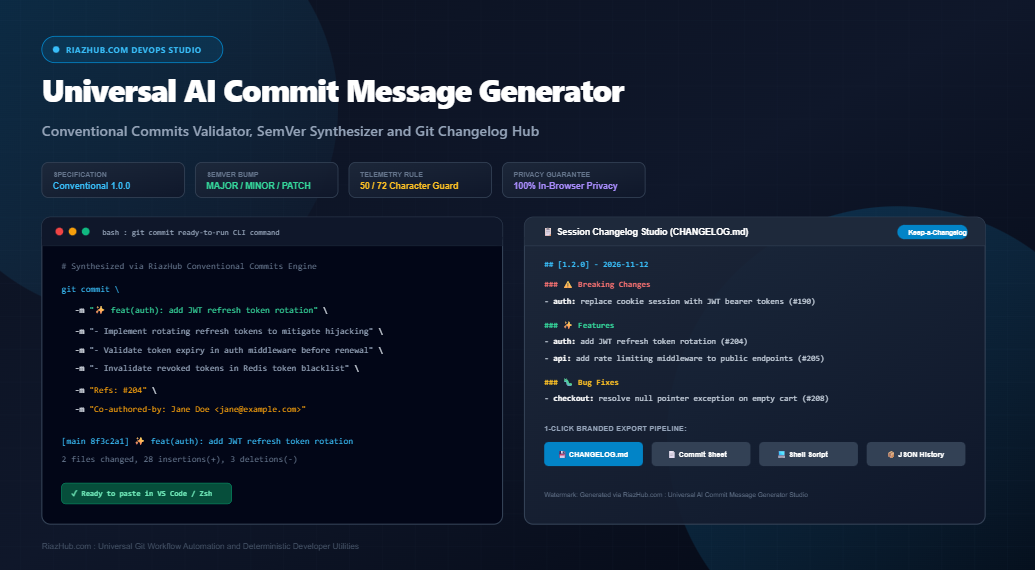
Mastering Git Commit Messages: The Complete Guide to Conventional Commits, SemVer Automation, and Release Notes Generation
Every software development team has encountered repository histories cluttered with vague commits like “fix typo”, “updates”, “WIP”, or “changes”. These cryptic commit logs slow down code reviews, complicate debugging sessions with git bisect, and break automated continuous integration pipelines. Standardizing your commit history with the Conventional Commits specification transforms your Git history into a clean, human-readable, and machine-parseable changelog.
To simplify this process and eliminate guesswork, developer teams can leverage the Universal AI Commit Message Generator, Conventional Commits Validator and Git Changelog Studio on RiazHub.com. This in-browser tool transforms raw code diffs and change summaries into structured Conventional Commits, calculates Semantic Versioning bumps, checks character limits, and compiles automated release notes without sending a single line of proprietary code to third-party cloud servers.
Standardize Your Commits in Seconds
Generate compliant Conventional Commits, enforce the 50/72 rule, and compile automated release notes directly in your browser.
1. Why Standardized Git Commit Messages Matter
A version control commit history serves as the primary technical ledger of a software project. When multiple engineers collaborate across microservices, frontend applications, and libraries, disciplined commit conventions deliver immediate operational benefits:
- Accelerated Code Reviews: Pull requests containing structured commits allow reviewers to evaluate feature changes, refactoring steps, and bug fixes incrementally.
- Automated Release Workflows: Tools such as Semantic Release, Release Please, and standard CI/CD runners can automatically analyze your commit stream to determine whether a release requires a MAJOR, MINOR, or PATCH version bump.
- Instant Automated Changelogs: You can automatically generate structured
CHANGELOG.mdfiles grouped by Features, Fixes, and Breaking Changes without manually scanning pull request tabs. - Precise Root-Cause Analysis: When production regressions occur,
git log --grep="fix(auth)"orgit bisectallows engineers to isolate the exact commit that introduced the bug.
2. Understanding the Conventional Commits 1.0.0 Specification
The Conventional Commits specification is a lightweight convention on top of standard Git commit messages. It provides a structured rule set for creating explicit commit histories, which makes it easy to write automated tools on top of them.
The Standard Commit Message Structure
A compliant Conventional Commit follows this anatomical layout:
<type>[optional scope][!]: <description>

[optional body]

[optional footer(s)]
Core Commit Types
The specification defines distinct types that communicate the intent of your code modifications:
| Commit Type | Gitmoji | Semantic Meaning | SemVer Impact |
|---|---|---|---|
feat |
✨ | Introduces new backward-compatible functionality to the codebase | MINOR (0.1.0) |
fix |
🐛 | Patches a bug or resolves an unexpected behavior in production | PATCH (0.0.1) |
refactor |
♻️ | Restructures source code without modifying runtime behavior or fixing bugs | PATCH (0.0.1) |
perf |
⚡ | Code modification specifically engineered to improve execution speed or resource utilization | PATCH (0.0.1) |
docs |
📚 | Documentation-only adjustments such as README updates, docstrings, or API schemas | NONE (No Bump) |
style |
💄 | Formatting, whitespace, semicolons, or lint corrections that do not alter code logic | NONE (No Bump) |
test |
✅ | Adding missing test suites or modifying existing unit, integration, or e2e tests | NONE (No Bump) |
build |
📦 | Changes affecting build tools, task runners, external packages, or package managers | PATCH (0.0.1) |
ci |
👷 | Modifications to continuous integration pipelines (GitHub Actions, GitLab CI, CircleCI) | NONE (No Bump) |
chore |
🔧 | Routine maintenance, tooling scripts, or auxiliary task configurations | NONE (No Bump) |
revert |
⏪ | Reverts a previously merged commit hash | PATCH (0.0.1) |
Instead of manually formatting these headers, developers can use the Conventional Commits Validator on RiazHub.com to verify commit types, attach optional scopes (e.g. feat(auth): or fix(api):), and automatically calculate the corresponding SemVer release tier.
3. The Golden 50/72 Character Rule in Git
One of the most widely acknowledged best practices in Git history engineering is the 50/72 rule:
The 50/72 Git Rule Explained
1. Limit the subject line to 50 characters: Keeping the subject header at or below 50 characters ensures that the message renders crisply without truncation in git log --oneline, GitHub Pull Request headers, and Slack/Teams webhook notifications.
2. Separate subject from body with an empty line: Git tooling uses this blank line to distinguish between the commit summary and the descriptive body payload.
3. Wrap body lines at 72 characters: Terminal pagers like less default to 80-column terminal windows. Wrapping commit body text at 72 characters leaves adequate margin space for terminal indentation without jagged word wrapping.
The AI Commit Message Generator Studio provides real-time character telemetry meters. As you type or paste your changes, a dynamic meter tracks your subject length, warning you if your header exceeds the 50-character target or breaks the 72-character threshold.
4. How the RiazHub In-Browser Git Synthesis Engine Works
The studio engine is designed from the ground up for high developer speed and comprehensive privacy. When you paste raw code changes or type a change summary, the engine executes four distinct analysis pipelines directly inside your browser:
A. Raw Git Diff Parser
If you paste the output of git diff, the parser automatically detects file headers (diff --git a/src/... b/src/...), identifies added functions, methods, and classes, tallies insertion and deletion statistics, and intelligently infers the appropriate scope (e.g. detecting auth from src/controllers/auth.controller.ts).
B. Imperative Mood Normalizer
A common mistake in commit messages is writing in past tense (“added validation”, “fixed bug”, “updated schema”). The Conventional Commits standard requires the imperative mood (“add validation”, “fix bug”, “update schema”), matching how Git itself formats merge commits (“Merge pull request #…”). The engine runs rule-based linguistic normalization to convert past-tense verbs and gerunds into clean imperative verbs.
C. Multi-Variant Commit Generation
Rather than producing only a single option, the generator builds three distinct commit formats simultaneously:
- Variant 1 (Concise One-Liner): Optimized for rapid merges and linear Git rebase workflows (e.g.
✨ feat(auth): add JWT refresh token rotation). - Variant 2 (Detailed Multi-Line Commit): Formats the header alongside bulleted change summaries and footer references (e.g.
Refs: #204,Co-authored-by: ...). - Variant 3 (Enterprise Structured Commit): Organizes changes into explicit WHY, WHAT, and TESTING verification sections for regulated enterprise teams.
D. Ready-to-Run CLI Command Builder
Instead of manually typing multiple -m flags into your terminal, the studio automatically escapes special characters, quotes, and newlines to construct an executable command ready to paste into VS Code Terminal, Git Bash, or Zsh:
git commit -m "✨ feat(auth): add JWT refresh token rotation" \
  -m "- Implement rotating refresh tokens to mitigate token hijacking" \
  -m "- Validate token expiry in auth middleware before session renewal" \
  -m "Refs: #204"
5. 100% In-Browser Privacy and Security Guarantees
Many online AI developer tools send your raw source code, repository diffs, and branch names to remote third-party cloud servers or external API endpoints. For enterprise engineers, open-source maintainers, and security-conscious developers, this introduces serious compliance risks:
Zero Cloud Leaks: Complete Client-Side Isolation
The RiazHub Git Changelog Studio runs 100% locally in your browser memory using pure vanilla JavaScript DOM and HTML5 Blob APIs.
- Zero server-side transmission of proprietary code diffs.
- Zero transmission of private Jira or GitHub issue identifiers.
- Zero leaks of internal team emails or co-author trailers.
- Full offline and air-gapped compatibility once loaded.
6. Compiling Automated CHANGELOG.md Release Notes
Keeping release documentation synchronized with code merges is often tedious. With the studio’s session queue feature, developers can accumulate commits as they stage changes across a release cycle.
Whenever you generate a commit, you can click “Add to Changelog” to store it in your session queue. The studio automatically sorts and groups items adhering to the Keep a Changelog 1.0.0 specification:
- ⚠️ Breaking Changes: Highlighted at the top of the release notes.
- ✨ Features: New user-facing or API capabilities.
- 🐛 Bug Fixes: Resolved defects and patches.
- ⚡ Performance Improvements: Optimized queries and caching routines.
- ♻️ Code Refactoring: Internal structural reorganizations.
You can customize the release version tag (e.g. 1.2.0), pick the release date, inspect overall SemVer bump recommendations, and export the compiled Markdown file with one click using the RiazHub Release Notes Hub.
Try the Universal Git Commit & Changelog Studio
Experience fast, deterministic, private commit generation and automated release documentation on RiazHub.com.
7. Step-by-Step Workflow: From Code Diff to Merged Release
Follow this simple five-step developer workflow to standardize your repository commits:
- Inspect Your Local Changes: Run
git diffin your project repository to inspect your staged modifications. - Ingest Into the Studio: Navigate to the AI Commit Message Generator Studio and paste the diff or type a brief summary of what you changed.
- Assign Type and Scope: Select the Conventional Commit chip (e.g.
feat,fix,refactor) and enter an optional scope such asapiorcheckout. - Copy the CLI Command: Switch to the Terminal CLI Preview tab and copy the ready-to-run
git commitcommand. Paste it directly into your terminal. - Queue for Release Notes: Click “Add to Changelog” to store the commit in your session ledger. When your milestone is ready, download the compiled
riazhub-changelog-[version].mdfile.
8. Frequently Asked Questions (FAQ)
No. The synthesis and validation algorithms run purely in client-side JavaScript. There are no API keys, accounts, or subscriptions required.
If the commit is flagged as a breaking change (or uses the ‘!’ suffix), the engine assigns a MAJOR bump. New features (‘feat’) trigger a MINOR bump, while bug fixes (‘fix’) and performance patches (‘perf’) trigger a PATCH bump. Documentation, formatting, and chores require no version bump.
Yes. All three variant cards provide editable text areas. You can tweak subject descriptions or bullet points directly, and the live 50/72 character telemetry counters will update in real time.
You can export formatted Markdown release notes (CHANGELOG.md), plain text commit sheets (.txt), executable bash scripts (.sh), structured JSON history logs, or print clean PDF release manifests.
Conclusion
Standardizing commit messages is one of the highest-leverage practices an engineering team can adopt. It eliminates ambiguity, streamlines pull request workflows, and unlocks automated Semantic Versioning and changelog publishing.
Supercharge your Git workflow today with the free, browser-based Universal AI Commit Message Generator, Conventional Commits Validator and Git Changelog Studio on RiazHub.com.
Universal AI Commit Message Generator, Conventional Commits Validator and Git Changelog Studio
Transform raw code diffs and change summaries into clean, standardized Conventional Commits. Enforce the 50/72 character rule, calculate SemVer version bumps, copy ready-to-run Git CLI commands, and export branded CHANGELOG.md files.
Change Ingestion and Context Deck
Step 1: InputStandard Conventional One-Liner
Detailed Commit with Bullet Body and Footers
Enterprise Structured Commit (Motivation, Technical Changes, Testing)
# Generate a commit to inspect ready-to-run Git CLI command
git commit -m "✨ feat(auth): add JWT refresh token rotation" \
  -m "- Implement rotating refresh tokens to mitigate token hijacking" \
  -m "- Validate token expiry in auth middleware before session renewal" \
-m "Refs: #204"Your session changelog queue is empty.
Generate commits and click "➕ Add to Changelog" to compile release notes.# Changelog
All notable changes to this project will be documented in this file.
The format is based on [Keep a Changelog](https://keepachangelog.com/en/1.0.0/),
and this project adheres to [Semantic Versioning](https://semver.org/spec/v2.0.0.html).
Generated via RiazHub.com : Universal AI Commit Message Generator Studio
## [1.0.0] - 2026-11-20
### ✨ Features
- Initial release commit configurationGit Best Practices and Conventional Commits Guidelines
The 50/72 Rule in Git Workflows ▾
The 50/72 rule is the industry gold standard for readable Git logs and seamless CI/CD parsing:
- 50 Characters for Subject Line: Keeps commit messages concise and prevents truncation in
git log --oneline, GitHub Pull Request lists, and Slack/Discord webhook alerts. - Blank Line Separation: Always separate the subject line from the body with an empty line so Git tooling recognizes the header properly.
- 72 Characters for Body Lines: Pagers such as
lessin terminal environments default to 80-column margins. Wrapping commit body text at 72 characters leaves ample room for indentation without messy line wraps.
Conventional Commits 1.0.0 and Semantic Versioning (SemVer) ▾
Conventional Commits creates a lightweight convention on top of commit messages, mapping directly to Semantic Versioning (SemVer 2.0.0):
- fix: Correlates to a PATCH bump (e.g. 1.0.0 to 1.0.1) for backward-compatible bug resolutions.
- feat: Correlates to a MINOR bump (e.g. 1.0.0 to 1.1.0) when introducing new backward-compatible functionality.
- BREAKING CHANGE (or '!'): Correlates to a MAJOR bump (e.g. 1.0.0 to 2.0.0) whenever breaking API changes or schema modifications occur.
- chore, docs, style, test, ci: Produce NO version bump in automated release pipelines (e.g. Semantic Release or Release Please).
100% Client-Side Privacy Guarantee ▾
Security and repository privacy are foundational to this tool:
- Zero Server Transmission: All diff parsing, keyword extraction, commit synthesis, imperative verb normalization, and file exports run exclusively inside your browser memory using pure JavaScript DOM and Blob APIs.
- No Cloud Leaks: Proprietary diffs, private branch names, internal Jira/GitHub issue IDs, and co-author emails are never transmitted across the network.
- Air-Gapped & Offline Compatible: Once loaded, this tool operates seamlessly offline without external API keys or cloud dependencies.