
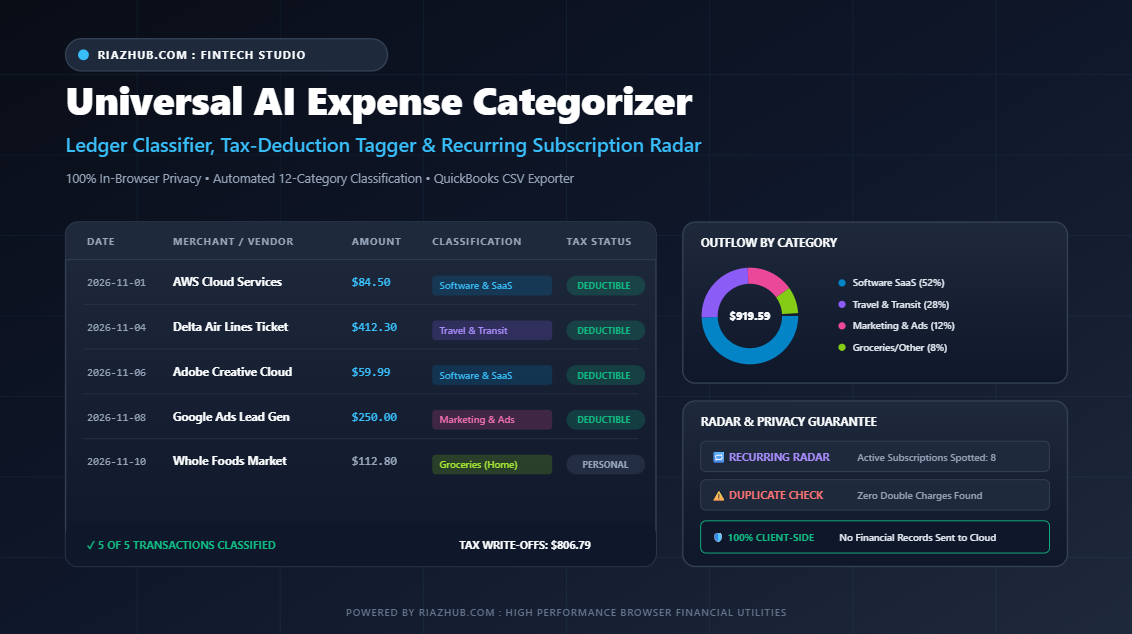
Mastering Small Business and Freelance Bookkeeping: The Complete Guide to Automated Expense Categorization and Tax Deductions
Tracking commercial cash flow, sorting credit card receipts, and separating personal living expenses from ordinary business write-offs remains one of the most tedious administrative burdens for freelancers, consultants, digital creators, and small business owners. Modern online banking portals provide endless downloadable CSV logs, but they rarely label transactions into clean accounting categories. Fortunately, modern in-browser tools such as the Universal AI Expense Categorizer, Ledger Classifier and Tax-Deduction Studio allow you to categorize months of statements in seconds without transmitting sensitive personal records to third-party servers.
The High Cost of Uncategorized Business Expenses
When financial ledgers remain unorganized throughout the tax year, companies suffer in two major ways: overpaying tax authorities due to missed deductible write-offs, and losing operational capital to unnoticed recurring subscriptions and duplicate vendor billing.
According to recent accounting surveys, independent contractors routinely fail to claim between 15% and 30% of their eligible operational business deductions simply because small expenses (such as $15 software seats, $4 parking fees, $25 cable adapters, and domain renewals) get lost inside cluttered bank statements. At the same time, companies with distributed software stacks experience severe “subscription creep,” where inactive tools continue charging corporate cards every month.
Using an automated browser tool like the RiazHub AI Expense Categorizer transforms messy raw transaction statements into standardized double-entry ready ledgers that protect your bottom line.
Why 100% Client-Side Financial Privacy Is Non-Negotiable
Traditional online accounting software and AI apps often require users to upload raw bank statements or connect live credentials through third-party aggregation APIs. While convenient, this architecture presents severe security and compliance liabilities:
- Confidential Vendor Intelligence: Raw statements reveal your subcontractors, wholesale suppliers, proprietary tools, and fee structures.
- Account Number Exposure: Many bank exports include masked card digits, routing numbers, and personal home addresses in statement headers.
- Data Retention and AI Training Risks: Cloud platforms often reserve the right to ingest user logs for machine learning training and model optimization.
In contrast, the Universal AI Expense Categorizer Studio processes all statements 100% locally in your web browser. Utilizing native HTML5 FileReader and client-side JavaScript execution, zero bytes of your financial statements ever leave your device or touch a web server.
Understanding the 12 Standard Accounting Categories
Consistent classification is the bedrock of IRS and IFRS compliance. When you ingest data through the AI Expense Categorizer and Ledger Classifier, your transactions are parsed across twelve standard commercial categories:
| Category | Typical Vendors & Examples | Standard Tax Treatment (Business Mode) |
|---|---|---|
| Software & Cloud SaaS | AWS, Google Cloud, GitHub, Adobe, Figma, Zoom, Hostinger, OpenAI | 100% Deductible Ordinary Operating Expense |
| Travel & Transit | Uber, Lyft, Delta Airlines, Marriott, Amtrak, Fuel, Tolls | Deductible when incurred for bona fide business purposes |
| Meals & Client Dining | Starbucks, Cafes, Restaurants, Catering, Food Delivery | 50% to 100% Deductible depending on local tax jurisdiction |
| Office Supplies & Equipment | Apple Store, Staples, Office Depot, Best Buy, Monitors, Cables | 100% Deductible or Section 179 depreciation |
| Marketing & Advertising | Google Ads, Meta Ads, LinkedIn Ads, Mailchimp, SEO software | 100% Deductible Operating Expense |
| Utilities & Telecom | Verizon, AT&T, Broadband Fiber, Electricity, Mobile Carrier | Deductible (full or proportional for home office) |
| Payroll & Contractors | Gusto, Upwork, Fiverr, Subcontractors, Retainers, Legal fees | 100% Deductible Business Expense |
| Rent & Facilities | WeWork, Regus, Commercial leases, Storage units, Coworking | 100% Deductible Facilities Expense |
| Groceries & Household | Costco, Walmart, Whole Foods, Supermarkets | Non-deductible Personal Spend (Tracked for Personal Budget) |
| Healthcare & Insurance | Pharmacies, CVS, Medical clinics, Dental, Health insurance | Personal itemized or eligible under dedicated health plans |
| Shopping & Retail | Amazon general merchandise, Clothing stores, Department retail | Personal unless explicitly classified for business inventory |
| Uncategorized / Review Needed | Ambiguous merchant codes, peer transfers, cash withdrawals | Requires manual verification before ledger finalization |
Detecting Subscription Creep and Duplicate Charges
One of the standout features of the Universal AI Expense Categorizer is its built-in anomaly radar. Financial audits reveal that recurring software subscriptions are the fastest growing unchecked overhead cost for digital companies.
The studio normalizes messy merchant strings (for example, grouping AMZN MKTP US*2X49 and Amazon Marketplace together) to identify:
- Recurring Vendor Outflows: Discovers repeating charges across dates and projects annual run-rates, giving you clear visibility into ongoing commitments.
- Accidental Duplicate Charges: Flags twin transactions that carry matching amounts and identical normalized merchant names on the same or adjacent calendar days, allowing you to dispute merchant billing errors instantly.
Step-by-Step Guide: How to Categorize Your Statements in Under 60 Seconds
- Access the Studio: Launch the web utility at RiazHub AI Expense Categorizer Studio.
- Select Your Lens and Currency: Toggle between Business & Freelance Tax Prep and Personal & Household Budget mode. Choose your preferred currency symbol ($ USD, SAR, € EUR, £ GBP, AED, or PKR).
- Ingest Your Data: Drag and drop your local bank or credit card statement (.CSV or .TSV). Alternatively, paste raw transaction lines directly into the input console or use the Quick Single Expense bar.
- Review Classified Ledger: Inspect the categorized rows. Use inline dropdowns to adjust any category, or click the Tax Status badge to switch between deductible and personal spend.
- Inspect Visual Analytics: Click the Visual Spending Charts tab to analyze category percentages and horizontal vendor outflow charts rendered in crisp HTML5 Canvas graphics.
- Export Your Formatted Files: Download a QuickBooks-compatible CSV ledger, a comprehensive Markdown tax audit report, a high-resolution PNG chart, or a JSON ledger backup with a single click.
Ready to Clean Up Your Financial Records?
Stop spending entire weekends sorting through confusing bank statements. Experience instant, private, and automated financial bookkeeping today with the Universal AI Expense Categorizer, Ledger Classifier and Tax-Deduction Studio on RiazHub.com.
Frequently Asked Questions (FAQ)
- Does this tool store my bank statements?
- No. All parsing, categorization, regex classification, and chart rendering happen completely inside your browser memory. Nothing is ever transmitted to an external server or saved in cloud storage.
- Can I import the exported CSV into QuickBooks or Xero?
- Yes. The exported CSV file adheres to standard RFC-4180 formatting with designated Date, Merchant, Amount, Category, and Tax Status columns that can be imported directly into QuickBooks, Xero, Wave, or Microsoft Excel.
- Can I add custom rules for uncommon local merchants?
- Absolutely. Navigate to the Custom Merchant Rules tab inside the Expense Categorizer Studio to define rules such as: If merchant contains “XYZ Logistics” -> Assign “Payroll & Contractors”. Your custom rules are saved securely in your browser’s local storage.
RiazHub.com : Universal AI Expense Categorizer Studio
Official Financial Categorization and Tax-Deductible Ledger Audit
Universal AI Expense Categorizer, Ledger Classifier and Tax-Deduction Studio
Upload or paste any bank statement or receipt log to automatically sort every expense into clean accounting categories. Flag tax-deductible business write-offs, spot recurring subscriptions, visualize category charts, and export QuickBooks-ready CSVs 100% locally in your browser.
| Date | Merchant / Description | Amount | Assigned Category | Tax Status | Alert Radar | Action |
|---|