
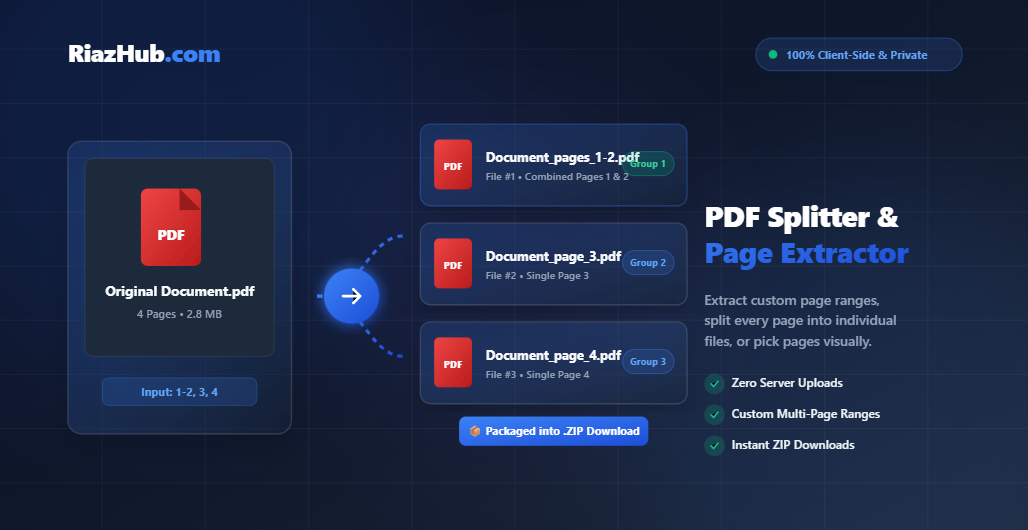
Dealing with bulky PDF files, lengthy reports, or multi-page scanned documents can often slow down your daily workflow. Whether you need to isolate specific chapters, separate contracts, or extract specific page ranges for sharing, an efficient and secure solution is essential. Welcome to the official guide on how to use our free Online PDF Splitter & Page Extractor on RiazHub.com.
Why Use the RiazHub Online PDF Splitter?
When working with confidential financial statements, legal records, or personal IDs, privacy and speed are non-negotiable. Our Browser-Based PDF Splitter Tool delivers enterprise-grade PDF page extraction with zero security risks.
- 🔒 100% Client-Side Privacy: Your PDF files are processed using local JavaScript libraries (pdf-lib & pdf.js). No uploads, no server storage, and zero data tracking.
- ⚡ Instant & Unlimited Processing: Say goodbye to uploading progress bars or daily conversion limits. Large multi-page documents split in milliseconds.
- 🎯 Smart Multi-Page Range Grouping: Enter complex page ranges like
1-2, 3, 4to extract pages 1 and 2 together into a single PDF, while keeping page 3 and page 4 as individual files. - 📦 Automatic ZIP Archiving: Whenever you generate multiple split files, our tool packages everything neatly into a high-speed
.zipdownload. - 🖼️ Interactive Page Thumbnail Grid: View clear canvas thumbnails of every page in your document and visually click to select or deselect pages.
- 📱 Fully Responsive & Cross-Platform: Works seamlessly on Windows, macOS, Android, iOS, tablets, and desktop browsers without installing software.
Three Easy Modes to Split PDF Documents
You can launch the PDF Page Extractor on RiazHub and choose from three tailored splitting modes depending on your workflow:
1. Custom Range Split Mode
This mode is ideal when you need to break down a document into specific multi-page sections or individual pages. Simply enter your target sequence into the range input box:
- Entering
1-3, 5, 8-10extracts Pages 1–3 into File #1, Page 5 into File #2, and Pages 8–10 into File #3. - Entering
1-2, 3, 4creates a 2-page PDF for Pages 1–2, a 1-page PDF for Page 3, and a 1-page PDF for Page 4, packaged together into a ZIP archive.
2. Split Every Page Mode
Need to separate an entire e-book, invoice batch, or multi-page scan into standalone single-page files? Select the Split Every Page tab. The tool automatically splits every page of your PDF into an individual file and downloads them all in a single compressed .zip archive.
3. Extract Selected Pages (Visual Grid Mode)
Prefer a visual approach? Switch to Extract Selected Pages to preview high-resolution canvas thumbnails of all pages. Use quick shortcut buttons like Select All, Select Even Pages, Select Odd Pages, or simply click individual thumbnails to customize your output.
Step-by-Step Guide: How to Split PDF Files Online
- Navigate to the Free PDF Splitter Tool at RiazHub.com.
- Drag and drop your PDF document into the interactive dropzone, or click Browse Files to select a document from your device.
- Choose your preferred splitting method: Custom Range, Split Every Page, or Extract Selected Pages.
- Review your output stats bar to verify the number of output files and targeted page counts.
- Click the primary Split & Download PDF button to save your extracted PDF document or compressed
.zipfile instantly.
Frequently Asked Questions (FAQ)
Q1: Is it safe to split confidential PDFs on RiazHub.com?
Yes, absolutely! The RiazHub PDF Splitter processes files entirely within your web browser using HTML5 FileReader APIs and client-side WebAssembly libraries. Your PDF content never leaves your browser cache.
Q2: Do I need to pay or create an account to split large PDFs?
No. Our tool is 100% free with no registration, no subscriptions, and no hidden file size limits.
Q3: How does the range syntax like “1-2, 3, 4” work?
Each comma separates an output file group. Entering 1-2, 3, 4 creates three files: File #1 containing pages 1 & 2, File #2 containing page 3, and File #3 containing page 4.
Q4: Can I use this tool on Android or iPhone?
Yes! Our responsive PDF Splitter web app is optimized for all mobile browsers, including Safari, Chrome, and Firefox on iOS and Android devices.
Ready to Split & Extract Your PDF Pages?
Try the ultra-fast, privacy-first PDF utility now. Zero uploads, zero waiting, and 100% free forever.