
Free Online Audio Trimmer & Cutter – 100% Private Browser Audio Editor
Why Choose Client-Side Audio Trimming?
Most traditional online media converters upload your confidential audio files to a remote server for processing. This raises significant privacy concerns and wastes your bandwidth, especially when working with long recordings or high-bitrate WAV files.
The RiazHub Free Audio Cutter operates using modern client-side Web Audio API technology. All audio decoding, peak waveform rendering, sample extraction, and encoding occur 100% locally on your device’s CPU and browser engine. Your audio files never leave your computer or phone!
Key Features & Technical Capabilities
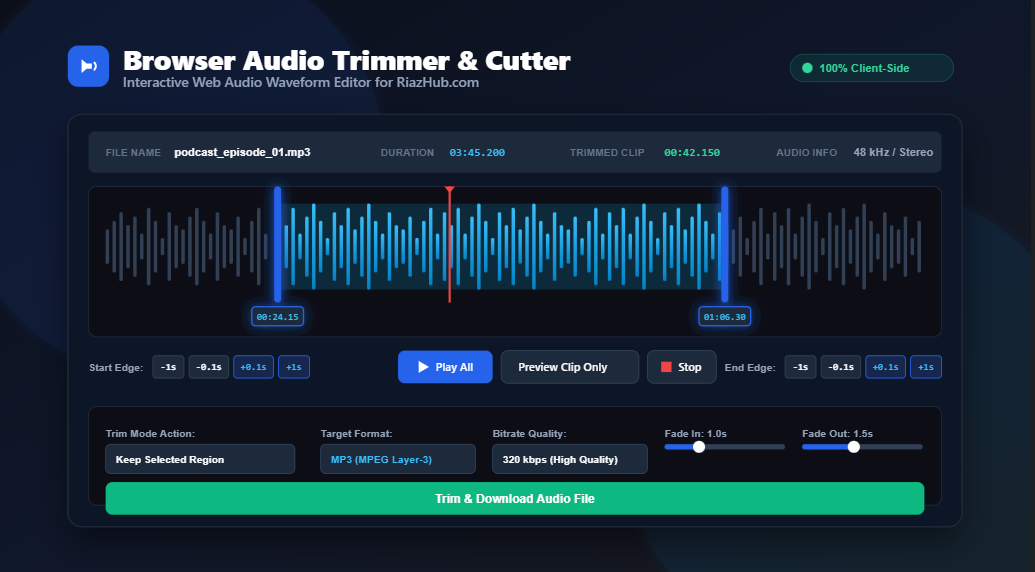
High-Resolution Interactive Waveform
Inspect audio peak amplitudes with dynamic 1x to 10x zoom magnification, real-time scrubber tracking, and highlighted selection region masks.
Precision Edge Controls (+/- Buttons)
Adjust Start and End trimming boundaries down to millisecond accuracy (`00:00:00.000`) using instant `-1s`, `-0.1s`, `+0.1s`, and `+1s` step buttons.
Flexible Trim Action Modes
Choose between Keep Selected Region (extract highlighted clip) or Remove / Cut Selected Region (splice and delete unwanted audio).
Smooth Fade In & Fade Out Effects
Eliminate abrupt sound pops and clicks by applying automated linear volume curves ranging from 0.0 seconds to 5.0 seconds.
Multi-Format Target Output Export
Re-encode your trimmed audio into MP3, WAV, AAC / M4A, OGG, WEBM, or FLAC with bitrate quality up to 320 kbps.
Universal Format Compatibility
Supports input decoding for MP3, WAV, AAC, M4A, OGG, FLAC, WEBM, OPUS, AIFF, WMA, and MP2 audio streams.
Step-by-Step: How to Trim Audio Files Online
- Upload Your Audio File: Visit the Online Audio Trimmer Tool Page and drag & drop your media file into the dropzone (or click to browse).
- Select the Trimming Region: Drag the visual Start (Left) and End (Right) handles across the visual waveform canvas, or use the dedicated
+/-quick adjustment buttons for precise timing. - Configure Audio Effects & Target Format: Select your preferred output format (e.g., MP3 320 kbps or raw WAV), trim action mode, and adjust Fade In / Fade Out sliders.
- Preview & Download: Click “Preview Selected Clip” to listen to your clip, then click “Trim & Download Audio” to instantly save the rendered file.
Supported Target Audio Formats Overview
Our Browser-Based Audio Trimmer provides multi-codec output options tailored for every workflow:
- MP3 (MPEG Layer-3): Universal audio standard compatible with all media players, car stereos, and mobile devices. Adjustable bitrates from 128 kbps to 320 kbps High Quality.
- WAV (Uncompressed PCM): Studio-grade uncompressed audio format ideal for music production, digital audio workstations (DAWs), and video editors.
- AAC / M4A (Advanced Audio Coding): High-efficiency audio format optimized for Apple iOS, iPhone ringtones, iTunes, and Android devices.
- OGG (Vorbis / Opus): Open-source compressed format offering superior audio quality at lower bitrates. Perfect for web development and game audio.
- WEBM (WebM Audio): Modern web stream format engineered for web applications and browser playback.
- FLAC (Free Lossless Audio Codec): Compressed lossless format preserving 100% original studio fidelity for audiophiles.
Practical Everyday Use Cases
1. Create Custom Mobile Ringtones
Cut your favorite chorus out of any song, add a 1-second fade-in, export as MP3 or M4A, and set it as your smartphone ringtone in seconds using the RiazHub Ringtone Trimmer.
2. Clean Up Podcast & Voice Recordings
Remove dead silence from the beginning and end of interview recordings or cut out background coughs using the “Remove / Cut Selected Region” trim mode.
3. Isolate Sample Clips for Video & Music Production
Extract precise drum loops, voiceovers, or background sound effects for YouTube videos, TikTok clips, and music beats without installing heavy desktop software.
Frequently Asked Questions (FAQ)
Q: Is the RiazHub Audio Trimmer completely free to use?
A: Yes! You can use the RiazHub Browser Audio Trimmer as many times as you like with zero hidden fees or premium paywalls.
Q: Are my uploaded audio files stored on any server?
A: No. All processing takes place locally inside your web browser using HTML5 Web Audio APIs. No files are uploaded to any server.
Q: Is there a file size limit?
A: Because processing relies on your device’s local memory, there are no artificial file size restrictions.
Q: Does it work on mobile phones?
A: Yes. The tool is fully responsive and supports touch gestures on iOS Safari and Android Chrome browsers.