
Building an In-Browser AI Chatbot: The Zero-API, Privacy-First Alternative to Costly Cloud AI
In modern web development and digital commerce, automated customer interactions are no longer a luxury they are a core operational expectation. Whether visitors are asking about product pricing, requesting return instructions, querying business hours, or looking for developer API documentation, instant responses directly impact conversion rates and brand reputation.
However, the current industry approach to chatbot deployment has created severe hurdles for small-to-medium businesses, WordPress creators, and independent developers. Traditional conversational AI implementations rely on external cloud models (such as OpenAI, Anthropic, or external SaaS platforms) that require ongoing API token billing, developer account provisioning, credit card attachments, and complex backend proxy servers. Even worse, external cloud bots introduce 1 to 3 seconds of network round-trip latency and transfer confidential visitor conversations and enterprise knowledge bases to third-party data centers.
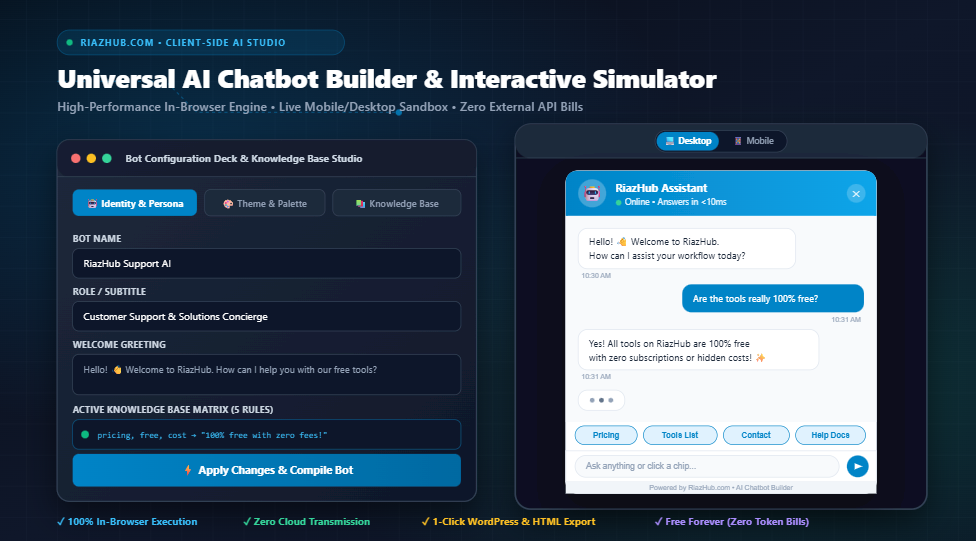
To solve this dilemma, we built the AI Chatbot Builder & Interactive Simulator Studio on RiazHub. This utility empowers any website owner to configure, customize, simulate, and export production-ready automated chatbots operating 100% inside the visitor’s browser runtime with zero cloud dependencies and zero running costs.
Why Client-Side Deterministic Chatbots Outperform Cloud AI for 90% of Websites
While large language models (LLMs) excel at open-ended creative writing and multifaceted analysis, the vast majority of customer support queries fall into known, predictable categories: pricing schedules, return policies, feature comparisons, contact channels, and technical specifications. Using a heavy cloud LLM for these deterministic questions introduces unnecessary points of failure.
| Evaluation Metric | Cloud-Based AI Chatbots (LLMs) | RiazHub Client-Side Chatbot Studio |
|---|---|---|
| Ongoing API Costs | $0.002 to $0.03 per message + monthly SaaS fees | $0.00 Forever (100% Free & Self-Contained) |
| Response Latency | 1,000ms – 3,500ms (Cloud round-trips & queuing) | < 10ms (Instantaneous in-browser matching) |
| Data Privacy & GDPR | User queries sent to third-party cloud servers | 100% Private (Zero data ever leaves the browser) |
| Uptime & Reliability | Vulnerable to third-party API outages & rate limits | 100% Uptime (Operates even completely offline) |
| Hallucination Risk | Frequent inaccurate or fabricated answers | 0% Risk (Strict adherence to configured rules) |
Architectural Fact: Because the RiazHub AI Chatbot Studio evaluates pattern matching locally within the browser’s JavaScript execution thread, responses trigger instantly with zero API quotas or cloud downtime.
Key Architectural Features of the RiazHub Chatbot Studio
The builder is engineered as a monolithic, zero-dependency environment that combines visual design, persona scripting, knowledge base ingestion, real-time testing, and production code compiling into a single intuitive interface.
🤖 Identity & Persona Deck
Customize the assistant’s name, professional role, dynamic status indicators (Online, Active Now, Away), custom avatars, greeting welcomes, and intelligent fallback responses.
📚 Dynamic Q&A Knowledge Matrix
An interactive rule builder allowing developers to define multi-trigger keyword lists, token normalizers, and rich automated answers with full add, edit, and delete controls.
🎨 Visual Palette & Brand Studio
Select primary brand accent colors, custom bot bubble tints, user chat bubble colors, widget border radius sliders (4px–24px), and circular vs. pill launcher styles.
📱 Dual-Mode Simulator Viewport
Test your chatbot in real time! Switch seamlessly between a realistic desktop browser canvas with corner floating launchers and a full-height smartphone device frame.
In addition to visual styling, the simulator provides a realistic conversational threading engine equipped with simulated typing indicators (animated bouncing dots with authentic 450ms pacing) and interactive quick-reply chip buttons that allow visitors to click commonly requested topics with a single tap. You can test all these features directly inside the interactive simulator preview deck.
Step-by-Step Guide: Building Your Support Bot in 3 Minutes
Follow these four simple steps to configure and export your website’s custom assistant:
- Select an Archetype or Enter Your Persona: Start with one of the built-in scenario presets (Customer Support AI, E-Commerce Sales Bot, Technical Lead AI, or Growth & Lead Gen) to pre-populate industry-standard parameters, or enter your own custom bot name and role.
- Define Your Knowledge Base Rules: Navigate to the Knowledge Base tab. In each rule row, enter comma-separated trigger keywords (e.g.,
shipping, delivery, tracking, dispatch) and the exact response you want the bot to deliver. Add as many rules as your business requires. - Customize Visuals to Match Your Brand: Open the Theme & Palette tab. Pick your brand’s primary hex color, choose user and bot bubble shades, set the corner roundness slider, and decide whether your floating widget should sit on the bottom-right or bottom-left of the screen.
- Test in the Simulator & Export: Click Apply Changes to Preview. Test questions in both Desktop and Mobile views. When satisfied, click any of the 1-click download buttons to retrieve your production files.
How to Embed the Generated Chatbot into WordPress and CMS Platforms
Once you’ve customized your assistant using the Universal AI Chatbot Builder Studio, deploying it onto your production website takes under two minutes. You have multiple deployment methods depending on your stack:
Method 1: Direct WordPress Theme Footer (Zero Plugins)
For a completely plugin-free setup on WordPress, navigate to Appearance > Theme File Editor, select footer.php from the right sidebar, and paste the generated snippet right above the closing </body> tag:
<div id=”riazhub-chatbot-root”></div>
<script src=”https://yourwebsite.com/path/to/riazhub-chatbot-embed.js”></script>
<!– End RiazHub Chatbot –>
Method 2: Using Header & Footer Code Injectors (WPCode)
If you prefer managing scripts through an admin dashboard, install the free WPCode (or Insert Headers and Footers) plugin. Create a new “Custom Code” snippet, set the Code Type to HTML, choose the location as Site Wide Footer, paste your code from the builder’s Production Embed Code tab, and hit Save.
Method 3: Elementor, Divi & Page Builders
If your website is built with Elementor, Divi, Beaver Builder, or the Gutenberg Block Editor, open your global footer template, add a Custom HTML Block or Code Module, and paste the embed snippet directly into the module.
Method 4: Standalone Static Websites & Offline Portals
The builder also provides a Download Standalone Bot (.html) export option. This compiles your entire configuration, CSS styles, floating launcher, responsive chat window, and interactive engine into a single independent HTML file that you can double-click and run locally on any computer, intranet, or static hosting service without any server dependencies.
Multi-Format Production Exports with Site Branding
Every build generated via the RiazHub Chatbot Builder Studio can be exported in four distinct formats:
- Standalone HTML (
riazhub-chatbot-standalone-[botname].html): A complete offline-capable web page containing the fully rendered chatbot widget ready for immediate testing or static distribution. - Production JavaScript (
riazhub-chatbot-embed-[botname].js): A pure vanilla JavaScript module that dynamically constructs the DOM elements, injects scoped styles, and mounts the floating widget into any webpage. - Configuration JSON (
riazhub-chatbot-config-[botname].json): A clean JSON backup of your bot persona, colors, quick replies, and rules matrix, allowing you to reload or automate configurations. - Integration Markdown Guide (
riazhub-chatbot-guide-[botname].md): A formatted documentation file detailing installation steps, knowledge base rules, and deployment instructions for your developer team.
Real-World Use Cases Across Industries
The lightweight, deterministic approach of the RiazHub Chatbot Studio makes it ideal for a multitude of online applications:
- E-Commerce Stores: Answer common pre-sale questions regarding discount codes, order tracking portals, delivery timelines, and return policies without human intervention.
- Digital Agencies & Consultants: Gather leads, guide visitors toward service discovery audits, and provide instant booking links for initial consultations.
- SaaS Platforms & Dev Tools: Provide quick answers to questions about API tokens, webhook payload formats, rate limiting quotas, and SDK library installations.
- Local Businesses & Clinics: Clarify opening hours, office locations, accepted insurance or payment methods, and appointment scheduling guidelines.
Universal AI Chatbot Builder & Interactive Simulator Studio
Build, customize, and test intelligent automated customer support chatbots right in your browser. Configure custom knowledge bases, test live automated responses, design tactile branding, and export single-file production-ready embed codes for WordPress and websites.
Copy the code from the Production Embed Code tab and paste it directly before the closing </body> tag in your theme's footer.php file, or use an injector plugin like WPCode or Insert Headers and Footers.
Drag an HTML Block or Code Widget to your global footer template or any individual landing page, and paste the generated script snippet.
Download the standalone bundle using Download Standalone Bot (HTML). It operates offline or on any web server without backend dependencies or cloud costs.
All Q&A rules are embedded inside the script as lightweight JSON. You can modify triggers and responses anytime by re-exporting or editing the variables directly in the script.
</body> closing tag. Alternatively, you can paste it inside a child theme's functions.php file using the wp_footer action hook.