
Universal AI Data Cleaning Assistant Studio: Complete Guide to In-Browser ETL Normalization and Anomaly Scrubbing
How modern data engineers, analytics professionals, and revenue operations teams eliminate messy spreadsheets, broken dates, duplicate leads, and currency clutter without uploading a single row to cloud servers.
When unscrubbed records slip into production databases like PostgreSQL, Snowflake, BigQuery, or MySQL, the consequences are immediate: broken database migrations, corrupted join operations, and misleading financial metrics. To solve this problem without exposing confidential databases to third-party cloud tools, you can utilize the free, fully client-side Universal AI Data Cleaning Assistant Studio on RiazHub.com.
Ready to test your dirty datasets immediately? Access the live utility directly at https://riazhub.com/ai-data-cleaning-assistant-studio/. Drag and drop any local CSV, TSV, or JSON file to profile health metrics, remove duplicates, and export production-ready datasets in seconds.
Why In-Browser ETL Beats Traditional Cloud Upload Services
Traditional online spreadsheet cleaners require you to upload proprietary customer lists, employee payroll files, healthcare records, or confidential CRM pipelines to external cloud servers. In an era governed by strict privacy mandates such as GDPR, CCPA, and HIPAA, transmitting raw spreadsheets to third-party backend APIs introduces serious legal liabilities:
- Data Residency Breaches: Storing customer records on unverified cloud instances can violate contractual sovereignty agreements.
- PII Exposure Vulnerabilities: Any unencrypted transfer of names, personal phone numbers, and email addresses poses data intercept hazards.
- Vendor Lock-in and Hidden Fees: Many online data utilities throttle row counts or place paywalls on basic CSV downloads.
The AI Data Cleaning Assistant Studio eliminates these vulnerabilities completely by executing all parsing, deduplication algorithms, regex transformations, and file generations locally inside your browser via the HTML5 FileReader API, JavaScript ArrayBuffers, and native DOM APIs. Your files never touch external storage or third-party servers.
Core Capabilities of the AI Data Cleaning Assistant Studio
The studio combines client-side processing speeds with a comprehensive suite of rule-based data cleansing transformers. Below is an overview of how each engine operates:
1. Exact and Case-Insensitive Deduplication
Standard spreadsheet deduplication filters frequently fail because they compare raw string representations without accounting for hidden whitespace, non-breaking spaces, or varying capitalization. The AI Data Cleaning Assistant Studio applies canonical normalization: each row is stripped of HTML, collapsed to uniform spacing, lowercased, and converted into a normalized hash before comparison.
2. ISO-8601 Date Standardization (YYYY-MM-DD)
Ambiguous regional dates represent one of the most destructive errors in data pipelines. A date formatted as 04/05/2026 is interpreted as April 5 in the United States, but as May 4 in Europe and Latin America. The studio inspects numeric patterns across date columns and converts slash, dash, and dot formats into the globally unambiguous ISO-8601 format (YYYY-MM-DD).
3. Currency Symbol and Numeric Sanitization
Spreadsheet exports frequently mix numeric quantities with formatting clutter like $1,250.00 USD or € 850.50. These string characters prevent SQL aggregation functions like SUM() and AVG() from executing. The cleaning engine strips currency tags, symbols, and comma separators while strictly preserving negative signs and decimal points.
4. Smart Missing and Null Value Imputation
Missing data can be handled using granular policies. Rather than forcing a single destructive action, the studio lets you choose from multiple imputation strategies:
- Smart Fill: Replaces missing text cells with
Unknownand missing numeric cells with0. - Numeric Mean (Average): Calculates the column average and imputes it into empty cells.
- Numeric Median: Calculates the middle statistical distribution value to mitigate outlier distortion.
- Numeric Mode: Identifies and inserts the most frequently occurring value in the column.
- Custom String: Injects your designated placeholder label.
- Drop Rows: Filters out any record that contains an empty cell.
Before vs. After: Real-World Data Transformation
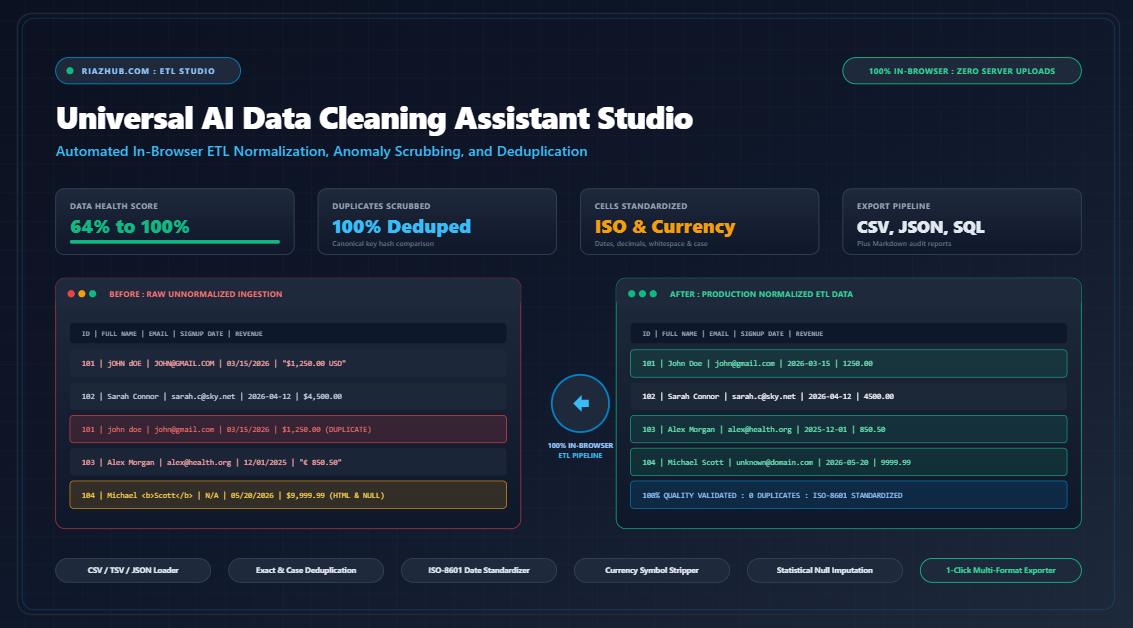
The table below demonstrates how the AI Data Cleaning Assistant Studio handles common real-world formatting anomalies:
| Field Name | Raw Dirty Input | Cleaned Normalized Output | ETL Action Applied |
|---|---|---|---|
| Customer Name | jOHN dOE Dirty |
John Doe Normalized |
Trimmed whitespace, converted to Title Case |
| Email Address | SARAH.C@SKY.NET Dirty |
sarah.c@sky.net Normalized |
Lowercased domain and account string |
| Signup Date | 03/15/2026 Dirty |
2026-03-15 Normalized |
Standardized to ISO-8601 (YYYY-MM-DD) |
| Deal Revenue | "$1,250.00 USD" Dirty |
1250.00 Normalized |
Stripped symbols, text labels, and commas |
| User Role | Michael <b>Scott</b> Dirty |
Michael Scott Normalized |
Stripped stray HTML formatting tags |
| Contact Phone | N/A or blank Dirty |
Unknown Normalized |
Imputed smart text default |
Step-by-Step Walkthrough: Cleaning a Dataset
Follow this practical workflow to clean your spreadsheets using the AI Data Cleaning Assistant Studio:
- Ingest Your Tabular Dataset: Navigate to the studio console and drag your file into the dropzone. The engine automatically detects whether your file is a comma-separated CSV, tab-separated TSV, or JSON array. Alternatively, paste raw spreadsheet cells directly into the text console.
- Review the Quality Telemetry HUD: Instantly check your initial Data Health Score (0-100%), duplicate row count, empty row count, and column-level completeness profile.
- Configure Pipeline Rules: Toggle rules on or off based on your destination requirements. Select your preferred null imputation policy from the dropdown.
- Run the Scrubbing Engine: Click
Auto-Clean All Detected Issuesto execute all rules sequentially, or clickApply Selected Rulesfor granular transformations. - Inspect Repaired Records: Switch between the paginated Cleaned Data Grid (where modified cells are highlighted in subtle green) and the ETL Audit Trail to review every transformation step.
- Export Production Files: Download your scrubbed data as a cleaned CSV, normalized JSON array, Markdown audit summary, or formatted SQL INSERT script.
Multi-Format Production Exporters
Downstream systems require data in specific formats. The Universal AI Data Cleaning Assistant Studio provides one-click export handlers tailored for diverse workflows:
- Cleaned Production CSV (.csv): RFC-4180 compliant with escaped quotation marks and standard delimiters, ready for Excel, Google Sheets, or Python pandas.
- Normalized JSON Array (.json): Formatted as an array of key-value objects with automatically inferred numeric values, ideal for REST APIs and NoSQL databases.
- Markdown Audit Report (.md): A complete documentation summary listing column completeness percentages, anomalies detected, and step-by-step transformation logs.
- SQL Import Script (.sql): Automatically generates a
CREATE TABLEstatement with inferred data types (INT, DECIMAL, DATE, VARCHAR) followed by batchINSERTstatements for instant database loading. - Clipboard Copy: Instantly copies the sanitized CSV to your clipboard with animated toast confirmation.
- Printable Audit PDF: Formatted print styling for compliance records and executive quality reports.
Frequently Asked Questions (FAQ)
Is my confidential data uploaded to RiazHub servers?
▾
No. The AI Data Cleaning Assistant Studio runs 100% locally inside your web browser. All file reading, string parsing, duplicate checking, and export generation happen strictly on your local machine using client-side JavaScript. Zero records are ever transmitted over the network.
What file formats and sizes are supported?
▾
The studio supports .csv, .tsv, .json, and raw pasted tabular text. Because processing takes place in your local browser memory, datasets containing tens of thousands of rows typically process in less than one second.
Can I undo transformations if I make a mistake?
▾
Yes. The studio features a complete in-memory Undo and Redo stack. You can reverse transformations step-by-step or click Reset Studio to restore your original raw dataset snapshot at any time.
How does the tool infer data types for SQL export?
▾
The SQL generator scans all non-null values across each column. If all values are whole integers, it assigns INT; if floating-point numbers are detected, it assigns DECIMAL(10, 2); if ISO dates are detected, it assigns DATE; otherwise, it assigns VARCHAR(255).
Final Thoughts on Data Pipeline Hygiene
Clean data is the foundation of high-performance engineering, reliable forecasting, and compliant customer operations. Rather than wrestling with fragile spreadsheet formulas or risking sensitive records on external servers, use the Universal AI Data Cleaning Assistant Studio to streamline your data wrangling workflow.
Visit https://riazhub.com/ai-data-cleaning-assistant-studio/ to test the studio with sample datasets or upload your own files for instant automated scrubbing.
Universal AI Data Cleaning Assistant, Deduplication and ETL Normalization Studio
Automatically detect and scrub duplicate rows, missing values, broken dates, messy whitespace, and currency clutter from any CSV, TSV, or JSON dataset. Preview cleaned records side-by-side and export production-ready files 100% locally in your browser.
📂 Data Ingestion Console
Load local CSV, TSV, or JSON files or paste raw tabular text directly.
⚙️ Interactive Cleaning Pipeline & Rule Deck
Select rules to apply selectively or trigger the comprehensive one-click Auto-Clean.
| # | Status | Awaiting Data Ingestion... |
|---|---|---|
📚 Data Engineering & In-Browser ETL Best Practices
📅 Why ISO-8601 Dates (YYYY-MM-DD) Prevent Catastrophic Database Errors
Regional date formats create critical data corruption in production pipelines. A date written as 04/05/2026 is interpreted as April 5 in the United States, but as May 4 across Europe, Latin America, and Asia. When ingested into BigQuery, Snowflake, PostgreSQL, or Python pandas, inconsistent parsing leads to corrupted month-over-month telemetry and inverted chronological joins.
The ISO-8601 standard (YYYY-MM-DD) provides an unambiguous, lexicographically sortable date format. This guarantees that basic alphabetical sorts match chronological order exactly without requiring date parsing overhead in downstream SQL pipelines.
👥 Deterministic vs. Probabilistic Deduplication: Eliminating Phantom Records
Standard spreadsheet deduplication filters fail when records contain invisible variations such as trailing spaces, inconsistent casing (e.g. "john.doe@company.com" vs "John.Doe@Company.com"), or non-breaking unicode spaces.
RiazHub Universal AI Data Cleaning Assistant applies deterministic canonical normalization: each record is stripped of HTML tags, collapsed to single spaces, lowercased in key identity columns, and hashed before comparison. This ensures that hidden duplicate records are reliably surfaced and purged without risking false negatives.
🔒 100% Client-Side Privacy Guarantee: Zero Cloud Leaks
Enterprise customer lists, CRM contact bases, employee salaries, and financial ledgers contain sensitive Personally Identifiable Information (PII) subject to GDPR, CCPA, and HIPAA compliance regulations. Transmitting raw CSV records to cloud APIs introduces severe privacy risks.
This studio runs entirely in your local browser runtime via the HTML5 FileReader API, JavaScript ArrayBuffers, and native DOM APIs. Your raw files are never uploaded to any remote server, database, or analytics bucket. All deduplication, regex scrubbing, imputation, and file export operations occur strictly in-memory on your device.