
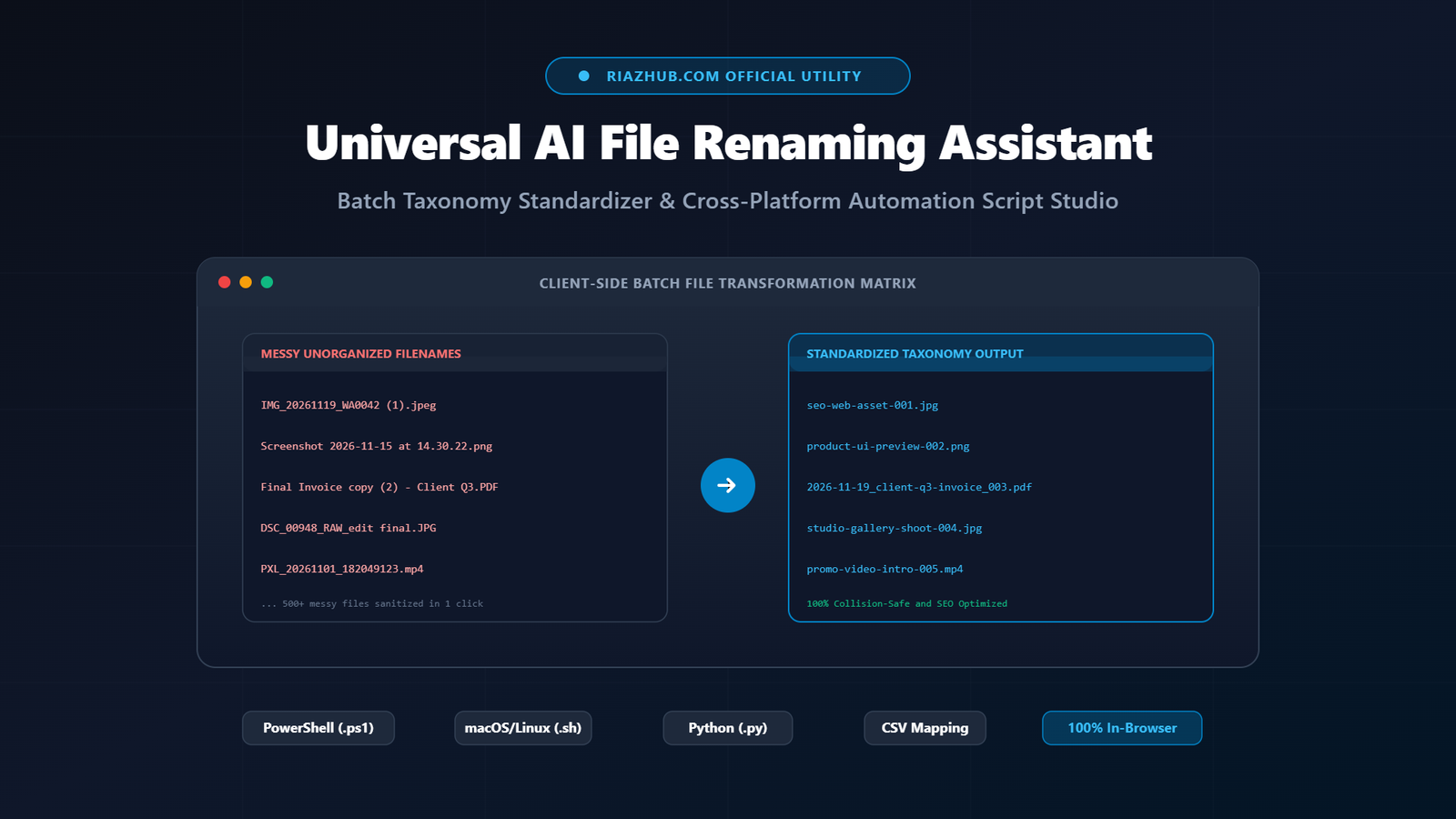
Universal AI File Renaming Assistant: How to Standardize Batch File Taxonomies, Optimize SEO Slugs, and Export 1-Click Scripts
Every digital creator, developer, photographer, and finance manager encounters the same chaotic challenge: disorganized folders overflowing with cryptic filenames. Whether it is a smartphone camera dump like IMG_20261119_WA0042 (1).jpeg, a desktop littered with Screenshot 2026-11-15 at 14.30.22.png, or accounting records saved as Final Invoice copy (2) - Client Q3.PDF, inconsistent file naming slows down workflows, creates broken web links, and degrades search engine rankings.
To eliminate manual file-by-file renaming and eradicate accidental overwrites, RiazHub has engineered the Universal AI File Renaming Assistant, Batch Taxonomy Standardizer & Automation Script Studio. Operating 100% inside your web browser via the HTML5 File API, this tool transforms hundreds of messy filenames into structured, SEO-friendly, or date-indexed formats in seconds.
Standardize Your File Queue in Under 60 Seconds
Inspect real filenames, sanitize messy camera codes, preview old-versus-new diffs, and download executable rename scripts for Windows, macOS, and Linux without uploading a single byte to the cloud.
Why Inconsistent File Naming Harms Web SEO and System Operations
File taxonomy is not merely an aesthetic preference: it directly impacts search visibility, cross-platform synchronization, and long-term asset retrieval.
1. Search Engine Optimization (SEO) and URL Encoding
Search engines like Google index image and document filenames to determine media relevance. When a filename contains spaces, web servers encode those characters as %20 (for example, my%20new%20product%20banner.png), which looks untrustworthy and dilutes keyword signals. While underscores (_) join characters into a single search token, hyphens (-) are recognized as natural word separators. Standardizing assets into clean kebab-case (e.g., my-new-product-banner.png) delivers immediate SEO dividends.
2. Cross-Platform Forbidden Characters and Sync Errors
Operating systems enforce conflicting rules regarding valid filename characters. Windows forbids the following characters in paths:
\ / : * ? " < > |When files containing colons, quotation marks, or trailing spaces are uploaded to cloud synchronization services (such as Google Drive, OneDrive, or Dropbox) or shared with Linux servers, they trigger synchronization halts and broken pipeline errors.
3. The Nightmare of Chronological Sorting
Human-written dates such as Nov-19-2026 or 19-11-2026 fail in alphanumeric directory sorting. The international ISO-8601 archival standard (YYYY-MM-DD) ensures that tax receipts, invoices, and legal contracts sort chronologically by default in Windows Explorer, macOS Finder, and command-line terminals.
The 5 Core File Naming Conventions Compared
The Batch Taxonomy Standardizer on RiazHub provides instant one-click presets for every major digital workflow:
| Convention Style | Example Output | Primary Use Case |
|---|---|---|
| SEO Kebab-Case | riazhub-seo-asset-001.jpg |
WordPress media uploads, web images, blog assets, URL slugs |
| Developer Snake_Case | module_config_schema_001.py |
Software engineering repositories, data pipelines, code scripts |
| ISO-8601 Date Archive | 2026-11-19_client-invoice_001.pdf |
Tax receipts, accounting audits, chronological legal archives |
| Client Accounting Taxonomy | AcmeCorp_Deliverable_001.mp4 |
Commercial photography deliveries, client shoot packages |
| PascalCase / CamelCase | ProductShowcaseBanner001.png |
React/Vue components, mobile app icons, object namespaces |
Architecture of the RiazHub Universal AI File Renaming Assistant
Unlike conventional software that requires bulky desktop installations or risky cloud uploads, the RiazHub AI File Renaming Assistant Studio operates entirely within your browser via pure vanilla JavaScript and DOM APIs.
100% Client-Side Privacy Guarantee: When you drag and drop confidential accounting spreadsheets, proprietary source code, or private personal photographs into the ingestion deck, only file metadata (filename, file size, and extension) is read via the HTML5 File API. Zero bytes leave your machine.
Key Engine Capabilities
- Multi-Ingestion Pipeline: Drag and drop real local files directly from your desktop, paste raw lists of up to 500 messy filenames, or inject 12 pre-configured sample files with one click.
- Smart AI Pattern Stripping: Automatically identifies and removes camera prefixes (such as
IMG_,DSC_,VID_,PXL_), mobile app codes (WA0042,Screenshot), and trailing copy markers like(1),(2), or- copy. - Accent and Diacritic Normalization: Decomposes Unicode diacritics (converting
résuméintoresume) and strips illegal OS characters. - Automatic Duplicate Collision Avoidance: Detects if two different files would resolve to the same target name and automatically appends sequential suffixes (e.g.,
-01,-02) to guarantee zero file overwrites. - Interactive Before-vs-After Live Diff Table: Displays the original name alongside the new clean filename with color-coded safety badges (
SAFE,DEDUPED,CUSTOM) and enables inline manual overrides on any specific row.
Automating Local Execution with Cross-Platform Rename Scripts
Once your filenames are calibrated inside the Universal AI File Renaming Studio, you can either download local files directly or export a native batch script tailored to your operating system.
1. Windows PowerShell Automation Script (.ps1)
The generated PowerShell script incorporates a strict safety check using Test-Path to ensure existing files are never overwritten:
# Generated via RiazHub.com : Universal AI File Renaming Assistant Studio
# Windows PowerShell Batch Rename Automation Script
if ((Test-Path -LiteralPath "IMG_20261119_WA0042 (1).jpeg") -and -not (Test-Path -LiteralPath "riazhub-asset-001.jpg")) {
    Rename-Item -LiteralPath "IMG_20261119_WA0042 (1).jpeg" -NewName "riazhub-asset-001.jpg"
}
2. macOS and Linux Bash Shell Script (.sh)
For Unix environments, the POSIX-compliant shell script uses mv -n (no clobber) to guarantee non-destructive renaming:
#!/usr/bin/env bash
# Generated via RiazHub.com : Universal AI File Renaming Assistant Studio
[ -e 'DSC_00948_RAW_edit final.JPG' ] && [ ! -e 'studio-shoot-002.jpg' ] && mv -n -- 'DSC_00948_RAW_edit final.JPG' 'studio-shoot-002.jpg'
3. Cross-Platform Python 3 Script (.py)
Python developers can run a safe pathlib renamer that defaults to DRY_RUN = True, allowing you to preview changes in your terminal before committing alterations to disk.
Step-by-Step Guide: Renaming 100+ Files in 3 Simple Steps
- Queue Your Files: Visit the Universal AI File Renaming Assistant on RiazHub. Drag and drop your target files into the dropzone, or paste a list of filenames into the input textarea.
- Select Your Convention & Context: Choose between Kebab-Case, Snake_Case, ISO-8601 Date, or Client Project presets. Enter your project context label (such as
blog-assets) and set sequence padding. - Preview & Export: Verify the before-and-after changes in the interactive diff table. Click Download PowerShell Script (.ps1) for Windows, Download Bash Script (.sh) for Mac/Linux, or export the CSV Rename Map for spreadsheet audits.
Frequently Asked Questions (FAQ)
Are my confidential documents uploaded to any remote server?
No. The entire transformation occurs locally inside your browser memory using the HTML5 File API. No external API calls, tracking scripts, or server-side file transfers take place.
Can I download renamed files directly without running scripts?
Yes. When you drag and drop real files from your local storage into the renamer deck, individual Save File buttons and a batch Download All Real Files button appear, enabling direct downloads with updated filenames.
How does the studio handle duplicate filename collisions?
The intelligent collision engine keeps a live ledger of generated names. If two different files result in identical names, an incremental sequence suffix (such as -01, -02) is automatically appended to protect both files.
Start Organizing Your Asset Library Today: Clean up years of messy file collections, boost your Google Image SEO rankings, and automate repetitive file organization with the RiazHub Universal AI File Renaming Assistant.
Universal AI File Renaming Assistant
Batch Taxonomy Standardizer, Smart Slug Engine & Cross-Platform Automation Script Studio for RiazHub.com. Clean up messy camera codes, screenshots, and legacy invoices into standardized SEO slugs, developer snake_case, or chronological archives in seconds.
| # | Original Filename | → | New Standardized Filename (Editable) | Status | Action |
|---|---|---|---|---|---|
No files currently queuedDrag and drop local files on the left, paste filenames, or click "Load 12 Sample Messy Files" to see the instant live diff. |
|||||
# Queued files will generate your safe PowerShell script here.- Place the downloaded
riazhub-batch-rename-[slug].ps1into the target folder. - Right click the folder → select Open in Terminal (or open PowerShell in that path).
- Execute:
powershell -ExecutionPolicy Bypass -File .\riazhub-batch-rename-[slug].ps1
:: Queued files will generate your safe Batch script here.- Download
riazhub-batch-rename-[slug].batdirectly into the folder with your files. - Double-click the .bat file to execute the instant rename.
#!/usr/bin/env bash
# Queued files will generate your safe POSIX shell script here.- Place
riazhub-batch-rename-[slug].shin your files directory. - Open Terminal in that directory.
- Make executable and run:
chmod +x ./riazhub-batch-rename-[slug].sh && ./riazhub-batch-rename-[slug].sh
# Queued files will generate your cross-platform Python script here.- Save
riazhub-batch-rename-[slug].pyinto the target folder. - Execute in Terminal / Command Prompt:
python riazhub-batch-rename-[slug].py - Set
DRY_RUN = Falseinside the script when ready to commit renames.
3. 1-Click Multi-Format Export Hub
All downloaded assets are locally generated and prefixed with RiazHub branding
📚 Digital Asset Management & File-System Best Practices
🌐 Why Kebab-Case Filenames Boost Search Engine Optimization (SEO) ›
Search engines such as Google and Bing treat hyphens (-) as natural word separators. When filenames use spaces, web servers encode them as messy %20 strings, while underscores (_) join characters into a single index token. Converting IMG_4921 final banner.png into keyword-descriptive-banner.png provides immediate keyword clarity for Google Image search ranking and improves page speed by avoiding URL encoding errors.
🛡️ Avoiding Cross-Platform Invalid Filename Characters ›
Operating systems enforce strict character restrictions. Windows forbids characters such as colons (:), asterisks (*), question marks (?), quotation marks ("), angle brackets (< >), and pipes (|). Linux and cloud synchronization drives (Google Drive, Dropbox, OneDrive) frequently fail or generate sync conflicts when encountering accents, leading periods, or trailing spaces. The RiazHub Studio sanitizes all these characters client-side automatically.
🔒 100% Client-Side Privacy Guarantee (Zero Cloud Leakage) ›
Unlike third-party conversion websites that upload your files to remote cloud servers for processing, this tool operates strictly within your browser via the HTML5 File API and vanilla JavaScript. Your confidential corporate invoices, personal photographs, financial receipts, and proprietary source files are never transmitted across the network, ensuring zero exposure and total data confidentiality.
📅 ISO-8601 Archival Standard for Chronological File Sorting ›
When archiving tax documents, client deliverables, or media projects, standard alphanumeric directory sorting scrambles dates like Nov-19-2026 and 05-12-2025. The international ISO-8601 format (YYYY-MM-DD) guarantees that files sort chronologically in Windows Explorer, macOS Finder, and Linux ls without requiring metadata inspection.
RiazHub.com : Universal AI File Renaming Assistant Audit Log
Generated via RiazHub.com : Universal AI File Renaming Assistant Studio