
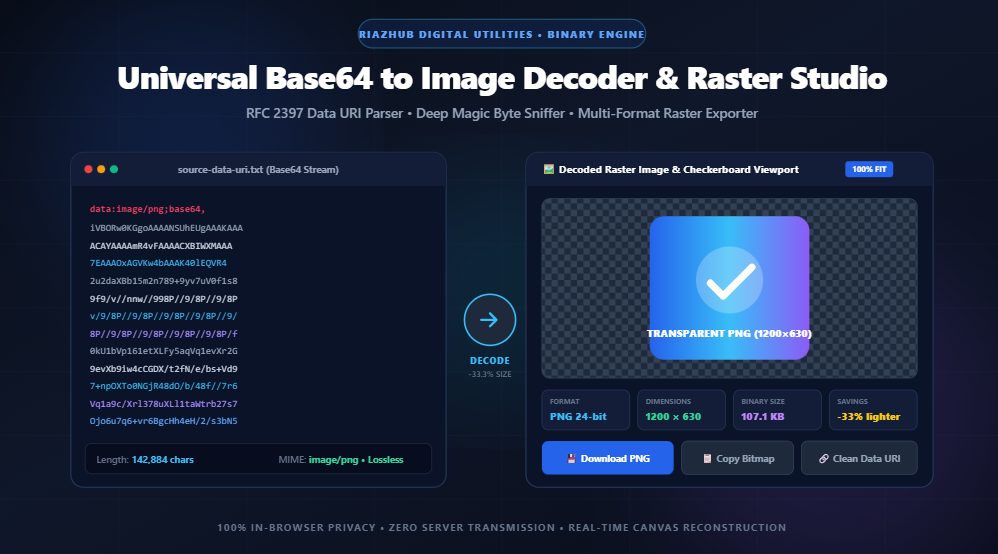
Universal Base64 to Image Decoder & Raster Restoration Studio: The Ultimate Guide to In-Browser Binary Reconstruction
In modern web development, API engineering, and cloud architecture, visual assets frequently travel not as separate graphic files, but as alphanumeric ASCII text strings known as Base64 Data URIs. While embedding graphical payloads directly into JSON schemas, database records, and CSS stylesheets eliminates auxiliary HTTP round-trips, inspecting, verifying, or extracting those images has traditionally been tedious and fraught with privacy concerns.
The Universal Base64 to Image Decoder & Raster Restoration Studio hosted on RiazHub.com represents a paradigm shift: an entirely client-side, zero-server forensic workstation that parses RFC 2397 Data URIs, repairs malformed headers via deep magic byte sniffing, analyzes pixel dimensions, and re-exports bitmaps across all modern formats (PNG, JPEG, WebP, SVG, and ICO) at lightning speed.
Need to Decode an Image Immediately?
Paste any raw Base64 string, CSS background rule, or HTML tag directly into our secure in-browser decoder. Zero bytes ever leave your device.
1. The Fundamentals of Base64: How Binary Bytes Become Text
Computer networks and communication protocols (such as SMTP for email or HTTP for web requests) were historically engineered to transmit human-readable 7-bit ASCII characters. When raw 8-bit binary assets—such as a lossless PNG screenshot, a photographic JPEG, or an SVG vector—are introduced into environments expecting plain text, unescaped null bytes and control characters can trigger corruption.
Base64 solves this problem by establishing a radix-64 representation system. It converts arbitrary binary octets into an alphabet of 64 guaranteed-safe ASCII characters:
- Uppercase letters:
A–Z(Indices 0–25) - Lowercase letters:
a–z(Indices 26–51) - Digits:
0–9(Indices 52–61) - Punctuation symbols:
+(Index 62) and/(Index 63) - Padding delimiter:
=(Used when the binary stream does not divide evenly by 3)
The Mathematical Cost: The Inherent 33.3% Data Expansion
Base64 encoding works by grouping three 8-bit binary bytes (3 × 8 = 24 bits) and regrouping them into four 6-bit segments (4 × 6 = 24 bits). Each 6-bit segment represents a value between 0 and 63, mapping directly to a character in the Base64 lookup index.
[ Byte 1: 8 bits ] [ Byte 2: 8 bits ] [ Byte 3: 8 bits ]  --> Total: 24 bits
           │                  │                  │
           ▼                  ▼                  ▼
[ 6 bits ]       [ 6 bits ]       [ 6 bits ]       [ 6 bits ] --> 4 ASCII Chars
Because four characters are required to represent three binary bytes, any Base64 string is mathematically 33.3% larger than the original binary file. When you decode a Base64 string back into a pure binary image file using the Base64 to Image Decoder tool, you instantly eliminate that 33% overhead, restoring the file to its original compact size.
2. Anatomy of an RFC 2397 Data URI Scheme
When Base64 images are embedded inline within HTML documents or CSS stylesheets, they conform to the RFC 2397 Data URI specification. A standardized Data URI follows this strict structural syntax:
data:[<mediatype>][;charset=<character-set>][;base64],<payload-data>Deconstruction Example:
data:image/png;base64,iVBORw0KGgoAAAANSUhEUgAA...
data:— The protocol scheme indicator instructing the browser that the following content is inline resource data.image/png— The declared MIME type specifying the raster image format.;base64— The encoding flag declaring that the binary payload has been radix-64 encoded.,iVBORw0...— The actual Base64 string representing the compressed image byte array.
However, in real-world scenarios—such as inspecting third-party API payloads, database dumps, or logs—the header prefix is frequently stripped, corrupted, or enveloped inside wrapper tags like url('...') or <img src="...">. Our Base64 to Image Decoder Studio features an automated sanitization pipeline that instantly purges surrounding wrappers, normalizes URL percent sequences (e.g., %2B, %2F), and restores missing padding.
3. Deep Magic Byte Forensic Sniffing: Decoding Beyond Declared MIME Types
A frequent pitfall in web development is encountering Data URIs with incorrect or generic MIME declarations, such as data:application/octet-stream;base64,... or data:text/plain;base64,.... Standard browser decoders often fail or refuse to render these assets.
The RiazHub Base64 to Image Decoder implements Deep Magic Byte Sniffing. Rather than trusting the declared header, the engine decodes the initial binary bytes into an array and inspects the file’s cryptographic file signature:
| Image Format | Magic Header Bytes (Hexadecimal) | Header Characteristics |
|---|---|---|
| PNG | 89 50 4E 47 0D 0A 1A 0A |
Starts with non-ASCII byte 89 followed by ASCII “PNG” |
| JPEG / JPG | FF D8 FF |
Standard Start of Image (SOI) marker followed by application marker |
| GIF | 47 49 46 38 37 61 / 39 61 |
ASCII string “GIF87a” or “GIF89a” |
| WebP | 52 49 46 46 … 57 45 42 50 |
RIFF container header containing “WEBP” at byte offset 8 |
| ICO (Favicon) | 00 00 01 00 |
Reserved zero word followed by icon type identifier 1 |
| BMP | 42 4D |
ASCII characters “BM” indicating Windows Bitmap format |
| SVG Vector | <?xml / <svg |
UTF-8 XML markup containing standard scalable vector namespace tags |
By validating these magic numbers, the utility can automatically reconstruct damaged MIME declarations, allowing you to preview and download corrupt strings that other utilities reject as invalid.
4. Privacy First: 100% In-Browser Client-Side Processing
Security is the paramount consideration when working with proprietary graphics, sensitive signatures, scanned legal documents, medical charts, or internal product mockups. Traditional web tools often upload user strings to a remote backend server for image conversion via Python or ImageMagick scripts, exposing confidential assets to interception, server-side disk logging, or leakage.
The Base64 to Image Decoder tool at RiazHub.com operates under a Zero-Server Architecture:
- Native
atob()Pipeline: Binary decoding executes directly within your browser’s V8 or SpiderMonkey JavaScript runtime. - In-Memory
Uint8Array&Blob: The binary bytes exist strictly within volatile browser RAM and are never written to external web storage or sent over network sockets. - Canvas Pixel Restoration: Re-encoding between PNG, JPEG, and WebP is performed using the browser’s native HTML5 Canvas hardware acceleration.
- Air-Gapped Compatibility: Once the page is loaded, you can disconnect your computer from the internet entirely, and the tool will continue to decode and download images seamlessly.
5. Base64 Inline Images vs. External CDN Files: When to Use Which?
While Base64 Data URIs are exceptionally useful, web performance optimization requires understanding their architectural trade-offs:
| Evaluation Metric | Base64 Data URI | External Image (CDN) |
|---|---|---|
| HTTP Requests | Zero auxiliary roundtrips (embedded directly in HTML/CSS) | Requires a separate DNS lookup and TCP/TLS handshake |
| Payload Size | ~33.3% larger due to Base64 byte-to-text expansion | Minimal, compressed raw binary file size |
| Browser Caching | Cannot be cached independently; re-downloaded whenever HTML changes | Fully cached via HTTP Cache-Control and ETag headers |
| HTML Parsing Speed | Slows down DOM parsing if large base64 strings block the critical path | Non-blocking; browser loads images asynchronously |
| Best Practical Use | Tiny UI sprites, critical above-the-fold icons, single-file HTML reports | Photographs, hero banners, large graphics, multi-page visual media |
Performance Best Practice Rule:
Keep Base64-embedded graphics under 2 KB to 4 KB. For anything larger, use the Base64 to Image Decoder to extract the string back into a clean WebP or PNG binary file, upload it to a CDN, and serve it via standard <img loading="lazy"> tags.
6. How to Use the Base64 to Image Decoder on RiazHub
Restoring raw text into a pristine visual image takes just three intuitive steps using the studio:
- Input Your String or File: Paste your Base64 payload or complete Data URI into the monospace editor. You can also drag and drop a
.txt,.b64,.css, or.htmlfile directly into the dropzone. - Inspect Real-Time Forensics: Observe the 4-Card Overview Diagnostic Grid. Review the detected MIME type, native pixel dimensions (Width × Height), aspect ratio, and binary file savings. Verify alpha transparency against the built-in checkerboard backdrop.
- Export & Download: Choose your target export format (Original Detected, PNG Lossless, JPEG Photo, or WebP Modern), adjust the quality slider if converting to JPEG/WebP, and click Download Decoded Image. You can also copy the bitmap directly to your operating system clipboard with a single click.
Ready to Inspect & Convert Your Base64 Strings?
Decode strings, verify pixel integrity, strip CSS wrappers, and convert formats with the fastest client-side utility on the web.
7. Frequently Asked Questions (FAQ)
Yes. The utility features automatic prefix synthesis and deep magic byte sniffing. Even if you paste a raw string starting with iVBORw0KGgo... or /9j/4AAQSkZ..., the engine identifies the format from the initial bytes and reconstructs the image automatically.
The interactive preview viewport features an integrated transparency checkerboard backdrop. Transparent alpha channels appear over a high-contrast grid, allowing you to confirm that transparent logos, icons, and cutouts have preserved their alpha channels without unwanted white backgrounds.
URL-Safe Base64 substitutes standard + and / characters with - (hyphen) and _ (underscore) to prevent collisions in URL query strings. The RiazHub Base64 Decoder automatically normalizes URL-safe characters and restores missing padding delimiters (=) prior to decoding.
Yes! Simply click the Reverse (Image → Base64) button or drop an image file (PNG, JPG, WebP, SVG, GIF) into the uploader. The tool will convert the image into a clean Data URI and populate the code generator with ready-to-use HTML, CSS, and React snippets.
Because all processing happens locally inside your browser using native typed byte arrays (Uint8Array), you are limited only by your computer’s available memory. Strings of 10 MB, 20 MB, or larger decode in a fraction of a second without server timeouts.
Universal Base64 to Image Decoder
Decode Base64 strings and Data URIs into clean raster or vector images, inspect binary headers & dimensions, verify byte integrity, and convert formats in real time.
Paste a Base64 string or drop a file to view decoded output.
| Detected MIME Type | — |
|---|---|
| Export File Extension | — |
| Native Dimensions | — |
| Aspect Ratio | — |
| Decoded Binary Size | — |
| Raw Base64 String Length | — |
| Base64 Binary Overhead | — |
| Magic Header Bytes (Hex) | — |
| Transparency Channel | — |
| Validation State | — |
<!-- Waiting for decoded image -->
/* Waiting for decoded image */
[//]: # (Waiting for decoded image)
{/* Waiting for decoded image */}
+, and /). Every 3 raw 8-bit bytes (24 bits) are grouped and divided into 4 six-bit chunks (4 × 6 = 24 bits). Because 4 characters are required to represent 3 binary bytes, Base64 strings naturally carry an inherent mathematical size overhead of 33.3% (plus padding with =). Decoding it back to pure binary restores the asset to its true, compact file size.
data:[<mediatype>][;base64],<data>.
For example, data:image/png;base64,iVBORw0KGgo... specifies an image MIME type of image/png encoded in Base64. If the media type is omitted, browsers default to text/plain;charset=US-ASCII. Our universal parser intelligently extracts the raw payload regardless of whether this header is present, malformed, or wrapped inside HTML/CSS declarations.
application/octet-stream), or entirely absent. This tool reads the leading hex bytes of the decoded binary array (the "magic numbers"):
- PNG:
89 50 4E 47 - JPEG:
FF D8 FF - GIF:
47 49 46 38 - WebP:
52 49 46 46 ... 57 45 42 50 - ICO Favicon:
00 00 01 00 - SVG: ASCII/UTF-8 XML tags containing
<svgor<?xml