
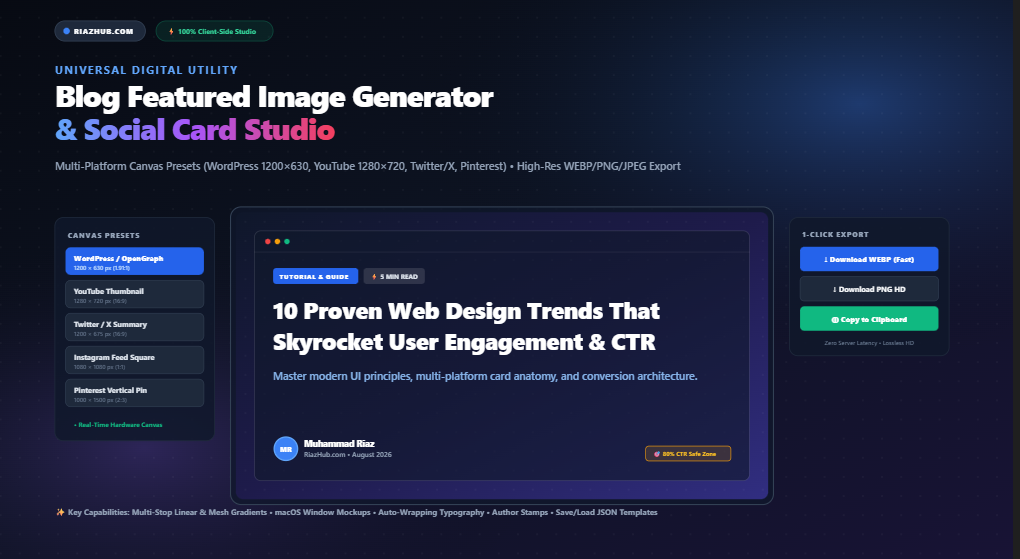
Universal Blog Featured Image Generator & Social Card Studio: The Complete Guide to High-CTR Social Graphics
In an era dominated by algorithmic feeds, RSS aggregators, search snippets, and social timelines, your article’s headline is only half the battle. Studies consistently show that social posts, blog listings, and content aggregators featuring compelling, custom-branded graphics receive up to 140% higher click-through rates (CTR) than plain links or generic stock photos.
Yet for most digital publishers, solo developers, and content creators, creating tailor-made featured images is a tedious chore. Booting heavyweight desktop software like Adobe Photoshop or wrestling with subscription-locked cloud services wastes precious hours—while exposing your unreleased draft titles and brand assets to third-party cloud servers.
To eliminate this friction, RiazHub developed the Blog Featured Image Generator & Social Card Studio: a 100% private, hardware-accelerated, browser-based graphics suite that synthesizes pixel-perfect social banners in seconds. In this comprehensive guide, we examine the anatomy of high-converting social cards, multi-platform dimension standards, and how to harness client-side canvas technology to supercharge your publishing workflow.
The Anatomy of a High-CTR Featured Image
A viral social card or featured image is not merely decorative—it is a functional micro-landing page designed to convey context, credibility, and intrigue within 500 milliseconds of scrolling. The most successful digital publications rely on a layered design hierarchy:
1. Atmospheric Backdrop
Multi-stop gradients, neon glow orbs, or darkened photograph scrims establish an emotional mood without distracting from foreground typography.
2. Category & Topic Badge
A vibrant pill badge (e.g., “TUTORIAL”, “SEO STRATEGY”) instantly tags the subject matter, orienting the reader before they read the title.
3. Multi-Line Typography
Bold, readable headlines (52px to 72px) with controlled line height, balanced word-wrapping, and optional secondary subheadings ensure legibility on mobile screens.
4. Author & Trust Stamp
A circular author avatar, verified domain badge (e.g., RiazHub.com), and publication date establish brand authority and human connection.
With the Blog Featured Image Generator & Social Card Studio, all four of these layers are synthesized dynamically on an interactive HTML5 canvas that updates in real time with sub-millisecond responsiveness.
Multi-Platform Canvas Presets & Aspect Ratio Standards
One of the most frustrating aspects of social distribution is platform fragmentation. Different social networks and CMS engines enforce differing viewport ratios and crop margins:
| Platform Preset | Resolution (W × H) | Aspect Ratio | Primary Use Case |
|---|---|---|---|
| WordPress / OpenGraph | 1200 × 630 px | 1.91:1 | Standard Facebook, LinkedIn, Discord, Slack & WordPress OG link preview cards. |
| YouTube Thumbnail | 1280 × 720 px | 16:9 (HD) | High-contrast video covers, course lessons, and widescreen webinar presentations. |
| Twitter / X Large Card | 1200 × 675 px | 16:9 | Twitter/X summary cards with large image meta tags (twitter:card). |
| Instagram / Square Feed | 1080 × 1080 px | 1:1 | Instagram grid posts, carousel slides, and community forum announcements. |
| Pinterest Vertical Pin | 1000 × 1500 px | 2:3 | Tall infographic headers, recipe cards, and vertical discovery feeds. |
| Custom Dimensions | User-Defined (px) | Dynamic Lock | Custom ad sizes, email newsletter headers, and bespoke web hero containers. |
Switching platforms in the Blog Featured Image Generator & Social Card Studio takes a single click. The underlying rendering engine recalculates text bounding boxes, adjusts margins, repositions corner accents, and re-centers author stamps instantly.
The 80% CTR Safe Zone Rule Explained
Have you ever uploaded a blog featured image to your site, only to find that when someone shares it on mobile Twitter or LinkedIn, the author badge is clipped or the title is sliced in half?
This occurs because mobile apps frequently crop outer edges (5% to 10% on each boundary) to fit varying smartphone aspect ratios. To combat this, the Blog Featured Image Generator & Social Card Studio includes a built-in CTR 80% Safe Zone Guide.
Toggling the safe zone overlay projects an amber dashed bounding box over your live canvas stage. By keeping essential text, category pills, and branding stamps inside this 80% zone, you ensure your social graphics remain 100% visible, centered, and readable across every mobile operating system and social client.
Deep Dive: Layered Canvas Architecture
The studio’s engine renders graphics through five distinct procedural phases:
1. Procedural Backgrounds & Atmospheric Depth
Choose from linear gradients with custom angles (0° to 360°), radial spotlight glows, futuristic multi-sphere mesh glows, or upload your own photography. When uploading background photos, an integrated dark tint scrim slider (0% to 90%) ensures that bright imagery never compromises title contrast.
2. Geometric Pattern Overlays
Flat gradients can feel sterile. The studio provides vector-drawn pattern textures—including subtle dot matrix grids, hexagonal blueprint meshes, diagonal circuit traces, and procedural film grain stippling—adding modern tech atmosphere to your design.
3. 3D Mockup Frames & Window Shells
Transforming simple text into an editorial showcase is easy with built-in frame mockups. Wrap your content inside a sleek dark macOS code window (complete with red, amber, and green titlebar controls), a frosted glassmorphism card, or a vibrant neon glow outline.
4. Dynamic Multi-Line Typography Wrapping
Word wrapping on standard HTML5 canvas contexts is notoriously difficult because native Canvas APIs only support single-line rendering. The Blog Featured Image Generator & Social Card Studio implements an advanced text metrics calculation engine. It evaluates word boundaries against available horizontal space, wraps lines dynamically, respects line-height ratios, and gracefully adds an ellipsis if text exceeds maximum bounds.
5. Author Stamps & Custom Brand Logos
Brand recognition requires consistency. Upload your circular author avatar or let the studio generate a stylized monogram badge from your initials. You can also upload transparent PNG or SVG brand logos, adjust display dimensions, and anchor them in the header or footer.
How to Generate a Social Banner in 4 Simple Steps
Creating an eye-catching card on the Social Card Studio follows a streamlined, intuitive workflow:
- Select Platform Preset or Profile: Click on your target output format (e.g., WordPress 1200×630 or YouTube 1280×720) or choose a 1-click preset profile like Modern SaaS Tech or Vibrant Creator.
- Type Your Title & Category: Enter your post headline in Tab A. Choose from Google Fonts like Inter, Poppins, Montserrat, Space Grotesk, or Playfair Display, and watch the live preview update in real time.
- Customize Background Atmosphere: In Tab B, select a curated gradient colorway (Deep Midnight, Hyper Neon, Sunset Coral, Emerald Tech) or upload a photo backdrop and adjust the overlay scrim.
- Export Lossless High-Res Graphics: Click “Download WEBP” for ultra-fast web delivery, “PNG HD” for lossless graphic master files, or click “Copy to Clipboard” to paste the image directly into your CMS editor or social media scheduler.
Format Comparison: WEBP vs. PNG HD vs. JPEG
Choosing the right export format balances image sharpness against page speed:
- WEBP (Recommended for Blogs): Produces clean vector-like clarity at roughly 40KB–75KB file sizes, boosting Google PageSpeed scores and Core Web Vitals.
- PNG HD (Best for Social Media): Delivers lossless, uncompressed color reproduction ideal for Twitter/X cards and LinkedIn shares where maximum visual fidelity is required.
- JPEG (Universal Fallback): Lightweight compatibility for legacy content management systems, email newsletters, and PDF documentation.
Frequently Asked Questions (FAQ)
Are my images or titles saved on external servers?
No. The Blog Featured Image Generator & Social Card Studio operates 100% inside your local web browser using client-side HTML5 Canvas 2D and File APIs. Zero blog titles, author profile pictures, brand logos, or generated graphics are ever transmitted or stored remotely.
Why is 1200 × 630 px the universal standard for Open Graph cards?
The 1.91:1 ratio (1200 × 630 px) is the official specification adopted by Facebook, LinkedIn, Discord, Slack, and Twitter/X for full-width summary cards. It ensures that when someone shares your article, the preview renders crisp on retina displays without awkward vertical cropping or blurry resampling.
Can I save my custom brand templates for future use?
Yes! Click “Save JSON” on the export toolbar to download your complete color palette, font selection, and layout configuration as a lightweight JSON file. When you’re ready to create a new banner, click “Load JSON” to restore your branding setup instantly.
Does the tool support transparent logos and custom avatars?
Yes. You can upload transparent PNG or SVG brand logos and author portraits. The studio automatically clips author photos into sleek circular stamps with accent borders and lets you resize and reposition brand logos anywhere on the canvas.
Is the tool completely free to use?
Yes. The RiazHub Blog Featured Image Generator & Social Card Studio is 100% free with unlimited exports, zero forced watermarks, and no account registration required.
Universal Blog Featured Image & Social Card Studio
Design eye-catching blog post banners, social media cards, and YouTube thumbnails with custom typography, multi-stop gradients, author stamps, pattern overlays, and 1-click HD export.