
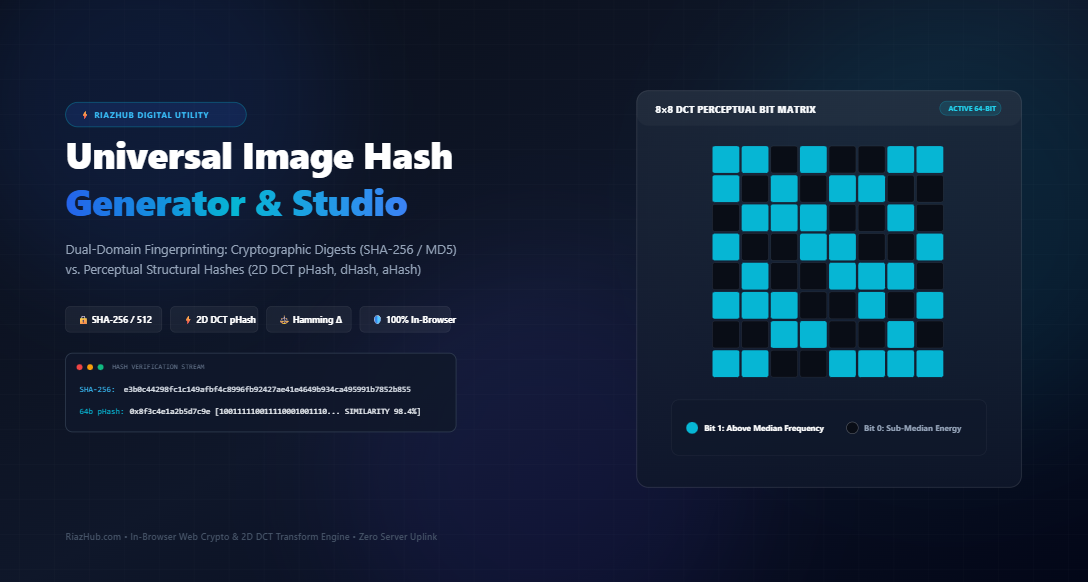
Dual-Domain Image Fingerprinting: Cryptographic Digests vs. Visual Perceptual Hashes Explained
In modern digital media pipelines, identifying and verifying images requires solving two fundamentally opposing problems: proving that an asset hasn’t suffered a single byte of unauthorized manipulation, or determining whether two visually identical images share the same source despite format changes, lossy compression, or resolution resizing.
To address both requirements concurrently, developers and forensic engineers rely on Dual-Domain Fingerprinting. You can experiment with both paradigms hands-on using the free, in-browser Universal Image Hash Generator & Multi-Vector Fingerprinting Studio, which executes SHA-256, SHA-512, MD5, and Discrete Cosine Transform (DCT) perceptual hashes (pHash, dHash, and aHash) entirely on your local machine.
Cryptographic hashes (e.g., SHA-256) evaluate binary byte streams; altering a single pixel completely randomizes the resulting digest.
Perceptual hashes (e.g., pHash, dHash) evaluate frequency and luminance gradients; two images that look visually similar will produce nearly identical binary strings, enabling fast near-duplicate detection via bitwise Hamming distance.
1. Domain 1: Cryptographic Integrity Hashing (Exact-Byte Avalanche Verification)
Cryptographic hashing algorithms—including SHA-256, SHA-512, SHA-384, SHA-1, and MD5—are mathematical one-way functions designed for data integrity, digital signatures, and tamper detection.
Their primary design criteria include:
- Pre-image Resistance: Computationally infeasible to reverse-engineer the original image from the digest string.
- Second Pre-image Resistance: Impossible to find a second image that yields the exact same hash output.
- Collision Resistance: Extremely difficult to find any two arbitrary inputs that generate the same hash output.
The Avalanche Effect
The most defining feature of cryptographic hashing is the Avalanche Effect. If you take a 4K photograph and change the RGB value of just one pixel by 1 step (e.g., rgb(120, 200, 50) to rgb(120, 200, 51)), or save the photo with 1% lossy compression, more than 50% of the output bits in the SHA-256 hash string will flip unpredictably.
// Original Image File:
SHA-256: 4a2b0e89f5c3817a892b...9d0124fe  [Verified Original]

// Same Image with 1 single pixel adjusted:
SHA-256: d8f3a6109e24b752003c...11a95b77  [Completely Random Digest]
While this makes cryptographic hashes indispensable for legal document chain of custody, software package verification, and forensic proof of non-tampering, it renders them completely ineffective for detecting re-compressed social media uploads, thumbnails, or watermarked duplicates. To inspect your image’s cryptographic digests, you can use the RiazHub Image Hash Studio to generate hardware-accelerated SHA-256 and MD5 checksums instantly.
2. Domain 2: Perceptual Visual Fingerprinting (Structural Robustness)
Rather than inspecting raw file bytes or metadata tags (like EXIF headers), Perceptual Hashing (pHash) algorithms process the actual visual signal rendered on screen. By downsampling the image, converting it into grayscale luminance, and analyzing frequency energy distributions, perceptual algorithms generate a compact 64-bit fingerprint that remains invariant to common transformations:
- Resolution scaling and aspect-preserving resizing (e.g., 4000×3000 down to 400×300).
- Lossy JPEG, WebP, or AVIF re-compression.
- Subtle color grading, contrast shifts, or gamma adjustments.
- Minor corner watermarks or copyright badges.
| Feature | Cryptographic Hashes (SHA-256, MD5) | Perceptual Hashes (pHash, dHash, aHash) |
|---|---|---|
| Evaluation Domain | Raw binary byte stream (ArrayBuffer) | Rendered pixel luminance & frequency matrix |
| Sensitivity | Infinite sensitivity (1-bit change flips 50%+ of hash) | Structural tolerance (similar images yield similar hashes) |
| Output Length | 128-bit (MD5), 256-bit (SHA-256), 512-bit (SHA-512) | Standard 64-bit compact binary integer / 16 hex chars |
| Similarity Measuring | Impossible (strictly binary equality: yes or no) | Hamming distance (calculates bit-difference percentage) |
| Primary Use Cases | Forensic integrity, legal audit trails, malware matching | Copyright monitoring, deduplication, search indexing |
3. The Mathematics Behind Perceptual Hashing Algorithms
Modern perceptual fingerprinting relies on three primary algorithmic methodologies. Each technique offers distinct trade-offs between computational overhead and transformation invariance:
A. 64-Bit dHash (Difference Hash)
dHash operates by analyzing the horizontal luminance gradient across adjacent pixels. The processing pipeline runs as follows:
- Downsample the input image to a 9×8 pixel grid using bilinear interpolation.
- Convert all pixels to standard luminance:
Y = 0.299*R + 0.587*G + 0.114*B. - For each of the 8 rows, compare the luminance of pixel
xagainst pixelx + 1. If the left pixel is brighter than the right pixel, set the corresponding bit to1; otherwise, set it to0. - 8 rows × 8 comparisons produce exactly 64 bits.
dHash is exceptionally fast ($O(1)$ computation) and highly resilient to brightness shifts, making it ideal for real-time video stream deduplication and high-throughput ingestion pipelines.
B. 64-Bit aHash (Average Hash)
aHash computes the global mean luminance threshold:
- Downsample the image to an 8×8 pixel grid (64 total pixels).
- Compute the average luminance across all 64 pixels:
avg = ∑(Luma) / 64. - Set bit to
1if the pixel’s luminance is greater than or equal to the average, otherwise0.
While simple and effective, aHash can be susceptible to non-linear gamma changes or high-contrast vignette filters.
C. 64-Bit pHash (Discrete Cosine Transform / DCT-II)
pHash represents the gold standard in perceptual image forensics. Instead of evaluating spatial pixels directly, it operates in the frequency domain using a 2D Discrete Cosine Transform (DCT):
- The image is downsampled to a 32×32 grayscale matrix (1,024 pixels).
- The 2D DCT decomposes the spatial intensity into a matrix of cosine wave frequency coefficients:
F(u,v) = 0.25 * C(u) * C(v) * ∑ ∑ [ f(i,j) * cos(((2i+1)uπ)/64) * cos(((2j+1)vπ)/64) ] - The top-left 8×8 submatrix is extracted. These 64 coefficients capture the fundamental low-frequency geometry and luminance structure of the image, discarding high-frequency noise and compression artifacts.
- The DC component at coordinate
[0,0](representing average luminance) is excluded. - The median value of the remaining 63 coefficients is calculated. Each bit is assigned
1if its coefficient exceeds the median, or0if below.
You can visualize this frequency distribution interactively using the 8×8 checkerboard bit matrix inside the Universal Image Hash Generator Studio.
Try Dual-Domain Fingerprinting in Your Browser
Analyze SHA-256 digests and 64-bit pHash visual matrices in real time with zero server uploads.
4. Measuring Image Similarity via Bitwise Hamming Distance
Unlike cryptographic hashes which can only be compared for exact matches, two 64-bit perceptual hashes can be compared mathematically using the Hamming Distance.
The Hamming distance represents the number of bit positions in which two binary strings differ. In software, this is executed using a bitwise XOR operation followed by a population count (popcount):
// Bitwise XOR comparison between two 64-bit perceptual hashes
const xorMask = BigInt(hashA) ^ BigInt(hashB);
let differingBits = 0;
for (let i = 0; i < 64; i++) {
    if ((xorMask >> BigInt(i)) & 1n) differingBits++;
}

// Convert to Percentage Similarity Score:
const similarityPercent = ((64 - differingBits) / 64) * 100;
Forensic Interpretation Thresholds:
- 0 Bits Difference (100% Match): Identical visual structure. The images are visually indistinguishable.
- 1 to 5 Bits Difference (≥ 92% Match): Visually similar. The difference is typically caused by lossy re-encoding (e.g., converting a high-res PNG to a 75% quality JPEG), subtle anti-aliasing shifts, or minor scaling.
- 6 to 10 Bits Difference (84% – 91% Match): Moderate variation. Indicates deliberate modifications such as added text watermarks, slight perspective cropping, or prominent color filters.
- > 10 Bits Difference (< 84% Match): Different images. The structural energy patterns do not correlate.
With the Dual-Image Similarity Comparator, you can upload reference Image A and comparison Image B to view the exact bit-flip count and confidence score in real time.
5. Practical Real-World Applications
Combining cryptographic digests with perceptual hashes provides a robust foundation for modern digital asset workflows:
1. Copyright Infringement & Content Moderation
Content platforms often face users who re-upload copyrighted or restricted images after applying subtle alterations—such as flipping horizontally, resizing by 5%, or adding slight color overlays. Cryptographic hashes fail immediately in these scenarios. By indexing assets via 64-bit pHash, content moderation engines can instantly identify re-uploaded assets by scanning against a database using fast Hamming distance lookups.
2. Cloud Storage & CDN Deduplication
Digital asset management systems use SHA-256 checksums to guarantee byte-for-byte file integrity upon upload. Concurrently, perceptual hashes enable “near-duplicate” auditing to identify redundant photos taken during a burst sequence or identical banners saved in different file formats (WebP vs. JPEG).
3. Digital Forensics & Chain of Custody
In legal evidence management, an asset must possess an immutable cryptographic checksum (SHA-256 or SHA-512) to verify that no bytes were tampered with during evidence handling. Simultaneously, a perceptual hash confirms that visual renderings presented in court match the original crime scene capture regardless of the monitor display scaling.
6. How to Use the RiazHub Universal Image Hash Generator
To perform multi-vector hashing on your media files:
- Visit the Universal Image Hash Generator & Multi-Vector Fingerprinting Studio.
- Select or Drop Images: Drag and drop single or multiple image files (JPG, PNG, WEBP, AVIF, SVG, BMP, TIFF, GIF) or paste an image directly from your clipboard using
Ctrl+V. - Configure Vectors: Toggle your required cryptographic algorithms (SHA-256, SHA-512, MD5, SHA-1, SHA-384) and perceptual algorithms (pHash, dHash, aHash).
- Select Output Representation: View perceptual fingerprints in Hexadecimal, 64-Bit Binary, Base64, or BigInt Decimal format.
- Inspect the 8×8 Grid: Navigate to the 8×8 Bit Matrix tab to inspect low-frequency coefficient distributions.
- Compare Visual Similarity: Switch to the Similarity Comparator tab, upload a secondary image, and observe the live Hamming distance calculation.
- Export Audit Manifests: Click Export Manifest (CSV) or Audit Report (JSON) to download complete forensic audit trails for your image batch.
7. Absolute Privacy: 100% Client-Side Processing Architecture
Many online image tools transmit user uploads to external cloud servers for processing, creating privacy and regulatory compliance liabilities when working with proprietary designs, legal scans, or confidential personal photographs.
The RiazHub Image Hash Generator Studio runs 100% client-side:
- Cryptographic hashes are computed via the hardware-accelerated
window.crypto.subtle.digestAPI native to modern web browsers. - Discrete Cosine Transform (DCT) matrix math and luminance operations execute in memory via HTML5 Canvas
ImageDataand JavaScript typed arrays (Uint8Array,Float32Array). - Zero bytes, previews, or generated fingerprints are ever transmitted to an external server, ensuring complete compliance with GDPR, HIPAA, and internal security protocols.
Ready to Audit Your Images?
Generate forensic SHA-256 checksums and 64-bit perceptual hashes in seconds.
Universal Image Hash Generator
Generate cryptographic SHA-256 / SHA-512 / MD5 checksums and perceptual dHash / pHash visual fingerprints with Hamming distance similarity verification in real time — 100% private in-browser computation.
No Image Loaded
Drag & drop an image or click "Load Sample" to inspect hash digests.
Cryptographic Digests vs. Perceptual Fingerprinting Guide
hashA ^ hashB). For 64-bit perceptual hashes:
- 0 bits difference (100% match): Identical visual structure.
- 1 to 5 bits difference (≥ 92% match): Extremely high visual similarity (minor compression or re-scaling).
- 6 to 10 bits difference (84% – 91% match): Moderate variation (minor cropping, watermark overlay, or color grading).
- > 10 bits difference (< 84% match): Distinctly different images or major visual alterations.
ArrayBuffer, Uint8Array, and ImageData). No files, preview thumbnails, or generated fingerprints are ever sent to an external server or cloud endpoint.