
Mastering Text Line Numbering & Sequential Indexing: A Complete Guide for Coders, Writers & Legal Teams
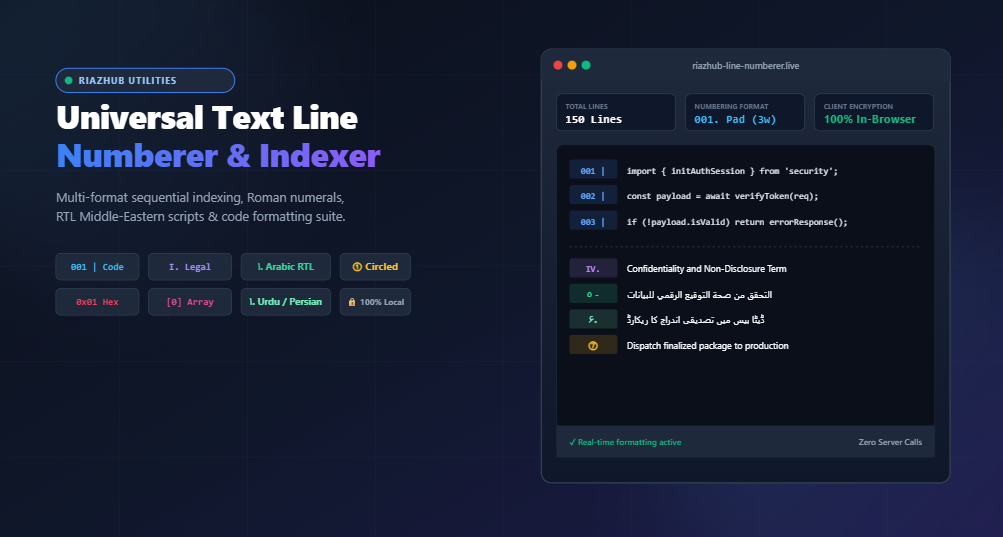
In this comprehensive guide, we explore the science and application of text line numbering, examining how modern automated tools like the Universal Text Line Numberer & Sequential Indexer streamline workflows, eliminate visual misalignment in monospace tables, and safeguard private data through 100% in-browser processing.
⚡ Live Online Tool Available
Need to index a list, format source code, or number a legal outline immediately? Use our free browser-based utility:
Why Line Numbering & Sequential Indexing Matter
Structured indexing is fundamental across multiple professional disciplines:
- Legal Briefs & Deposition Transcripts: Attorneys, court reporters, and judges require exact continuous line references (e.g., Page 14, Line 22) to cite witness testimony, evidence exhibits, and statutory clauses without ambiguity.
- Software Engineering & Code Reviews: Sharing snippets in documentation, emails, or chat platforms often strips IDE gutter numbering. Formatting snippets with rigid zero-padded indices (e.g.,
001 |,002 |) maintains clarity during architecture reviews. - Data Science & Log Auditing: When analyzing server crash logs, CSV rows, or JSON dumps, numbering rows allows data engineers to locate error boundaries and anomalies rapidly.
- Multilingual & Bidirectional Lists: Middle-Eastern content creators drafting catalogs or legal clauses in Arabic, Urdu, Persian, or Hebrew require authentic numeral systems (such as Eastern Arabic
١, ٢, ٣or Abjad alphabetical orderingأ, ب, ج) aligned seamlessly in Right-to-Left (RTL) mode.
Exploring Numbering Styles and Notation Schemes
Different tasks demand different numerical notations. With the Text Line Numberer on RiazHub, you have access to over 20 distinct sequential formats:
| Category | Style Name | Sample Output Sequence | Primary Use Case |
|---|---|---|---|
| Standard | Arabic Digits | 1., 2., 3., 4. |
Standard checklists, step-by-step tutorials |
| Monospace | Zero-Padded Digits | 001 |, 002 |, 003 | |
Source code listings, data logs, fixed-width files |
| Legal & Outline | Roman Numerals (Upper) | I., II., III., IV. |
Contract sections, statutory articles, thesis chapters |
| Middle Eastern (RTL) | Eastern Arabic Digits | ١., ٢., ٣., ٤. |
Arabic official documents, academic exams |
| Middle Eastern (RTL) | Persian / Urdu Digits | ۱., ۲., ۳., ۴. |
Urdu, Farsi, and Pashto literary outlines & lists |
| Traditional RTL | Abjad Numerical | أ., ب., ج., د. |
Traditional Islamic jurisprudence, manuscripts |
| Enclosed | Circled Numbers | ①, ②, ③, ④ |
Diagram legends, UI mockups, visually distinct steps |
| Technical | Hexadecimal Notation | 0x01, 0x02, 0x0A |
Memory addressing, byte buffers, firmware dumps |
The Monospace Alignment Problem: Why Zero-Padding Matters
In standard variable-width fonts, digit count variations often go unnoticed. However, in programming editors and terminal logs using monospace fonts, an unpadded digit sequence creates ragged indentation shifts:
Without Zero-Padding (Indentation shifts at line 10):
1. const app = express();
...
9. app.use(cors());
10. app.listen(3000);   <-- Indentation pushed right!

With 3-Width Zero-Padding (Rigid Column Alignment):
001 | const app = express();
...
009 | app.use(cors());
010 | app.listen(3000); <-- Perfectly aligned!
By leveraging the zero-padding and right-alignment toggles inside the Universal Text Line Numberer, code listings maintain strict columnar integrity regardless of whether your document spans 10 lines or 10,000 lines.
Step-by-Step Workflow: How to Index Text in Seconds
- Import Your Content: Navigate to the RiazHub Text Line Numberer. Paste your raw text, click Paste from Clipboard, or drag-and-drop any plain text file (
.txt,.md,.csv,.py,.js,.json). - Select Your Formatting Preset: Click one of the 1-click preset profile pills (e.g., Standard, Code Listing, Arabic RTL, Legal Outline, or Array Index) to auto-configure optimal settings.
- Fine-Tune Sequencing Parameters:
- Start At & Step: Set your starting index (e.g., start at
100with step5for milestone ticketing). - Custom Delimiters: Add custom separators like
.,|,), or tab escapes (\t). - Prefixes & Suffixes: Enclose items in brackets (e.g., prefix
[Item #and suffix]) or code comments (// Line). - Blank Line Management: Enable Skip Blank Lines and Freeze Sequence Counter so empty spacing rows don’t disrupt your sequential math.
- Start At & Step: Set your starting index (e.g., start at
- Export or Copy: Instantly copy the output to your clipboard with one click, or download the formatted results as a
.txtfile or structured.mdMarkdown list.
Advanced Use Cases: Beyond Basic Numbering
1. Formatting Markdown Task Lists and Documentation
When drafting GitHub documentation or Notion pages, preserving paragraph breaks while maintaining numbered lists is critical. By configuring the delimiter to . and enabling Trim Whitespace per Line, your raw notes convert into standards-compliant Markdown ordered lists ready for immediate publishing.
2. Multilingual Bidirectional Formatting (RTL)
Translating software manuals or legal contracts into Arabic, Persian, or Urdu frequently breaks list alignment because Western numerals cause bidirectional text cursor glitches. Switching the tool’s direction mode to RTL with Eastern Arabic (١, ٢, ٣) or Urdu (۱, ۲, ۳) numerals ensures the index and delimiter snap to the correct right-side margin.
3. Creating Key-Value Arrays and Data Dumps
Developers frequently need to turn a list of strings into a structured array or dictionary. By setting the start index to 0, prefix to [, delimiter to ] => ', and suffix to ',, an unformatted list instantly transforms into a valid PHP or JavaScript indexed array map.
Frequently Asked Questions (FAQ)
Can I number lines starting from a negative number or zero?
Yes. The Start Numbering At field supports zero (standard for array indices) as well as custom offsets.
How does the tool handle blank lines?
You have full control. You can choose to skip numbering blank rows while continuing the sequence, freeze the counter on blank rows so the next text line resumes seamlessly, or number every single row including empty carriage returns.
Does this utility work offline?
Yes. Because the entire processing engine runs inside your browser via client-side JavaScript, once the page is loaded at RiazHub.com, all transformations, conversions, and file exports operate seamlessly even without an active internet connection.
Conclusion
Precision text indexing is indispensable for anyone working with code, legal briefs, technical specifications, or structured documentation. By removing the friction of manual numbering and offering flexible multilingual notation, the Universal Text Line Numberer & Sequential Indexer empowers professionals to format text faster, cleaner, and with complete data privacy.
Ready to Index Your Text?
Experience instant, secure, and customizable line numbering for free.
Universal Text Line Numberer
Add custom line numbers, prefixes, suffixes, Roman numerals, Eastern Arabic/Urdu/Persian indices, and zero-padded sequences in real time.
Source Input
Numbered Output
This tool fully supports bidirectional indexing. When processing Right-to-Left (RTL) scripts, you can select native numeral systems including:
• Eastern Arabic Numerals (١, ٢, ٣, ٤...) — Standard throughout the Arab world.
• Persian / Urdu Numerals (۱, ۲, ۳, ۴...) — Extended Arabic-Indic numerals for Pakistan, Iran, and Afghanistan.
• Arabic Hijai (أ, ب, ت, ث...) & Abjad (أ, ب, ج, د...) — Traditional alphabetical indexing systems.
• Hebrew Gematria (א, ב, ג, ד...) — Standard Hebrew alphanumeric notation.
Use the Auto / LTR / RTL switcher to quickly lock text direction or allow automatic script detection.
Line numbering is essential across legal briefs, patents, court transcripts, and corporate contracts so attorneys, clerks, and judges can cite exact clauses and lines without ambiguity.
For technical documentation, numbered lists establish procedural hierarchies, while Roman numerals (I. Section, II. Subsection) and Alphabetical letters (A. Overview) clarify document structuring.
When displaying source code with line counts exceeding 9 (e.g. lines 1 to 100), single digits take up fewer column spaces than double or triple digits. Without zero-padding or right-alignment, your code statements shift to the right when transitioning from line 9 to line 10.
Enabling Zero-Padded Digits (e.g., 001 | , 002 | ) or Right-Align Numbers guarantees strict columnar alignment across all code blocks and monospace listings.
All string transformations, numbering sequence conversions, regular expressions, and file exports execute locally in your web browser using client-side JavaScript (ES6+). Zero plaintexts, proprietary code snippets, or confidential contracts are ever transmitted over the network or stored on any server.