
Mastering the Islamic Lunar Calendar: The Ultimate Guide to the Interactive Hijri Calendar Tool on RiazHub
The Islamic calendar (Hijri calendar) is an essential part of daily life for over 1.9 billion Muslims worldwide. Whether determining the exact start of Ramadan, tracking the blessed days of Dhul Hijjah, planning Sunnah fasting on White Days (Ayyam al-Beed), or keeping up with weekly Friday congregational prayers, accurate lunar date mapping is vital.
To serve the digital community with maximum astronomical precision and privacy, RiazHub has launched the state-of-the-art Interactive Hijri Calendar.
Built purely around privacy-first, client-side browser technology, the RiazHub Hijri Calendar Tool provides dynamic dual Hijri-Gregorian date conversion, real-time moon phase rendering, flexible regional moon sighting offset adjustments, and 1-click iCal (.ics) calendar synchronization without requiring any personal data or external API requests.
Why the Hijri Calendar Matters in Everyday Life
Unlike the solar Gregorian calendar—which follows the Earth’s 365-day revolution around the Sun—the Islamic calendar relies strictly on lunar cycles. A lunar year consists of 12 months totaling 354 or 355 days. Because a lunar month spans approximately 29.5 days, each Hijri month begins with the astronomical birth and physical sighting of the new crescent moon (Hilal).
This fundamental difference means Islamic months rotate backward through the solar seasons by approximately 10 to 11 days each Gregorian year. Key worship milestones tied directly to the Hijri calendar include:
- Ramadan (رمضان): The holy month of obligatory fasting from dawn to sunset.
- Shawwal (شوال) & Eid al-Fitr: Celebrating the completion of Ramadan.
- Dhul Hijjah (ذو الحجة) & Hajj: Performing the sacred pilgrimage to Mecca, standing on Mount Arafah, and celebrating Eid al-Adha.
- Sacred Months (الأشهر الحرم): Muharram, Rajab, Dhul Qa’dah, and Dhul Hijjah, where good deeds carry multiplied rewards.
- Sunnah Fasting: Fasting on the “White Days” (13th, 14th, and 15th of each lunar month) and every Monday and Thursday.
Using a modern web tool like the Interactive Hijri Calendar ensures you never miss a sacred day regardless of where you live in the world.
Key Features of the RiazHub Interactive Hijri Calendar
The Interactive Hijri Calendar on RiazHub is engineered to deliver a seamless, intuitive, and feature-packed experience across desktop, tablet, and mobile devices.
1. Live Today Status & Moon Phase Graphic
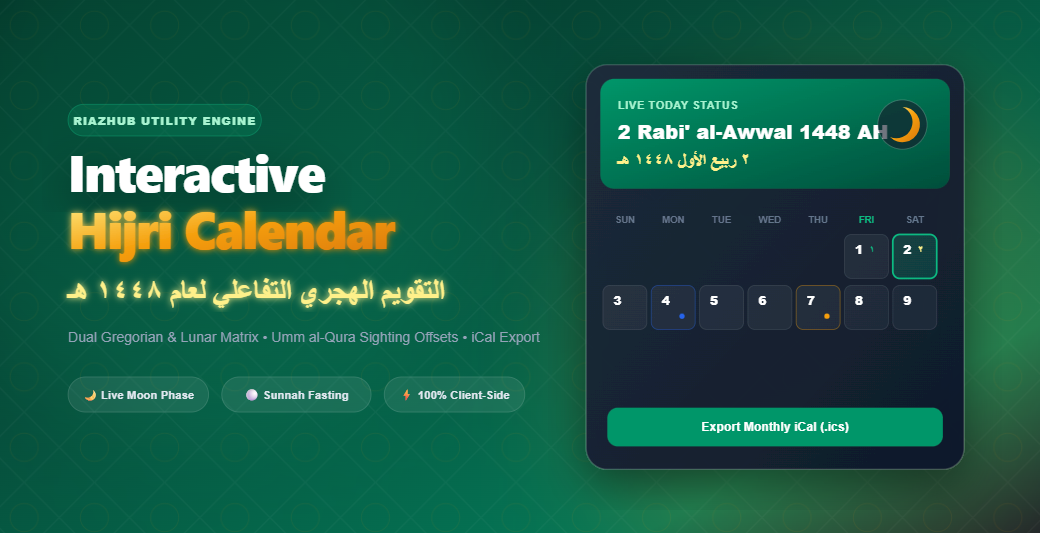
At the top of the interface, the live header card displays:
- Dual Live Date: Current Hijri date (e.g., 2 Rabi’ al-Awwal 1448 AH) alongside the corresponding Gregorian date.
- Arabic Calligraphy Badge: Authentic Arabic script numerals and month typography (٢ ربيع الأول ١٤٤٨ هـ).
- Dynamic Moon Phase Graphic: High-precision SVG lunar illumination showing the moon’s current phase (Waxing Crescent, First Quarter, Full Moon/Badr, Waning Crescent) and estimated lunar age in days.
- Jump to Today Button: One-click navigation returning instantly to the current live date.
2. Regional Moon Sighting Offset Controls (-2 to +2 Days)
Because local crescent moon sightings can vary depending on geographical location, weather, and national religious authorities, fixed calendar tables often differ by a day or two between countries.
The Browser-Based Hijri Calendar solves this by incorporating a Moon Sighting Offset Dropdown. Users can select between -2 days, -1 day, 0 days (Umm al-Qura standard), +1 day, or +2 days. Selecting an offset instantly recalculates the entire date matrix in real time without refreshing the page.
3. Dual-Date Monthly Matrix Grid
The main monthly grid displays a clean 7-day layout (with optional Sunday or Monday start):
- Bold Primary Number: Primary Hijri day (1–30).
- Arabic Number Accent: Clear Arabic script digit indicator.
- Gregorian Corner Badge: Matching solar date and month (e.g., 15 Aug).
- Friday (Jummah) Highlight: Visual accent honoring the weekly congregational day.
- Today Highlight: Distinct emerald border and glow for the current active date.
4. Comprehensive Fasting & Event Markers
Every day cell automatically scans and tags key Islamic observances:
- Islamic Holidays & Milestones: Ashura, Mawlid al-Nabi, Isra & Mi’raj, Ramadan start, Laylat al-Qadr seek nights, Eid al-Fitr, Day of Arafah, and Eid al-Adha.
- White Days (Ayyam al-Beed): Color-coded badges highlighting the 13th, 14th, and 15th lunar days recommended for voluntary fasting.
- Weekly Sunnah Fasting: Automatic indicators for Mondays and Thursdays.
5. Interactive Day Details Modal & iCal Export
Clicking any cell opens a detailed modal dialog displaying full Hijri and Gregorian date strings, Arabic calligraphy, moon phase descriptions, fasting status, and historical significance.
Visitors can click “Add Day Event to iCal (.ics)” or download a full monthly .ics calendar file to instantly sync Hijri dates into Google Calendar, Apple Calendar, or Microsoft Outlook.
6. 12-Month Yearly Overview & Spiritual Virtues Accordion
Want to look ahead at the full year? Toggle to the 12-Month View to inspect mini cards for all 12 lunar months of 1448 AH. You can also expand the collapsible Virtues & Significance Accordion to read authentic historical background and recommended deeds for the selected month.
Technical Superiority & Privacy-First Architecture
Unlike traditional web tools that rely on constant server round-trips or slow third-party APIs, the RiazHub Hijri Calendar Utility runs 100% locally inside your web browser.
- Privacy-First: Zero personal data, location tracking, or cookies are sent to external servers.
- Browser Native Speed: Powered by standard vanilla JavaScript and the browser’s native
Intl.DateTimeFormatAPI with Kuwaiti astronomical fallbacks. - Automatic Light & Dark Mode: Designed with CSS custom variables so it seamlessly inherits light or dark theme aesthetics.
- Print & PDF Ready: Includes custom
@media printstylesheets allowing users to generate clean, printable physical calendars with a single click.
How to Use the Hijri Calendar on RiazHub
Accessing and using the tool is simple:
- Head over to the official Interactive Hijri Calendar Page.
- Check today’s date and current moon phase on the live header card.
- Select your desired Hijri Month and Year (spanning 1445 AH to 1455 AH).
- If your local moon sighting committee reported a date shift, adjust the Moon Sighting Offset dropdown to align the grid with your region.
- Click on any date cell to view detailed event insights or export events directly to your phone calendar via the Download Monthly iCal (.ics) button.
Frequently Asked Questions (FAQ)
What is the Umm al-Qura Calendar?
The Umm al-Qura calendar is the official astronomical lunar calendar calculated by the Saudi Arabia government. It uses precise astronomical calculation of the new moon conjunction at Mecca coordinates as a baseline. The RiazHub Hijri Calendar uses Umm al-Qura as its default 0-offset reference.
How do I adjust for local moon sightings in my country?
Simply use the Moon Sighting / Offset Dropdown on the RiazHub Hijri Calendar Tool to shift dates by -2, -1, +1, or +2 days according to your local moon sighting authority.
Can I import Hijri dates into Google Calendar or iPhone?
Yes! Click the “Download Monthly iCal (.ics)” button on the Interactive Hijri Calendar to download a standard VCALENDAR file, then import it into Google Calendar, Apple Calendar, or Outlook in seconds.
Conclusion
Whether you are organizing spiritual goals for Ramadan, planning travel around Eid holidays, or observing Sunnah fasting on White Days, the Interactive Hijri Calendar at RiazHub provides an indispensable, free, and privacy-focused digital utility.
Experience the tool today by visiting the RiazHub Interactive Hijri Calendar and bookmark it for year-round lunar date reference!