
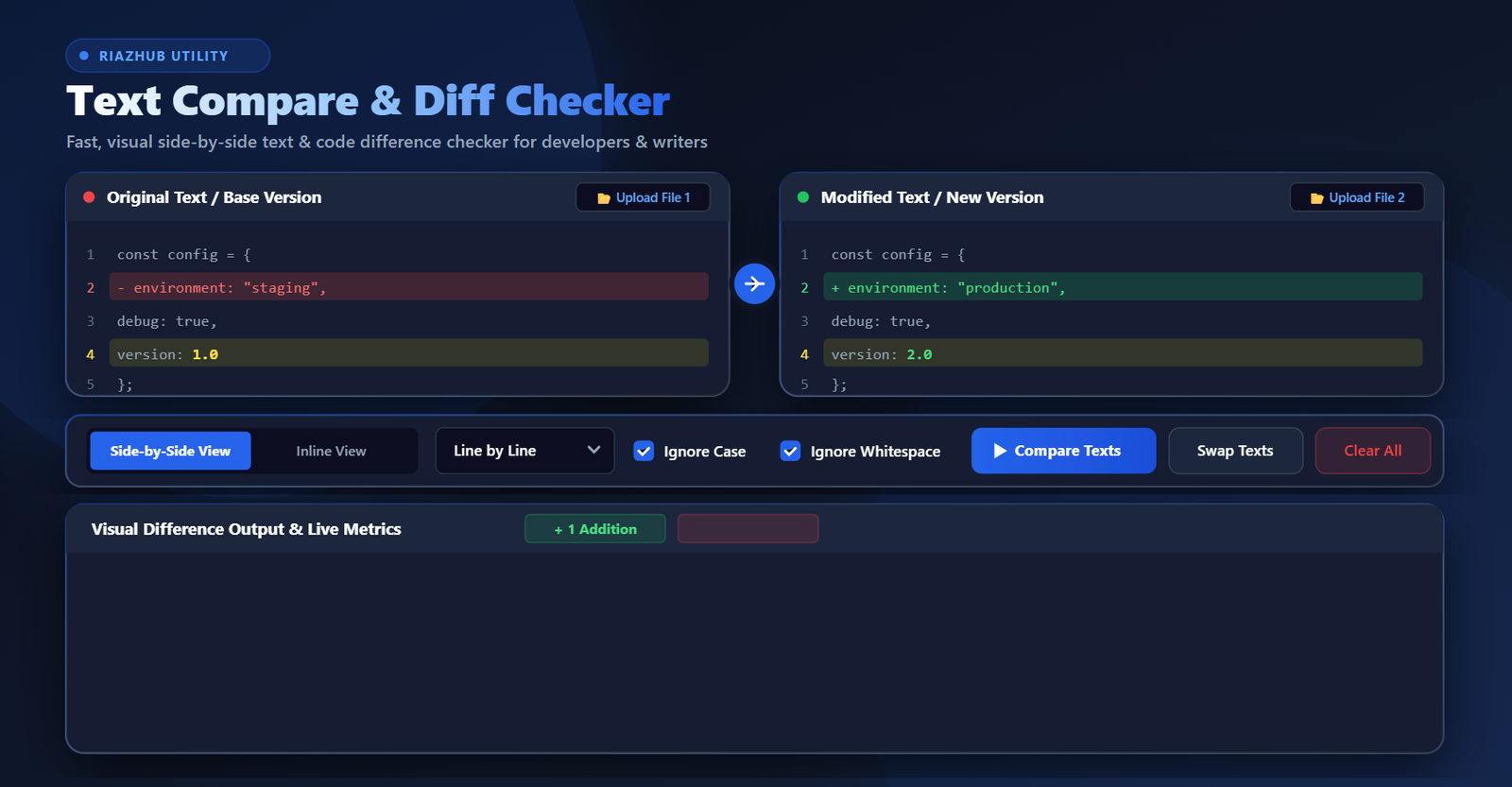
The free Online Diff Checker Tool by RiazHub provides a lightning-fast visual comparison between two texts or source code files right inside your browser. With support for side-by-side and inline visual views, line-by-line, word-by-word, and character-by-character diffing levels, local file uploading, case-insensitivity, whitespace ignoring, and RTL multilingual script support (Arabic, Urdu, Hebrew), this tool handles any text comparison scenario with total precision.
Try the Text Compare & Diff Checker Now
Paste your text or upload your files to highlight additions, deletions, and line modifications instantly.
Why Use an Online Text Compare & Diff Checker?
Manual proofreading often fails when dealing with subtle text variations such as altered punctuation, swapped words, added lines, or modified code variables. Here is why using the RiazHub Text Compare Tool gives you an instant advantage:
- Eliminate Human Error: Human eyes naturally skip over tiny spelling tweaks or missing symbols. The automated diff algorithm highlights every single addition and deletion down to individual character changes.
- Save Time & Boost Productivity: Instead of spending 20 minutes reading two multi-page documents line-by-line, get a visual difference summary in under 2 seconds.
- Inspect Source Code Changes: Developers can paste JSON payload structures, JavaScript functions, CSS stylesheets, Python scripts, or HTML templates to review exact line edits before committing code.
- 100% Private & Secure Browser Processing: The Text Difference Checker at RiazHub processes all text comparisons client-side inside your browser. Your sensitive code, personal documents, and legal texts are never sent to external servers or stored in any database.
Key Features of RiazHub’s Text Compare Tool
1. Flexible Visual Display Modes
Choose between two customizable visual views depending on your workflow preference:
- Side-by-Side View: Displays the original text on the left pane and the modified text on the right pane in parallel columns with synchronized line numbering and highlighted changes.
- Inline / Unified View: Merges both versions into a single unified stream, displaying additions with a green plus (
+) indicator and deletions with a red minus (-) indicator.
2. Three Granular Compare Levels
Different tasks require different levels of detail. The Side-by-Side Text Diff Tool offers three distinct diffing granularities:
- Line by Line: Best for comparing document paragraphs, code scripts, or multi-line data lists. Sub-word intra-line highlighting is automatically applied to modified lines.
- Word by Word: Focuses on altered words, inserted phrases, or deleted vocabulary within sentences.
- Character by Character: Provides micro-level inspection down to single letters, digits, punctuation marks, or whitespace characters.
3. Multilingual & Bi-Directional RTL Script Support
Languages written from right to left—such as Arabic, Urdu, Hebrew, and Persian—often suffer layout rendering bugs in standard diff tools. The RiazHub Multilingual Text Compare Utility features native dir="auto" detection and Unicode grapheme cluster segmentation, ensuring flawless visual alignment and text direction for global users.
4. Ignore Case & Ignore Whitespace Options
Need to focus on actual content changes rather than formatting differences? Toggle the Ignore Case option to treat uppercase and lowercase letters as identical, or enable Ignore Whitespace to disregard trailing spaces, indentation differences, and extra blank lines.
5. Real-Time Similarity Score & Statistics
Every comparison automatically calculates comprehensive quantitative metrics:
- Additions Count (
+): Number of newly added lines or tokens. - Deletions Count (
-): Number of removed lines or tokens. - Unchanged Lines (
=): Count of identical content. - Similarity Percentage Score: Visual progress bar calculating the exact mathematical similarity percentage between both texts.
6. Direct File Uploading
Instead of manually copying and pasting lengthy files, click the Upload File 1 or Upload File 2 buttons to load local text files directly into the editor boxes. The file selection window automatically filters for supported formats including .txt, .js, .css, .html, .json, .csv, .md, .py, .php, .sql, .log, and .xml.
Step-by-Step Tutorial: How to Compare Texts Online
- Navigate to the RiazHub Text Compare & Diff Checker page.
- Paste your original (base) text or code into the left text box (Original Text), or click Upload File 1 to select a document from your computer.
- Paste your new or modified version into the right text box (Modified Text), or click Upload File 2.
- Select your preferred Display Mode (Side-by-Side or Inline) and Compare Level (Line, Word, or Character).
- Click the blue Compare Texts button (or allow the auto-compare feature to run).
- Review the highlighted results: Green indicates added text, Red indicates deleted text, and Yellow indicates modified words.
- Click Copy Output to copy the rendered comparison results directly to your clipboard.
Real-World Use Cases
For Developers & Engineers
Compare two versions of source code files before submitting pull requests or pushing updates to production. Easily detect missing semicolons, modified variable names, or altered configuration keys in .json or .env files using the Code Diff Checker by RiazHub.
For Writers, Authors & Content Editors
When collaborating with co-authors or proofreading edited article submissions, compare the draft copy against the final edited version to verify what revisions were made.
For Legal & Business Professionals
Ensure zero unauthorized changes are made when reviewing legal contracts, service agreements, terms of condition documents, or financial statements.
For Students & Researchers
Compare different essay revisions, reference citations, or translated script passages quickly and accurately.
Feature Comparison Table
| Feature | RiazHub Text Compare Tool | Manual Proofreading | Traditional Desktop Diff Apps |
|---|---|---|---|
| Speed | Instant (< 1 second) | Slow (15–30 mins) | Fast |
| Sub-Word Highlighting | Yes (Intra-line diff) | No | Varies |
| RTL Script Support (Arabic/Urdu) | Yes (Native Unicode) | Manual | Rare |
| Browser Installation Required | No (100% Free Online) | No | Yes (Download needed) |
| Privacy Protection | 100% Client-Side Browser Execution | Private | Private |
| Similarity Percentage Metric | Yes (Live Score) | No | Rare |
Frequently Asked Questions (FAQ)
Is the Text Compare tool free to use on RiazHub?
Yes! The Text Compare & Diff Checker is 100% free with no hidden fees, no subscription requirements, and no daily usage limits.
Is my pasted text or file data secure?
Absolutely. The tool operates completely inside your web browser using JavaScript. No text data or uploaded files are ever sent to our servers or saved in any database.
Which file types can I upload?
You can upload plain text files (.txt, .log, .csv, .md) as well as programming code files (.js, .css, .html, .json, .xml, .py, .php, .sql, .java, .cpp, .ts).
Can I compare texts written in Arabic, Urdu, or Persian?
Yes. The RiazHub Diff Checker supports full Unicode bi-directional text and right-to-left (RTL) alignment for Arabic, Urdu, Hebrew, and Persian scripts.
Ready to Compare Your Text Files?
Experience fast, accurate, and secure text difference checking online.