
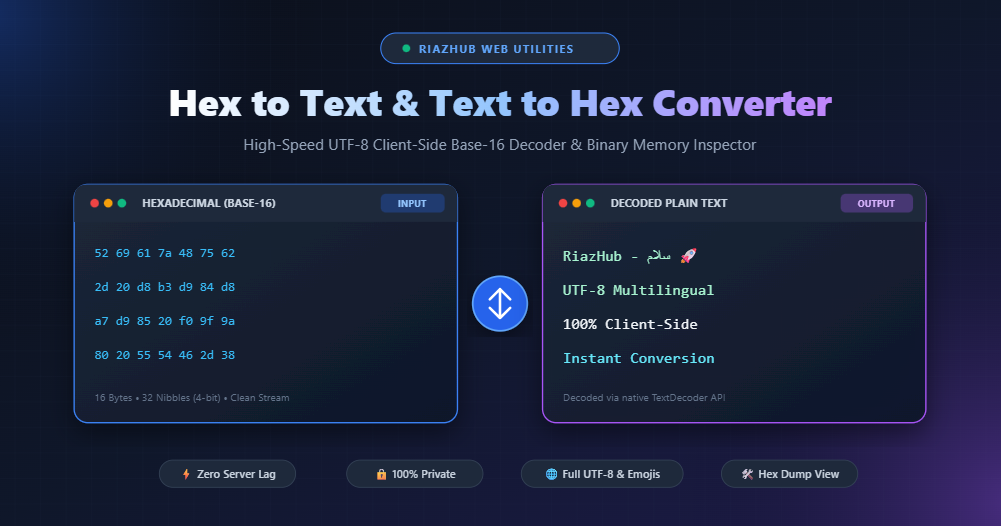
Whether you are analyzing encrypted network packets, inspecting compiled binary files, debugging web APIs, or decoding low-level memory dumps, understanding how computers bridge the gap between Hexadecimal (Base-16) numbers and human-readable Text is an essential engineering skill.
Whenever you need to immediately convert raw byte streams, you can use the free RiazHub Hex to Text Converter & Decoder to translate hexadecimal values into clear UTF-8 text and vice versa with zero server lag.
What is Hexadecimal (Base-16) and Why Do Computers Use It?
Computers operate fundamentally on binary (Base-2), composed exclusively of 0s and 1s. While binary is native to electronic transistors, long sequences like 01010010 01101001 01100001 01111010 are unwieldy and error-prone for human engineers to read or manipulate.
To simplify binary representations, computer scientists developed the Hexadecimal (Base-16) numbering system. Base-16 uses 16 distinct symbols:
- 0 through 9 representing values 0 to 9
- A through F (or
athroughf) representing values 10 to 15 (A=10, B=11, C=12, D=13, E=14, F=15)
The Mathematical Symmetry of Bits, Nibbles, and Bytes
Why is hexadecimal preferred over octal or decimal? The reason lies in pure powers of two:
$$2^4 = 16$$
Because $2^4 = 16$, exactly one hexadecimal digit maps perfectly to a 4-bit binary sequence, known as a nibble.
Since a standard byte consists of 8 bits (two 4-bit nibbles), every single byte in computer memory is represented by exactly two hexadecimal characters:
Binary:      0101   0010
Nibbles:       5      2
Hex Byte:        0x52
ASCII Char:       'R'
This 1:1 architectural alignment makes Base-16 the universal standard for memory addressing, color codes in web design (e.g., #2563EB), bytecode inspection, and cryptographic hashes (such as SHA-256 and MD5).
Need to Decode Hex Sequences Instantly?
Try our fast, client-side, zero-server decoder supporting custom delimiters and multi-byte UTF-8 scripts.
How Hexadecimal Translates to Text: ASCII vs. UTF-8 Multi-Byte
Converting a series of hexadecimal values into text requires knowing the character encoding scheme used when the data was originally written.
1. Standard ASCII (Single-Byte Encoding)
Standard ASCII defines 128 characters (0 to 127), fitting entirely within a single 7-bit or 8-bit byte. In ASCII:
0x48 0x65 0x78translates directly to “Hex”.0x20represents a Space character.0x0Arepresents a Line Feed (\n).
2. UTF-8 (Variable-Length Multi-Byte Encoding)
Modern software requires support for international alphabets including Arabic, Urdu, Persian, Chinese, Japanese, accents, and emojis. UTF-8 solves this by using variable-length byte streams ranging from 1 to 4 bytes per character:
| Character | Script / Type | Hexadecimal Sequence (Bytes) | Total Bytes |
|---|---|---|---|
| R | Latin / ASCII | 52 |
1 Byte |
| س | Arabic / Urdu | D8 B3 |
2 Bytes |
| 文 | Chinese (Han) | E6 96 87 |
3 Bytes |
| 🚀 | Rocket Emoji | F0 9F 9A 80 |
4 Bytes |
Important Note on Multi-Byte Safety: Traditional, naive hex converters often assume 1 byte = 1 character, which irreparably scrambles international text and emojis into broken question marks () or corrupted symbols. The RiazHub Hex Converter utilizes native browser TextDecoder('utf-8') to guarantee 100% loss-free multi-byte reconstruction.
Common Hex Formats and Notations Explained
When extracting hexadecimal dumps from network sniffers (like Wireshark), programming language debuggers, or compiled binaries, you will encounter diverse formatting conventions:
- Space-Separated (
52 69 61 7a): Common in network packet dissectors and command-line hex dump tools. - Continuous Stream (
5269617a): Common in cryptographic hashes, SHA-256 digests, and raw binary string exports. - C / Assembly Notation (
0x52, 0x69): Used across C++, Rust, Python, and Java source code to denote integer hex literals. - Escape Sequence (
\x52\x69\x61\x7a): Standard regex and string literal notation in programming environments. - Percent-Encoding (
%52%69%61%7a): Used in web browsers and HTTP URLs to safely transmit non-ASCII characters.
With the RiazHub Hex to Text / Text to Hex utility, you can toggle between all these formats, customize your delimiters, and automatically strip extraneous prefixes with a single click.
Step-by-Step: How to Convert Hex to Text and Text to Hex
Step 1: Choose Your Conversion Mode
Navigate to the Hex to Text Tool on RiazHub. Use the top pill switcher to select:
- Hex ➔ Plain Text (Decode): Converts raw Base-16 hex values into readable text.
- Plain Text ➔ Hex (Encode): Converts plain text, multi-line logs, or international scripts into formatted hex sequences.
Step 2: Input or Upload Your Data
Type or paste your data directly into the source textarea. You can also click Paste, Sample to load an instant demonstration dataset, or drag-and-drop any .txt, .hex, .log, or .bin file directly onto the editor.
Step 3: Customize Output Delimiters & Casing
Use the configuration panel to select your preferred byte separator (Space, None, Colon, Comma, Dash, or Custom), choose between lowercase (a-f) and UPPERCASE (A-F), or enable auto-padding for incomplete nibbles.
Step 4: Inspect and Export
Watch your converted output update dynamically in real time. Use the Copy to Clipboard button or click Download to save your result as a clean text or hex file.
Live Binary Hex Dump Inspector
Inspect byte offsets (00000000), 16-byte memory blocks, and printable ASCII glyphs side-by-side.
Real-World Engineering Use Cases
Where is Hex to Text conversion applied in daily development and IT operations?
- Network Packet & Wireshark Analysis: Deciphering raw payload data transmitted over TCP/UDP sockets.
- Malware Analysis & Cybersecurity: De-obfuscating malicious scripts hidden inside hex payloads or shellcodes.
- Firmware & Microcontroller Debugging: Reading EEPROM and flash memory buffers from Arduino, ESP32, and ARM chips.
- Database & BLOB Inspection: Inspecting raw binary objects stored inside MySQL, PostgreSQL, or SQLite databases.
- Game Development & Save File Editing: Modifying binary save files, resource packs, and level definitions.
Why Privacy Matters: 100% Client-Side Processing
When decoding proprietary binary blobs, API tokens, cryptographic keys, or sensitive database dumps, sending your data across third-party remote servers introduces severe security risks.
The RiazHub Hex to Text Converter runs entirely within your client web browser sandbox. No strings, hex payloads, or decoded outputs are ever transmitted over the network, ensuring complete confidentiality, zero latency, and offline-capable reliability.
Conclusion
Understanding hexadecimal notation empowers developers, system administrators, and cybersecurity professionals to interact directly with the fundamental layers of computing. Whenever you need a fast, reliable, and secure conversion utility, bookmark the RiazHub Hex to Text & Text to Hex Tool for all your decoding needs.
Hex to Text Converter
Decode hexadecimal values (Base-16) into readable plain text, or encode plain text & multi-byte UTF-8 into clean hex strings with live bitstream inspection.
Hexadecimal & Computer Architecture Guide
The hexadecimal numbering system (Base-16) uses 16 unique symbols: 0-9 and A-F (where A=10, B=11, C=12, D=13, E=14, F=15). In modern computer architecture, one hexadecimal digit represents exactly 4 binary bits (also known as a nibble, since 24 = 16).
Because one byte consists of 8 bits, exactly two hexadecimal digits represent a complete byte (2 nibbles = 1 byte = 8 bits). For example, the byte value 255 in decimal is 11111111 in binary and FF in hex.
While standard ASCII characters (A-Z, 0-9) take exactly 1 byte (such as 'A' = 0x41), international characters require multi-byte UTF-8 encoding:
• Arabic / Urdu characters (like 'س' = 0xD8 0xB3) use 2 bytes.
• Asian scripts & Chinese/Japanese use 3 bytes.
• Emojis & mathematical symbols (such as 🚀 0xF0 0x9F 0x9A 0x80) use 4 bytes.
This tool utilizes native browser TextDecoder('utf-8') and TextEncoder() APIs to guarantee 100% loss-free multi-byte conversion without broken character corruptions.
All data entered into RiazHub's Hex to Text tool is processed strictly inside your local web browser's memory sandbox using ECMAScript 6+ client-side logic. No network requests, API queries, or analytical dumps are dispatched to any server, guaranteeing absolute confidentiality for sensitive tokens, hashes, cryptographic keys, and binary streams.