
How to Extract Tables from PDF to Excel (.xlsx) & CSV Free In-Browser: The Ultimate Guide
Copying tabular financial data, bank statements, or invoices from PDF files directly into Excel often results in scrambled text, broken column alignments, and hours of tedious manual re-formatting. Discover how RiazHub’s client-side PDF Table Extractor solves this problem by parsing 2D Cartesian spatial coordinates directly inside your web browser with 100% data privacy guarantee.
Need to Extract a PDF Table Right Now?
Convert your PDF financial statements and ledgers to Excel (.xlsx), CSV, or JSON entirely in your browser with zero server uploads.
Launch PDF Table Extractor Utility
1. Why Standard Copy-Pasting from PDF Files Fails
PDF (Portable Document Format) files were designed for consistent document printing and rendering across devices—not for structured tabular data extraction. Under the hood, a standard PDF does not contain structural elements like HTML <table>, <tr>, or <td> tags.
When you highlight and copy text from a PDF table into Microsoft Excel or Google Sheets, the browser or PDF viewer extracts raw character streams. As a result:
- Scrambled Columns: Multi-column data merges into single long text strings inside a single cell.
- Broken Multi-Line Wraps: Long item descriptions split across multiple rows, corrupting financial calculations.
- Loss of Numeric Formatting: Numbers containing currency symbols (e.g.,
$1,250.50) paste as plain text, preventing spreadsheet formulas from calculating sums or averages. - Privacy Vulnerabilities: Uploading sensitive bank ledgers, payroll documents, or tax forms to third-party online converters exposes confidential financial data to server-side logging.
2. How Browser-Based Spatial Grid Reconstruction Works
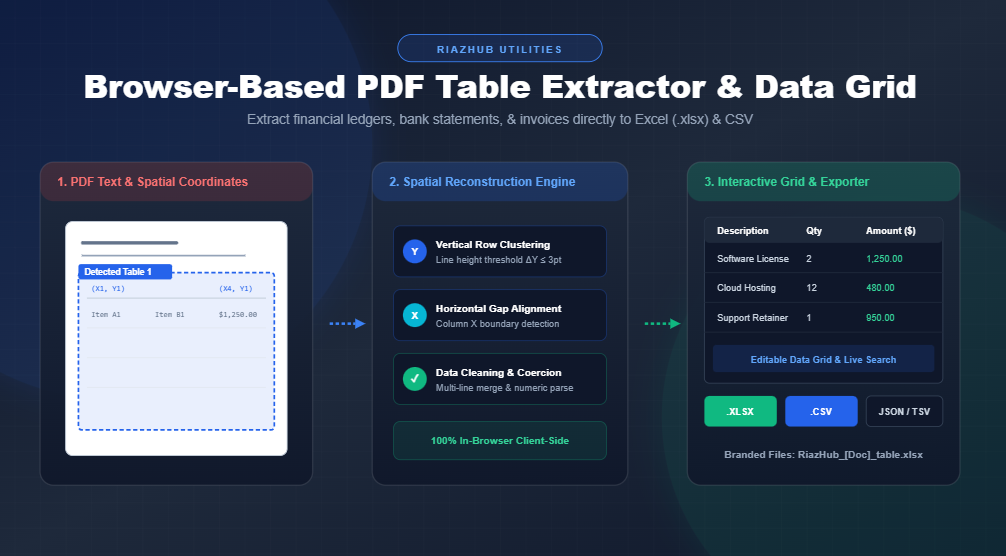
Instead of treating PDF text as an unorganized character stream, the RiazHub PDF Table Extractor utilizes WebAssembly and PDF.js to inspect the exact two-dimensional Cartesian coordinates \((X, Y)\) of every text item on the page.
Technical Note: The extractor clusters text tokens vertically based on line-height tolerances (\(\Delta Y \le 3\text{ pt}\)) and aligns horizontal column boundaries using gap interval analysis across adjacent rows.
Key Extraction Strategies:
- Lattice / Stream Hybrid Mode (Auto-Detect): Scans for explicit vector border lines alongside whitespace gaps to reconstruct formal financial report tables.
- Whitespace Stream Mode: Best for borderless invoices or bank statements where columns are aligned purely by horizontal $X$-spacing intervals.
- Multi-Page Aggregation: Automatically aggregates detected tables across multi-page documents into a single combined master sheet or separate Excel worksheets.
3. Step-by-Step Guide: Converting PDF Tables to Excel & CSV
Follow these simple steps to extract structured tables from your documents using the online PDF Table Extractor tool:
Step 1: Upload Your PDF Document
Navigate to the RiazHub PDF Table Extractor page and drag and drop your PDF file into the upload dropzone. The diagnostic header will instantly analyze your document, displaying the file size, total page count, and detected table regions.
Step 2: Configure Extraction Settings
Tailor your data cleaning options using the settings panel:
- Auto-Detect Header Row: Treats Row 1 as column titles in your spreadsheet.
- Merge Multi-Line Cell Wraps: Combines text wrapped across multiple PDF lines into single logical rows.
- Auto-Convert Currency & Numbers: Strips formatting symbols like
$or,to output true numerical floating-point values compatible with Excel formulas. - Page Scope: Select all pages, the first page, or a custom page range (e.g.,
1-4, 7).
Step 3: Preview & Edit in the Live Data Grid
Review your extracted table in the real-time interactive HTML data grid. Click any cell to edit content directly, use the quick search bar to filter specific rows, or reorder, rename, and delete columns before exporting.
Step 4: Export to Your Preferred Format
Click Export to Excel (.xlsx) to generate an instant spreadsheet file, or choose Export as CSV, JSON, or Copy to Clipboard (TSV) for immediate pasting into Google Sheets.
Try the Free PDF Table Extractor
No registration, no server uploads, and no document limits. Extract PDF tables safely in seconds.
4. Feature Comparison: Client-Side vs Server-Side Converters
Here is how the client-side PDF Table Extractor utility compares to conventional cloud-based PDF conversion websites:
| Feature | RiazHub PDF Table Extractor | Traditional Online Converters |
|---|---|---|
| Data Security | 100% In-Browser (Zero Server Upload) | File uploaded to external cloud server |
| File Size & Speed | Instant local parsing (No upload delay) | Slower (Depends on upload bandwidth) |
| In-Browser Data Grid Editor | Yes (Edit, search & reorder columns live) | No (Download static output file only) |
| Multi-Format Output | Excel (.xlsx), CSV, JSON, TSV Clipboard | Limited to single output format |
| Numeric Auto-Formatting | Automatic conversion to real numbers | Pasted as text strings |
| Branded Export Files | Custom site-branded filename output | Generic random file names |
5. Frequently Asked Questions (FAQ)
Are my uploaded PDF files safe?
Yes, absolutely. The RiazHub PDF Table Extractor processes 100% of your document data locally inside your web browser. No PDF file, financial invoice, or extracted table cell is ever sent to any remote server or stored in a database.
Does it support scanned or flat image PDFs?
Native vector PDFs containing actual text coordinates yield the best results. If your PDF is a flat scanned image, we recommend running a quick optical character recognition (OCR) tool on your PDF before extracting tables.
Can I combine tables from multiple pages into one Excel sheet?
Yes! Using the Export Scope control, you can choose to merge tables from all pages into a single combined spreadsheet or export each page as a separate worksheet tab in Excel (.xlsx).
6. Conclusion
Extracting structured tables from PDF financial statements and invoices doesn’t have to be frustrating or risk data privacy. With RiazHub’s free PDF Table Extractor, you can convert complex PDF documents into clean, editable Excel spreadsheets, CSV files, and JSON data in seconds completely within your web browser.
PDF Table Extractor & Data Grid
Instantly extract tables from financial reports, invoices, and bank statements directly into Excel (.xlsx), CSV, or JSON without uploading files to any server.
Drag & Drop your PDF file here
Supports invoices, bank statements, financial ledgers, and multi-page reports (.pdf)
document.pdf
Detected Table Region
Page 1 of 1Extracted Table Data Grid
PDF Table Extraction Best Practices Guide
<table> or <tr> tags. Instead, text items are placed at precise 2D Cartesian coordinates \((X, Y)\). Our client-side algorithm clusters text tokens vertically based on line-height thresholds (\(\Delta Y \le 3\text{ pt}\)) and aligns horizontal column boundaries using gap interval analysis.
Stream Mode: Works for borderless invoices or bank statements where columns are separated purely by white spacing gaps.