
How to Inspect Camera EXIF Metadata, Exposure Triangle Settings, and GPS Geolocation Privately in Your Browser
From exact shutter speeds and physical aperture geometries to focal lengths, ISO sensitivities, camera body serial numbers, editing software signatures, and even pinpoint satellite GPS coordinates, EXIF data records the precise optical and physical environment at the microsecond of capture.
Whether you are a professional photographer auditing exposure settings to refine your craft, an investigator verifying photographic authenticity, or a privacy-conscious individual making sure sensitive coordinates aren’t accidentally exposed online, having access to an instantaneous, client-side metadata reader is essential. You can inspect your photos immediately using the free Universal Image EXIF Viewer & Photographic Metadata Inspector on RiazHub.
⚡ Instant Photographic Metadata & Geolocation Inspector
Inspect camera make, lens model, shutter speed, aperture, ISO, and GPS maps directly inside your web browser. 100% private with zero server uploads.
1. The Architecture of Photographic Metadata: How EXIF Works
First established by the Japan Electronic Industry Development Association (JEIDA) in 1995 and maintained under CIPA DC-008 standards, EXIF embeds structured photographic metadata directly within common image container formats—most notably JPEG, TIFF, WebP, PNG, HEIC/AVIF, and proprietary camera RAW files (such as Canon CR2/CR3, Nikon NEF, and Adobe DNG).
In a standard JPEG stream, metadata is encapsulated within an Application Marker Segment designated as APP1 (Hex marker 0xFFE1). The binary structure follows a strict hierarchy:
- SOI (Start of Image): A 2-byte marker (
0xFFD8) indicating the commencement of the JPEG file. - APP1 Marker: Two bytes (
0xFFE1) followed by a 16-bit integer designating the total length of the metadata segment. - Exif Header: A 6-byte identifier consisting of the ASCII string
Exiffollowed by two null terminator bytes (0x45 0x78 0x69 0x66 0x00 0x00). - TIFF Header: An 8-byte header specifying byte-endianness (
IIfor Intel Little-Endian orMMfor Motorola Big-Endian), the arbitrary 42 identification constant (0x002A), and an offset pointer to the primary Image File Directory. - Image File Directories (IFDs): Structured blocks storing tag identifiers, data types, value counts, and value offsets.
Did You Know? The primary directory (IFD0) manages global camera attributes (Make, Model, Software, Orientation). It contains internal 32-bit pointers referencing specialized sub-directories: the Exif SubIFD (Tag 0x8769) for optical exposure metrics, and the GPS Info SubIFD (Tag 0x8825) for satellite telemetry.
2. Demystifying the Exposure Triangle: Shutter, Aperture, and ISO
Photographers rely on the Exposure Triangle—the mathematical relationship between shutter speed, lens aperture, and sensor sensitivity—to balance exposure and creative depth of field. Modern digital sensors store these values using high-precision integer pairs rather than rounded decimals.
| EXIF Tag | Hex ID | Native Binary Type | Photographic Meaning & Formula |
|---|---|---|---|
ExposureTime |
0x829A |
RATIONAL (num / den) | Duration of sensor exposure in seconds (e.g., 1/500s or 2.5s). |
FNumber |
0x829D |
RATIONAL (num / den) | Lens focal ratio (aperture opening), represented as f/2.8 or f/8.0. |
ISOSpeedRatings |
0x8827 |
SHORT (16-bit uint) | Sensor amplification sensitivity based on ISO 12232 standards (e.g., ISO 100, ISO 3200). |
FocalLength |
0x920A |
RATIONAL (num / den) | Actual optical focal length in millimeters (e.g., 50mm). |
FocalLengthIn35mmFilm |
0xA405 |
SHORT (16-bit uint) | Full-frame equivalent focal length accounting for APS-C or Micro 4/3 crop factor. |
ExposureBiasValue |
0x9204 |
SRATIONAL (signed) | Exposure compensation dial setting in EV (e.g., +0.33 EV or -1.0 EV). |
MeteringMode |
0x9207 |
SHORT (16-bit uint) | Light metering evaluation method (Multi-Segment/Matrix, Spot, Center-Weighted). |
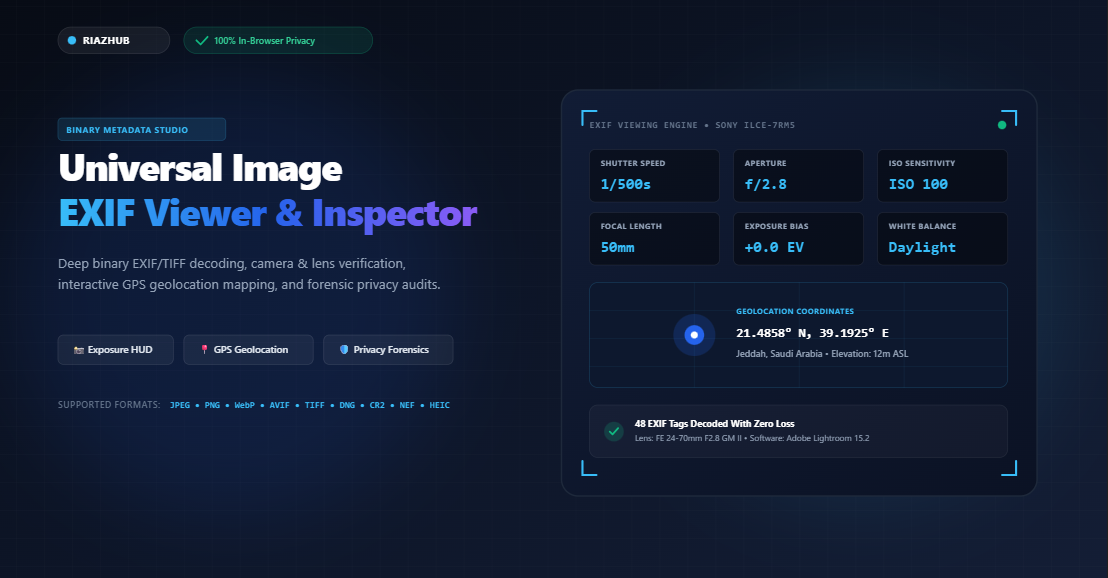
When you load a photo into the Universal Image EXIF Viewer, these binary rationals are instantly translated into an authentic digital camera LCD viewfinder graphic:
——————————————————-
SHUTTER : 1/500s | APERTURE : f/2.8 | ISO : 100
FOCAL : 50mm (eq) | EV BIAS : +0.0 EV | WB : Daylight
CAMERA : Sony ILCE-7RM5 (Alpha 7R V)
LENS : FE 24-70mm F2.8 GM II
METERING: Multi-Segment (Pattern Matrix)
3. Why RATIONAL and SRATIONAL Values Matter
A common source of confusion in metadata analysis is why exposure values aren’t simply stored as floating-point numbers (e.g., 0.002 for 1/500s).
In binary computing, floating-point numbers based on IEEE 754 standards are susceptible to rounding errors and architectural discrepancies between different microprocessors. To guarantee 100% mathematical fidelity, the EXIF specification utilizes two fundamental 64-bit structures:
- RATIONAL (Type 5): Consists of two consecutive 32-bit unsigned integers. The first integer represents the Numerator; the second represents the Denominator. A shutter speed of 1/250s is stored as
1and250. An aperture of f/2.8 is recorded as28and10. - SRATIONAL (Type 10): Consists of two consecutive 32-bit two’s-complement signed integers. This allows negative values, essential for exposure compensation (e.g.,
-33and100for-0.33 EV) or temperatures below freezing.
4. Geolocation Forensics: Decoding GPS Coordinates & Elevation
When pictures are taken using smartphones (iPhones, Samsung Galaxy, Google Pixel) or cameras equipped with GPS receivers, satellite coordinates are stored under the GPS Info SubIFD (0x8825).
Rather than storing decimal numbers, GPS coordinates are recorded as three distinct RATIONAL pairs representing Degrees, Minutes, and Seconds (DMS):
Latitude = Degrees + (Minutes / 60) + (Seconds / 3600)
For instance, consider a photo taken at 21° 29' 8.88" N, 39° 11' 33.00" E:
- Latitude Degrees:
21 / 1 - Latitude Minutes:
29 / 1 - Latitude Seconds:
888 / 100 - Latitude Reference (Tag
0x0001):N(North)
The viewer calculates: 21 + (29 / 60) + (8.88 / 3600) = 21.485800° N.
If the reference tag is S (South) or W (West), the coordinate is converted to a negative signed value. With the RiazHub EXIF Inspector, coordinates are automatically rendered onto an interactive, privacy-friendly OpenStreetMap canvas, pinpointing the location without sending requests through tracking-heavy third-party mapping SDKs.
Privacy Warning: GPS coordinates embedded in photos can pinpoint a photographer’s exact physical location down to a few centimeters. Sharing unstripped photos taken in residential areas can inadvertently reveal your home address, daily routines, or workplace.
5. Detecting Digital Manipulation & Software Footprints
Digital forensics often hinges on determining whether an image is a pristine original or has been modified in post-processing software. The EXIF standard contains chronological checkpoints and software signatures that reveal digital tampering:
- DateTimeOriginal (Tag
0x9003) vs. DateTime (Tag0x0132):
Tag0x9003records the microsecond the sensor captured the exposure. Tag0x0132is updated by operating systems or editing applications whenever the file is re-saved. A significant discrepancy between these two timestamps confirms post-capture modification. - Software Signature (Tag
0x0131):
Native camera firmware writes identifiers such asILCE-7RM5 v2.00. When exported from creative software, this tag is replaced by strings likeAdobe Photoshop Lightroom Classic 15.2 (Windows),GIMP 2.10, orCanva. - Camera Body & Lens Serial Numbers (Tags
0xA431&0xA435):
High-end photographic equipment embeds permanent hardware serial numbers. Forensic investigators use these serials to confirm whether multiple disparate photos were captured using the exact same camera body.
6. Why Social Media Platforms Strip Metadata
If you download an image from Instagram, Facebook, Twitter/X, or WhatsApp and run it through an EXIF viewer, you will usually find zero metadata tags. This is not an accident; major platforms employ automated sanitization pipelines during ingestion:
- Bandwidth & Storage Optimization: High-resolution embedded thumbnails and MakerNote data can add 50KB to 500KB of overhead per image. Stripping non-essential binary chunks saves petabytes of global network bandwidth.
- User Privacy Protection: Stripping GPS coordinates and device serials prevents malicious tracking, cyberstalking, and unauthorized location profiling.
However, when images are transferred as uncompressed documents, shared via AirDrop, uploaded to cloud storage (Google Drive, Dropbox), or e-mailed as attachments, the original binary EXIF stream remains completely intact.
7. Zero-Server Architecture: Why 100% In-Browser Inspection Matters
Many online metadata inspection tools require you to upload your personal photos to their remote servers. This introduces substantial security risks: your private family photos, sensitive travel coordinates, and proprietary gear signatures are transmitted across the web and stored in unfamiliar server logs.
The Universal Image EXIF Viewer on RiazHub eliminates this vulnerability completely by operating on a 100% Client-Side Zero-Server Architecture:
- Local Binary Ingestion: Files are read directly from your device storage using the browser’s native HTML5
FileReaderAPI. - In-Memory DataView Parsing: Binary marker traversal, endianness evaluation, and rational decoding execute inside browser memory via
DataView. - Zero Telemetry: No pixels, coordinates, or filenames are ever transmitted to any external server. You can disconnect your internet connection entirely after loading the page and the tool will continue to function smoothly.
Summary & Key Takeaways
Understanding and auditing EXIF metadata gives you full visibility into the technical and forensic aspects of your digital images:
- Photographers: Analyze exact shutter, aperture, ISO, and lens performance to hone optical techniques.
- Investigators: Verify timestamps, software signatures, and equipment serial numbers to authenticate digital evidence.
- Everyday Users: Audit personal images for exposed GPS coordinates before publishing them to public websites or forums.
🔍 Inspect Your Image EXIF Metadata in Seconds
Ready to analyze your photos? Drop your JPEG, PNG, WebP, AVIF, TIFF, or RAW files into our free browser-based inspector for an instant, confidential analysis.
Universal Image EXIF Viewer & Photographic Inspector
Inspect shutter speed, aperture, ISO, camera and lens gear, GPS geolocation, and complete binary EXIF metadata with instant forensic privacy auditing in real time.
No Image Loaded Yet
Drag and drop an image or click "Load Sample EXIF" on the left to begin.
| IFD Group | Tag Hex | Tag Name | Formatted Decoded Value | Type / Count | Copy |
|---|---|---|---|---|---|
| No metadata tags loaded yet. | |||||
| Thumb | Filename | Camera & Lens | Exposure | Date Taken | GPS | Action |
|---|---|---|---|---|---|---|
| No images in batch queue. Drag multiple photos to compare! | ||||||
0xFFD8. Metadata is stored inside an APP1 application segment (Marker 0xFFE1). Inside this segment, the header begins with the 6-byte signature Exif\0\0, immediately followed by a complete TIFF header defining byte-endianness (II for Little-Endian Intel or MM for Big-Endian Motorola). The TIFF header points to tiered Image File Directories (IFDs): IFD0 (primary image attributes), ExifIFD (shutter, aperture, ISO, lens profiles), GPSIFD (satellites and coordinates), and Interoperability IFD.
1 / 500, an aperture of f/2.8 is encoded as 28 / 10, and an exposure compensation bias of -0.33 EV is encoded as signed -33 / 100. Our in-browser binary parser reads these exact integer pairs directly from memory with zero floating-point rounding degradation.
FileReader and binary DataView APIs. No files are ever uploaded, transmitted, or logged to our servers or any third parties. You can disconnect your internet connection entirely after loading this page and the tool will continue to decode EXIF metadata flawlessly.