
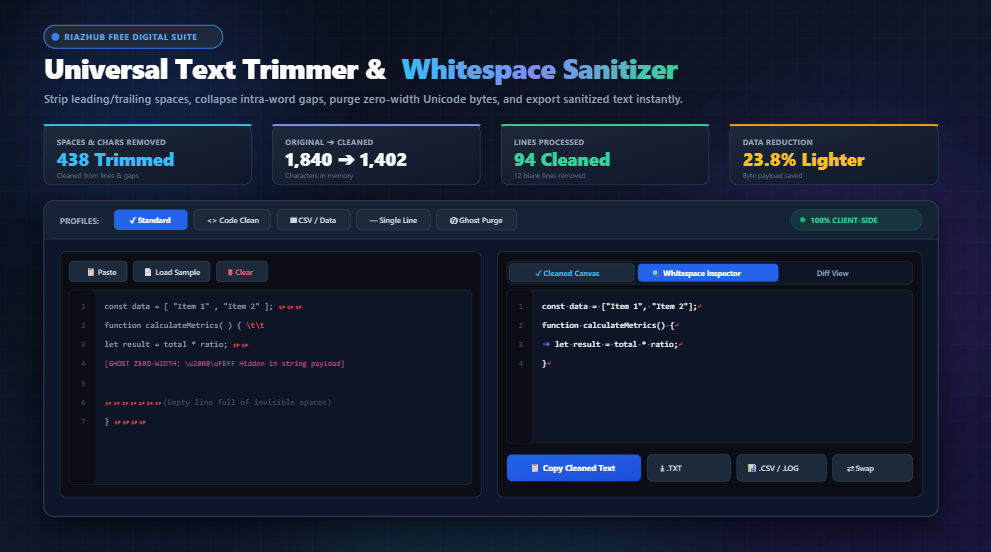
Mastering Text Hygiene: The Ultimate Guide to Trimming Whitespace, Collapsing Gaps, and Purging Invisible Unicode Characters
The Silent Hazard of “Invisible” Whitespace
To the human eye, an empty space looks harmless. When you read an article or skim a block of code, the character between words is just background canvas. But in the deterministic realm of compilers, regex processors, SQL query engines, and Git diff algorithms, whitespace is tangible data.
A single trailing space at the end of a line in Python can distort string literals. A stray tab character in a tab-delimited file or CSV export offsets entire columnar datasets. Worst of all, invisible Unicode code points—such as \u200B (Zero-Width Space) or \uFEFF (Byte Order Mark)—silently masquerade inside strings, causing perplexing syntax errors like Unexpected token ILLEGAL in Node.js and browser JavaScript.
Whenever you copy and paste content from web pages, PDFs, Slack messages, or rich-text documents into your terminal or code editor, you inevitably smuggle these ghost artifacts along for the ride. That is why professional developers and data practitioners rely on the Universal Text Trimmer on RiazHub before committing code or feeding data into production pipelines.
Strips accidental spaces and tabs lingering at the beginning and end of each individual line.
Shrinks multiple consecutive spaces between words into exactly one clean ASCII space.
Scans and incinerates zero-width characters (\u200B, \u200C, BOM) that break JSON and SQL.
Converts hard tab stops into consistent 2, 4, or 8 space indentations across your document.
Why Git Repositories Hate Trailing Whitespace
If you work on a software team using Git or GitHub, trailing whitespace is one of the quickest ways to cause friction during code reviews.
When a developer modifies a single word on line 42, but their editor’s auto-formatter deletes trailing spaces on 80 other unrelated lines, Git treats all 81 lines as modified. This results in:
- Polluted Pull Request Diffs: Reviewers must wade through hundreds of phantom changes to find the actual two lines of logic you updated.
- Git Blame Obfuscation: Running
git blamewill attribute the authorship of those lines to your formatting commit rather than the developer who wrote the original algorithm. - Unnecessary Merge Conflicts: If two engineers touch the same file and their editors handle trailing whitespace differently, Git cannot reconcile the conflict automatically.
Running your modified source code through the Code Clean profile inside the RiazHub Whitespace Sanitizer preserves intentional indentation while scrubbing dirty trailing spaces before you stage your commit.
Understanding Whitespace Characters: The Anatomy of Hidden Bytes
Not all spaces are created equal. Modern computers recognize dozens of distinct Unicode whitespace and formatting code points. Here is a technical breakdown of the most common space types:
| Character Name | Unicode Point | Visual Inspector Symbol | Typical Origin & Hazard |
|---|---|---|---|
| Standard ASCII Space | U+0020 |
· (Blue Dot) | Standard spacebar key. Harmless between words, dirty at line boundaries. |
| Horizontal Tab | U+0009 |
➔ (Purple Arrow) | Tab key. Creates misalignment when teams mix spaces and tabs. |
| Non-Breaking Space (NBSP) | U+00A0 |
· (Normalized) | Web pages ( ). Prevents line wrapping but breaks bash scripts and regex. |
| Zero-Width Space (ZWSP) | U+200B |
[ZW] (Pink Badge) | Copy-pasting from CMS editors & PDFs. Crashes JSON parsers and SQL compilers. |
| Byte Order Mark (BOM) | U+FEFF |
[BOM] (Purged) | Windows Notepad & legacy UTF-8 exporters. Smuggles invisible leading bytes into APIs. |
| Line Break / Newline | U+000A |
↵ (Red Return) | Enter key. Stacking multiple newlines creates unnecessary blank document gaps. |
How Invisible Zero-Width Characters Break JSON & APIs
Imagine this scenario: your frontend application sends a JSON payload to a REST API. You inspect the payload in the console, and everything looks pristine:
{
  "username": "riaz_admin",
  "role": "editor"
}
Yet the server responds with a baffling 400 Bad Request: SyntaxError: Unexpected token in JSON at position 18. You copy the payload into an online validator, and it passes. What happened?
A zero-width character (\u200B) was accidentally embedded between the quotation marks. While invisible in standard text editors, the byte sequence exists in the binary buffer. When JSON.parse() attempts to tokenize the string, the unrecognized byte trips the parser.
The Ghost Space Purge mode in the RiazHub Universal Text Trimmer scans specifically for bidirectional marks, zero-width joiners, and byte order marks, scrubbing them instantly with zero performance hit.
Step-by-Step: How to Sanitize Messy Datasets in Seconds
Whether you are preparing a messy CSV spreadsheet for database ingestion, formatting a Python script, or cleaning up a blog post draft, follow this 4-step workflow using the RiazHub Text Trimmer:
- Supply Your Source Text: Paste raw text directly into the left editor canvas, click Paste from Clipboard, or simply drag and drop a
.txt,.csv,.log,.json, or.pyfile onto the drop zone. - Select a Quick Profile or Configure Custom Rules:
- Standard: Trims line ends and boundaries, collapses multi-spaces, and purges zero-width bytes.
- Code Clean: Preserves line indentation, turns tabs into 4 spaces, and removes trailing spaces.
- CSV / Data: Trims leading and trailing quotes or separators per row and eliminates blank lines.
- Single-Line: Collapses all line breaks and spaces into one continuous string.
- Ghost Purge: Solely targets invisible Unicode code points without modifying visible characters.
- Inspect Changes Visually: Switch to the Visual Whitespace Inspector tab to inspect exact space positions rendered as dots (
·), tabs as arrows (➔), and newlines as return symbols (↵). Check the Diff View to review precisely what was removed. - Export or Copy: Click Copy Cleaned Text for immediate clipboard pasting, or download the output as a
.txtor.csvfile with a single click.
100% Client-Side Privacy: Why Browser-Based Execution Matters
In an era of cloud-based AI tools and centralized web services, pasting proprietary source code, confidential customer lists, or proprietary financial tables into an online tool can be a severe compliance violation.
The Universal Text Trimmer on RiazHub.com was architected with a strict zero-transmission privacy guarantee. All string operations, regex matches, character buffer manipulations, and file downloads are executed entirely within your browser’s local memory using pure client-side JavaScript.
No data ever touches external servers, no cookies track your input, and no telemetry logs your confidential documents. When you close the browser tab, your text vanishes completely from memory.
Frequently Asked Questions (FAQ)
\u00A0) looks identical to a standard space (\u0020), but terminal shells and programming languages treat it as a distinct non-space character. If copied into a terminal command, bash will throw a “command not found” error because it cannot delimit arguments properly.Universal Text Trimmer & Whitespace Sanitizer
Strip leading, trailing, and redundant whitespace, collapse multiple spaces, remove blank lines, and purge hidden Unicode zero-width characters in real time.
Source Text Input
Whitespace Hygiene, Encoding Standards & Trimming Guide
\u200B Zero-Width Space, \u200C Zero-Width Non-Joiner, \uFEFF Byte Order Mark, and bidirectional marks) are completely invisible in standard text editors. However, modern parsers (like JSON.parse(), SQL query compilers, and URL encoders) treat them as distinct byte sequences. Copy-pasting text from rich web articles, PDFs, or messaging apps often smuggles these ghost bytes into API payloads, leading to enigmatic SyntaxError: Unexpected token errors. The Ghost Purge preset instantly scrubs these corrupting bytes.
U+0020) allows word wrapping at line ends. In contrast, the Non-Breaking Space ( or U+00A0) prevents an automatic line break between two words. While essential for typography in typesetting, non-breaking spaces frequently break regex scripts, CSV column aligners, and command-line execution when copied from websites into terminals. Our tool converts non-breaking spaces into standard whitespace seamlessly.