
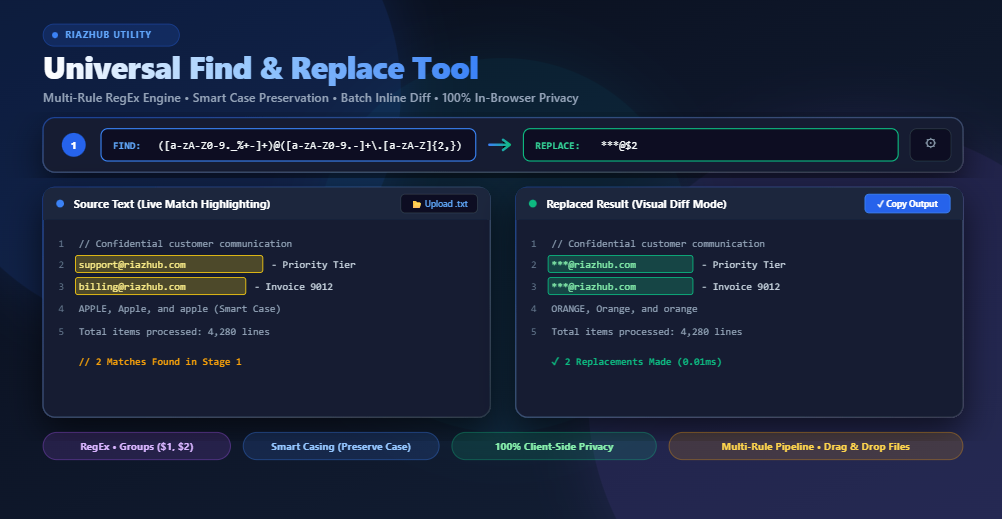
Universal Find & Replace Tool: The Ultimate Guide to Multi-Rule Regex, Smart Casing, and Client-Side Batch Text Transformation
Traditional desktop text editors and basic online tools often fall short when handling complex scenarios. They lack multi-stage rule chaining, fail to preserve original letter casing, stumble over Unicode lookaheads, or require you to upload proprietary datasets and sensitive company documents to unknown third-party cloud servers.
To address these challenges, RiazHub developed the free Universal Find & Replace Tool. In this deep-dive guide, we explore how regular expression engines work, how to preserve dynamic capitalization patterns, how to structure multi-rule replacement pipelines, and how to harness instant visual diff previews all executed safely inside your web browser with 100% client-side privacy.
Why Standard Find & Replace Is No Longer Enough
Basic “search and replace” dialogs have remained largely unchanged since early desktop word processors. While searching for literal substrings (such as swapping "color" for "colour") works for basic memos, modern text workloads demand substantial flexibility:
1. The Case Preservation Conundrum
In traditional search tools, replacing the word "apple" with "orange" across a large document destroys intentional styling. Words written as "Apple" (Title Case) or "APPLE" (All-Caps acronym/header) become lowercase "orange". Using the Smart Casing feature in the Universal Find & Replace Utility, the engine automatically analyzes token casing and applies the exact matching capitalization format:
"APPLE"➔"ORANGE"(All-Caps)"Apple"➔"Orange"(Title Case)"apple"➔"orange"(Lowercase)
2. Multi-Stage Pipeline Chaining
Real-world data normalization rarely involves a single pass. For instance, cleaning exported database text usually requires stripping HTML tags, trimming trailing whitespace, converting linebreaks, and anonymizing email addresses. Repeating manual single-pass replacements is tedious and prone to sequencing errors. Chaining sequential rules inside the multi-rule batch replacer passes mutated output directly from Rule 1 into Rule 2 and Rule 3 simultaneously in real time.
3. Zero-Knowledge Browser Privacy
Pasting proprietary codebases, customer lists, medical records, or confidential legal documents into cloud-based converters presents critical data compliance risks. The RiazHub Find & Replace Tool processes every regex evaluation and string substitution purely within client-side JavaScript memory, guaranteeing zero bytes leave your computer.
Unlocking the Power of Regular Expressions (RegEx)
Regular Expressions provide a universal syntax for identifying complex structural patterns rather than fixed literal words. When the Use RegEx switch is activated in the RiazHub text engine, you gain access to capture groups, lookarounds, and quantifier manipulation.
Capture Groups & Dynamic Backreferences
Parentheses (...) define capture groups within your search query, allowing you to extract and rearrange specific sub-patterns in the replacement string using $1, $2, and $3:
| Task | Find Pattern (RegEx) | Replace Pattern | Sample Result |
|---|---|---|---|
| Reformat Dates (YYYY-MM-DD to DD/MM/YYYY) | (\d{4})-(\d{2})-(\d{2}) |
$3/$2/$1 |
2026-08-23 ➔ 23/08/2026 |
| Mask Email Usernames | ([a-zA-Z0-9._%+-]+)@([a-zA-Z0-9.-]+\.[a-zA-Z]{2,}) |
***@$2 |
user@domain.com ➔ ***@domain.com |
| Convert HTML Links to Markdown | <a href="([^"]+)">([^<]+)</a> |
[$2]($1) |
<a href="url">text</a> ➔ [text](url) |
You can test all these formulas instantly by clicking the built-in preset chips on the Universal Find & Replace web tool.
Top 8 Practical Text Automation Workflows
Here are eight common text transformation routines that can be accomplished in a single click using presets on RiazHub:
- Remove Extra Spaces & Double Tabs: Replaces consecutive whitespace characters with a single space (
\s+➔' '). - Remove Blank & Empty Lines: Eliminates excessive carriage returns and trailing newlines (
^\s*[\r\n]+➔''). - Strip HTML & XML Markup: Cleans raw web copy into plain text by stripping all tags (
<[^>]*>➔''). - Strip URLs and Web Links: Cleans datasets by removing HTTP/HTTPS web links (
https?:\/\/\S+➔''). - Anonymize Email Addresses: Automatically preserves the domain name while masking user identities for GDPR compliance.
- Remove Numeric Digits: Strips all numbers from raw transcripts and OCR documents (
\d+➔''). - Trim Line Endings: Trims accidental spaces at the start and end of every line without altering content.
- Flatten Linebreaks to Spaces: Transforms multi-line paragraphs into continuous single-line strings.
Live Match Highlighting & Visual Diff Verification
One of the biggest hazards of bulk find and replace operations is accidental over-matching—such as unintentionally modifying "cat" inside words like "caterpillar" or "certificate".
The RiazHub Find & Replace Application protects your data through two synchronized visual validation layers:
- Real-Time Synchronized Backdrop: Highlights all active search matches in bright yellow directly behind your source text editor as you type.
- Token-Level Inline Diff Mode: Compares the original source against the final replaced text, highlighting deletions in
red strikethroughand insertions in green highlight.
This ensures you can visually audit every substitution before copying the result or exporting it as a .txt file.
How to Use the Universal Find & Replace Tool
Transforming large text documents or code files takes just four simple steps:
- Load Your Text: Paste text directly into the source editor, click Sample to load demo data, or drag-and-drop a
.txt,.md,.csv, or.jsonfile. - Set Your Rules: Enter the target term in the Find input and your desired substitution in the Replace input. Click + Add Another Rule to chain additional replacements.
- Configure Matching Options: Toggle Match Case, Match Whole Word, Smart Case Preservation, or Use RegEx based on your requirements.
- Inspect & Export: Review the live statistics and diff preview, then click Copy to copy the result to your clipboard or Save .txt to download the file.
Ready to streamline your text editing workflow? Launch the free Universal Find & Replace Tool now on RiazHub and experience lightning-fast, secure, and private batch text processing.
Find & Replace Tool
Find, highlight, and replace text or complex Regular Expressions (RegEx) in real time with batch multi-rule support. 100% private in-browser processing.