
The Definitive Guide to Photographic Contact Sheets: Darkroom Traditions, 300 DPI Standards, and Modern Client Proofing
In the golden era of analog photography, before the arrival of digital touchscreens, cloud galleries, and instant Lightroom syncs, photographers lived and died by a single artifact: the contact proof sheet.
Whether you were Henri Cartier-Bresson documenting Paris on Leica 35mm film or Richard Avedon photographing icons with an 8×10 large format field camera, the contact sheet was your visual journal. It revealed every shutter click, every missed focus, every experimental framing, and ultimately, the triumphant frame that defined history.
Fast forward to the modern digital studio: while photographers can snap thousands of RAW images during a single commercial session, the necessity of indexing, sequencing, and presenting those images to clients has never been more urgent. Creating clear, high-resolution contact sheets allows art directors, wedding couples, and agency leads to curate, approve, and critique shoots with surgical precision.
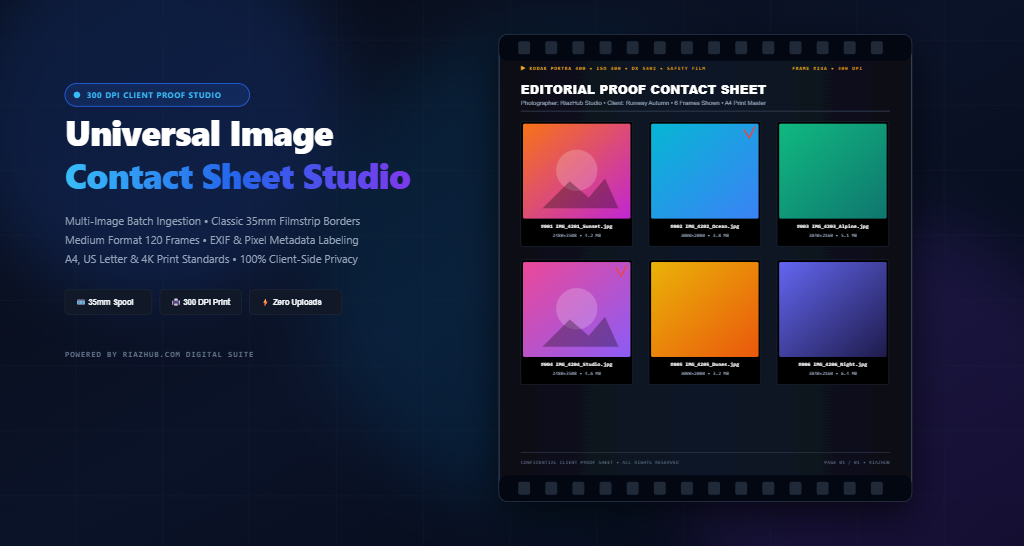
To make this process instantaneous, designers and photographers can utilize the Universal Image Contact Sheet & Photographic Proof Sheet Studio on RiazHub.com. This in-browser utility synthesizes the timeless aesthetics of 35mm darkrooms and medium format proofing with razor-sharp 300 DPI print mathematics.
What Is a Photographic Contact Sheet?
A contact sheet (often called a proof sheet or thumbnail matrix) is a single photographic document displaying an orderly, rectangular grid of thumbnail images from a film roll or digital photo batch.
The term “contact” stems from its physical manufacturing technique: darkroom technicians placed cut strips of developed 35mm or 120 film negatives directly in physical contact with a sheet of 8×10 or 11×14 inch photosensitive bromide paper under an enlarger light. Once developed in chemical baths (developer, stop bath, and fixer), the resulting print produced 1:1 scale positive miniatures of every single frame on the roll.
“A contact sheet is full of points of the compass. It shows what you rejected, what caught your eye, how you got from the first step to the decisive moment.” — Classic Photography Maxim
Why Contact Sheets Remain Indispensable in the Digital Age
With cloud storage folders and infinite photo carousels available, why do top-tier commercial agencies and wedding photographers still produce contact sheets?
- Rapid Batch Curation: Scrolling through 400 separate full-screen images causes cognitive fatigue. A structured 4×6 or 5×6 contact sheet grid allows the human eye to compare lighting ratios, model poses, and expressions across consecutive frames in seconds.
- Definitive Client Sign-Off: Sending an A4 or US Letter PDF/PNG proof sheet with sequentially numbered frames (e.g.,
#001to#024) provides unambiguous communication. Clients simply mark checkboxes or reference frame numbers instead of typing lengthy, confusing file descriptions. - Archival & Binder Documentation: Physical contact sheets slipped into transparent archival sleeves allow studios to maintain offline catalog binders that remain accessible regardless of hard drive failures or software updates.
- Editorial Proofing & Darkroom Aesthetics: The iconic 35mm filmstrip borders, Kodak/Fujifilm edge codes, and red grease-pencil inspection markings impart an artisanal, high-end editorial gravitas that digital galleries fail to convey.
Using the free web-based Image Contact Sheet Studio, photographers can assemble up to 100+ photos into customized multi-column proof sheets with real-time hardware-accelerated previewing.
⚡ Instant In-Browser Processing — Zero Server Uploads
Client photography, unreleased fashion campaigns, and private family shoots require strict confidentiality. Unlike conventional web converters that upload your private photos to third-party cloud servers, the RiazHub Photographic Proof Sheet Tool runs 100% locally in your browser using pure JavaScript and HTML5 Canvas. Your photos never leave your computer.
The Science of 300 DPI: Why High-Resolution Canvas Matters
One of the most common pitfalls when creating contact sheets with generic web tools is pixelation during printing. Standard computer displays render web content at 72 to 96 pixels per inch (PPI). If you send a 72 DPI graphic to a physical inkjet or laser printer, the typography becomes fuzzy and image details blur.
To achieve commercial publishing quality, contact sheets must be rendered at 300 Dots Per Inch (DPI). At 300 DPI, individual dots blend seamlessly to the naked human eye, ensuring that tiny exposure values, camera dimensions, and frame indices remain needle-sharp.
| Standard Page Format | Physical Dimensions | Resolution at 300 DPI | Optimal Use Case |
|---|---|---|---|
| A4 International | 210 × 297 mm | 2480 × 3508 px | Global standard for client binders, editorial portfolios, and office printers. |
| US Letter | 8.5 × 11.0 in | 2550 × 3300 px | Standard print format in the United States, Canada, and Mexico. |
| A3 Large Proof | 297 × 420 mm | 3508 × 4960 px | Exhibition proofing, dense 8×8 photo grids, and commercial campaign reviews. |
| 4K Digital Screen | 16:9 Aspect | 3840 × 2160 px | Ultra-high-definition presentation on client monitors, iPads, and TV displays. |
| Square Portfolio | 1:1 Aspect | 3000 × 3000 px | Instagram carousel proofing, Hasselblad 6×6 square format curation. |
Photographic Aesthetics: 4 Darkroom Proofing Styles
Every photographic genre demands a distinct visual tone. The RiazHub Contact Sheet Studio offers four curated aesthetic profiles:
1. Classic 35mm Darkroom Filmstrip
Inspired by legendary 35mm film stocks like Kodak Portra 400 and Tri-X, this aesthetic features a deep obsidian backdrop (#0B0F19), realistic top and bottom film sprocket holes, orange/amber DX edge markings, and monospace frame numbers. It gives digital captures the authentic aura of an analog darkroom.
2. Medium Format 120 Proof
Emulating 6×6 and 6×7 roll film negatives from Hasselblad, Rolleiflex, and Mamiya systems, this profile pairs solid black border rebates with minimalist red grease-pencil inspection badges, replicating the marks art directors used when selecting keeper shots.
3. Modern Clean Studio
Tailored for corporate clients, commercial advertising agencies, and e-commerce catalogs. It utilizes a pure white or light grey canvas, modern sans-serif typography, and subtle card borders for maximum legibility.
4. Editorial Portfolio Catalog
Designed for fashion editorials and fine-art weddings. It features generous gallery margins, sophisticated serif typography (Playfair Display), and interactive [ ] SELECT approval checkboxes next to every thumbnail.
Image Fit Strategies: Letterboxing vs. Center Cropping
When building a uniform grid of photos shot across varied cameras and orientations (vertical 2:3 portraits, horizontal 3:2 landscapes, 16:9 panoramas), you must select how each photo sits inside its cell:
- Fit Aspect Ratio (Letterbox / Contain): Preserves 100% of the photographer’s original framing without clipping a single pixel. Unoccupied cell space is filled with the background canvas color. This is the gold standard for photographic critique.
- Cover / Uniform Center Crop: Fills each cell entirely from edge to edge by cropping excess margins. This creates an immaculate, visually symmetrical grid ideal for graphic design mood boards.
- Square Crop (1:1): Crops all photos into perfect squares centered on the subject, matching medium format 120 film and social media preview matrices.
Step-by-Step: How to Generate Your Contact Sheet
Creating a publication-ready photographic contact sheet takes less than 60 seconds with the Universal Image Contact Sheet & Photographic Proof Sheet Studio:
- Ingest Your Photos: Drag and drop your image files (JPG, PNG, WEBP, AVIF, BMP, TIFF) onto the dropzone, paste directly from your clipboard (
Ctrl+V), or click “Load Sample Shoot” to test immediately. - Reorder & Sequence: Use the interactive thumbnail tray to drag and drop photos into your preferred storytelling order, or click “A-Z” to sort alphabetically by filename.
- Choose Your Aesthetic & Page Size: Select between 35mm Filmstrip, Medium Format 120, Modern Clean, or Editorial Proof. Choose your target output (A4, US Letter, A3, or 4K).
- Configure Grid Geometry: Fine-tune the number of columns (2 to 8), rows (2 to 10), cell gap spacing, and page margins using the intuitive live sliders.
- Customize Metadata & Branding: Enable the header banner to add your Project Title, Photographer Name, and Client Details. Toggle metadata labels under each photo (Filename, Pixel Resolution, Frame Number, File Size).
- Preview & Export: Use the zoom and pan controls to inspect details at 100% actual size. Switch to the “Print Preview” tab for direct physical printing, or click “Download High-Res Contact Sheet” for lossless PNG or high-quality JPEG output.
Frequently Asked Questions (FAQ)
How many photos can I ingest at once?
The tool comfortably handles batches of up to 100+ high-resolution photographs. Because all decoding is performed locally via hardware-accelerated HTML5 Canvas, performance depends on your device’s memory rather than internet bandwidth.
Can I copy the generated sheet directly to Photoshop or Slack?
Yes! Simply click the “📋 Copy Sheet to Clipboard” button. The studio uses the native asynchronous Clipboard API to copy a lossless PNG bitmap directly to your system clipboard, ready to paste (Ctrl+V) into Slack, Discord, Photoshop, or Figma.
Does this tool work on mobile devices and tablets?
Yes. The interface is built with responsive CSS flexbox and grid layouts, supporting touch-friendly controls, pinch zooming, and portrait/landscape adaptation across iPad, iPhone, and Android devices.
Final Thoughts
A contact sheet is more than a grid of pictures—it is a visual narrative that captures the essence of a photographic journey. By merging classic darkroom aesthetics with modern 300 DPI print accuracy, the Universal Image Contact Sheet & Photographic Proof Sheet Studio on RiazHub.com empowers creators to present their work with timeless elegance and total digital privacy.
Universal Image Contact Sheet & Proofing Studio
Generate high-resolution photographic contact sheets, 35mm darkroom proof sheets, and client preview grids with customizable metadata labels in real time. 100% in-browser processing with zero server uploads.