
Mastering Web Image Weight & Core Web Vitals: The Definitive Guide to Bits-Per-Pixel, LCP Budgets, and Bandwidth Optimization
In modern web architecture, image assets represent over 60% to 75% of total page weight across the top one million domains on the internet. While typography, CSS stylesheets, and JavaScript bundles receive intensive engineering attention, uncompressed visual media quietly remains the single most common cause of failed Google Core Web Vitals Largest Contentful Paint (LCP) audits.
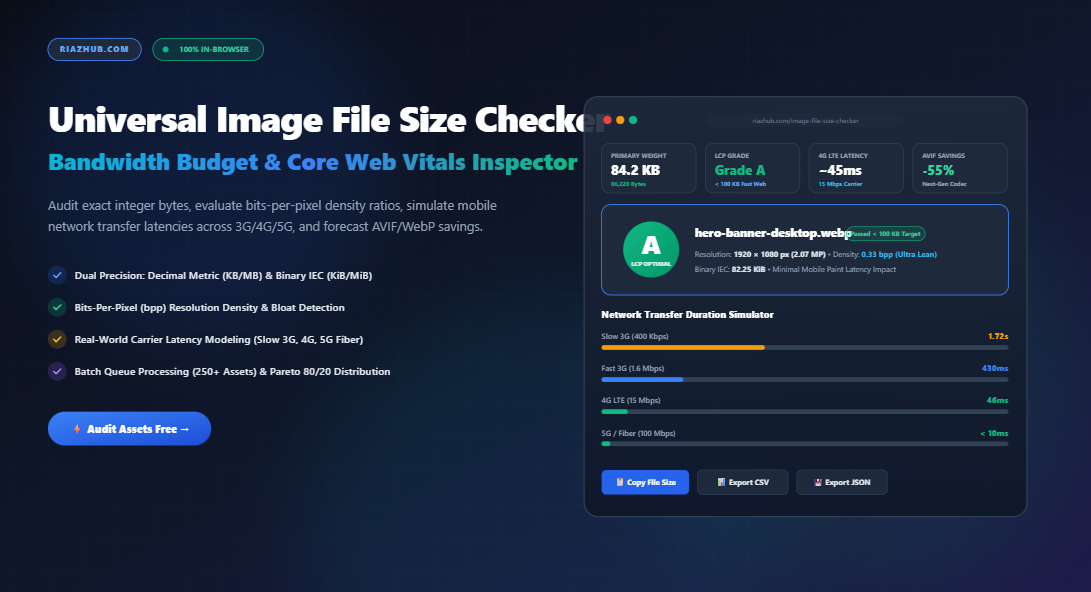
When a mobile visitor navigates to an e-commerce catalog or an editorial publication on a cellular connection, every unoptimized byte translates directly into latency. A 1.8 MB banner might render in the blink of an eye on a gigabit fiber connection, yet stalls for over four agonizing seconds on a standard 3G or constrained 4G network. To diagnose, audit, and eliminate these digital bottlenecks, engineers and content teams turn to the free in-browser Universal Image File Size Checker & Bandwidth Budget Inspector on RiazHub.
1. The Measurement Dilemma: Decimal Metric (KB/MB) vs. Binary IEC (KiB/MiB)
One of the most persistent sources of confusion in web asset delivery is the discrepancy between decimal metric units and binary memory calculations. Depending on the operating system or diagnostic tool you use, the reported “file size” of an identical graphic can differ by over 4.8%:
- Decimal Metric System (SI Standard): Based on powers of 10 ($1\text{ KB} = 1,000\text{ bytes}$, $1\text{ MB} = 1,000,000\text{ bytes}$). This standard is universally utilized by networking hardware, telecommunication carriers, macOS, and web performance monitors like Google Lighthouse.
- Binary IEC Standard (Base 2): Established by the International Electrotechnical Commission, where $1\text{ KiB} = 1,024\text{ bytes}$ and $1\text{ MiB} = 1,048,576\text{ bytes}$. Traditional operating systems like Windows File Explorer have historically displayed binary values under the label “KB”.
When you run a file through the Image File Size Checker & Bandwidth Budget Inspector, both standards are calculated side-by-side with exact, down-to-the-byte precision. This eliminates guessing games when aligning your production pipeline with strict engineering budgets.
| Exact Byte Count | Decimal Metric (SI) | Binary IEC Standard | Difference |
|---|---|---|---|
100,000 Bytes |
100.00 KB | 97.66 KiB | -2.34% |
500,000 Bytes |
500.00 KB | 488.28 KiB | -2.34% |
1,048,576 Bytes |
1.05 MB | 1.00 MiB | +4.86% |
2,500,000 Bytes |
2.50 MB | 2.38 MiB | -4.80% |
2. Bits-Per-Pixel (bpp): The True Measure of Visual Compression Efficiency
Evaluating an image purely by its kilobyte weight is misleading. A 300 KB image might seem reasonable at first glance—until you realize it measures a mere 400×300 pixels (a thumbnail). Conversely, a 300 KB file measuring 3840×2160 (4K UHD) represents an extraordinary feat of compression efficiency.
To reveal whether an image is genuinely lean or masquerading as lightweight, performance architects utilize the Bits-Per-Pixel ($\text{bpp}$) metric:
Bits-Per-Pixel (bpp) = (File Size in Bytes × 8) / (Width × Height)The bpp ratio reveals the density of stored data per physical pixel:
- < 0.50 bpp (Ultra Lightweight): Exceptional compression. Typical of modern vector illustrations, flat graphic charts, or heavily optimized next-generation AVIF photographs.
- 0.50 – 1.50 bpp (Balanced Photographic Quality): The sweet spot for modern responsive web images. Pristine visual clarity with zero noticeable artifacts.
- 1.50 – 2.50 bpp (Suboptimal / Unoptimized): High byte density relative to canvas area. Often caused by inefficient baseline JPEG tables or uncompressed 24-bit PNG photographic assets.
- > 2.50 bpp (Critical Bloat): Severe data bloat. These images consume disproportionate network transfer quotas and require immediate re-quantization or format conversion.
By feeding your batch uploads into the RiazHub Image File Size Checker, each image receives an instant bpp density rating alongside actionable tips for image dimension and compression adjustments.
3. Aligning Image Weight with Core Web Vitals & Largest Contentful Paint (LCP)
Under Google’s official Core Web Vitals framework, Largest Contentful Paint (LCP) must occur within 2.5 seconds of initial page navigation to qualify for a “Good” rating in search rankings. In over 70% of real-world page audits, the LCP candidate is an image—either a desktop hero banner, an e-commerce featured product photo, or a prominent blog header.
Establishing strict performance budgets prevents content drift from destroying your technical SEO health:
Recommended Web Image Performance Budgets:
- Mobile Hero Target: < 100 KB — Fast initial render on cellular 3G/4G networks, preventing high mobile bounce rates.
- E-Commerce Product Catalog: < 200 KB — Balanced resolution allowing crisp user zoom while maintaining high throughput across multi-item catalog grids.
- Full-Width Desktop Hero: < 500 KB — Maximum permissible weight for high-DPI desktop viewports (1920px+).
- Exceeds 600 KB: Critical Bloat Warning — Triggers red diagnostic alerts in Google PageSpeed and throttles mobile paint operations.
4. Real-World Network Download Latency Modeling
Developers testing on high-speed office fiber often fail to notice how heavily image payloads punish mobile visitors in transit, in rural regions, or in congested urban cellular cells.
The Universal Image File Size Checker integrates a real-time carrier simulation engine that models packet download times across four standardized profiles:
- Slow 3G (400 Kbps): Typical of emerging markets, rural cellular corridors, and congested underground transit systems. A 1 MB image requires over 20.9 seconds to download!
- Fast 3G (1.6 Mbps): Standard mobile connection floor. A 500 KB image demands roughly 2.56 seconds purely in payload transfer.
- 4G LTE (15 Mbps): Modern global cellular average. Smooth delivery for assets under 250 KB (< 0.13 seconds).
- 5G / Fiber (100 Mbps+): High-speed broadband where network latency approaches the sub-50ms mark.
5. Next-Generation Codec Forecast: WebP, AVIF, and MozJPEG
Converting legacy formats (uncompressed PNG and standard baseline JPEG) to modern modern encoding formats remains the fastest route to dramatic bandwidth savings.
The Bandwidth Budget Inspector Studio computes automated re-compression forecasts for every analyzed image:
- Next-Gen AVIF (AV1 Image File Format): Delivers approximately 50% to 65% byte reduction compared to standard JPEG at equivalent perceptual quality, utilizing advanced spatial prediction and chroma sub-sampling.
- Google WebP: Provides roughly 30% to 45% savings with universal browser support exceeding 97% across global desktop and mobile clients.
- Optimized MozJPEG: Employs progressive scan ordering and Trellis quantization for legacy platforms requiring strict fallback backward compatibility.
6. Batch Inspection & The Pareto 80/20 Distribution
When managing e-commerce stores or corporate portals with dozens of assets per page, auditing graphics one-by-one is inefficient. The RiazHub Studio supports client-side ingestion of up to 250+ images at once.
By applying the Pareto 80/20 rule to your uploaded batch, the tool highlights the critical minority of images that consume the majority of your total page weight. Often, compressing just two or three misconfigured background banners eliminates over 75% of your total payload bloat, yielding instant Core Web Vitals gains without requiring a full redesign.
7. Privacy-First Architecture: Zero Server Uploads
Unlike cloud-based conversion platforms that require you to upload your raw assets to third-party web servers posing confidentiality concerns for proprietary product prototypes, financial receipts, or personal photography RiazHub’s Image File Size Checker runs 100% inside your local web browser.
Utilizing modern HTML5 File, FileReader, and Image() DOM APIs, all dimensions, byte counts, bits-per-pixel densities, and network simulations execute on your device’s local CPU. Zero bytes leave your machine, ensuring absolute compliance with corporate data privacy and security mandates.
Frequently Asked Questions (FAQ)
Why does macOS show a different image file size than Windows?
macOS utilizes decimal metric units ($1\text{ KB} = 1,000\text{ bytes}$), whereas Windows File Explorer uses binary IEC units ($1\text{ KiB} = 1,024\text{ bytes}$). A file containing 1,000,000 bytes is labeled as 1.0 MB in macOS and ~976 KB in Windows.
What is the maximum image file size recommended for a website hero?
For mobile optimization and fast Core Web Vitals LCP, hero images should ideally remain under 100 KB. On large desktop viewports, an upper threshold of 200–500 KB is acceptable if served via modern WebP or AVIF formats.
How do I calculate Bits-Per-Pixel manually?
Multiply the exact file size in bytes by 8 (to determine total bits), then divide the result by the total pixel resolution (width × height). For example: $(200,000\text{ bytes} \times 8) / (1920 \times 1080) = 1,600,000 / 2,073,600 \approx 0.77\text{ bpp}$.
Can I export my audit results for client reports or Jira tickets?
Yes. The Image File Size Checker provides one-click export to CSV reports, JSON data trees, and formatted plain-text summaries ready for documentation.
Universal Image File Size Checker & Performance Studio
Inspect exact byte-level weights, compute bits-per-pixel density, simulate network transfer times across mobile networks, and audit Largest Contentful Paint (LCP) budgets entirely inside your browser.
- Select or drop any image file to generate personalized optimization recommendations.
Estimated client download duration over standard real-world carrier profiles (excluding server TTFB):
Predicted byte payload savings upon re-encoding into modern high-efficiency image formats:
| # | Filename | Format | Dimensions | Size | Exact Bytes | bpp | Grade | Action |
|---|---|---|---|---|---|---|---|---|
| No batch items loaded. Add files via the upload panel. | ||||||||
Visual proportional weight share of all loaded images across the current payload batch:
Image File Weight, Bits-Per-Pixel & PageSpeed Performance Guide
(File Size in Bits) / (Width × Height). A 500 KB image measuring 3840×2160 (4K resolution) has a bpp of only ~0.48 bpp (exceptionally efficient compression). Conversely, a 500 KB image measuring only 400×300 has a bpp of ~33.3 bpp (heavily uncompressed or bloated raw data). Evaluating bpp reveals bloated thumbnails and uncompressed small graphics masquerading as "acceptable" file sizes.
File, FileReader, and HTML5 Image()). Zero bytes, photos, sensitive personal documents, or private metadata are ever sent to any remote server or third-party cloud. Your image processing is instant, private, and works completely offline.