
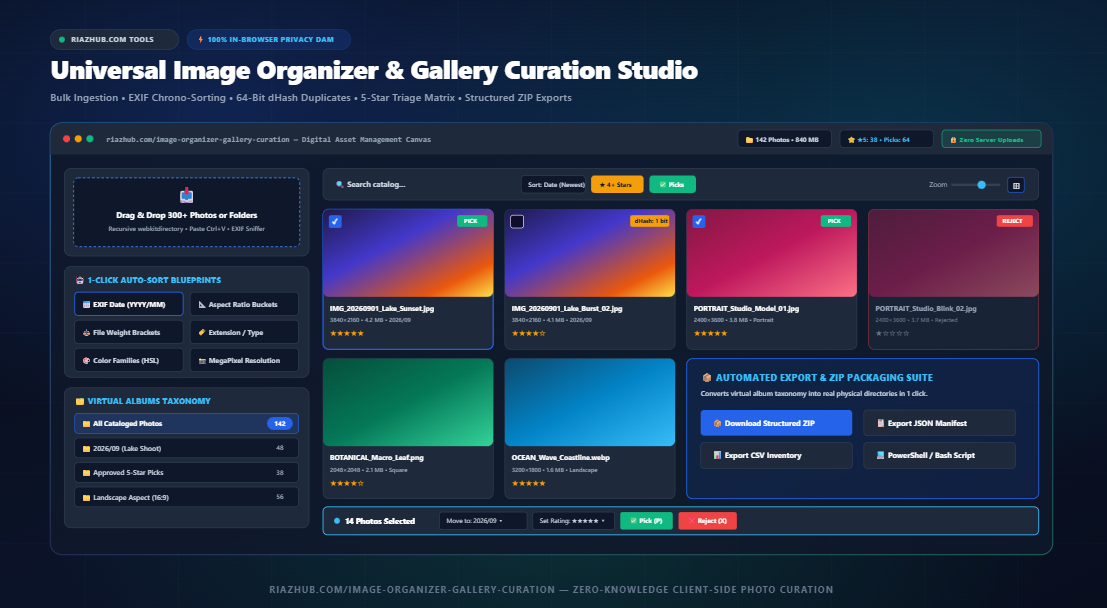
How to Organize and Cull Thousands of Photos in Your Browser: The Complete EXIF & dHash Curation Guide
Tackle camera roll bloat, isolate duplicate burst shots using 64-bit perceptual hashing, sort files by authentic camera capture timestamps, and export physical structured ZIP directories—all without uploading a single byte to external servers.
⚡ Try the Live Browser Tool Right Now
Looking to instantly organize a wedding shoot, drone survey, or vacation camera roll without buying expensive desktop licenses? Try our free, browser-based utility:
Launch Universal Image Organizer & Gallery Curation Studio →
- The Modern Photo Bloat Dilemma: Why Manual Sorting Fails
- Introducing RiazHub’s Universal Image Organizer & Curation Studio
- The In-Browser DAM Engine: Binary EXIF Parsing & Perceptual dHash
- 5 High-Speed Auto-Sorting Blueprints Explained
- Professional Culling: 5-Star Ratings & Rapid Pick/Reject Workflow
- Step-by-Step Guide: Curing a 300+ Photo Shoot in 60 Seconds
- Export Suite: Structured ZIPs, JSON Manifests, and Shell Scripts
- Client-Side Zero-Knowledge Privacy: Why Browser Memory Matters
- Frequently Asked Questions (FAQ)
1. The Modern Photo Bloat Dilemma: Why Manual Sorting Fails
Modern cameras and smartphones make taking photos effortless. A single weekend wedding, family gathering, or commercial product shoot routinely produces hundreds if not thousands of high-resolution images. However, when it comes time to catalog, review, and back up these files, chaos quickly ensues:
- Corrupted Timestamps: When files are downloaded from Google Drive, Dropbox, WhatsApp, or SD card adapters, operating systems frequently overwrite the original creation date with the download date. A photo taken in 2023 suddenly displays today’s date.
- Burst Shot Overload: Action sequences, sports events, and portrait sessions generate dozens of near-identical frames where only minor micro-expressions or blinks differ. Manual inspection of every single frame is exhausting.
- Aspect Ratio Mismatches: Social media managers must separate 9:16 vertical stories from 1:1 square Instagram feeds and 16:9 widescreen YouTube thumbnails. Sorting through file explorer lists based on filename alone is impossible.
- Privacy Concerns with Cloud Tools: Traditional online photo sorters require uploading client shoots, private family albums, or proprietary images to remote servers, introducing severe data leak risks and slow upload bottlenecks.
2. Introducing RiazHub’s Universal Image Organizer & Curation Studio
To solve these challenges without forcing photographers, designers, and content creators to install heavyweight desktop software like Adobe Lightroom or Capture One, we built the Universal Image Organizer & Gallery Curation Studio.
Operating entirely inside your web browser via modern HTML5 Canvas, typed arrays (DataView and ArrayBuffer), and native browser File System APIs, the tool acts as a high-speed Digital Asset Management (DAM) workstation. It enables you to bulk-ingest hundreds of files or entire folders, auto-triage them into virtual album subdirectories, detect burst-shot duplicates, apply 5-star ratings, and download an organized ZIP archive with physical nested folders in seconds.
📅 True Binary EXIF Chrono-Sorting
Parses raw JPEG APP1 binary blocks to extract the genuine camera shutter timestamp (DateTimeOriginal), immune to OS file modification dates.
🔍 64-Bit Perceptual dHash Hunter
Rescales photos to 9×8 luminance matrices and calculates gradient Hamming distances to isolate burst shots and near-duplicates automatically.
⭐ Rapid 5-Star & Pick/Reject Matrix
Use lightning-fast keyboard shortcuts (1-5, P for Pick, X for Reject) in a fullscreen lightbox with side-panel technical EXIF inspection.
📦 Structured ZIP Folder Packaging
Packages your virtual albums into physical ZIP subdirectories (e.g. 2026/09/photo.jpg) directly in client memory without server compression.
3. The In-Browser DAM Engine: Binary EXIF Parsing & Perceptual dHash
What makes the Universal Image Organizer remarkably fast and accurate is its low-level JavaScript architecture.
A. Raw Binary EXIF Segment Sniffing
Standard file inputs only expose OS-level metadata like file.lastModified. When photos are transferred via cloud storage, this date gets reset. The tool bypasses high-level abstractions by streaming the first few kilobytes of the file into a DataView and locating the JPEG APP1 marker (0xFFE1).
Inside the TIFF header, it reads endianness (Little Endian 0x4949 or Big Endian 0x4D4D), follows the pointer to the Image File Directory (IFD0), and navigates directly to the Exif SubIFD (Tag 0x8769). There, it extracts Tag 0x9003 (DateTimeOriginal):
// Pure client-side binary EXIF scanning
const view = new DataView(arrayBuffer);
if (view.getUint16(0, false) === 0xFFD8) { // Valid JPEG SOI
    // Locate APP1 marker 0xFFE1 -> TIFF Header -> SubIFD
    // Read ASCII byte sequence: "YYYY:MM:DD HH:MM:SS"
}
This guarantees that even if a photo was downloaded yesterday, it is categorized according to the exact moment its camera sensor was triggered years ago.
B. 64-Bit Difference Hashing (dHash) Algorithm
Cryptographic hashes (such as MD5, SHA-1, or SHA-256) are useless for finding visual duplicates because altering even a single pixel or slight metadata header results in a completely different hash string.
The Image Organizer Studio implements Gradient Difference Hashing (dHash):
- Downsampling: The photo is drawn onto an offscreen canvas rescaled to 9 pixels wide by 8 pixels high.
- Grayscale Luminance: Each pixel is converted into perceived brightness using standard rec. 601 coefficients:
L = 0.299*R + 0.587*G + 0.114*B. - Gradient Comparison: For each row of 9 pixels, adjacent horizontal pixels are compared: if
pixel[x] > pixel[x + 1], it outputs a binary1, otherwise0. - 64-Bit Signature: An 8×8 matrix of boolean comparisons produces a 64-bit binary fingerprint.
When two images have a Hamming distance (number of mismatched bits) of $\le 4$, they represent near-identical shots or burst captures.
4. 5 High-Speed Auto-Sorting Blueprints Explained
With a single click in the curation workspace, you can reorganize your entire catalog using five intelligent blueprints:
- 📅 By EXIF Capture Date: Groups files into chronological folders formatted as
YYYY/MM(e.g.2026/08,2026/09). Perfect for importing into chronological archives or Lightroom catalogs. - 📐 By Aspect Ratio Buckets: Automatically detects image dimensions and categorizes them into:
- Landscape: Aspect ratio > 1.15 (ideal for desktop screens and horizontal galleries).
- Portrait: Aspect ratio < 0.85 (tailored for vertical social posts and mobile wallpapers).
- Square: Ratio between 0.85 and 1.15 (standard 1:1 e-commerce product shots).
- Panoramic: Ultrawide ratio > 1.85 (landscape panoramas and banner hero assets).
- 🏷️ By File Extension: Segregates JPG, PNG, WEBP, AVIF, SVG, and GIF formats into distinct subdirectories.
- ⚖️ By File Weight: Segregates lightweight web assets (
< 500 KB), standard files (500 KB - 2 MB), and heavy raw/high-res masters (> 2 MB). - 🎨 By Dominant Chromatic Color Cluster: Samples the image palette and sorts by primary color families (Reds, Blues, Greens, Warm Earth, Neutral Monochrome) using HSL cluster boundaries.
5. Professional Culling: 5-Star Ratings & Rapid Pick/Reject Workflow
Professional photo editing relies on rapid culling—the practice of separating usable shots from rejects before spending hours retouching. The Universal Image Organizer provides a streamlined triage matrix:
- Star Ratings (0 to 5 Stars): Click stars directly on thumbnail cards or tap the numbers
1through5on your keyboard while reviewing in fullscreen mode. - Pick / Reject Flags: Tap
Pto mark a photo as an approved Pick (highlighted in emerald green) orXto mark it as a Reject (dimmed and grayed out). - Color Tags: Assign Red (To Edit), Yellow (In Review), Green (Approved), or Blue (Final) tags for multi-stage client approval pipelines.
- Floating Batch Bar: Select multiple photos using checkboxes or click “Select All” to bulk-move items into custom virtual albums in one click.
6. Step-by-Step Guide: Curing a 300+ Photo Shoot in 60 Seconds
Here is how to organize a cluttered photo folder from start to finish:
- Open the Studio: Navigate to the Universal Image Organizer on RiazHub.com.
- Ingest Your Photos: Drag and drop your image folder onto the central dropzone, or click “Select Folder” to ingest all nested subdirectories via
webkitdirectory. You can also pressCtrl+Vto paste images directly from your clipboard. - Select an Auto-Sort Blueprint: Click “📅 EXIF Date” to split your shoot into month-by-month virtual folders, or click “📐 Aspect Ratio” to separate portrait and landscape shots.
- Hunt for Duplicates: Click “🔍 Find Visual Duplicates (dHash)”. Adjust the Hamming distance slider to
4bits. Review the side-by-side matches and click “Auto-Reject Lower-Rated Duplicates” to instantly cull redundant burst captures. - Refine with Quick Keyboard Navigation: Click any photo to enter fullscreen lightbox mode. Use
←and→arrow keys to move through the gallery, tappingPto pick favorites andXto reject flawed shots. - Export Organized Archive: Scroll down to the export suite and click “📦 Download Structured ZIP”.
7. Export Suite: Structured ZIPs, JSON Manifests, and Shell Scripts
The Image Organizer Studio provides multiple versatile ways to export your curated assets:
1. In-Memory Structured PKZIP Download
Instead of dumping all files into a flat folder, our client-side PKZIP generator writes custom Local File Headers with relative directory paths (e.g. 2026/09/IMG_01.jpg or Approved_Picks/photo2.png). When you extract the downloaded ZIP archive on Windows Explorer or macOS Finder, your entire virtual folder tree is recreated on your hard drive.
2. 1-Click Local Shell Move Script (PowerShell & Bash)
If your photo collection is 20 Gigabytes in size, downloading an in-memory ZIP file is impractical. That’s why the studio includes a Shell Script Generator. With one click, it outputs a ready-to-run script that moves your original files on your computer without re-downloading them:
# Windows PowerShell sorting script generated by RiazHub
New-Item -ItemType Directory -Force -Path "2026/09" | Out-Null
Move-Item -LiteralPath "IMG_1024.jpg" -Destination "2026/09/" -Force
3. JSON & CSV Inventory Manifests
Export complete catalogs containing image dimensions, aspect ratios, file byte sizes, star ratings, flag statuses, dominant colors, and parsed camera settings for seamless integration with spreadsheets, databases, or DAM pipelines.
8. Client-Side Zero-Knowledge Privacy: Why Browser Memory Matters
Photographers frequently handle confidential client shoots, unreleased commercial products, and sensitive family archives. Cloud-based SaaS platforms frequently store your uploads on remote cloud storage buckets, run telemetry analysis, or use photos for AI training datasets.
The RiazHub Universal Image Organizer is architected around Strict Client-Side Zero-Knowledge Processing:
- No File Uploads: Every single byte is read into your browser’s local RAM via
FileReader,Blob, andArrayBuffer. - Zero Remote Server Telemetry: No external image processing API or third-party tracking script touches your files.
- Offline Compatible: Once the page is loaded in your browser, you can disconnect your Internet connection completely and the tool will continue working at full speed.
9. Frequently Asked Questions (FAQ)
Does the tool compress or reduce the resolution of my photos?
No. When you download the structured ZIP file or run the generated shell sorting script, your photos retain their 100% original binary data, EXIF camera metadata, color profile, and pixel resolution. Downsampling is only performed on temporary offscreen canvases for dHash duplicate calculation.
How many photos can I ingest at once?
The tool easily processes batches of 300 to 500+ photos simultaneously on standard computers. For massive libraries with thousands of photos, we recommend sorting in batches or using the Shell Script Generator to avoid excessive browser memory consumption.
Which image formats are supported?
The studio supports JPG, JPEG, PNG, WEBP, AVIF, GIF, BMP, and SVG files. EXIF metadata extraction is optimized for standard JPEG and TIFF camera outputs.
Can I drag and drop nested folders?
Yes. Using the “Select Folder” button or dragging a directory onto the dropzone leverages the browser’s webkitdirectory API to ingest nested folder hierarchies recursively.
Universal Image Organizer & Curation Studio
Bulk ingest camera archives, auto-sort by date & aspect ratio, detect duplicates with perceptual dHash, and export organized folder trees in real time.
No Photos Ingested Yet
Drag and drop images, select a local folder, paste from clipboard, or click below to inspect demo photos.
📦 Structured Export & Automation Suite
Package your categorized virtual tree into physical directories, export metadata manifests, or copy shell scripts.
📖 Digital Asset Management, EXIF Chronology & Perceptual Hashing Guide ▼
📸 Binary EXIF Header Extraction
Camera capture dates are embedded inside the raw binary EXIF APP1 (0xFFE1) segment of JPEG files. When photos are downloaded from cloud backups or social media, file creation dates often get overwritten. Our in-browser parser inspects the underlying TIFF IFD pointers and reads DateTimeOriginal (0x9003) directly from the raw bytes for 100% accurate chronological sorting.
🎯 64-Bit Difference Hashing (dHash)
Unlike cryptographic checksums (MD5/SHA256) which break completely if a single byte changes, perceptual dHash rescales photos to a 9×8 grayscale grid and records relative horizontal gradient differentials. This produces a fingerprint invariant to minor compression, slight color corrections, or watermark overlays, effortlessly grouping burst shots and duplicates.
📂 Structured Folder Tree ZIP Packaging
Virtual albums created in this studio are converted into real physical subdirectories inside our in-memory PKZIP archive engine. When downloaded and unpacked, folders like 2026/09/, Landscape/, or Picks/ are already populated, ready for immediate import into Adobe Lightroom, Apple Photos, or the WordPress Media Library.
🔒 Zero-Knowledge Local Browser Privacy
Built on pure HTML5 Canvas, File System APIs, and Typed Arrays (ArrayBuffer / DataView), not a single byte of your family albums or photography archives is ever transmitted across the network. Everything executes securely inside your local browser memory.