
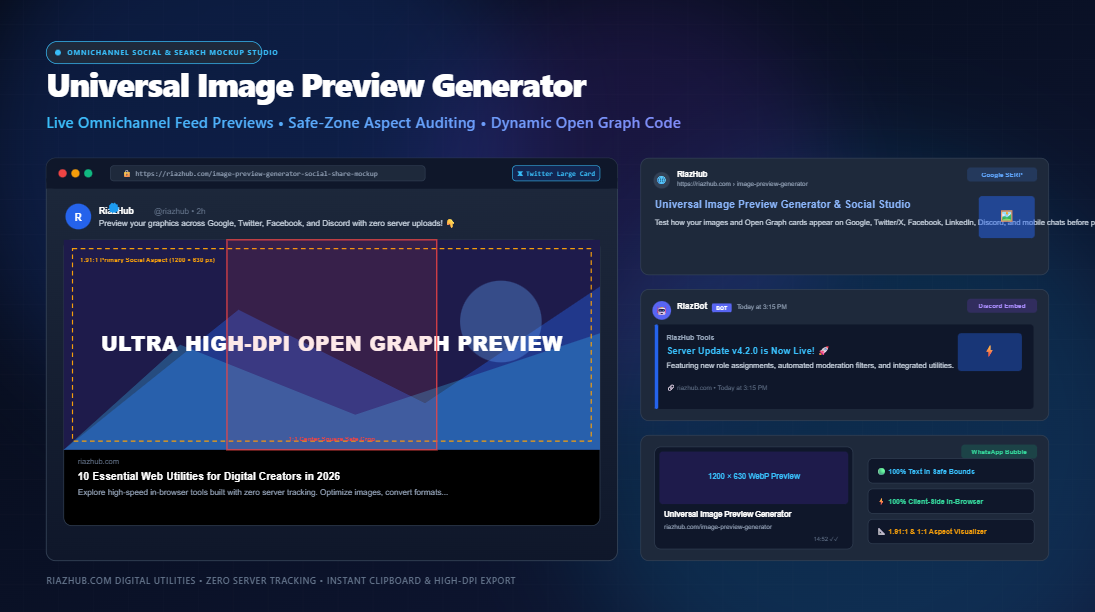
The Definitive Guide to Open Graph Image Previews, Social Share Cards & Click-Through Rate Optimization
In modern digital publishing, an article, product page, or tool is rarely discovered through a direct URL typed into a browser address bar. Over 78% of organic traffic journeys originate from a rich visual link preview encountered in a feed whether that is a recommended card on 𝕏 (Twitter), an editorial share on LinkedIn, a community unfurl inside Discord, a rich snippet on Google Search, or a private recommendation shared inside WhatsApp.
Yet, despite spending dozens of hours perfecting web content and typography, digital teams frequently neglect the single graphic element that governs discovery: the Open Graph preview card. When a link preview appears with a blurry thumbnail, awkward center-cropped text, or generic default placeholder art, click-through rates (CTR) plummet by up to 65%.
1. The Psychology of the Social Share Card: Why Visuals Dictate CTR
Human visual processing occurs in less than 13 milliseconds. When users scroll through lightning-fast mobile feeds, their eyes register the high-contrast imagery of an Open Graph card long before reading the headline or author byline. A properly executed preview card fulfills three essential psychological functions:
- Perceived Editorial Quality: A pixel-crisp, branded banner signals that the underlying domain is authoritative, modern, and trustworthy.
- Frictionless Information Scannability: Complementing the title with contextual visual indicators (such as version badges, data charts, or UI framing) allows visitors to assess content relevance instantly.
- Feed Real-Estate Domination: Platforms reward large visual formats. On Twitter/X, switching from a legacy compact card to a
summary_large_imagecard expands your clickable screen area by over 350%.
2. The Golden Ratio: Why 1.91:1 (1200 × 630 px) is the Universal Standard
During the early days of social metadata, each network implemented competing aspect ratios, forcing web developers to maintain dozens of platform-specific meta tags. Fortunately, the industry converged around the 1.91:1 landscape aspect ratio, originally codified by Facebook’s Open Graph Protocol and subsequently adopted by Twitter, LinkedIn, Discord, and Slack.
The canonical dimension for this ratio is 1200 × 630 pixels:
Why 1200 × 630 px Specifically?
- High-DPI / Retina Crispness: While desktop feeds display cards between 500px and 600px wide, mobile devices with 2x and 3x device pixel ratios require source assets of at least 1000px to avoid visible blurring or interpolation artifacts.
- Bandwidth Efficiency: At 1200 × 630 px, modern image formats (such as WebP or optimized PNG) weigh comfortably between 80 KB and 250 KB—well within crawler download limits while preserving lossless typographic sharpness.
- Unified Crawler Compatibility: Standardizing on 1200 × 630 px allows a single
<meta property="og:image">declaration to serve Facebook, LinkedIn, Twitter/X, Discord, Pinterest, and iMessage simultaneously.
3. The 1:1 Center-Square Trap & Safe-Zone Engineering
While 1.91:1 is the landscape benchmark, social platforms frequently auto-crop preview imagery depending on device viewport, connection speed, and presentation context. The most dangerous trap in social design is the central 1:1 square crop:
- WhatsApp & Chat Apps: Often crop the incoming link thumbnail to a 1:1 square taken directly from the center of the image.
- Instagram Feed Reposts: Restrict previews to 1:1 squares or 4:5 vertical cards.
- Mobile Fallbacks: On slow cellular connections, platforms may fall back to compact inline thumbnails rather than full-width banners.
If your graphic features crucial headlines, brand marks, or call-to-action buttons positioned along the left or right edges, they will be violently amputated when cropped to a square.
To prevent this, always design with a central 600 × 600 px safe zone in mind. Keep your primary typography, logos, and focal illustrations within this central square, while allowing atmospheric background colors, textures, and subtle gradients to extend outward to the full 1200 × 630 px perimeter. You can test your assets against both guidelines using the RiazHub Image Preview Generator.
4. Omnichannel Social Card Specifications at a Glance
Below is an engineering reference table detailing dimensions, aspect ratios, and character constraints across all primary discovery channels:
| Platform | Recommended Aspect | Optimal Dimensions | Title Limit | Description Limit |
|---|---|---|---|---|
| Twitter / X (Large Card) | 1.91 : 1 | 1200 × 630 px | ~70 chars | ~125 chars (desktop) |
| Facebook Feed Share | 1.91 : 1 | 1200 × 630 px | ~60 chars | ~155 chars |
| LinkedIn Company Post | 1.91 : 1 | 1200 × 627 px | ~70 chars | ~100 chars |
| Google Search SERP | 4 : 3 or 16 : 9 | 1200 × 900 px (Rich) | 50 – 60 chars | 150 – 160 chars |
| Discord Rich Embed | 1.91 : 1 (Inline) | 1200 × 630 px | 256 chars max | 2048 chars max |
| WhatsApp Chat Bubble | 1 : 1 or 1.91 : 1 | 800 × 800 px (Square) | ~55 chars | ~90 chars |
5. Platform-by-Platform Architecture Deep Dive
𝕏 / Twitter: Dominating the Feed with summary_large_image
Twitter cards operate on a hierarchical fallback engine. If you do not provide explicit twitter:* meta tags, the Twitter crawler will search for generic og:* equivalents. However, omitting <meta name="twitter:card" content="summary_large_image"> defaults your tweet to a tiny thumbnail floated to the left of the text, surrendering massive visual real estate.
<!-- Twitter Card Specification -->
<meta name="twitter:card" content="summary_large_image">
<meta name="twitter:site" content="@riazhub">
<meta name="twitter:title" content="10 Essential Web Utilities for Digital Creators in 2026">
<meta name="twitter:description" content="Explore high-speed in-browser tools built with zero server tracking. Optimize images, convert formats, and preview social cards.">
<meta name="twitter:image" content="https://riazhub.com/images/og-preview.png">
Facebook & The Open Graph Protocol
Facebook requires explicit og:image:width and og:image:height attributes. When these dimensional headers are provided, Facebook’s crawler can render the large preview card on the very first share without having to asynchronously download, parse, and measure the image on edge servers.
<!-- Essential Open Graph Tags -->
<meta property="og:type" content="website">
<meta property="og:url" content="https://riazhub.com/tools">
<meta property="og:site_name" content="RiazHub">
<meta property="og:title" content="Universal Image Preview Generator & Social Studio">
<meta property="og:description" content="Test your Open Graph cards live across all major platforms with real-world chassis.">
<meta property="og:image" content="https://riazhub.com/images/og-cover.png">
<meta property="og:image:width" content="1200">
<meta property="og:image:height" content="630">
Google Search SERP: Structured Data & Rich Results
Google does not rely exclusively on Open Graph tags for search result snippets. To qualify for rich cards in Google Search and Google Discover, you must pair your visual assets with Schema.org JSON-LD structured data:
<!-- Schema.org JSON-LD ImageObject Markup -->
<script type="application/ld+json">
{
  "@context": "https://schema.org",
  "@type": "WebPage",
  "name": "Universal Image Preview Generator",
  "description": "Test how your images appear on Google, Twitter, Facebook, and Discord.",
  "url": "https://riazhub.com/image-preview-generator-social-share-mockup",
  "primaryImageOfPage": {
    "@type": "ImageObject",
    "url": "https://riazhub.com/images/og-cover.png",
    "width": 1200,
    "height": 630
  }
}
</script>6. Multi-Device Framing Chassis: Presenting Cards with Impact
When presenting design mockups to stakeholders, clients, or marketing directors, showing a raw image file often fails to convey its real-world impact. Context is everything.
Framing preview cards inside realistic chassis—such as a macOS Safari browser window with traffic-light controls and address bars, or a modern smartphone bezel complete with speaker slits and dynamic islands—transforms an abstract banner into a tangible consumer experience. You can export clean high-DPI screenshots of both device frames using RiazHub’s studio tool.
7. The “Stale Preview” Curse: Demystifying Crawler Caches
A frequent source of developer frustration occurs after deploying an updated banner: you share the link, but the social network stubbornly continues to display the old graphic.
To conserve millions of dollars in bandwidth, social media scrapers cache Open Graph metadata at their CDN edge for up to 30 days. If you update an image, you must invalidate that cache using platform debugger endpoints:
- Facebook Sharing Debugger: Enter your URL and click “Scrape Again” to force a fresh fetch.
- LinkedIn Post Inspector: Paste your URL to clear cached thumbnail assets across the corporate feed.
- Query String Cache Busting: If you cannot access platform debuggers, append a version parameter to your image URL (e.g.,
og-cover.png?v=2). Social scrapers treat query strings as unique assets and immediately bypass edge caches.
8. 100% Client-Side Privacy: Why Browser-Based Processing Matters
Many online meta tag checkers require you to upload your images, draft headlines, and unreleased product graphics to third-party web servers. For creative agencies managing embargoed press releases, stealth startups, or proprietary brand assets, third-party server processing poses unacceptable security and intellectual property risks.
The RiazHub Social Share Mockup Studio performs 100% of image decoding, safe-zone auditing, device chassis composition, and canvas screenshot rendering directly inside your browser using the HTML5 Canvas 2DContext API. Zero files or descriptions leave your device.
9. Step-by-Step Workflow: How to Audit & Export Your Share Cards
- Upload or Paste Your Graphic: Drag your PNG, JPG, or WebP banner directly into the dropzone, or press
Ctrl+Vto paste directly from your clipboard. - Customize Metadata: Input your Page Title and Meta Description while observing live character counters (keep titles under 60 characters and descriptions under 155 characters).
- Audit Safe Bounds: Toggle the “Show Safe-Zone Crop Guides” switch to verify that critical logos and headlines sit safely inside the 1:1 square zone.
- Switch Device Chassis: Select between Minimal Card, macOS Browser Window, or Smartphone Frame.
- Inspect the Comparison Matrix: Switch to the Comparison Matrix tab to evaluate Google SERP, Twitter, Facebook, LinkedIn, Discord, and WhatsApp simultaneously.
- Download High-DPI Mockup: Click “Download Mockup Screenshot (PNG)” or copy the image directly to your clipboard for instant client presentations.
10. Conclusion & Best Practices Checklist
Pre-Flight Social Share Checklist
- ✔ Image dimensions are set to exactly 1200 × 630 pixels.
- ✔ File size is compressed below 300 KB (using WebP or optimized PNG).
- ✔ Primary headline and logo fit within the central 600 × 600 px safe crop.
- ✔ Page title is under 60 characters to avoid Google and Facebook ellipsis truncation.
- ✔ Meta description is between 120 and 155 characters for optimal scannability.
- ✔
twitter:cardis explicitly declared assummary_large_image. - ✔ Schema.org JSON-LD structured markup is embedded for Google rich snippet indexing.
Ready to optimize your discovery pipeline? Test your Open Graph cards live with the RiazHub Image Preview Generator today and maximize click-through rates across every channel.
Universal Image Preview Generator Omnichannel Live Studio
Test how your images and Open Graph cards appear on Google, Twitter/X, Facebook, LinkedIn, Discord, and mobile chats before publishing. 100% private in-browser rendering.
Open Graph Standards & Social Sharing Documentation
<meta name="twitter:image"> tags. If absent, it seamlessly falls back to <meta property="og:image">. Setting twitter:card to summary_large_image renders a full-width visual card that achieves up to 3x higher click-through rates (CTR) compared to standard small square thumbnails.
?v=2) to the image URL.