
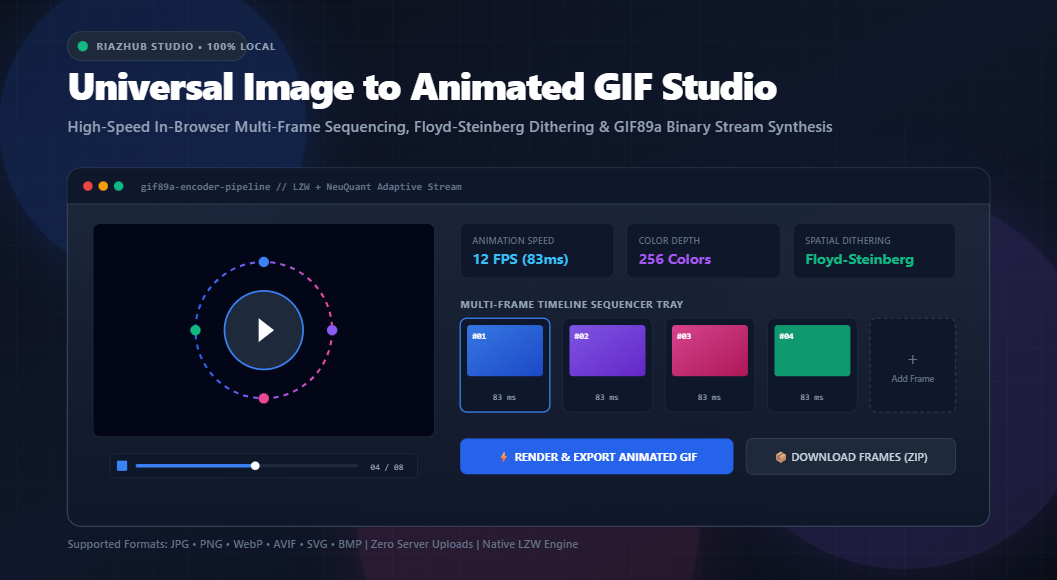
Mastering In-Browser Animated GIF Creation: Binary GIF89a Architecture, Floyd-Steinberg Dithering, and Zero-Server Processing
In an era dominated by heavy MP4 containers and proprietary video codecs, the humble GIF89a format remains one of the most universally compatible, unencumbered animation standards on the web. From Discord avatars and GitHub documentation pull requests to social media reactions, email newsletters, and technical walkthroughs, animated GIFs require zero plugins, zero codec licensing, and auto-play across every operating system and browser built over the past three decades.
However, historically creating custom animated GIFs from high-resolution bursts, render passes, or photo sequences meant wrestling with bloated desktop software, command-line ImageMagick syntax, or sketchy cloud converters that harvest user photos and paste unsightly watermarks. Today, thanks to modern ECMAScript standard advancements, typed binary arrays (Uint8Array), and hardware-accelerated HTML5 Canvas rasterization, you can assemble, quantize, dither, and encode professional GIF89a binaries directly inside your web browser.
⚡ Try the Free In-Browser Studio
Looking to convert multi-format photo bursts into smooth animated GIFs right now? No installations, zero uploads, 100% private.
1. The Architecture of the GIF89a Binary Stream
To understand how sequential photographs or motion graphics transform into an animated loop, one must inspect the byte-level architecture defined in CompuServe’s 1989 specification (GIF89a). Unlike single-image formats like JPEG or basic PNG, a GIF is structured as a sequential byte stream consisting of descriptors, extension blocks, and raster data chunks:
├── [7 Bytes: Logical Screen Descriptor (Canvas Width, Height, Packed Flags)]
├── [19 Bytes: Netscape 2.0 Application Extension (Looping Counter Block)]
│
├── [FRAME 1]
│ ├── [8 Bytes: Graphic Control Extension (Disposal, Transparency, Delay in 1/100s)]
│ ├── [10 Bytes: Image Descriptor (Position, Local Width, Local Height, LCT Flag)]
│ ├── [768 Bytes: Local Color Table (256 RGB Triplet Values)]
│ └── [Variable Bytes: Table Based Image Data (LZW Bitstream Packets)]
│
├── [FRAME 2 … N]
│ └── (Graphic Control Extension + Image Descriptor + Local Palette + LZW Stream)
│
└── [1 Byte: Trailer 0x3B (Terminates File Stream)]
When utilizing the Image to Animated GIF tool on RiazHub, your browser dynamically synthesizes these exact binary blocks into contiguous in-memory memory arrays using JavaScript’s Uint8Array. Because no server roundtrips occur, sensitive family photos, proprietary UI mockups, or unreleased product prototypes never leave your device.
2. The Challenge of Color Reduction: Adaptive Quantization
Modern digital photographs captured in JPG, PNG, or WebP represent color using 24-bit sRGB depth granting up to 16,777,216 distinct color permutations. The GIF specification, by contrast, restricts each individual frame to an indexed palette of at most 256 colors (8-bit color depth).
Naively truncating 24-bit RGB values down to 8 bits results in extreme banding, mudded hues, and ruined gradients. High-grade tools overcome this through adaptive quantization algorithms:
- Median-Cut Channel Partitioning: Pixels from source frames are represented as coordinates in a 3D RGB color cube. The algorithm repeatedly identifies the color channel (Red, Green, or Blue) exhibiting the highest variance, sorts the pixels along that axis, and splits them at the median into smaller bounding boxes until 256 optimal clusters remain.
- NeuQuant Neural-Network Quantization: A self-organizing Kohonen neural network learns the topological color landscape of the image sequence, prioritizing perceptual high-frequency colors that human eyes detect first.
3. Banishing Posterization: Floyd-Steinberg Spatial Error Diffusion
Even with an optimal 256-color palette, smooth gradients (such as sunsets, skies, or soft skin tones) can suffer from posterization harsh stepped rings between adjacent color bands. To resolve this, our client-side encoder deploys Floyd-Steinberg spatial error diffusion dithering.
When a pixel at coordinate (x, y) is mapped to its closest palette match, a numerical difference the quantization error occurs between the original color and the palette entry:
Rather than discarding this discrepancy, Floyd-Steinberg diffuses the error forward to unvisited neighboring pixels according to strict geometric ratios:
- Pixel to the Right (x + 1, y): Receives
7 / 16of the error. - Pixel to Bottom-Left (x – 1, y + 1): Receives
3 / 16of the error. - Pixel Directly Below (x, y + 1): Receives
5 / 16of the error. - Pixel to Bottom-Right (x + 1, y + 1): Receives
1 / 16of the error.
This spatial distribution fools human visual perception into perceiving continuous tones, producing rich, natural-looking images without increasing palette size.
4. Lossless Variable-Length LZW Compression
Once pixels are mapped to indexed integers (0 to 255), the raw raster data must be compressed. GIF utilizes Lempel-Ziv-Welch (LZW), an adaptive dictionary algorithm that replaces recurring sequences of color indices with variable-length code tokens:
| Code Size (Bits) | Available Dictionary Codes | Role in GIF Bitstream |
|---|---|---|
| 8 Bits (Initial) | 0 – 255 | Root pixel color indices |
| Special Codes | 256 (Clear) / 257 (EOI) | Dictionary Reset & End of Information |
| 9 to 12 Bits | 258 – 4095 | Dynamic multi-pixel phrase dictionary tokens |
As repeating background pixels (such as large solid backgrounds or stationary elements in a stop-motion frame) are scanned, LZW packs hundreds of identical pixels into compact 10-bit or 12-bit code words, dramatically lowering the exported file size without losing a single pixel of clarity.
🎞️ Craft Your Animated GIF in Seconds
Drag in your JPGs, PNGs, SVGs, or AVIF burst captures and experience lightning-fast client-side LZW encoding in action.
5. Step-by-Step Guide: Generating GIFs on RiazHub
Creating an animated GIF using the browser-based GIF Studio takes just a few clicks:
- Ingest Your Image Sequence:
Drag and drop your sequence of JPG, PNG, WebP, AVIF, BMP, or SVG frames into the dropzone. You can also paste copied images directly with Ctrl+V or click Load Sample Burst to experiment immediately with an interactive geometric sample sequence. - Calibrate Animation Frame Rate:
Use the real-time speed slider to configure your playback rate. The studio automatically displays both Frames Per Second (FPS) and millisecond delays:- Stop-Motion Animation: 10 to 12 FPS (83ms – 100ms delay).
- High-Speed Reaction Memes: 15 to 20 FPS (50ms – 66ms delay).
- Product Turntables (360°): 24 FPS (41ms delay).
- Fine-Tune Individual Frame Timing:
Need the introductory or concluding frame to linger longer? The interactive timeline tray displays editable per-frame delay boxes beneath every thumbnail card. - Select Canvas Fit Topologies:
Choose whether incoming images should be Cover Cropped (filling uniform bounds), Contained (with transparent or solid letterbox matting), or Stretched. - Render and Inspect:
Click Render & Export Animated GIF. Watch the real-time progress bar compile the LZW binary stream, inspect the interactive color palette grid, and preview the resulting animation on the checkerboard stage. - Download or Copy:
Download your.gifdirectly with 1 click, copy the binary to your clipboard, or download normalized individual frames as a bundled ZIP archive!
6. Fitting Topologies: Cover vs. Contain vs. Stretch
A frequent problem when combining photos from different cameras or crops is inconsistent aspect ratios. The RiazHub GIF Maker handles this cleanly via three customizable fitting modes:
- Cover (Crop): Scales the image uniformly until both target dimensions are filled, trimming excess edges from the center. Recommended for full-bleed social media clips and avatars.
- Contain (Letterbox): Scales the image to fit entirely within the viewport without cropping. Unoccupied canvas space is rendered as transparent alpha or solid matte color. Ideal for schematics, vector diagrams, and product photography.
- Stretch: Forces every frame into the exact pixel width and height specified. Useful when source frames share uniform pixel dimensions.
7. Frequently Asked Questions (FAQ)
Are my uploaded photos sent to any remote server?
No. 100% of the image reading, color quantization, dithering, and LZW byte stream compilation happens locally inside your browser’s V8 JavaScript runtime using HTML5 Canvas and typed arrays. Your files never leave your computer.
What image formats can I upload into the timeline?
The studio natively supports all modern web image standards, including JPG/JPEG, PNG (with transparency), WebP, AVIF, BMP, and vector SVG files.
Does the exported GIF support looping?
Yes. The tool injects standard Netscape 2.0 Application Extension blocks into the binary stream, allowing you to choose between infinite looping (∞), single playthrough, or custom repeat iteration counts.
Why does Floyd-Steinberg dithering increase file size slightly?
Because spatial dithering diffuses color error into high-frequency alternating pixel patterns, reducing long runs of identical colors that LZW compresses most efficiently. However, the dramatic improvement in photographic gradient quality is nearly always worth the modest byte increase.
Ready to Convert Your Photos into High-Fidelity Animated GIFs?
Test out the full suite of timing controls, palette optimizers, and instant frame sequencing tools now on RiazHub.
Universal Image to Animated GIF Studio
Combine photos into smooth animated GIFs, adjust frame rates, apply Floyd-Steinberg dithering, and encode binary GIF89a streams directly inside your browser.
📁 1. Source Image Frames
JPG, PNG, WebP, AVIF, SVG, BMP⏱️ 2. Timing & Playback Calibration
📐 3. Dimensions & Canvas Fit
🎞️ 4. Frame Sequence Tray (0)
1. GIF89a Logical Stream Architecture
The CompuServe GIF89a standard specifies a Logical Screen Descriptor followed by a Netscape 2.0 Application Extension Block (loop iterations) and sequential Graphic Control Extension (GCE) blocks dictating disposal method, transparent color flags, and frame delays in 1/100ths of a second.
2. Adaptive Color Quantization
Standard sRGB images contain up to 16.7 million 24-bit colors. GIF requires reduction to an indexed 256-color palette. The studio calculates an adaptive color cube via median-cut channel partitioning, grouping perceptual neighbors and preserving gradient integrity.
3. Floyd-Steinberg Spatial Dithering
Quantization error (the delta between true color and closest palette index) is diffused to neighboring pixels: 7/16 to right, 3/16 to bottom-left, 5/16 below, and 1/16 to bottom-right. This eliminates harsh posterization in skies and skin tones.
4. LZW Compression & 100% Privacy
Raster pixel indices are compressed on-the-fly using the Lempel-Ziv-Welch (LZW) dictionary algorithm with variable bit-lengths (3 to 12 bits). All byte streams are compiled into Uint8Array buffers locally; zero user imagery touches any server.