
Mastering Batch Media Organization: How to Sort, Deduplicate, and Structure Thousands of Photos 100% In-Browser
DCIM, duplicates spawned across multiple social backups, and nondescript file names like IMG_8492.JPG or Screenshot_20260912.png make finding a specific memory or locating client deliverables a frustrating ordeal.
Traditional solutions to this crisis present major drawbacks. Heavy desktop media catalogers often demand costly recurring subscription plans, complicated database setups, and intrusive system installations. On the other side, conventional cloud-based organizers require users to upload hundreds of gigabytes of deeply personal photographs, family albums, and sensitive client media to third-party servers raising critical privacy concerns and demanding massive internet bandwidth.
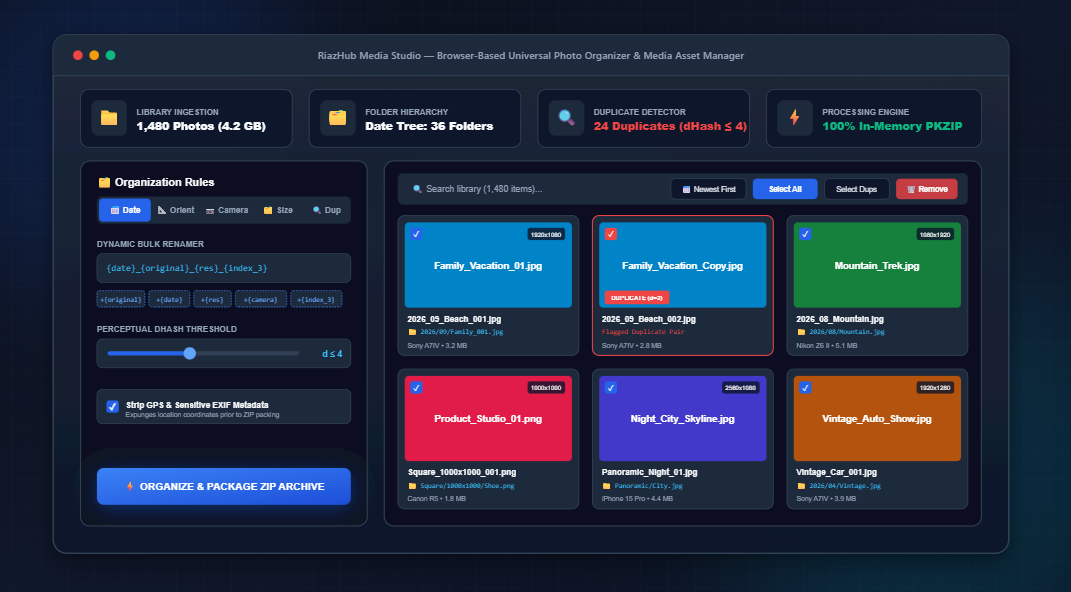
To solve this dilemma, we developed the Universal Photo Organizer & Batch Media Asset Manager. This high-speed utility executes 100% inside your browser using modern Web APIs combining multi-file and full-directory ingestion, binary EXIF metadata parsing, 64-bit perceptual hashing for duplicate detection, batch dynamic renaming, and nested PKZIP packaging into an instantaneous, serverless workflow.
⚡ Ready to Organize Thousands of Photos in Seconds?
No software installations, no server uploads, and complete privacy guaranteed for all personal albums.
1. The Four Pillars of Modern In-Browser Media Management
Executing professional media asset management inside a browser sandbox requires a modern architectural approach. The RiazHub Photo Organizer & Media Manager is built upon four computational pillars:
- Zero-Upload Privacy Architecture: Utilizing HTML5
File,Blob, andFileReaderAPIs, your photos never travel across a network wire. Every pixel calculation, folder hierarchy generation, and ZIP compilation occurs within your device’s memory. - Microsecond Binary EXIF Extraction: Rather than decoding entire high-resolution photographs to read metadata, our engine parses the raw binary bytes of JPEG APP1 markers, reading TIFF tags for camera models, timestamps, and orientation in microseconds.
- Perceptual Difference Hashing (dHash): Unlike cryptographic hashes (MD5, SHA-256) which fail if even a single byte or compression level changes, 64-bit dHash calculates structural luminance gradients. It accurately detects duplicate photos even if they have been resized, cropped, or converted from PNG to JPG.
- In-Memory PKZIP Directory Serialization: The engine constructs standard ZIP archives complete with nested directory headers (
YYYY/MM/,Orientation/Resolution/) on the fly, downloading directly via browser blobs without server intermediation.
2. Deep-Dive: How 64-Bit Perceptual Hashing (dHash) Catches Duplicate Images
Duplicate images are among the largest culprits of wasted storage. Consider this common scenario: you take three continuous bursts of a family group portrait, export one for Instagram (compressed to 1080px), save another as a PNG, and keep the original RAW JPEG. Cryptographic checksums treat all four as completely unrelated files because their byte structures differ entirely.
The photo organizer tool overcomes this challenge using Difference Hashing (dHash). Here is the mathematical step-by-step breakdown:
- Downsampling: The source image is drawn onto an in-memory
OffscreenCanvasand reduced to a 9-pixel wide by 8-pixel high matrix ($72$ total pixels). - Grayscale Luminance Conversion: Each pixel is stripped of color and evaluated for perceived human brightness using standard ITU-R BT.601 coefficients:
Luminance = 0.299*Red + 0.587*Green + 0.114*Blue - Horizontal Gradient Comparison: For each of the 8 rows, the algorithm compares adjacent pixel pairs from left to right. If pixel $(x, y)$ has greater luminance than pixel $(x+1, y)$, it outputs a binary
1; otherwise, it outputs a0:Bit(x, y) = P(x, y) > P(x+1, y) ? 1 : 0With 8 comparisons across 8 rows, a compact 64-bit binary fingerprint is produced.
- Hamming Distance Evaluation: When evaluating two photographs, the engine calculates their Hamming distance—the total number of differing bits between the two 64-bit strings:
Hamming Distance = XOR(Hash_A, Hash_B) bit count
• Distance = 0: Exact visual twins or identical copies.
• Distance 1 to 4: Near-duplicates, identical scenes with minor compression, or resized versions.
• Distance 5 to 10: Same scene with slight subject movement or different camera framing.
• Distance > 10: Distinctly different photographs.
Inside the Universal Photo Organizer, an interactive sensitivity slider lets you calibrate the Hamming distance threshold between 0 and 10. Furthermore, quick-action buttons allow you to auto-select newer or older duplicate variants with a single click.
3. Multi-Dimensional Folder Topologies
Different workflows demand different organizational taxonomies. A wedding photographer needs chronological sequences, an e-commerce catalog manager needs resolution groupings, and a hardware enthusiast prefers sorting by camera models.
Our tool allows you to switch between four distinct folder hierarchy models instantaneously:
| Organization Mode | Nested Folder Pattern | Ideal Use Case |
|---|---|---|
| 📅 Chronological Date Tree | Photos_Export/YYYY/MM/DD/Filename.ext |
Family archives, vacation photo albums, and personal annual library backups. |
| 📐 Orientation & Dimensions | Photos_Export/Landscape/1920x1080/Filename.ext |
E-commerce product asset management, social media staging, web publishing. |
| 📷 Camera EXIF Hardware | Photos_Export/Sony_ILCE-7M4/Filename.ext |
Multi-camera studio shoots, drone vs. DSLR sorting, gear comparisons. |
| 🗂️ File Size & Megapixels | Photos_Export/Under_1MB/Filename.ext |
Storage audit, isolating high-res master files from low-res web thumbnails. |
Before downloading your archive, you can inspect the Folder Tree Directory View directly inside the workspace to preview the exact nested directory structure that will be generated inside the ZIP file.
4. Dynamic Batch Renaming with Token Interpolation
Standard camera roll filenames like IMG_0042.JPG provide zero context regarding when the photo was taken, what camera captured it, or its dimensions.
The dynamic renamer inside the Batch Media Asset Manager replaces static strings with real-time tokens:
{original}: The existing file base name (e.g.,Summer_Trip).{date}: Chronological date extracted from EXIF or file timestamp (YYYYMMDD).{res}: Exact width and height (e.g.,1920x1080).{camera}: Normalized camera make and model (e.g.,Sony_A7IV).{index_3}: Sequential 3-digit padded index (001,002,003).
You can also combine token rules with Regex Find & Replace (e.g., stripping IMG_ prefixes) and an integrated Letter Case Converter (lowercase, UPPERCASE, kebab-case, or snake_case) to enforce uniform file naming standards across entire enterprise libraries.
5. Protecting Privacy: 1-Click EXIF Geolocation Scrubbing
Modern smartphones and smart cameras embed precise GPS coordinates into the EXIF headers of every photo you capture. When sharing images publicly or publishing them online, this metadata can expose your home address, workplace, or travel patterns to unauthorized parties.
The online photo organizer includes a built-in privacy scrubber. By enabling the [x] Strip GPS & Sensitive EXIF Metadata option, images are cleanly re-rendered through an isolated canvas context before packaging into the final ZIP archive. Geolocation coordinates, camera serial numbers, and personal device identifiers are permanently removed—without degrading visual fidelity.
6. Step-by-Step Tutorial: How to Organize Your Photo Library in 3 Minutes
Here is how you can transform thousands of scattered photographs into a structured archive:
- Open the Organizer: Navigate to the Universal Photo Organizer & Batch Media Asset Manager on RiazHub.
- Ingest Files or Folders: Drag and drop your photos into the dropzone, or click “Select Entire Folder” (which leverages
webkitdirectoryto ingest complete folder hierarchies in a single click). - Choose Your Structure: Select your preferred organization pill tab (e.g., 📅 Date for chronological year/month folders or 📐 Orientation for dimension grouping).
- Scan for Duplicate Images: Switch to the 🔍 Duplicates tab and review flagged near-duplicate pairs. Toggle off redundant versions you wish to exclude from the final package.
- Configure Dynamic Renaming: Enter your renaming template (e.g.,
{date}_{original}_{index_3}) and preview updated filenames in real time in the Detailed Table View. - Package and Download: Click ⚡ Organize & Package ZIP. The in-memory PKZIP packager bundles your photos into nested folders and downloads the complete archive straight to your downloads directory.
📊 Need to Audit Your Media Library First?
You can also export a complete CSV file inventory containing file dimensions, megapixels, camera models, and target paths with one click.
7. Frequently Asked Questions (FAQ)
Is there a file size or upload limit?
Because all processing occurs entirely in your browser’s local memory, there are zero server-side upload limits. You can ingest hundreds of photos (and libraries exceeding several gigabytes) limited only by your device’s available RAM.
What image formats are supported?
The engine supports JPG, JPEG, PNG, WEBP, AVIF, TIFF, BMP, and GIF formats. Binary EXIF parsing is optimized for standard JPEG and TIFF files, with intelligent fallback to file modification timestamps for other web formats.
Will the tool work in night / dark mode?
Yes! The tool features automatic night-mode synchronization that detects your system preferences, WordPress theme settings, and background luminance, with an integrated manual toggle in the header.
Can I use this tool on mobile or tablets?
Absolutely. The interface is built with responsive CSS flexbox and grid layouts, scaling seamlessly from 1100px desktop monitors down to smartphones and tablets.
Final Thoughts
Taking control of your digital media archive should not require invasive software installations, monthly subscription fees, or sacrificing personal privacy. With modern in-browser computing, you can organize, deduplicate, rename, and archive thousands of media assets in seconds.
Experience seamless digital asset management today by visiting the Universal Photo Organizer & Batch Media Asset Manager on RiazHub.com.
Universal Photo Organizer & Media Manager Studio
Sort thousands of photos by date, orientation, or camera EXIF, detect duplicate images with 64-bit perceptual hashing, batch rename files, and export structured folder ZIP archives in real time. Zero server upload.
Media Organization Architecture & EXIF Hashing Guide
DataView and ArrayBuffer. It locates the 0xFFE1 APP1 EXIF marker and parses the TIFF header (Endian byte-order 0x4949 or 0x4D4D) directly extracting tag 0x0110 (Camera Model), 0x010F (Camera Make), and 0x9003 (DateTimeOriginal). This binary extraction happens in microseconds without uploading photos to any server.
0x04034b50), Central Directory Headers (0x02014b50), and an End of Central Directory record (0x06054b50) with nested relative paths (e.g. 2026/09/Photo_001.jpg). The resulting Blob is downloaded instantly, perfectly compatible with Windows Explorer, macOS Finder, and Linux archives.