
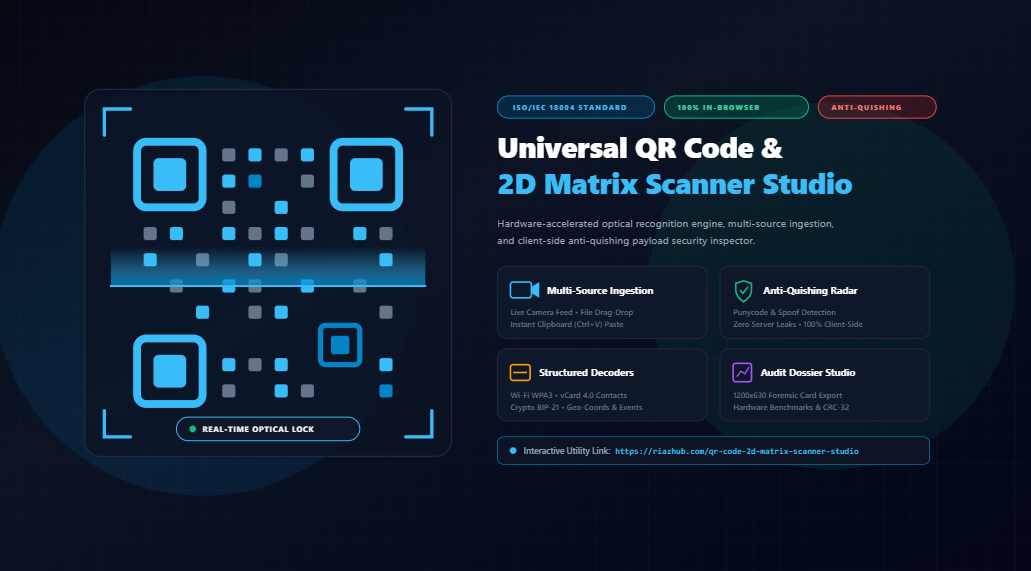
Universal QR Code & 2D Matrix Scanner Studio: The Complete Guide to Client-Side Optical Recognition & Anti-Quishing Security
Quick Response (QR) codes have become the ubiquitous bridge connecting physical surfaces to digital ecosystems. From restaurant menus, retail packaging, and paper business cards to Wi-Fi onboarding stations and two-factor authentication (2FA) seed exports, optical 2D barcodes handle billions of transactions every single day.
However, the seamless convenience of pointing a camera at a pattern of black and white modules conceals severe security vulnerabilities and privacy loopholes. Traditional online QR decoders require you to upload images to remote web servers, creating permanent paper trails of your private data. Meanwhile, cybercriminals increasingly deploy deceptive QR codes in targeted phishing campaigns known as “Quishing”.
To solve both challenges simultaneously, the Universal QR Code & 2D Matrix Scanner Studio provides a high-precision, 100% in-browser optical ingestion engine combined with a real-time anti-quishing payload heuristic radar. In this comprehensive guide, we explore how client-side optical computer vision works, examine why serverless decoding is vital for data privacy, and demonstrate how to inspect, decode, and verify any 2D barcode safely.
1. The Privacy Crisis of Legacy Online QR Scanners
When users do not have a dedicated smartphone scanner or need to decode a barcode displayed on their desktop monitor, the common instinct is to search for a free “online QR code decoder.” Most of these services work by transmitting the image to a backend server running an image-processing script (such as Python Pillow with ZBar or an image-processing microservice).
From a cybersecurity standpoint, this architecture introduces catastrophic privacy hazards:
- Wi-Fi Credential Harvesting: QR codes printed on the underside of office routers or conference passes contain explicit WPA/WPA2/WPA3 pre-shared network keys (PSKs) and SSIDs in plaintext. Sending this image to an external server hands over direct access to your local network perimeter.
- vCard Identity Exfiltration: Business cards and medical badges encoded in QR format store full names, personal mobile numbers, home addresses, and corporate email addresses.
- Cryptocurrency Address Front-Running: Scanning a Bitcoin, Ethereum, or Solana payment invoice through an unverified server allows malicious operators to log transaction intents or perform man-in-the-middle clipboard address poisoning.
- Confidential URL Leakage: QR codes frequently contain private cloud storage tokens, internal staging URLs, password reset deep-links, or secret invite codes that should never hit third-party access logs.
2. Anatomy of an ISO/IEC 18004 QR Code Matrix
To understand how modern optical engines interpret barcodes, we must review the standardized geometry defined by ISO/IEC 18004. A QR code is not just a random constellation of squares; it is an intricately structured mathematical matrix:
- Finder Patterns (Position Detection Markers): The three prominent double-concentric square eyes located at the top-left, top-right, and bottom-left corners. They enable the scanning engine to detect the barcode’s presence, locate its orientation, and calculate its rotation angle in 3D perspective space (even if captured at an oblique tilt).
- Alignment Patterns: As QR codes increase in data density (Versions 2 through 40), smaller secondary square markers are placed throughout the matrix to compensate for physical paper curvature or optical lens distortion.
- Timing Patterns: Alternating black and white modules connecting the finder patterns along the 6th row and 6th column, establishing the matrix grid coordinate system and module pitch.
- Format Information & Error Correction: Strips flanking the finder patterns that encode the mask pattern used and the Reed-Solomon Error Correction Level (Level L = ~7%, Level M = ~15%, Level Q = ~25%, Level H = ~30% recoverable damage).
- Data Modules & Reed-Solomon Codewords: The interleaved payload blocks that carry the binary data alongside polynomial parity bytes capable of restoring damaged or occluded segments.
| EC Level | Damage Recovery Capability | Optimal Use Case |
|---|---|---|
| Level L (Low) | Approx. 7% of data codewords restored | High data density where surface wear is minimal (clean screens, packaging). |
| Level M (Medium) | Approx. 15% of data codewords restored | Default general-purpose standard for commercial marketing and business cards. |
| Level Q (Quartile) | Approx. 25% of data codewords restored | Industrial tags, warehouse barcodes, and transport logistics. |
| Level H (High) | Approx. 30% of data codewords restored | Branded QR codes with logos centered in the middle, or outdoor signage exposed to weather. |
When you ingest an image into the QR Code Scanner Studio, the engine’s telemetry tab automatically measures the optical acquisition latency and reports the exact matrix dimension (e.g., 21×21 modules for Version 1 up to 177×177 for Version 40), allowing developers and QA engineers to audit barcode print quality instantly.
3. The Architecture: Hardware-Accelerated W3C Barcode Detector API
Historically, browser-based QR scanning suffered from stuttering framerates and sluggish CPU consumption because every single video frame had to be manually extracted to an offscreen canvas and processed through pure JavaScript mathematical transformations.
The Universal QR Code & 2D Matrix Scanner Studio implements a hybrid optical pipeline that bridges bleeding-edge browser APIs with reliable pure-JS fallbacks:
Primary Pipeline: Native W3C Barcode Detector API
In modern Chromium-based browsers (Google Chrome, Microsoft Edge, Opera, Brave) and mobile Android browsers, the tool taps directly into the hardware-accelerated BarcodeDetector interface. This passes video stream textures directly to the underlying operating system’s computer vision neural silicon (such as Apple Neural Engine, Qualcomm Hexagon DSP, or Intel/AMD GPU media decoders). This delivers instantaneous scanning latencies as fast as 4 to 12 milliseconds with negligible battery drain.
Secondary Pipeline: Pure-JS Matrix Solver Fallback
If the tool detects that the host browser (such as Mozilla Firefox or legacy desktop Safari) does not expose the experimental Barcode Detection API, it gracefully falls back to a high-resolution, multi-pass pure JavaScript optical kernel. It applies adaptive thresholding (binarization), detects quad corner markers, normalizes perspective distortion, and computes Reed-Solomon polynomial parity checks without requiring any external plugins or extensions.
4. Multi-Source Ingestion: Beyond Simple Webcams
Most online tools force you to rely solely on a live webcam. The Universal QR Code & 2D Matrix Scanner Studio provides three versatile ingestion channels:
- Live Optical Camera Stream: Seamlessly hooks into your device’s video cameras with automated front/rear lens detection, continuous focus tracking, high-contrast HUD bounding boxes, and an optional scan confirmation audio beep.
- Drag-and-Drop Image File Deck: Ingest any static image format, including PNG, JPG, WEBP, AVIF, GIF, SVG, BMP, and TIFF. Whether you have a screenshot of a QR code or an exported vector flyer, simply drop the file onto the deck for immediate decoding.
- OS System Clipboard Paste (Ctrl + V): The ultimate productivity shortcut. Whenever a QR code appears on your screen in a Slack channel, a Zoom presentation, an email, or a PDF simply take a screen crop using your operating system’s shortcut (such as
Win + Shift + Son Windows orCmd + Shift + 4on macOS), switch to the tool, and pressCtrl + V. The image is parsed directly from memory in a fraction of a second.
5. The Rising Threat of “Quishing” (QR Phishing)
Because smartphones automatically open URLs when scanning QR codes, cyber attackers have aggressively adopted Quishing to bypass traditional email spam gateways and enterprise security perimeters. Secure Email Gateways (SEGs) frequently scan email text attachments and body links, but they often fail to extract and analyze URLs trapped inside embedded graphic images.
- Parking Meter & EV Charger Stickers: Criminals paste counterfeit sticker QR codes over legitimate public payment terminals, redirecting motorists to fraudulent payment gateways that clone credit card credentials.
- Corporate M365 Authentication Alerts: Fraudulent emails masquerade as IT department notices warning that “Your MFA session has expired. Scan this QR code on your mobile phone to re-authenticate.” Once scanned, the victim’s phone opens an adversary-in-the-middle (AiTM) proxy page that steals session tokens and bypasses 2FA.
- Internationalized Domain Name (IDN) Homograph Spoofing: Attackers register domain names using Cyrillic or Greek characters that look visually identical to Latin letters (e.g., using Cyrillic “а” instead of Latin “a”). On a small smartphone screen, the user cannot spot the difference.
To neutralize these tactics, the Universal QR Code & 2D Matrix Scanner Studio incorporates a built-in Anti-Quishing Heuristic Radar (v2.4). Every decoded URL is subjected to client-side threat scoring before you ever open it:
- Punycode & Homoglyph Verification: Automatically checks for
xn--prefixes that indicate deceptive character substitution. - IP-Literal Host Detection: Flags raw numeric IP addresses (such as
http://192.168.1.50/login) commonly used by disposable phishing drop servers. - Shortener & Redirect Cloaking Analysis: Detects commercial URL shorteners (bit.ly, tinyurl, t.co, is.gd) frequently used to obscure malicious landing destinations.
- Suspicious Top-Level Domain (TLD) Scrutiny: Alerts users when domains employ high-risk, free, or abuse-prone TLDs (.tk, .xyz, .top, .work, .click).
- Credential Trap Identification: Scans query parameters for embedded username, password, or base64 authentication tokens.
6. Supported Payload Specifications & Structured Parsers
A raw QR code payload is merely a string of UTF-8 characters. To make that data truly useful, the Universal QR Code & 2D Matrix Scanner Studio contains specialized entity extractors that format and present the payload dynamically:
Wi-Fi Network Access Protocol
Formatted according to the standard WIFI:S:MyNetwork;T:WPA;P:SecretPassword;; syntax. The tool extracts the SSID, security encryption protocol (WPA, WPA2, WPA3, WEP, or Open), password with one-click clipboard copy and unhide toggles, and hidden network flags.
vCard & MeCard Contact Dossiers
Recognizes RFC-compliant vCard 2.1/3.0/4.0 and Japanese NTT DoCoMo MECARD schemas. It cleanly isolates first/last names, telephone numbers, corporate affiliations, professional job titles, street addresses, and emails. You can even download a structured .vcf file ready to import directly into Apple Contacts, Microsoft Outlook, or Google Contacts.
Cryptocurrency Payment Protocols
Understands BIP-21 (Bitcoin), ERC-681 (Ethereum), Solana, and USDT payment URI schemes. It strips away protocol prefixes to provide clean cryptographic public addresses, invoice labels, and exact token quantities for error-free transactions.
Calendar Events (iCalendar VEVENT)
Parses meeting invitations, extracting start/end timestamps, event titles, physical locations, and agenda summaries.
Geolocation Coordinates
Parses geo:latitude,longitude standards, providing instant mapping links to Google Maps and OpenStreetMap for rapid pinpoint navigation.
7. Comparative Feature Matrix
How does the client-side studio compare against typical alternatives? The table below highlights key functional and privacy distinctions:
| Capability | Universal QR Studio | Standard Smartphone Camera | Traditional Web Scanners |
|---|---|---|---|
| Execution Privacy | 100% In-Browser (Zero Server Calls) | Local, but often transmits metadata to vendor OS | Hazardous (Uploads image files to remote server) |
| Anti-Quishing Threat Radar | Built-in heuristic risk scoring | None (Blind auto-redirects) | None (Raw text display only) |
| Multi-Source Ingestion | Live Camera, File Drag-Drop, Clipboard Paste | Camera Only | File Upload Only |
| Structured Wi-Fi & vCard Parsers | Full visual dossier + one-click export | Basic prompt to connect or save | Raw messy text string |
| Hardware Acceleration | W3C BarcodeDetector API + JS Engine | Native OS API | Server-side image library processing |
| Forensic Dossier Card Export | Yes (1200×630 branded audit card) | No | No |
8. Step-by-Step Walkthrough: How to Use the Studio
Getting started with the Universal QR Code & 2D Matrix Scanner Studio takes only seconds:
- Select Your Ingestion Method: Click on Live Camera Stream to activate your webcam, Upload QR Image to pick a graphic file from your disk, or Clipboard Paste to immediately analyze a copied screenshot.
- Align the Code: If using the live viewfinder, position the barcode within the cyan guide brackets. The engine automatically locks onto the finder patterns.
- Review the Anti-Quishing Security Audit: Check the trust index badge and heuristic checklist in the right-hand inspector deck to verify whether the target link is clean, suspicious, or dangerous.
- Interact with the Parsed Entity: Copy formatted passwords, click dialable phone numbers, download contact VCF cards, or preview web destinations in safety.
- Generate an Audit Dossier: Switch to the Dossier Studio tab to create a polished 1200×630 PNG security audit card complete with timestamp, hash verification, and threat analysis for documentation or client reporting.
Frequently Asked Questions (FAQ)
No. The Universal QR Code & 2D Matrix Scanner Studio runs 100% client-side in your local browser window. You can verify this in your browser developer tools (Network tab) zero outbound API requests are made during scanning or image analysis.
Yes. QR codes feature built-in Reed-Solomon polynomial error correction capable of recovering up to 30% of lost or corrupted data modules. The studio’s adaptive contrast algorithms pre-process low-light or noisy frames to maximize decode rates.
On browsers supporting the W3C BarcodeDetector API, the engine can also decode Aztec codes, Data Matrix, PDF417, EAN-13, UPC-A, Code 128, and Code 39 barcodes seamlessly.
Simply take a screenshot of any QR code visible on your screen (using Win+Shift+S on Windows or Cmd+Shift+4 on macOS), navigate to the QR Code Scanner Studio, and press Ctrl+V. The tool captures the image data from your clipboard memory and decodes it immediately without saving any temporary files to your drive.
Universal QR Code & 2D Matrix Scanner Studio
High-precision optical camera stream scanner, static image ingestion, and payload security inspector. Automatically decodes Wi-Fi credentials, vCard contacts, web links, and crypto keys client-side with zero external server leaks or privacy exposure.
Quick Preset Testing Scenarios (Instant Optical Simulation)
📚 Optical Recognition, ISO/IEC 18004 & Security Standards
WIFI:T:WPA;S:NetworkSSID;P:PassKey;H:false;; enables instant network onboarding without manual typing. For digital business cards, RFC 6350 (vCard 3.0 / 4.0) formats contact data into structured Name, Phone, Email, and Organization parameters that can be imported directly into Apple Contacts, Google Contacts, or Microsoft Outlook.
- Level L (Low): Restores approximately 7% of damaged codewords; maximizes data capacity.
- Level M (Medium): Restores approx. 15% of corrupted codewords; standard commercial default.
- Level Q (Quartile): Restores approx. 25% of corrupted codewords; ideal for industrial environments.
- Level H (High): Restores up to 30% of lost codewords; allows central logos and graphics to be placed over the matrix without losing readability.
navigator.mediaDevices.getUserMedia, file picker image bitmaps, and clipboard items are processed entirely within your computer or mobile device's local memory using the W3C BarcodeDetector API and HTML5 2D Canvas routines. Zero frames, Wi-Fi credentials, contact details, or visited URLs are ever transmitted to RiazHub.com or external cloud infrastructure.