
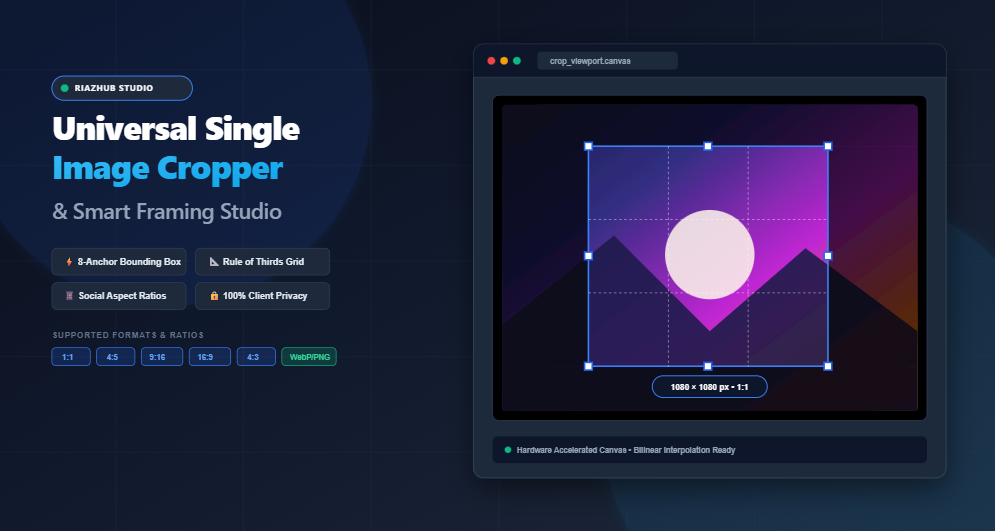
To address these challenges, RiazHub developed the Universal Single Image Cropper & Smart Framing Studio. Built entirely upon native HTML5 Canvas 2DContext and modern browser capabilities, this utility brings studio-grade compositional framing, interactive eight-anchor dragging, aspect ratio locks, exact pixel clamping, and alpha transparency masking directly into your browser tab with sub-millisecond responsiveness.
⚡ Try the Online Tool Directly
Experience real-time interactive cropping, Rule-of-Thirds grid alignment, and instant lossless downloads on any desktop or mobile browser.
1. The Art of Photographic Framing & The Rule of Thirds
Composition is what transforms an ordinary snapshot into an eye-catching photograph. One of the most venerable rules in visual arts and photography is the Rule of Thirds.
By dividing an image canvas into nine equal quadrants using two equidistant vertical lines and two horizontal lines, you establish four primary intersection points (often called power points). Human eye-tracking research proves that viewer attention naturally settles on these intersections rather than dead-center of a frame.
In the Single Image Cropper & Smart Framing Studio, the Rule of Thirds grid is dynamically rendered directly within your interactive crop selection box. Whenever you drag or adjust any of the eight anchor points, high-contrast dashed guidelines illuminate your frame, allowing you to align horizons along the lower or upper third and place human eyes or focal subjects exactly at optimal focal intersections.
2. Fluid 8-Point Draggable Bounding Box Architecture
Many basic online cropping tools restrict you to dragging just one corner or force rigid predefined rectangular boxes that fail to accommodate asymmetric crops. Our studio incorporates an industrial-grade eight-anchor manipulation system:
- Corner Handles (Top-Left, Top-Right, Bottom-Right, Bottom-Left): Enable dual-axis proportional or freeform diagonal expansion.
- Edge Center Handles (Top-Center, Bottom-Center, Left-Center, Right-Center): Enable single-axis vertical or horizontal adjustments while preserving perpendicular bounds.
- Bounding Box Interior (Move Cursor): Allows you to reposition the entire crop window freely across the base image without resizing.
- Outside Scrim Mask: A semi-transparent dark overlay covers cropped-out periphery regions so you immediately perceive your cropped framing without visual distractions.
- Full Pointer & Touch Event Support: Seamlessly switch between mouse pointers on desktop monitors and multi-touch gestures on smartphones or tablets using pointer capture APIs.
3. Social Media Aspect Ratios: From Instagram to OpenGraph
Every modern social network enforces specific aspect ratios and pixel dimensions to prevent unsightly automatic center-crops, awkward letterboxing, or blurry compression. The RiazHub Single Image Cropper provides instant one-click aspect ratio pill toggles tailored for every major platform:
| Aspect Ratio | Standard Resolution | Optimal Use Cases |
|---|---|---|
| Freeform | Variable Pixel Range | Custom layouts, arbitrary editorial crops, graphic design slices. |
| 1:1 Square | 1080 × 1080 px | Instagram feed squares, profile avatars, eCommerce product listings. |
| 4:5 Portrait | 1080 × 1350 px | Instagram vertical posts (maximizes mobile feed screen real estate). |
| 9:16 Vertical | 1080 × 1920 px | TikTok videos, Instagram Reels, YouTube Shorts, Snapchat & Facebook Stories. |
| 16:9 Banner | 1280 × 720 / 1920 × 1080 px | YouTube video thumbnails, OpenGraph blog header cards, Twitter/X banners. |
| 4:3 Standard | 1024 × 768 / 1600 × 1200 px | Classic computer monitors, presentation slides, retro photography displays. |
| 3:2 Classic Photo | 1500 × 1000 / 3000 × 2000 px | 35mm film photography standard, DSLR sensor native format, art print cards. |
4. Exact Pixel Dimensions vs. Viewport Display Resampling
A common flaw in rudimentary browser tools is that they capture whatever scaled resolution happens to be displayed on the user’s screen. If your browser window is 800px wide, an ordinary tool might only output an 800px image, even if your original uploaded raw file was an ultra-crisp 4000×3000px DSLR photo.
The Smart Framing Studio on RiazHub solves this through dual-pipeline canvas geometry:
- Viewport Display Pipeline: Operates at an optimized interactive screen resolution to deliver buttery smooth 60 FPS drag-and-drop bounding box manipulation without device lag.
- High-Precision Native Resampling Engine: When you preview, copy, or download your result, the engine maps display coordinates $(x, y, w, h)$ back to your source photo’s true natural resolution using native 9-parameter bilinear canvas interpolation:
drawImage(source, srcX, srcY, srcW, srcH, 0, 0, outW, outH). - Target Dimension Locking: Need an image to be strictly
1200 × 630 pxfor Facebook OpenGraph or800 × 800 pxfor an eCommerce catalog? Simply check the “Lock Dimensions” toggle and enter your exact pixel constraints. The engine smoothly interpolates the cropped region to your required dimensions.
5. Circular Avatar Masking & Rounded Corner Alpha Clipping
Cropping isn’t just about sharp rectangles. Profile pictures across social media, team pages, and chat apps require circular formatting. Historically, creating a true circular avatar required launching heavy graphic software like Photoshop or Figma, creating a clipping mask, and exporting as a transparent PNG.
With the Universal Image Cropper, circular avatar masking is accomplished in one click:
- Circle Avatar Mode: Uses vector path arc geometry (
ctx.arc(cx, cy, r, 0, Math.PI * 2)) to clip away all outer pixels, instantly generating transparent alpha channels for clean profile photos. - Rounded Corner Slider: Adjust corner radius smoothly between 4px and 120px to produce modern app-card style rounded rectangles.
- Intelligent Format Adaptation: When you select circular or rounded masks, the studio automatically optimizes your export to PNG or WebP to guarantee the transparent perimeter is preserved with zero jagged edges.
6. Lossless Rotations and Flip Transformations
Photos taken on smartphones frequently load with incorrect EXIF orientation tags or require creative angle correction. The built-in transformation engine allows you to:
- Rotate 90° clockwise or counter-clockwise with automatic canvas dimension transposition.
- Perform horizontal mirroring (Flip H) for webcam selfies and portraiture.
- Perform vertical flipping (Flip V) for creative graphic inverted compositions.
- All rotations and flips are executed natively on the master buffer prior to crop coordinate mapping, eliminating multiple re-compression cycles.
7. Multi-Format Lossless Exporter & Direct Clipboard Support
Once your crop is framed to perfection, exporting is completely seamless:
- WebP Format: Modern next-generation image format offering superior visual compression and lightweight payloads for websites and blogs.
- PNG Format: Lossless fidelity with full 32-bit RGBA transparency support, essential for circular avatars and graphic icons.
- JPEG Format: Universally compatible photo compression with an adjustable quality slider (10% to 100%, defaults to optimal 92%).
- Direct Clipboard Copy: Click “Copy to Clipboard” to pipe your cropped bitmap directly into your operating system clipboard via
navigator.clipboard.write([new ClipboardItem(...)]). You can immediately pressCtrl+VorCmd+Vin Slack, Discord, Google Docs, Figma, or WhatsApp Web without saving temporary files to your hard drive.
8. Step-by-Step Guide: How to Crop Photos Like a Pro
Follow these quick steps to achieve professional framing in seconds:
- Open the Tool: Navigate to the Single Image Cropper & Smart Framing Studio.
- Load Your Image: Drag and drop any image file (JPG, PNG, WebP, AVIF, BMP, GIF) into the dropzone, click “Browse File”, or click “Load Sample Photo” to test immediately.
- Select an Aspect Ratio or Preset: Choose from Freeform, 1:1 Square, 4:5 Portrait, 9:16 Story, 16:9 Banner, or Exact Pixel lock.
- Adjust the Interactive Bounding Box: Drag the center to move the crop region or pull any of the 8 anchor handles to resize. Use the Rule of Thirds grid to position focal elements on intersection lines.
- Choose Shape & Transformation (Optional): Switch to Circular Avatar mode for profile pictures or rotate/flip the image if needed.
- Download or Copy: Select your desired file format (WebP, PNG, JPEG), adjust the quality slider, and click “Download Cropped Image” or “Copy to Clipboard”.
9. 100% Client-Side Privacy: Why Browser-Based Processing Matters
In an era where many free online file converters secretly upload personal photographs, medical scans, ecommerce assets, or private family pictures to remote servers for processing and cloud logging, privacy is paramount.
The RiazHub Universal Single Image Cropper guarantees absolute, zero-server client privacy:
- Every pixel is decoded, transformed, clipped, and encoded entirely inside your device’s local memory and graphics processing unit (GPU).
- Zero bytes of your visual media are ever transmitted across the network or stored on any external server.
- You can even disconnect your Wi-Fi after opening the page, and the tool continues to operate at full speed completely offline.
10. Conclusion & Try It Now
Precision photo composition should be effortless, fast, and secure. Whether you are a social media manager crafting viral reels, a content creator designing YouTube thumbnails, or a web developer preparing responsive web assets, having a dependable framing studio in your toolkit saves hours of tedious work.
Start Framing Your Photos Today
Crop with eight-point precision, align with the Rule-of-Thirds, and export high-resolution assets in WebP, PNG, or JPEG.
Universal Single Image Cropper & Smart Framing Studio
Crop photos to standard social aspect ratios, custom pixel dimensions, or circular avatars with an interactive Rule-of-Thirds crop box in real time. Zero server uploads — processed entirely inside your browser.
Aspect Ratio Freeform
Target Output Dimensions
Mask & Shape Clipping
Transformations
Export Format & Quality
No Image Selected
Drag an image here or click "Load Sample Photo" to begin.
Framing Optics & Crop Ratios Guide
Learn professional photography framing, social aspect ratios, and how browser-based lossless clipping works.
4:5 Portrait (1080×1350 px): Maximizes vertical mobile screen real estate on Instagram feeds.
9:16 Vertical (1080×1920 px): Standard full-screen format for TikTok, Instagram Reels, and YouTube Shorts.
16:9 Landscape (1280×720 or 1920×1080 px): YouTube thumbnails, OpenGraph blog previews, and Twitter header cards.