
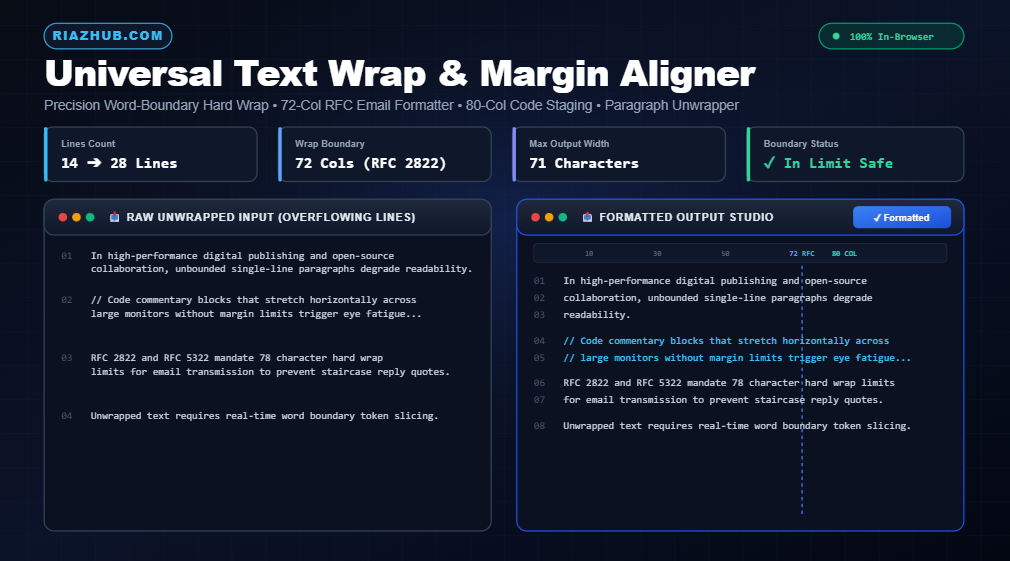
The Definitive Guide to Text Wrapping: Hard Wrap vs. Soft Wrap, RFC 2822 Standards & Line Formatting
In modern digital publishing, software engineering, and email correspondence, unbounded lines of text are one of the most pervasive yet overlooked sources of visual chaos. When a paragraph stretches endlessly across an ultra-wide monitor, human eyes struggle to track line breaks, code reviews become horizontal-scrolling nightmares, and plain-text emails degrade into jagged, stair-stepped quotation ruins.
Whether you are preparing patches for an open-source mailing list, formatting Markdown documentation, or cleaning up messy draft exports, mastering line boundaries is critical. In this comprehensive guide, we unpack the mechanics of word wrapping, analyze the historic 72-character and 80-column standards, and show you how to leverage the Universal Text Wrap Tool on RiazHub to automate line formatting with sub-millisecond precision.
Need Instant Line Wrapping Right Now?
Paste your raw text, code comments, or email drafts into our free, browser-based utility. Enforce 72-character RFC standards, unwrap fragmented paragraphs, or set hanging comment indents without sending your confidential data to an external server.
1. Hard Wrap vs. Soft Wrap: Understanding the Core Difference
To understand why text breaks or fails to break across different devices, one must first appreciate the fundamental technical distinction between soft wraps and hard wraps.
Soft Wrapping (Visual Viewport Rendering)
A soft wrap is a visual convenience managed entirely by your display software (such as a web browser, word processor, or IDE). The underlying text stream remains a single, continuous line without newline characters. The application merely bends the visual line when it collides with the right margin of the active viewport window.
The catch: If you copy a soft-wrapped paragraph into a command-line terminal, an IRC client, or a raw text document, it expands back into one gargantuan, 2,000-character line that runs off the edge of the screen.
Hard Wrapping (Explicit Delimiter Injection)
A hard wrap permanently injects explicit newline characters (such as Unix Line Feed \n or Windows Carriage Return Line Feed \r\n) at predetermined column limits. The text is physically broken into individual line strings.
Hard wrapping guarantees that whether your recipient opens the document in Windows Notepad, a Linux VT100 console, Vim, Apple Mail, or an embedded receipt printer, every line breaks at the exact same character boundary. Using the Universal Text Wrap Tool, you can generate true hard-wrapped text with customizable line endings in a single click.
| Feature / Attribute | Soft Wrap | Hard Wrap |
|---|---|---|
| Newline Characters Injected | No (0 bytes added) | Yes (\n or \r\n inserted) |
| Cross-Platform Consistency | Variable (depends on screen width) | Fixed & Identical Everywhere |
| Terminal & CLI Safe | No (causes horizontal scrolling) | Yes (100% boundary compliant) |
| Email Quoting Compatibility | Prone to broken stair-stepping | RFC 2822 / 5322 Compliant |
| How to Apply | CSS word-wrap: break-word |
RiazHub Text Wrap Engine |
2. The Architecture of Standard Column Limits: 72 vs. 80 Characters
Why do technical standards frequently gravitate toward 72 and 80 characters instead of arbitrary round numbers like 50 or 100? The answer combines human optical ergonomics with computing heritage.
The 72-Character RFC Email Standard (RFC 2822 & RFC 5322)
Under internet email standards RFC 2822 and RFC 5322, line lengths are strictly capped at 998 characters, but authors are strongly advised to keep lines under 78 characters. The industry-wide sweet spot adopted across Unix, Usenet, and kernel mailing lists is 72 characters.
The mathematical reason is simple: when someone replies to your plain-text email, their client prepends a quote character (> ). As a conversation threads through three or four replies, multiple quote markers are attached:
>>>> Original line starts here with 72 characters...
>>> Next respondent adds their comment here...
>> Third reply thread...
> Latest comment...
If the original message were formatted at 80 columns, the first reply would push lines to 82 columns, forcing the terminal to wrap the last two words onto an awkward orphan line. By capping original text at 72 characters, you leave ample breathing room for multiple levels of blockquote markers. The online text wrap utility includes a dedicated 1-click preset configured specifically for RFC 72-character email formatting.
The 80-Column Display Legacy & PEP 8
The 80-column standard originated in 1928 with the standard IBM 80-column punched card, which was later adopted by early CRT terminals such as the DEC VT52 and DEC VT100.
Today, even though developers possess 32-inch 4K monitors, the 80-column rule remains central to clean software engineering. Python’s official style guide, PEP 8, enforces a limit of 79 characters for code and 72 characters for docstrings and comments. Adhering to 80 columns allows engineers to keep two or three editor windows open side-by-side alongside a terminal without horizontal scrollbars.
3. Word-Boundary Preservation: Why Naive Slicing Fails
The simplest way to wrap text in code is a naive string split every N characters. However, naive slicing produces unreadable fragments:
// NAIVE SLICING (Hard Break at 30 Chars):
The international space stat
ion conducted orbital researc
h yesterday.

// WORD-SAFE SLICING (Smart Lookback):
The international space
station conducted orbital
research yesterday.
A high-performance formatting pipeline must scan backward from the column limit to locate natural token boundaries:
- Whitespace Matching: Locate the last space character prior to column
N. - Punctuation Hyphenation: If no space exists, inspect hyphens (
-) and path separators (/). - Fallback Safety: Only if a single word or URL exceeds the entire width of the line does the engine invoke an explicit split to prevent layout overflow.
The algorithm running inside the RiazHub text wrapping suite performs token analysis in-memory, processing documents exceeding 10,000 lines in less than 5 milliseconds.
4. Paragraph Unwrapping: Repairing Fragmented Text
Formatting text is not just about adding breaks often, you need to remove them. If you copy text from a PDF, an old email client, or a raw OCR scan, the text is frequently riddled with hard breaks at the end of every line.
Trying to paste this text into a modern content management system or Google Docs produces broken, fragmented sentences. The Paragraph Unwrapper mode inside the Universal Text Wrap Tool detects double newlines as authentic paragraph markers while stitching single hard breaks back into seamless, flowing prose.
5. Formatting Code Comments, Markdown Quotes & Hanging Indents
When formatting technical documentation, regular wrapping often destroys indentation hierarchies. The tool’s Wrap with Indent / Prefix strategy solves this elegantly:
- Code Comment Blocks: Wrap long commentary at 80 columns while automatically prepending
//or#to every wrapped continuation line. - Markdown Blockquotes: Enforce 65-column boundaries while prepending
>to ensure flawless GitHub and GitLab README rendering. - Hanging Tab Indentation: Preserve leading whitespace on list items while indenting wrapped secondary lines to align with the first word.
6. The Privacy Imperative: 100% In-Browser Text Processing
In an era of centralized AI scrapers and aggressive web telemetry, transmitting proprietary source code, internal company emails, legal contracts, or confidential drafts to a remote server for formatting is a major security risk.
“Text formatting should never require transmitting confidential corporate data or private credentials over the wire.”
The universal line formatting utility at RiazHub.com executes 100% inside your browser’s local JavaScript sandbox. No text is ever uploaded, cached, or logged on our servers. You can disconnect your internet connection entirely and the tool will continue formatting multi-thousand-line documents with full fidelity.
Frequently Asked Questions
.txt) and Markdown (.md) files, generated dynamically via local browser Blob URLs.<pre> and <code>), hard wrapping prevents awkward horizontal overflow on mobile devices.Ready to Clean Up Your Lines and Formatting?
Experience instant, word-boundary-safe wrapping, visual character ruler guides, and 100% private in-browser text processing on RiazHub.
Universal Text Wrap Tool
Wrap text at fixed column widths, enforce hard line breaks at word boundaries, unwrap paragraphs, or align code blocks to standard margins in real time.
Source Input
Wrapped Output
Under RFC 2822 and RFC 5322 (Internet Message Format), plain text emails are recommended to have lines no longer than 78 characters, with 72 characters being the universally adopted industry norm.
This standard ensures that when an email message is quoted and replies are prepended with reply markers (e.g., > or >> ), the lines will not wrap awkwardly or cause jagged stair-stepping formatting on terminal-based email clients, mailing lists, and patch submission systems like the Linux Kernel Mailing List (LKML).
Soft Wrap: A purely visual rendering trick performed by text editors, web browsers, and word processors. No newline characters are actually inserted into the underlying data stream. If you copy the text into another program, it remains one giant, unbroken single line.
Hard Wrap: Explicit newline characters (\n or \r\n) are permanently injected at specific column boundaries. This guarantees that your lines break at exact character widths across any terminal, source code repository, plain text viewer, or embedded printer.
The ubiquitous 80-column limit traces its history back to the 1928 IBM punch card format, which featured 80 columns of punched data. This standard was adopted by classic CRT computer displays such as the DEC VT100 terminal.
In modern software engineering, coding conventions like Python's PEP 8 and standard C/C++ style guidelines enforce 79 or 80 column limits. This permits developers to view two to three code files side-by-side on wide monitors without horizontal scrolling, and dramatically improves reading comprehension.
This tool operates with complete client-side autonomy. Every line computation, regex parsing step, and file generation routine is executed in your web browser's local JavaScript memory.
Zero data is sent to RiazHub or any third-party server. You can safely format confidential legal contracts, proprietary source code, private cryptographic keys, and sensitive correspondence without privacy risk.