
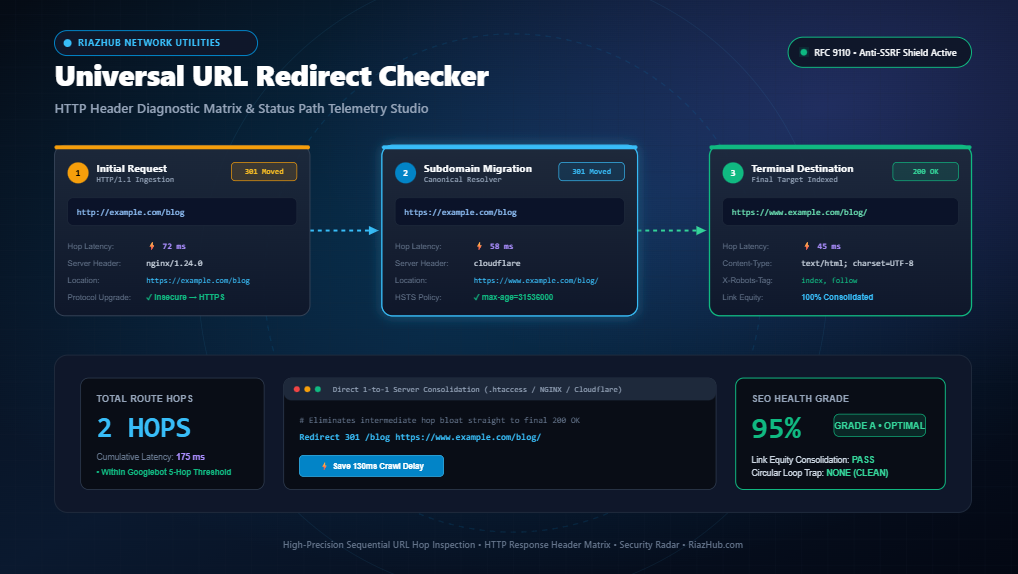
Mastering HTTP Redirects: The Complete Guide to Hop Inspection, Header Diagnostics, and Crawl Budget Optimization
How sequential redirect chains, status code nuances (301 vs. 302 vs. 307 vs. 308), and misconfigured server headers silently destroy link equity, Core Web Vitals, and search engine crawlability.
1. The Anatomy of an HTTP Redirect: Behind the Scenes of Browser Navigation
Every time a web browser, search crawler, or API client requests a resource from a web server, an intricate protocol dialogue occurs. While the ideal scenario is a direct 200 OK response, real-world websites undergo redesigns, migrations, domain mergers, and URL restructuring. When an original URL moves, the server replies with an HTTP redirection status code (in the 3xx range) accompanied by a Location header instructing the client where to navigate next.
To diagnostic tools and search engine spiders, redirects are not instantaneous. They are sequential network transactions requiring DNS resolutions, TCP handshakes, TLS negotiations, and server round-trips. When you diagnose your website using the URL Redirect Checker & HTTP Header Diagnostic Matrix on RiazHub, each step in this journey is isolated into a discrete “hop,” revealing the underlying server behavior and response headers at each stage.
2. Deciphering HTTP Status Codes: 301, 302, 303, 307, and 308
Choosing the wrong redirect code is one of the most common and costly technical SEO blunders. Here is the architectural breakdown of how search engines interpret each status protocol:
| HTTP Status Code | Classification | Link Equity Transfer | Request Method Preserved? | Ideal Use Case |
|---|---|---|---|---|
| 301 Moved Permanently | Permanent | 100% (Full PageRank Consolidation) | No (Browsers historically mutate POST → GET) | Permanent site migrations, HTTPS redirects, canonical domain standardization. |
| 302 Found | Temporary | 0% (Retains equity on source URL) | No (May mutate POST → GET) | A/B testing, seasonal promotional redirects, geo-location routing. |
| 303 See Other | Temporary (Post/Redirect/Get) | 0% | Explicitly transforms POST → GET | Handling form submissions or e-commerce checkout confirmations to prevent resubmissions. |
| 307 Temporary Redirect | Temporary (Strict RFC 9110) | 0% | Yes (Preserves POST/PUT request body) | API endpoints or maintenance holding patterns requiring exact method retention. |
| 308 Permanent Redirect | Permanent (Strict RFC 9110) | 100% | Yes (Guarantees method and body preservation) | High-security RESTful APIs and modern web infrastructure permanent migrations. |
Crucial Architectural Distinction: While both
301and308signal permanent relocation,308 Permanent Redirectstrictly prevents the client from altering the HTTP method. If your application handles payment callbacks or webhooks, using a301redirect can cause the browser or client to drop the POST payload and issue an empty GET request. You can verify whether your server preserves request methods by running trace diagnostics through the RiazHub URL Redirect Checker.
3. The Performance Cost of Redirect Chains on Core Web Vitals
A redirect chain occurs when an initial URL hops through two or more intermediate destinations before arriving at the final webpage:
http://example.com/blog
  → [301] https://example.com/blog (HTTPS Upgrade)
  → [301] https://www.example.com/blog (WWW Canonicalization)
  → [301] https://www.example.com/blog/ (Trailing Slash Resolution)
  → [301] https://www.example.com/insights/ (Renamed Category Path)
  → [200 OK] Terminal Destination Reached
In the chain above, the user and search engine spider must complete four unnecessary round trips before retrieving a single byte of HTML. Each hop requires:
- DNS Query & Resolution: 20ms to 80ms (if not cached).
- TCP 3-Way Handshake: 1 RTT (Round Trip Time) between browser and server.
- TLS Cryptographic Handshake: 1 to 2 RTTs for TLS 1.2 or TLS 1.3 key exchange and certificate verification.
- Server Request Processing & Response Header Construction: 40ms to 150ms depending on server load.
On 4G or 5G mobile networks where latency fluctuates between 50ms and 150ms per round trip, a 4-hop chain effortlessly adds 600ms to 1,200ms of sheer dead time to your Time to First Byte (TTFB). This directly degrades your Largest Contentful Paint (LCP) score, triggering ranking penalties in Google’s mobile-first indexing algorithms.
4. Googlebot’s 5-Hop Truncation Rule and Crawl Budget Depletion
Search engine bots do not have infinite patience or computing resources. Google Search Central documentation specifies that Googlebot will abandon a redirect chain after a maximum of 5 hops. If your migration route contains 6 or more chained steps, Googlebot flags the target as an unresolvable crawl error and ceases indexation.
Furthermore, even for chains under 5 hops, search bots discount crawl priority. If Google allocates 1,000 page requests per day to your domain (your “crawl budget”) and 400 of those requests are squandered on intermediate redirect hops, 400 of your fresh or updated product pages will remain uncrawled. You can immediately identify whether your URLs exceed acceptable thresholds by inspecting your domain routes on the RiazHub HTTP Header Diagnostic Matrix.
5. Critical HTTP Response Headers You Must Audit on Every Hop
A URL redirect is not merely a status code; it carries critical server telemetry. Inspecting these headers on each discrete hop provides deep security and indexability insights:
- Location: The absolute or relative target URL where the client is being redirected. Always verify that the Location header specifies a secure
https://scheme rather than an insecurehttp://fallback. - Strict-Transport-Security (HSTS): Enforces modern HTTPS connections. An intermediate hop lacking HSTS exposes users to SSL-stripping and man-in-the-middle (MITM) attacks during navigation.
- X-Robots-Tag: Server-level indexing directives. If an intermediate hop or final URL returns
X-Robots-Tag: noindex, search engines will purge the destination from their index despite a clean 200 OK status. - Cache-Control: Specifies how browsers and proxy CDNs cache the redirect. A 301 redirect with
Cache-Control: public, max-age=31536000is cached permanently in client browsers, meaning even if you change your rewrite rule later, previous visitors will continue to bounce to the old cached destination until their browser cache is purged. - Server: Identifies the web server software (e.g., Cloudflare, nginx, Apache, LiteSpeed). Analyzing server signatures across hops reveals if intermediate caching proxies or firewalls are interfering with traffic routing.
6. Detecting Circular Redirect Loops (ERR_TOO_MANY_REDIRECTS)
A circular redirect loop occurs when URL A redirects to URL B, and URL B (directly or through intermediate steps) redirects back to URL A:
https://example.com/login → [302] https://example.com/dashboard → [302] https://example.com/loginThis condition instantly causes browsers to crash with ERR_TOO_MANY_REDIRECTS, rendering the page completely inaccessible to users and causing search engines to de-index the page within days. Circular loops typically stem from conflicting CMS plugins (e.g., conflicting SSL plugins or membership gatekeepers) or contradictory .htaccess rewrite conditions.
Running automated diagnostics with the URL Redirect Checker on RiazHub.com flags circular loops instantly, highlighting the exact hop where the cycle repeats.
7. How to Consolidate Multi-Hop Chains into Direct 1-to-1 Server Rules
The ultimate remedy for redirect bloat is consolidating intermediate hops into a direct 1-to-1 rewrite rule. Instead of letting traffic bounce through multiple milestones, your web server should point the initial URL straight to the terminal destination.
Apache Web Server (.htaccess)
Replace chained rewrite conditions with a direct, high-precedence rule:
# Direct 1-to-1 Permanent Redirect (Bypasses intermediate hops)
Redirect 301 /legacy-page https://www.example.com/modern-destination/
NGINX Server Block
Add an exact-match location block inside your primary server configuration:
location = /legacy-page {
    return 301 https://www.example.com/modern-destination/;
}
Cloudflare Page Rules / Redirect Rules
Configure an edge redirect rule in your Cloudflare dashboard:
Incoming Request: http*://example.com/legacy-page
Action: Dynamic/Static Redirect
Status: 301 - Permanent Redirect
Target Destination: https://www.example.com/modern-destination/
Bypassing your origin server and executing 1-to-1 redirects at the Cloudflare edge reduces total hop latency down to sub-30 milliseconds worldwide.
Universal URL Redirect Checker & Status Path Studio
Trace sequential HTTP redirect hops, analyze server response headers, detect circular loops, measure network latency per hop, and generate clean 1-to-1 rewrite rules.
⚙️ Advanced Trace Settings ▾
# Direct 1-to-1 Redirect (Eliminates Intermediate Hops)
Redirect 301 /old-url https://example.com/final-url
# Direct 1-to-1 NGINX Directive
location = /old-url {
    return 301 https://example.com/final-url;
}
URL: http://example.com/old-url
Setting: Forwarding URL (Status Code: 301 - Permanent Redirect)
Destination: https://example.com/final-url
🟢 301 Moved Permanently
Passes full link equity (canonical PageRank consolidation). Signals search engine web crawlers to permanently replace the old URL in their search index.
🟡 302 Found (Temporary)
Withholds canonical consolidation. Search engines retain the original URL in the index, assuming the relocation is temporary (e.g., A/B tests or maintenance).
🔵 307 vs. 308 (Method Preservation)
HTTP/1.1 modern equivalents of 302 and 301. Crucially guarantees that browsers will NOT mutate POST requests to GET requests during the redirect.
⚠️ Chained Redirection Bloat
Every intermediate hop adds DNS, TCP, and TLS round-trips, destroying Time to First Byte (TTFB) and risking Googlebot crawl termination after 5 hops.