
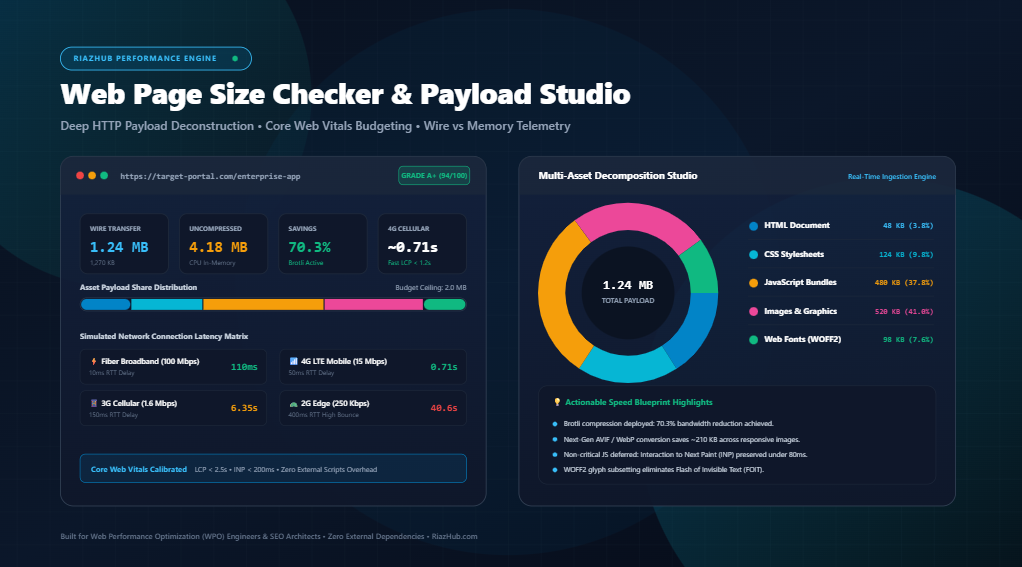
Mastering Web Page Size & Performance Budgets: The Complete Core Web Vitals Engineering Guide
Every single kilobyte transferred over the wire imposes a direct latency tax on your visitors. Whether it is an uncompressed hero image, redundant JavaScript dependencies, or unminified CSS frameworks, excess payload volume slows down server response times (TTFB), delays the rendering of the Largest Contentful Paint (LCP), and exhausts mobile CPUs during script compilation.
To diagnose, dissect, and conquer these bottlenecks, engineers and SEO architects utilize the free RiazHub Web Page Size Checker & Performance Budget Studio. In this comprehensive guide, we examine the underlying physics of web payload transmission, differentiate over-the-wire transfer bytes from in-memory resource weight, and outline actionable strategies to achieve stellar Google Core Web Vitals health.
⚡ Audit Your Website’s Live Payload Weight Now
Test live URLs or paste raw HTML code to deconstruct assets, inspect Brotli/Gzip wire savings, and project download times across 4G and 3G networks.
1. Transfer Size (Over-the-Wire) vs. Resource Size (In-Memory)
One of the most frequent misconceptions in web performance audits is conflating Network Transfer Size with Uncompressed Resource Size. Understanding the boundary between these two metrics is essential for diagnosing Core Web Vitals failures:
- Transfer Size (Over-the-Wire): This is the exact number of bytes transmitted from the web server or Content Delivery Network (CDN) across the physical internet to the client device. Modern production servers apply lossless HTTP stream compression algorithms such as Brotli (br) or Gzip to text-based assets (HTML, CSS, JavaScript, SVG, and JSON). A 500 KB bundle of code might travel over the network as a mere 140 KB wire payload.
- Resource Size (Uncompressed / In-Memory): Once the packets arrive at the client browser, the engine immediately decompresses the stream back into its original, full-length byte form. This uncompressed footprint occupies active memory (RAM) and must be parsed, tokenized, and executed by the device’s CPU.
The Mobile CPU Tax: While high-efficiency compression algorithms like Brotli save cellular data allowances, they do not eliminate the CPU computational burden. A 2 MB JavaScript application compressed to 450 KB over the wire will still expand into 2 MB of code that must be compiled on a resource-constrained mobile device, frequently locking up the browser’s main thread and wrecking your Interaction to Next Paint (INP) score.
By using the RiazHub Page Size Checker, you receive a side-by-side comparative matrix contrasting actual over-the-wire transfer bytes against in-memory execution sizes, along with an instant calculation of your server’s compression efficiency ratio.
2. Why 1 MB of JavaScript is 5x More Harmful Than 1 MB of Images
Not all kilobytes are created equal. A common pitfall in web development is treating an image payload and a JavaScript bundle as equivalent weights on the scale. In reality, their execution pathways inside the browser engine could not be more divergent:
| Asset Category | Browser Processing Pipeline | Main Thread Impact | Primary Core Web Vitals Risk |
|---|---|---|---|
| JavaScript (.js) | Download → Decompress → Parse AST → Compile bytecode → Execute on Main Thread | Severe (Thread Blocking) | INP (Interaction to Next Paint) & TBT (Total Blocking Time) |
| CSS (.css) | Download → Parse CSSOM → Calculate Stylesheet Cascade & Specificity | High (Render Blocking) | FCP (First Contentful Paint) & LCP (Largest Contentful Paint) |
| Images (.webp, .avif) | Download → Decode raster bits → GPU Texture Upload | Low (Offloaded to GPU) | LCP (Largest Contentful Paint) |
| Web Fonts (.woff2) | Download → Decode glyph table → Rasterize font vector curves | Moderate (FOIT / FOUT) | CLS (Cumulative Layout Shift) |
When an image downloads, the browser decodes it asynchronously on background threads and ships the textured bitmap straight to the GPU. It does not prevent user clicks, scrolls, or form inputs.
Conversely, when the browser encounters a <script> tag without defer or async, it must halt HTML parsing, compile the code, and execute it on the single main execution thread. Every 1 MB of unoptimized JavaScript introduces between 300ms and 800ms of CPU compilation freeze on budget smartphones. You can immediately evaluate your site’s JavaScript payload weight using the RiazHub HTTP Payload Deconstructor.
3. The Architecture of a Modern Performance Budget
A Performance Budget is an operational threshold established during product development and design sprints to prevent progressive feature bloat. Rather than auditing a website after it has grown sluggish, a performance budget enforces a hard ceiling on total page weight and asset categories:
- Grade A+ (Featherweight Baseline — Under 1.0 MB): Exceptional performance. Loads instantaneously across 3G cellular connections. Ideal for editorial blogs, documentation portals, and high-conversion landing pages.
- Grade A (Modern Optimal Budget — 1.0 MB to 2.0 MB): The recommended upper boundary for modern, feature-rich corporate and enterprise web applications. Guarantees mobile LCP load times under 1.8 seconds on 4G LTE networks.
- Grade C (Moderate Bloat Alert — 2.0 MB to 3.5 MB): High probability of Core Web Vitals degradation. Requires immediate image compression to WebP/AVIF and removal of redundant third-party tracking tags.
- Grade F (Critical Overweight Penalty — Exceeding 3.5 MB): Severe mobile latency. Triggers high user bounce rates on cellular connections and risks organic rank demotions under Google’s Page Experience update.
With the RiazHub Performance Budget Studio, you can dynamically configure your target budget threshold (from 0.5 MB up to 5.0 MB) using an interactive slider to instantly benchmark your webpage against real-world mobile tolerances.
4. Simulated Network Latency: The Physics of Mobile Throughput
Page speed is not determined solely by raw bandwidth; it is strictly constrained by Round Trip Time (RTT) and the TCP slow-start handshake. The download duration for an asset follows this fundamental telecommunications equation:
Total Download Time (T) = (Total Payload Bits / Effective Throughput bps) + Round Trip Latency (RTT)
Where: 1 Byte = 8 bits, and RTT represents physical packet traversal delay across cell towers and DNS resolvers.
Consider a typical unoptimized web landing page weighing 3.5 MB (28,000,000 bits). Here is how that single page performs across standard real-world consumer connection profiles:
- High-Speed Fiber Broadband (100 Mbps, 10ms RTT): Download completes in ~0.29 seconds. User perception is instantaneous.
- High-Speed 4G LTE Mobile (15 Mbps, 50ms RTT): Download duration climbs to ~1.92 seconds. Noticeable visual delay for heavy hero assets.
- Average 3G Cellular (1.6 Mbps, 150ms RTT): Download requires a grueling ~17.65 seconds. Over 53% of mobile visitors abandon sites taking longer than 3 seconds to load.
- Constrained 2G Edge (250 Kbps, 400ms RTT): Download spans an unviable ~112 seconds, effectively locking out emerging market audiences.
The RiazHub Connection Speed & Latency HUD automatically executes these calculations for any audited URL, providing actionable bounce risk telemetry before you launch your campaign.
📊 Generate Shareable Page Weight Audit Dossiers
Export high-resolution 1200×630 audit certificate cards, CSV payload inventories, and technical memos ready for client presentations.
5. The WPO Action Plan: How to Trim 60% of Your Page Weight
If your audit reveals bloat, implement these five prioritized web performance optimization techniques to slash excess bytes:
A. Transition from Legacy JPEG/PNG to Next-Gen WebP and AVIF
Images frequently constitute between 50% and 75% of total page weight. Converting legacy PNG and JPEG files to modern AVIF and WebP formats cuts file sizes by 30% to 60% without perceptible loss in visual fidelity. Always provide responsive sizing via the <picture> element to serve appropriately scaled graphics to mobile screens.
B. Activate Modern Brotli (br) Compression at the Server Edge
Ensure your Nginx, Apache, or Cloudflare CDN configuration deploys Brotli compression over legacy Gzip. Brotli features a specialized pre-computed static dictionary tailored for web text, delivering 15% to 25% tighter compression ratios on HTML, CSS, and JavaScript streams.
C. Implement Code-Splitting and Tree-Shaking on JavaScript Bundles
Avoid shipping monolithic JavaScript application bundles to first-time landing page visitors. Leverage modern bundlers (Webpack, Vite, esbuild) to split dynamic routes into on-demand chunks. Eliminate dead code through aggressive tree-shaking and audit third-party dependencies using bundle analyzers.
D. Subset Web Fonts and Enforce font-display: swap
Custom web fonts often include thousands of unused glyphs for archaic linguistic tables. Subset your WOFF2 font files to the Latin character set to reduce font weights from 180 KB down to under 25 KB per font face. Apply font-display: swap; in your @font-face definitions to eliminate Flash of Invisible Text (FOIT).
E. Deploy Edge Caching and HTTP/3 Protocol Support
Serve static assets over HTTP/3 (QUIC) to eliminate Head-of-Line blocking and streamline multiplexed parallel downloads. Utilize full-page edge caching to deliver Time to First Byte (TTFB) under 80 milliseconds across global geographic points of presence.
6. Frequently Asked Questions (FAQ)
How does page weight affect Google SEO rankings?
Google officially utilizes Page Experience and Core Web Vitals as direct ranking signals. Overweight pages suffer from extended server response times and delayed Largest Contentful Paint (LCP), leading to algorithmic ranking penalties and diminished crawl budget efficiency for large websites.
What is considered a healthy web page size in 2026?
Industry-leading web performance standards recommend maintaining total over-the-wire page weight under 1.5 MB to 2.0 MB. Sites operating beneath 1.0 MB achieve Grade A+ featherweight ratings and offer flawless mobile experiences.
How can I test raw HTML code before publishing a landing page?
You can switch to the Raw HTML Ingestion Mode on the RiazHub Page Size Studio. Simply paste your template markup or DOM string to inspect byte counters, simulate Brotli/Gzip wire savings, and inventory embedded resource tags before pushing to production.
Does the RiazHub Page Size Checker store or log my analyzed URLs?
No. The diagnostic engine operates on secure, privacy-first principles. Live URL probes are executed through transient server proxies with zero persistent logging of submitted endpoints.
Ready to Elevate Your Website’s Speed & Search Rankings?
Perform complete asset payload audits, enforce performance budgets, and export beautiful diagnostic dossier cards with the free online utility.
Universal Web Page Size Checker & HTTP Payload Deconstructor
Deconstruct complete web page weights into HTML, CSS, JavaScript, and graphics. Inspect over-the-wire compression, simulate download times across connection speeds, and benchmark against Google Core Web Vitals performance budgets.
| Asset Type | Transfer Size | Share | Requests |
|---|
Actual network data transferred
Parsed & executed by client CPU
Compression Efficiency Breakdown
Over-the-wire compression (Brotli/Gzip) reduces transfer volume, saving user cellular bandwidth. Once received in memory, client devices must unpack and compile the entire uncompressed asset weight.