
Mastering SERP Snippets: The Complete Guide to Google Pixel-Width Optimization & Social Card Previews
In modern digital marketing and technical SEO, your search engine result page (SERP) snippet represents the single most crucial billboard for your web content. Before a prospective visitor ever reads your opening sentence, admires your web design, or converts on a product page, they encounter a 3-line snapshot on Google: your favicon & site hierarchy, your blue title link, and your meta description snippet.
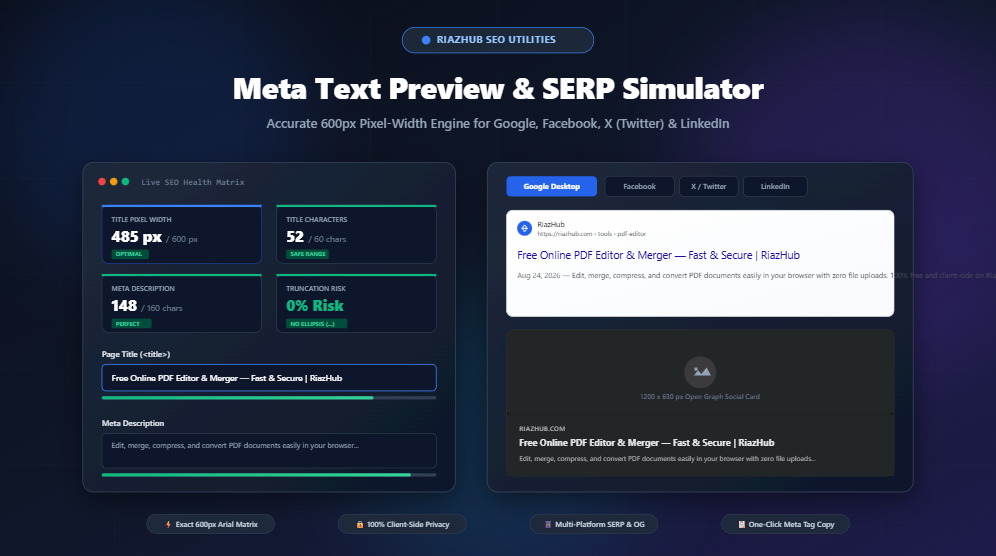
Despite this reality, thousands of webmasters and content creators continue to rely on outdated “character count rules of thumb” that lead to truncated titles, ugly trailing ellipses (...), and botched Open Graph social shares. To solve this problem with pixel-perfect mathematical accuracy, you can use the free, privacy-first Meta Text Preview & SERP Simulator tool on RiazHub.
1. The Pixel-Width Paradox: Why Character Counts Fail
For decades, SEO guides have cited the traditional “keep your title tags under 60 characters” rule. While helpful as a rough baseline, this advice ignores the foundational way web browsers and search engine rendering engines draw proportional typography.
Google renders desktop search titles using proportional Arial 20px font metrics inside a container capped strictly at 600 pixels. Because Arial is a proportional font rather than a monospace font, every character consumes a unique width on the screen canvas:
- Wide Characters (17px – 20px): Uppercase letters like
W,M, symbols like@, and accented glyphs. - Standard Characters (11px – 14px): Letters like
a,b,c,d,g,p, numbers0–9. - Narrow Characters (4px – 7px): Characters like
i,l,t,|,!,:, and standard whitespaces.
Consider the following real-world comparison:
| Title String Example | Character Count | Measured Canvas Pixel Width | Google SERP Outcome |
|---|---|---|---|
WWW & WOMEN'S MAXIMUM WEIGHTLIFTING WORKOUTS |
49 characters | 642 px | Truncated with ‘…’ |
Initial Little Digital Utilities List | Free Online Tool |
56 characters | 498 px | 100% Fully Visible |
By simulating your drafts through the RiazHub Meta Text Preview tool, you can see the precise off-screen canvas measurement calculated live in real time as you type.
2. Optimizing Meta Descriptions for Maximum Click-Through Rate (CTR)
While meta descriptions do not directly influence Google search rankings as an algorithmic signal, they directly dictate your organic Click-Through Rate (CTR). A compelling description that highlights your unique value proposition, contains a natural call-to-action (CTA), and avoids abrupt truncation can dramatically elevate your organic traffic.
Desktop vs. Mobile Meta Description Limits
Google enforces different viewport constraints depending on whether the searcher is on a desktop computer or a mobile device:
- Desktop Limit: Approximately 960 pixels, corresponding to roughly 155 to 160 characters in Arial 14px typography.
- Mobile Limit: Approximately 120 characters before Google wraps or cuts the snippet to accommodate narrow mobile screens.
Best Practices for Crafting High-Converting Meta Descriptions
- Front-Load Critical Keywords: Place your primary subject matter and primary keyword within the first 100 characters so mobile searchers grasp the value instantly.
- Include a Clear Call to Action (CTA): Phrases like “Try our free browser-based simulator,” “Learn the exact formula,” or “Calculate your pixel width instantly” prompt action.
- Account for Snippet Dates: If your CMS (like WordPress) publishes dates in search results, Google will prepend
Aug 24, 2026 —to your description, deducting approximately 15 to 20 characters from your visible budget. The Meta Text Preview & SERP Simulator allows you to specify date stamps to verify exact visibility.
3. Mastering Social Media Open Graph (OG) & X (Twitter) Cards
Optimizing for Google is only half the battle. When visitors, influencers, or your marketing team share your URL across Facebook, X (formerly Twitter), LinkedIn, Pinterest, or Slack, the social platform’s web crawler fetches your site’s <meta property="og:*"> tags to generate a rich visual card.
The Universal 1.91:1 Social Ratio
Major social networks standardize around the 1.91:1 aspect ratio, with a recommended image dimension of 1200 × 630 pixels:
- Facebook Feed Preview: Displays the 1200×630 image banner, an uppercase root domain pill (e.g.,
RIAZHUB.COM), bold 2-line title, and truncated summary. - X (Twitter) Summary Large Image: Renders large rounded image cards with domain tags and clean headline links.
- LinkedIn Post Preview: Embeds clean corporate article cards with reading time indicators.
Using the multi-platform switcher tabs in the RiazHub SERP & Social Snippet Simulator, you can drag and drop your social banner image to instantly preview how your cards will display across all four major networks simultaneously.
4. Generated Code: Standard HTML, Open Graph & Schema.org
Once you have dialed in your typography and verified that zero truncation occurs, you need clean, error-free HTML meta tags to insert into your website’s <head> section. The tool automatically compiles and formats all major metadata standards:
<!-- Standard HTML Meta Tags -->
<title>Free Online PDF Editor & Merger — Fast & Secure | RiazHub</title>
<meta name="description" content="Edit, merge, compress, and convert PDF documents easily in your browser with zero file uploads. 100% free and client-side on RiazHub.">
<link rel="canonical" href="https://riazhub.com/tools/pdf-editor">
<!-- Open Graph (Facebook, LinkedIn, Pinterest) -->
<meta property="og:type" content="website">
<meta property="og:url" content="https://riazhub.com/tools/pdf-editor">
<meta property="og:title" content="Free Online PDF Editor & Merger — Fast & Secure | RiazHub">
<meta property="og:description" content="Edit, merge, compress, and convert PDF documents easily in your browser with zero file uploads.">
<meta property="og:image" content="https://riazhub.com/assets/og-cover.png">
<meta property="og:image:width" content="1200">
<meta property="og:image:height" content="630">
<meta property="og:site_name" content="RiazHub">
<!-- Twitter / X Summary Large Image Card -->
<meta name="twitter:card" content="summary_large_image">
<meta name="twitter:url" content="https://riazhub.com/tools/pdf-editor">
<meta name="twitter:title" content="Free Online PDF Editor & Merger — Fast & Secure | RiazHub">
<meta name="twitter:description" content="Edit, merge, compress, and convert PDF documents easily in your browser with zero file uploads.">
<meta name="twitter:image" content="https://riazhub.com/assets/og-cover.png">
<!-- Schema.org JSON-LD Structured Data -->
<script type="application/ld+json">
{
"@context": "https://schema.org",
"@type": "WebPage",
"name": "Free Online PDF Editor & Merger — Fast & Secure | RiazHub",
"description": "Edit, merge, compress, and convert PDF documents easily in your browser with zero file uploads.",
"url": "https://riazhub.com/tools/pdf-editor",
"publisher": {
"@type": "Organization",
"name": "RiazHub"
}
}
</script>5. 100% Client-Side Privacy Guarantee
Many online SEO tools require you to submit your draft titles and unreleased landing page copies to remote third-party databases. In contrast, the RiazHub Meta Text Preview & SERP Simulator executes 100% inside your local browser memory using pure vanilla JavaScript and the native HTML5 Canvas API. No drafts, proprietary page titles, client URLs, or uploaded graphic assets are ever transmitted to an external server.
Conclusion: Step-by-Step Workflow for Every Content Launch
Before hitting “Publish” on any new blog post, landing page, or product catalog, integrate this 2-minute quality assurance workflow:
- Draft your working title and paste it into the Meta Text Preview tool.
- Verify that the measured pixel width is under 580px (staying safely below the 600px red threshold).
- Write a punchy meta description between 130 and 155 characters with an actionable closing CTA.
- Upload or link your 1200×630px social card banner and confirm visual alignment across Google, Facebook, Twitter, and LinkedIn tabs.
- Click “Copy Meta Tags” or export the complete SEO audit JSON report for your technical implementation.
Meta Text Preview & SERP Simulator
Test, optimize, and simulate Google Search, Facebook Open Graph, X (Twitter), and LinkedIn snippets with precise typography pixel-width truncation.
Metadata & SEO Parameters
Live Platform Previews

Generated Meta Tags & Schema
<!-- Generating meta tags... -->